Traeger
- 5.46K
- 4.7
- Installs
- 1.00M
- Price
- Free

Screenshots


Analysis by Reviewed
I see Traeger as most useful when the grill itself is part of the experience, not just a way to cook dinner. The app brings recipes, grill controls and a community together, which can make a long cook easier to manage. It is less compelling if you only want a general recipe book or do not own a compatible grill. That distinction matters: its best features are tied to Traeger equipment, so the app is not a universal upgrade for every home cook.
Recipes and grill control in one place
Made by Traeger Pellet Grills, LLC., this free Food & Drink app is available on Android and iOS. It has an average rating of 4.5 from around 22,000 ratings, and has been installed over a million times. It is rated for everyone, so its audience is broad, but the practical value depends much more on your cooking setup than on your age or experience.
What works best during an actual cook
Let me tell you about my recent culinary adventure with the Traeger app. If you’re someone like me who loves to grill but sometimes finds it hard to keep track of recipes and grill times, this app might just be your new best friend.
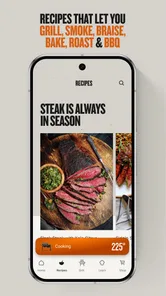
Upon launching the Traeger app, I was greeted by a neat and user-friendly interface. It’s like having a little personal chef in my pocket. The first thing that caught my eye was the extensive library of recipes. I mean, there are hundreds of them! Ranging from classic BBQ staples to more adventurous culinary quests, it’s all there. The app is available for both Android and iOS, which is a big win for me since I like to switch between devices.
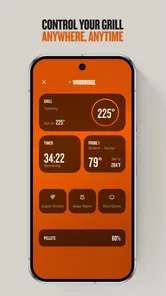
One of the coolest features of this app is the integration with WiFIRE-enabled Traeger grills. If you have one of those, you can actually control your grill directly from your phone. I had a blast trying this out. Imagine adjusting the temperature while lounging in your backyard, drink in hand. Pure grilling bliss! This feature is incredibly intuitive, and the app walks you through every step of the way.
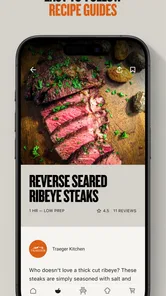
The recipe section deserves a special mention. Not only does it offer detailed cooking instructions, but it also provides a shopping list feature. I found this super handy when preparing for a big BBQ party. No more last-minute dashes to the grocery store because you forgot something. Plus, the app allows you to save your favorite recipes for quick access.
A practical routine for planning dinner
The shopping list is most useful before cooking, rather than when you are already standing at the grill. I’d use it while choosing a recipe, then check the ingredients against what is already in the kitchen before heading out. Saving a reliable recipe also makes sense for repeat meals: it cuts down on searching when you already know what the family likes. For a first attempt at a new dish, I’d read the instructions all the way through before starting, so preparation and cooking steps do not catch me by surprise.
More From Our News Desk

Weather by Xiaomi Review: Clear at a Glance, Less Clear Up Close

X Under Pressure: Can It Recover When Posting Goes Wrong?

Clash of Clans Is Won Between the Battles

Android Auto Makes the Case for Quieter Car Software

MobiOffice: Transforming Mobile Productivity with Seamless Integration

EA SPORTS FC™ Mobile Soccer: Redefining Mobile Sports Gaming
Picture a weekend meal where guests are due later than expected. With a WiFIRE-compatible grill, remote temperature control can help you make an adjustment without staying beside the cooker every minute. That convenience is not a reason to leave food unattended, though; I’d still treat the app as a way to manage the grill, not as a substitute for checking the cook and following safe food-handling habits. The real benefit is having useful controls close at hand while you handle other parts of the meal.
Community ideas, with a useful caveat
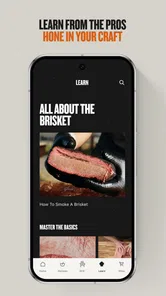
Another aspect I love about the Traeger app is the community feel. There’s a section where users can share their own recipes and grilling tips. It’s like a social media platform for grill enthusiasts. I’ve picked up a few handy tips and tricks from fellow users that have definitely upped my grilling game.
Community suggestions are best treated as inspiration, not as a guarantee that every method will suit your ingredients, grill or schedule. I’d compare a shared tip with the recipe instructions and use my own judgement, especially when cooking an unfamiliar cut. This is also where the app differs from a basic recipe app: it connects cooking ideas to a grill-centered crowd, while a general food app may be a better fit if you want recipes for many appliances or cuisines without a brand-specific focus.
Where the experience can fall short
If you ever run into issues, the app has a robust support section. There are FAQs, troubleshooting guides, and even customer service contacts if you need more help. The developers seem really committed to ensuring users have the best experience possible.
The main trade-off is that remote control is useful only with a WiFIRE-enabled Traeger grill. Without one, the recipe and community side may still be appealing, but it loses the feature that most clearly sets it apart from ordinary cooking apps. Even with a compatible grill, relying on phone control means the app and grill connection become part of the cooking routine; if you prefer a simple dial and minimal screen time, manual operation may feel more straightforward.
Who should put it on their phone
I’d recommend it first to people who already own a compatible Traeger and want recipes, saved favorites and grill control gathered in one place. It also suits cooks who enjoy learning from other grill owners and are happy to plan a meal around a recipe. If you are shopping for a grill app but use a different brand, or mainly need broad meal planning, a brand-neutral recipe app or your grill maker’s own tool is likely the more practical choice.
The app was released on March 21, 2017, and its current version is 3.11.0, with Android 10 as the minimum operating system. Those details make it worth checking device compatibility before installing, particularly if you use an older phone. For people who meet that requirement and have the right grill, the combination of cooking guidance and control is the point; the community and saved recipes add value around it rather than replacing that core use.
Final thoughts
All in all, the Traeger app is a must-have for anyone who loves grilling. It’s packed with features that make outdoor cooking more fun and convenient. Whether you’re a seasoned grill master or a newbie just starting out, this app has something for everyone. So go ahead, fire up that grill, and let the Traeger app take your BBQ sessions to the next level!
My recommendation is more specific: get it if a compatible Traeger is already part of your cooking setup and you’ll use the recipes or remote controls often. If not, it is harder to justify over a regular recipe app. For the right owner, it can make planning and tending a cook feel more organized; for everyone else, the brand-specific focus is a real limitation rather than a minor detail.
Traeger Frequently Asked Questions
Who develops Traeger, and what is the app mainly for?
Traeger is a Food & Drink app developed by Traeger Pellet Grills, LLC. Its central purpose is to connect users with a WiFIRE grill and the worldwide Traeger community. It is most relevant if you already use Traeger products or want a place to explore grilling ideas and cooking guidance. The app is free to download, so you can look through its offerings before deciding how it fits your routine.
Is Traeger suitable for beginners who have little grilling experience?
The app can be useful for people who are still learning to grill, as well as for more experienced cooks. Its recipes and cooking guidance can help you choose dishes and follow instructions during preparation. The connected features are a separate part of the experience: remote grill controls and monitoring are intended for use with a compatible WiFIRE grill. That makes Traeger useful for exploring ideas even before you are ready to manage a grill by phone.
Can Traeger help me find new grilling ideas and plan meals?
Yes. Traeger provides recipes and cooking guidance that can help you find inspiration when deciding what to make. You can browse ideas and use the instructions to plan a meal, whether you are new to grilling or already comfortable with it. These resources are available independently of connecting a grill, so the app may still be worthwhile if you mainly want cooking inspiration rather than phone-based grill controls.
Is Traeger available for my phone, and what operating system does it require?
Traeger is a Food & Drink app from Traeger Pellet Grills, LLC., available on Android and iOS. On Android, it requires version 10 or later. The app is rated for Everyone, and its current version is 3.11.0. Before downloading, check your device’s operating system and make sure it meets the minimum requirement so you can install and use the app.
What is Traeger and how does it work?
Traeger is an app designed to enhance your grilling experience with Traeger grills. It connects your smartphone with your grill via WiFi, allowing you to control and monitor your cooking remotely. You can adjust temperatures, set timers, and even access a vast collection of recipes tailored for various grilling needs. It simplifies the grilling process by providing step-by-step instructions and real-time notifications, ensuring excellent results every time.
Pros
- User-friendly interface for all skill levels.
- Access to a vast library of delicious recipes.
- Easy integration with smart home devices.
- Remote grill monitoring via Wi-Fi.
- Efficient customer support and updates.
Cons
- Requires constant internet connection.
- Limited features in the free version.
- Occasional app crashes reported by users.
- Some features need expensive subscriptions.
- Compatibility issues with older devices.











