Total Mp3, offline music play
- 249.00
- 4.2
- Installs
- 1.00M
- Price
- Free

Screenshots



Analysis by Reviewed
Ever found yourself in a situation where you just want to tune into your favorite tracks without the worry of an internet connection? Well, let me introduce you to Total Mp3, an app that’s got you covered for all your offline music needs. As a music enthusiast, I know the struggle of finding a reliable app that lets you enjoy music without draining your data, and Total Mp3 hits the right notes.
Seamless Offline Music Experience
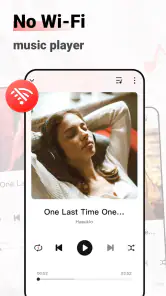
One of the standout features of Total Mp3 is its ability to play music offline. Whether you’re on a plane, in the subway, or just in a no-signal zone, this app ensures your music experience is uninterrupted. The app allows you to download your favorite tracks and playlists so you can listen to them anytime, anywhere. It’s like carrying a mini jukebox in your pocket!
User-Friendly Interface
Let’s talk about the interface because nobody wants to spend hours figuring out how an app works. Total Mp3 boasts a clean and intuitive interface that even the least tech-savvy user can navigate with ease. Everything is laid out logically, allowing you to search, download, and organize your music seamlessly. The minimalistic design ensures that the app runs smoothly, without any unnecessary clutter.
Sound Quality That Impresses
I’ve used a plethora of music apps, and sound quality often becomes a dealbreaker. With Total Mp3, the audio output is crisp and clear, rivaling some of the more premium apps out there. Whether you’re into bass-heavy tracks or classical symphonies, this app delivers sound quality that enhances your listening experience.
Customization and Features
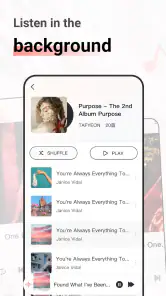
Customization is key for any music lover, and Total Mp3 doesn’t disappoint. You can create and edit playlists on the fly, shuffle tracks, or repeat your favorite tunes endlessly. The app also supports a variety of audio formats, which is a huge plus if you have an eclectic collection of music files.
Additionally, the app offers a built-in equalizer, allowing you to tweak the sound settings to your liking. It’s these little features that make a big difference, giving you control over how you experience your music.
Final Thoughts
In a world where internet connectivity isn’t always guaranteed, having an app like Total Mp3 is a lifesaver. It combines functionality with simplicity, ensuring music lovers can enjoy their favorite tracks without a hitch. Whether you’re a casual listener or a hardcore audiophile, this app is worth checking out. So, why not give it a spin and let the music take over?
More From Our News Desk

Clash of Clans Is Won Between the Battles

Android Auto Makes the Case for Quieter Car Software

MobiOffice: Transforming Mobile Productivity with Seamless Integration

EA SPORTS FC™ Mobile Soccer: Redefining Mobile Sports Gaming

How Microsoft OneDrive Became a Mobile Productivity Giant

How Google Translate Breaks Language Barriers Effortlessly
Total Mp3, offline music play Frequently Asked Questions
What is Total Mp3 - Offline Music Play?
Total Mp3 - Offline Music Play is an application designed for music enthusiasts who prefer to listen to their favorite tracks without an internet connection. The app allows users to download and manage their music files efficiently, providing a seamless offline listening experience. It supports various audio formats and offers features like playlist creation and equalizer settings to enhance your music experience.
How do I download music for offline listening using Total Mp3?
To download music for offline listening using Total Mp3, first ensure you have the music files saved on your device or accessible through a compatible source. The app allows you to import these files directly into its library. Once imported, you can organize your music into playlists and access them anytime without an internet connection. Remember, the app doesn't support downloading music directly from online sources.
What audio formats does Total Mp3 support?
Total Mp3 supports a wide variety of audio formats to ensure compatibility with your music collection. These formats include MP3, WAV, AAC, FLAC, and more. This flexibility allows users to import almost any audio file into the app, making it a versatile choice for those with diverse music libraries. However, always check the app's specifications for the latest supported formats as updates may expand this list.
Can I customize my listening experience in Total Mp3?
Yes, Total Mp3 provides several customization options to enhance your listening experience. The app includes an equalizer with various presets and manual adjustment options to tailor the sound to your preference. Additionally, users can create custom playlists, adjust playback speed, and use features like shuffle and repeat to enjoy their music exactly how they like it. These features make Total Mp3 a great choice for audiophiles.
Is Total Mp3 compatible with both Android and iOS devices?
Total Mp3 is designed to work seamlessly on both Android and iOS platforms, ensuring a broad user base can access its features. The app is optimized for performance on both operating systems, providing a smooth experience regardless of your device choice. Whether you are using a smartphone or tablet, Total Mp3 aims to deliver consistent quality in offline music playback across all supported devices.
Pros
- High-quality audio playback.
- User-friendly interface.
- Supports various audio formats.
- No internet required for playback.
- Customizable playlists.
Cons
- Limited cloud storage integration.
- No lyrics display feature.
- Advertisements in free version.
- Occasional app crashes.
- Limited equalizer settings.

- Category
- Entertainment
- Version
- 2.0.1