

ToonScroll:Your Story Universe
- 1.02K
- 4.1
- Installs
- 500.00K
- Price
- Free

Screenshots
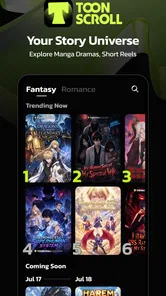
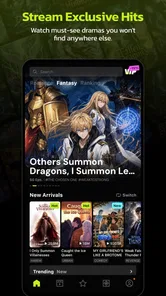
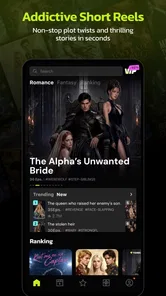
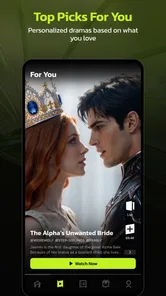
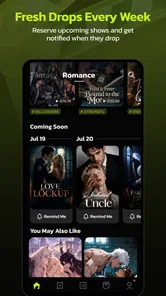
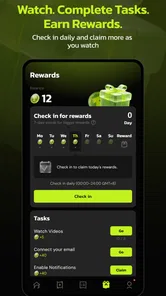
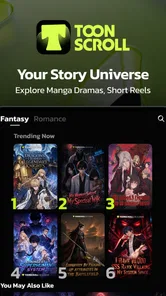
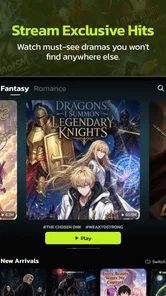
Analysis by Reviewed
I opened ToonScroll: Your Story Universe looking for something lighter than a full streaming service and more engaging than simply scrolling through short videos. NovaBeats presents it as an entertainment app built around toons, stories, and audiobooks, and that combination gives it a distinct place on my phone. It is free to start, carries a Mature 17+ age rating, and feels aimed at people who want quick fictional escapes rather than a single long-form format.
My first impression was that this is best understood as a compact entertainment shelf. I can move from illustrated storytelling to spoken content without changing apps, which is useful when my attention or surroundings change. I might read a toon during a quiet break, then switch to an audiobook while doing chores. That flexibility is the main reason I would recommend trying it, although it also creates the app’s biggest challenge: a broad catalog can feel less focused than a dedicated comic reader or audiobook service.
From a spare moment to a complete listening and reading routine
I look at ToonScroll as a way to shape small gaps in the day into a simple reading-and-listening routine, rather than as a service that needs a long session to feel worthwhile. The useful question is how its mix of formats holds up when I move from browsing to actually spending time with a story.
Starting with the right expectation
The app belongs to the entertainment category, not to education, productivity, or serious reference reading. That distinction matters. I would not install it expecting carefully organized academic audiobooks, a professional digital library, or the deep reading controls of a specialist e-reader. I would install it when I want stories presented in accessible formats and prefer having several kinds of content available in one place.
NovaBeats released the app on March 16, 2022, and the current version is 5.6.0. It runs on Android 5.0 or later, so the system requirement is relatively approachable for people using older Android hardware. In everyday use, that broad compatibility can be helpful, but an older phone may still make image-heavy browsing or audio switching feel less comfortable than it would on a newer device.
The app has built a noticeable audience: it has passed 500 thousand installs, with an average rating of 4.1 from roughly 10 thousand ratings and close to 1 thousand written reviews. I read that as a sign of steady interest rather than proof that every reader will enjoy it. The rating suggests a generally positive experience with enough room for individual preferences to matter, especially because people approach illustrated stories and audiobooks very differently.
My first workflow: choosing between visual and spoken stories
I find the best way to begin is not to browse aimlessly. I first decide how I want to consume a story. If I have a few minutes and can look at the screen, I lean toward the toon side. If I am walking, cooking, or trying to rest my eyes, audio makes more sense. Making that decision before opening the catalog reduces the feeling of being pulled in too many directions.
More From Our News Desk

 Gmail
GmailGmail in a Busy Inbox: Who Benefits Most?
From first account to crowded workday, Gmail earns its place through dependable search and flexible sorting—but its best fit depends on how much inbox maintenance you can tolerate.

 Prime Video
Switching to Prime Video: What Changes in Your Viewing Routine
Prime Video can make a compelling second home for streaming, but switching means learning a different catalog, rental layer, and route from browsing to playback.

 Universal TV Remote Control
Universal TV Remote Control Works Best as a Reliable Backup
A phone remote earns its place through quick setup and reliable habits. Here is how to get more from Universal TV Remote Control—and where its limits show.

 Weather - By Xiaomi
Weather by Xiaomi Review: Clear at a Glance, Less Clear Up Close
Xiaomi’s weather app makes everyday forecasts quick to scan, but its calm surface can leave useful details and recovery paths harder to find than they should be.

 X
XX Under Pressure: Can It Recover When Posting Goes Wrong?
A resilience-focused review of X, examining setup, mistaken posts, interruptions, weak connections, and the gaps that matter when recovery needs to be dependable.

 Clash of Clans
Clash of Clans Is Won Between the Battles
Its raids are quick; its community is a long-term project of coordination, teaching, rivalry, and shared responsibility—with all the friction that entails.
Latest News



This is one of the app’s less obvious strengths. The different formats are not merely extra content types; they fit different parts of a normal day. A short visual session works during a waiting period, while spoken storytelling can continue through a task that would make reading inconvenient. A dedicated audiobook app may offer a more specialized experience, but it cannot necessarily give me the same quick change from listening to illustrated fiction.
I also recommend starting with one title instead of collecting several immediately. With a mixed entertainment catalog, it is easy to sample everything and finish nothing. I get more value when I choose a story based on my available time, follow it for a while, and only then decide whether another format is worth adding to the routine.
Moving through a story without treating it like a video feed
The name ToonScroll naturally suggests a scrolling reading experience, and I approach the toon material differently from a traditional page-turning comic. Scrolling can make a story feel immediate because the next visual beat appears as I move downward. It also suits short sessions: I can stop after a natural moment without needing to remember a page number in the same way I would with a physical book.
That convenience has a trade-off. Scrolling encourages a quick rhythm, so I have to slow myself down when artwork or dialogue deserves more attention. If I rush, the story becomes another stream of content instead of something I am actually following. My practical tip is to hold the phone at a comfortable distance and pause at scene changes rather than treating each swipe as a signal to move as fast as possible.
For readers who prefer fixed pages, print-like layouts, or detailed control over typography, this may not feel as natural as a conventional comic or e-book reader. The app’s appeal is the ease of moving through stories, not recreating the exact feeling of a paper volume. That makes it a better match for casual, mobile-first reading than for someone building a carefully managed digital library.
Switching to audio when the screen is no longer practical
The handoff from visual reading to audiobooks is where the app becomes especially useful in real life. Imagine I start a toon during breakfast, leave home, and want to continue enjoying fiction while commuting or walking. Instead of opening a separate service and searching for an entirely different kind of entertainment, I can stay within the same app’s general story environment and switch my attention from the screen to sound.
I would still treat this as a change of activity, not as a seamless continuation of the exact same title. A toon and an audiobook may offer different experiences, and the value is in keeping storytelling available rather than assuming every story transfers perfectly between formats. The practical outcome is less app-hopping, but I still need to remember what I was reading and what I was listening to.
Audio also changes the surroundings in which the app works well. In a quiet room, spoken content can be relaxing. In traffic, a noisy gym, or a crowded street, the experience depends more heavily on the phone, headphones, and environment than on the app itself. I would choose audio when I can listen comfortably, not simply because I want to avoid looking at the display.
Managing the handoffs between discovery, selection, and return visits
There are several handoffs in the complete workflow: I move from the home screen or catalog to a title, from browsing to actual consumption, and from one format to another. Each handoff is a possible point of friction. The more time I spend deciding what to open, the less time I spend enjoying the story.
My solution is to use a simple personal rule. I give a title a short trial, then make a clear choice: continue, leave it for later, or move to another format. This avoids endless sampling. It also helps when the app offers many tempting options but I only have ten minutes available. A quick session should end with a satisfying stopping point, not with a catalog that feels unfinished.
Another useful habit is to separate “discovery time” from “reading time.” I browse when I have patience for it, then return to the chosen story when I want entertainment immediately. This is particularly helpful for audiobooks, where searching and settling into a title can take more effort than pressing play on something already selected. The app works better for me when I treat it as a small personal queue rather than an endless recommendation surface.
What the free starting point really means
The app is free to download and use as an entry point, but it includes in-app purchases ranging from $0.99 to $149.99 per item. That range is important for anyone deciding whether the app fits a budget. I would explore the free experience first and avoid assuming that every appealing story or convenience will remain free.
The safest workflow is to decide what kind of spending I am comfortable with before browsing deeply. A low-cost occasional purchase can make sense for someone who finds a story they genuinely want. A person who expects a completely open catalog without purchase prompts may find the commercial side distracting. The higher end of the listed purchase range also means parents should pay attention to the Mature 17+ rating and keep purchasing decisions separate from casual browsing.
I would not describe the price model as automatically good or bad. It depends on how often I use the app and whether the available stories feel worth paying for individually. Compared with a subscription-centered audiobook service, this approach may appeal to someone who prefers selective spending. Compared with a fully open reading platform, it may feel less predictable. The right question is not whether the app is free to install, but whether its purchase structure matches my habits.
A realistic everyday scenario
Here is the routine in which I think the app makes the most sense. I have a short break in the afternoon, so I open a toon and read only until I need to return to work. Later, while preparing dinner, I switch to an audiobook because my hands and eyes are occupied. At night, I return to the visual story for a few more minutes instead of opening a social feed that tends to consume more time than planned.
The outcome is not a dramatic transformation; it is a more intentional way to fill small gaps in the day. I get fiction in a format suited to each moment, and the app acts as a bridge between reading and listening. That is a stronger use case than simply saying it contains several kinds of entertainment. The real advantage appears when my schedule changes but I still want stories available.
Where the flow breaks down
The same flexibility can become a weakness. If I want only audiobooks, a specialist service will probably offer a more focused path from search to playback. If I want only comics, a dedicated reader may provide a calmer library experience and tools designed around long reading sessions. ToonScroll is most convincing when I value variety and convenience more than deep specialization.
The Mature 17+ rating also narrows its audience. I would not treat it as a general family entertainment app, and I would be careful before handing the phone to a younger user. Adults who want stories suitable for all ages should check the material themselves rather than relying on the broad idea of “toons” to imply children’s content.
Older Android support is welcome, but compatibility is not the same as comfort. On a small or aging phone, extended scrolling and audio navigation may feel less pleasant. I would test the app during a normal session before committing to it as my main reading or listening tool. If my priority is accessibility, precise display control, or a polished long-session interface, another app may be a better choice even if it offers fewer formats.
There is also a mental cost to switching formats. I may open the app intending to continue a story and end up browsing something unrelated. That is not a technical flaw so much as a result of combining several entertainment modes. The workaround is simple but important: choose the next title before I am tired or in a hurry, and return to the app with a specific purpose.
Who I would recommend it to
I would recommend this entertainment app to someone who enjoys illustrated fiction but also wants spoken stories for screen-free moments. It is especially suitable for casual readers, commuters, and people who prefer short sessions spread throughout the day rather than one long reading block. The free entry point makes it easy to explore before deciding whether any purchases are worthwhile.
I would be more cautious recommending it to a dedicated audiobook listener who already has a carefully organized library elsewhere. That person may value playback depth, catalog specialization, and continuity more than the convenience of having toons nearby. I would also point comic enthusiasts toward a specialist reader if they care about page presentation, collection management, or a distraction-free environment above all else.
For parents, the Mature 17+ label is the clearest reason to skip it as a shared children’s app. For budget-conscious adults, the sensible approach is to use the free starting experience as a trial and consider each purchase separately. For users on older Android phones, the minimum operating-system requirement is reassuring, but the actual comfort of reading and listening will still depend on the device.
My final result after using the full workflow
After moving from discovery to selection, from visual reading to audio, and from short sessions to return visits, I see ToonScroll as a flexible story companion rather than a replacement for every specialist service. Its strongest result is convenience: one entertainment app can support different kinds of attention throughout the day. Its weaker side is focus, because variety can make the experience feel less deliberate and the purchase model requires awareness.
NovaBeats has created something I would keep on my phone if I wanted lightweight access to toons, stories, and audiobooks in the same place. I like it most when I use it with a plan: choose a format for the moment, give one story a fair trial, and avoid browsing without an endpoint. The best reason to try it is the handoff between screen-based and screen-free storytelling.
My recommendation is therefore positive but specific. Try the free version if you want flexible entertainment and do not need a specialist library. Keep the age rating in mind, decide how you feel about individual in-app purchases, and compare the experience with a dedicated comic or audiobook app if depth matters more than variety. Used on its own terms, it can turn scattered spare moments into enjoyable story sessions without demanding a large commitment at the start.
ToonScroll:Your Story Universe Frequently Asked Questions
What age rating does ToonScroll: Your Story Universe have?
ToonScroll: Your Story Universe is rated Mature 17+, so it is intended for adults rather than children. The app centers on stories, and individual themes may vary, making it sensible to consider whether its content suits you before installing it. Parents and guardians should use the age rating as a guide and supervise access if the app is available on a shared device.
Will ToonScroll run on my phone or tablet?
ToonScroll is an entertainment app available for Android and iOS, and the Android version requires Android 5.0 or later. Check your device’s operating system before downloading, and make sure you are choosing the version intended for your platform. The app is called ToonScroll: Your Story Universe and is developed by NovaBeats, which can help you identify the right app in your device’s app store.
What is ToonScroll: Your Story Universe?
ToonScroll: Your Story Universe is a mobile storytelling app built around short, visually presented stories that users can read in a comic-like, scrollable format. It is designed for quick entertainment, combining illustrated scenes, dialogue, and episodic storytelling. The app may appeal to readers who enjoy romance, drama, fantasy, mystery, and other bite-sized narrative genres on Android or iOS.
Is ToonScroll: Your Story Universe free to download and use?
ToonScroll: Your Story Universe can generally be downloaded without an upfront purchase, but the complete experience may include optional in-app purchases, premium episodes, subscriptions, or other paid content. Availability and pricing can vary by country, platform, and promotional offers. Before downloading or making a purchase, users should review the current store listing and carefully check the app’s payment and subscription terms.
Does ToonScroll require an internet connection?
An internet connection is typically needed to download stories, load illustrations, synchronize reading progress, and access newly released episodes or account features. Some content may be temporarily available after loading, but users should not assume that every story can be read offline. If you plan to use ToonScroll while traveling or with limited data, check whether the specific episode provides an offline or download option.
Pros
- Smooth vertical scrolling makes stories easy to read with one hand.
- Colorful artwork and expressive characters create an engaging visual experience.
- Episodes are divided into short sections for quick reading sessions.
- The growing story universe offers different plots and characters to explore.
- Simple navigation lets new users start reading without a steep learning curve.
Cons
- Some episodes may require in-app purchases or premium access.
- The reading experience depends heavily on a stable internet connection.
- Frequent updates may be needed to access the latest stories and features.
- The large amount of content can make it difficult to choose where to begin.
- Readers seeking traditional page layouts may dislike the scroll-based format.











