

TizzChat: Craft Your World
- 40.00
- 2.8
- Installs
- 50.00K
- Price
- Free

Screenshots

Analysis by Reviewed
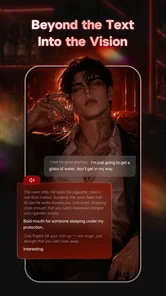
I approached TizzChat: Craft Your World expecting a casual entertainment app built around conversation and imagination. That is the right starting point, but it does not quite capture the experience. The app sits between a chat companion, a creative writing playground, and an interactive world-building space. I found its appeal strongest when I treated it as a place to experiment with scenes and characters rather than as a replacement for a normal messaging app.
That distinction matters because the experience is not equally useful for everyone. If you enjoy inventing stories, testing fictional conversations, or exploring imaginative settings at your own pace, TizzChat can be an engaging way to fill a short break. If you want dependable communication with friends, a polished social network, or a focused writing tool, I think the usual alternatives will serve you better.
How TizzChat feels in everyday use
The app comes from NATUREAI TECHNOLOGY PTE. LTD. and is listed in the entertainment category. It is free to install, which makes trying the basic experience easy, although in-app purchases range from $1.49 to $299.00 per item. I would keep that pricing range in mind before becoming heavily invested in any paid elements, especially if you are downloading it mainly out of curiosity.
The central idea is simple: chat, create stories, and explore immersive worlds. In practice, I found the most interesting part was the way these activities can support one another. A conversation can become a scene, a scene can suggest a larger setting, and that setting can give the next conversation more direction. The app works best when I brought it a small creative prompt instead of waiting for it to provide all the imagination for me.
For example, I could begin with a straightforward situation such as two strangers meeting in an unfamiliar city. Rather than trying to write a complete story immediately, I would use the interaction to discover the tone, conflict, and personalities one step at a time. That workflow feels less intimidating than opening a blank document, while still leaving room to shape the result in my own way.
My main takeaway is that TizzChat is more rewarding as a guided creativity tool than as ordinary chat. It gives a casual activity some structure, but the quality of the session depends heavily on the prompt, the direction I choose, and my willingness to continue refining an idea.
Conversation is the entry point, not the whole experience
People who install the app expecting a conventional inbox may find the concept confusing at first. The conversational format is useful because it makes creative exploration feel immediate, but the purpose is different from sending practical messages to people you know. I would describe it as interactive entertainment with a social shape, rather than a standard communication service.
More From Our News Desk

 Gmail
GmailGmail in a Busy Inbox: Who Benefits Most?
From first account to crowded workday, Gmail earns its place through dependable search and flexible sorting—but its best fit depends on how much inbox maintenance you can tolerate.

 Prime Video
Switching to Prime Video: What Changes in Your Viewing Routine
Prime Video can make a compelling second home for streaming, but switching means learning a different catalog, rental layer, and route from browsing to playback.

 Universal TV Remote Control
Universal TV Remote Control Works Best as a Reliable Backup
A phone remote earns its place through quick setup and reliable habits. Here is how to get more from Universal TV Remote Control—and where its limits show.

 Weather - By Xiaomi
Weather by Xiaomi Review: Clear at a Glance, Less Clear Up Close
Xiaomi’s weather app makes everyday forecasts quick to scan, but its calm surface can leave useful details and recovery paths harder to find than they should be.

 X
XX Under Pressure: Can It Recover When Posting Goes Wrong?
A resilience-focused review of X, examining setup, mistaken posts, interruptions, weak connections, and the gaps that matter when recovery needs to be dependable.

 Clash of Clans
Clash of Clans Is Won Between the Battles
Its raids are quick; its community is a long-term project of coordination, teaching, rivalry, and shared responsibility—with all the friction that entails.
Latest News



That makes it suitable for short creative sessions. I could use it while commuting, during a quiet evening, or when I wanted to explore an idea without committing to a full writing project. The low-pressure format helped me start quickly. I did not need a detailed outline before beginning, and I could change direction when a premise stopped being interesting.
The trade-off is that a flexible conversation can also feel unfocused. When I wanted a finished story with a deliberate structure, I had to provide that structure myself. TizzChat can help generate momentum, but it should not be mistaken for an editor that automatically turns every exchange into a polished narrative.
Where the world-building angle becomes useful
The world-focused side is most valuable when I used it to create constraints. A setting becomes more memorable when it has rules, a mood, and a reason for the characters to remain there. I had better sessions when I decided on those elements early instead of adding random details whenever the conversation slowed down.
One practical method is to begin with three boundaries: where the scene takes place, what the characters want, and what prevents them from getting it. This keeps the interaction from becoming a string of disconnected surprises. It also makes the experience more useful for anyone who wants to practice storytelling, role-play a fictional situation, or develop a concept for a larger creative project.
A second method is to use the app for discovery rather than final drafting. I would collect interesting turns of phrase, character ideas, or conflicts from a session, then rewrite the strongest parts elsewhere. This avoids the common problem of accepting the first generated direction simply because it is convenient. The app becomes a sketchbook for ideas, not the only place where the work happens.
A third useful approach is to revisit a promising premise with a different tone. A mysterious setting can become comic, tense, romantic, or reflective depending on the choices made during the exchange. That makes the app more flexible than a single-purpose story prompt, but it also means the user has to actively guide the mood. Passive use tends to produce a less personal result.
The limitation I noticed most often
The biggest weakness is the gap between an appealing concept and the consistency required for a truly immersive experience. Interactive storytelling depends on continuity. If a character’s motivations, the setting’s rules, or the emotional tone drift too much, the illusion weakens. I found that I needed to restate important details and steer the conversation when I wanted a coherent arc.
This is not a deal-breaker for casual entertainment, but it changes who will enjoy the app. Someone looking for spontaneous surprises may see the looseness as part of the fun. Someone writing a carefully plotted story may find the need for repeated guidance tiring. In that second case, a dedicated writing application with notes, outlines, and direct control over every sentence is the better choice.
The same issue affects longer sessions. A quick exchange can feel lively because there is no pressure to maintain a large amount of context. As the imagined world grows, however, the user has more details to track. I recommend keeping a short personal note with names, goals, and important rules if you intend to return to one world repeatedly. That small habit makes the experience more coherent and prevents the creative thread from becoming difficult to follow.
There is also a financial consideration. Since the app is free but includes purchases, I would explore the unpaid experience first and decide whether it genuinely fits my routine before spending anything. The presence of a high upper price point among the listed purchase options makes it especially important to check each confirmation screen carefully. Free entry is convenient, but it should not be confused with unlimited access to every part of the experience.
Who should try it, and who should skip it
I would recommend TizzChat to people who enjoy character-driven entertainment, improvisational writing, and fictional conversations. It is particularly suitable for someone who often has story ideas but struggles to begin. The conversational format lowers the barrier to entry, while the world-building angle gives the user more to explore than a single isolated prompt.
It can also suit readers who like interactive fiction but do not want a rigid game structure. Instead of following a fixed route, I could approach a premise as a creative experiment and decide what matters as I go. That freedom is the app’s strongest quality when paired with an active imagination.
It is less suitable for children because the content rating is Mature 17+. Parents should treat that age guidance seriously rather than assuming that a chat-shaped entertainment app is automatically appropriate for younger users. I would also avoid recommending it to anyone who needs a private, dependable channel for real-world conversations, since its purpose is imaginative entertainment rather than ordinary messaging.
People who dislike open-ended experiences may also become frustrated. The app does not remove the need to make choices, provide context, or correct a direction that is not working. If your ideal entertainment is a fully produced show, a conventional game with clear objectives, or a finished novel, TizzChat may feel more like preparation for entertainment than entertainment itself.
How it compares with familiar alternatives
Compared with a standard messaging app, TizzChat offers more room for fictional exploration but less practical value. Messaging apps are better when the goal is quick coordination, personal updates, or reliable contact with friends. TizzChat is better when the conversation itself is the activity and the subject can change according to the world being created.
Compared with a conventional interactive-fiction game, it appears less dependent on a fixed story path. That can make it more personal because I am not simply selecting from a prepared sequence. The downside is that the experience may lack the carefully balanced pacing, art direction, and narrative closure found in a dedicated game.
Compared with a writing app, it offers a more responsive way to overcome a blank page. A writing app still wins for organizing chapters, polishing prose, and maintaining precise control. My preferred workflow would be to use TizzChat for brainstorming and scene discovery, then move the material into a writing tool for revision.
Compared with general-purpose creative chat services, the attraction here is the entertainment framing and the emphasis on immersive worlds. That focus can make it easier to start a playful session. However, users who want broad research help, professional drafting, or extensive productivity features should choose a tool designed for those jobs instead.
Practical advice before committing to it
Start with a small premise rather than attempting an entire universe. A single location, a clear tension, and two contrasting personalities are enough for a useful first session. If the idea works, expand it gradually. This approach makes it easier to judge whether the app’s style matches your imagination without spending a long time building something you may abandon.
Give characters distinct goals instead of describing only their appearance. A character who wants something creates movement; a character who merely has an interesting background can leave the conversation static. I found that adding a limitation or secret also produced more interesting choices than adding a long list of decorative details.
When an exchange takes an unexpected turn, do not automatically correct it. Some of the best creative moments can come from treating an odd development as a new story problem. On the other hand, if the turn breaks the premise, restate the key rule in plain language and continue from there. The balance between accepting surprises and protecting continuity is central to getting value from the app.
I would also separate experimentation from evaluation. A session can be enjoyable even if it does not produce usable writing. Judging every conversation by whether it becomes a finished story creates unnecessary pressure and makes the app seem less capable than it is. Its real strength is helping me move from vague curiosity to a more concrete idea.
Device, maturity, and current state
The app requires Android 7.0 or later, so it remains accessible to many Android users with older supported devices. The current version is 1.1.4, which suggests an experience that is still developing rather than a long-established entertainment platform. I would keep expectations realistic and allow for rough edges while deciding whether its creative approach suits me.
Its reach is already above 50 thousand installs, but the average rating is 2.8 from around 193 ratings, with 40 written reviews. I would not treat those figures as a complete verdict, yet they do encourage a cautious download rather than an assumption that the app will work perfectly for everyone. The mixed reception fits my own conclusion: the concept is appealing, but the value depends on how much direction and patience the user brings.
The app was released on May 23, 2026, and that timing reinforces the need to judge it as a relatively new product. Early versions of creative platforms often change quickly, and a user who enjoys experimentation may be comfortable with that. Someone seeking a mature, predictable service may prefer to wait or choose a more established alternative.
My final recommendation
TizzChat is worth trying if you want a playful way to explore conversations, characters, and imagined settings. I like that it turns the blank page into an exchange and that a simple prompt can grow into a larger creative world. The app is at its best when I use it deliberately: setting a premise, guiding the tone, saving useful ideas, and accepting that some sessions will be more successful than others.
I would not recommend it as a universal chat replacement, a complete writing studio, or a traditional game with guaranteed narrative polish. Its open-ended design creates freedom, but that freedom comes with responsibility. You have to provide the direction, watch for continuity problems, and decide whether a paid option is worthwhile before committing money.
For imaginative adults who enjoy improvisation, that trade-off can be satisfying. For users who want structure, certainty, or practical communication, another category of app will be a better fit. My verdict is cautiously positive: TizzChat is an inventive entertainment app with real creative potential, but it rewards active participation far more than passive scrolling.
TizzChat: Craft Your World Frequently Asked Questions
What should I know about TizzChat: Craft Your World before downloading?
TizzChat is an entertainment app for chatting, creating stories, and exploring immersive worlds. Its focus is broader than a basic messaging tool, so it may appeal to people who enjoy combining social interaction with creative virtual spaces. The app is free to download, and it is rated Mature 17+, which is worth considering before installing it or recommending it to someone else.
Who develops TizzChat: Craft Your World, and how popular is it?
TizzChat: Craft Your World is developed by NATUREAI TECHNOLOGY PTE. LTD. It has over 50,000 installs and an average rating of 2.8 from 193 ratings, with 40 written reviews. Those figures offer a quick sense of its current reach and user feedback, but individual experiences can differ, so it is useful to read recent reviews and decide whether its social and creative features suit you.
What is TizzChat: Craft Your World?
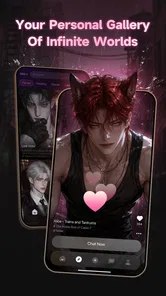
TizzChat: Craft Your World is a social and creative app built around customizable virtual spaces, character expression, and interactive conversations. After exploring its main features, I found that the experience focuses on letting users shape a personal world while communicating with others. It combines elements of social networking, avatar customization, and casual virtual-world gameplay rather than functioning as a traditional messaging app alone.
Is TizzChat: Craft Your World free to download and use?
TizzChat: Craft Your World can generally be downloaded without an upfront purchase, allowing users to try its core features before spending money. However, some customization items, virtual goods, premium content, or optional upgrades may require in-app purchases. Its in-app purchases range from $1.49 to $299.00 per item, so check the purchase details and account settings before spending. Availability and pricing can vary by device, country, and account settings, so checking the store listing before downloading is recommended.
Does TizzChat: Craft Your World require an internet connection?
Yes, users should expect to need a stable internet connection for most of the app’s important functions. Social communication, account synchronization, online interactions, and access to shared or updated content depend on connecting to the service. Some screens may load while offline, but the app is primarily designed as an online experience, so mobile data usage and connection quality should be considered.
Pros
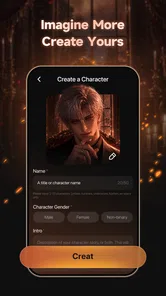
- Creative tools let users build and customize unique chat environments.
- Social features encourage sharing creations and discovering other users’ worlds.
- The playful design makes the app appealing to younger audiences.
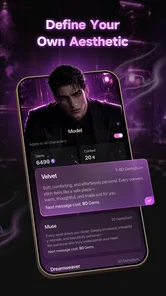
- Customization options provide plenty of room for personal expression.
- Interactive elements make conversations feel more engaging than standard messaging.
Cons
- Some features may require in-app purchases or premium access.
- The interface can feel confusing until you learn how the creation tools work.
- User-generated content may vary widely in quality and appropriateness.
- Online features may depend heavily on a stable internet connection.
- Privacy settings should be checked carefully before sharing creations publicly.











