

Tires Plus
- 351.00
- 4.7
- Installs
- 100.00K
- Price
- Free

Screenshots
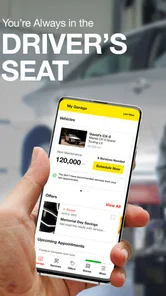
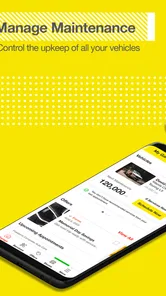

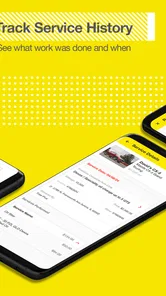
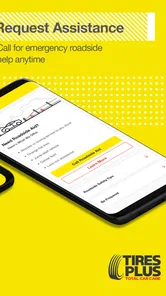
Analysis by Reviewed
When I need to think about tires, an oil change, or a basic vehicle-care appointment, I usually want less friction rather than another complicated dashboard. Tires Plus is built around that practical need. It is a free Auto & Vehicles app from Firestone Complete Auto Care, presented under the Tires Plus name, and its purpose is easy to understand: help drivers stay more organized when vehicle maintenance becomes part of an already busy day.
My first impression is that this is most useful as a service companion, not as a complete replacement for every automotive tool. It can make it easier to approach tire and maintenance decisions with a plan, but it should not be confused with a diagnostic scanner, a roadside emergency service, or an independent comparison marketplace. That distinction matters because the app works best when I already know what kind of help I need and want a more direct path to taking action.
The app has been available since July 24, 2012, and its current version is 7.2.1. It is suitable for Everyone and requires Android 10 or later. With an average rating of 4.7 from around 3K ratings and more than 100K installs, it has attracted a solid audience without feeling like an obscure utility. I would still judge it by how clearly it handles my information and choices, rather than treating popularity as proof that every experience will be perfect.
What I trusted, and what I checked carefully
I trust Tires Plus most when I treat it as a practical route into service rather than as an authority on every car-care decision. In this section, I look at how I would verify the vehicle, request, and store details before acting, then keep the app’s convenience in perspective when the decision involves safety or an expensive repair. A quick check before submitting can prevent avoidable confusion.
A focused role instead of an all-purpose car app
The strongest trust signal is the app’s narrow identity. Tires Plus is connected to Firestone Complete Auto Care, so I understand that it is designed to support that company’s service ecosystem rather than offer neutral advice from every garage in town. That is not automatically a weakness. If I already use Tires Plus or want to arrange service through it, the focused approach can be more convenient than jumping between a general map app, a calendar, and a separate tire-research site.
At the same time, I would not use it as my only source when comparing brands, prices, or repair opinions. A service-centered app naturally reflects the business behind it. I would use the app to organize a visit, review the choices it presents, and then compare important decisions with the vehicle manual, an independent mechanic, or another reputable source when the repair is expensive or safety-critical.
The short store summary, “Stay in the Driver’s Seat,” gives the app a control-oriented tone, but I found that phrase more useful as a reminder than as a promise. The real question is whether I can understand what I am selecting before I submit a request or begin a service process. For me, trust comes from visible steps: knowing which location I am dealing with, what kind of appointment or service I am considering, and whether I can change my mind before committing.
More From Our News Desk

 Gmail
GmailGmail in a Busy Inbox: Who Benefits Most?
From first account to crowded workday, Gmail earns its place through dependable search and flexible sorting—but its best fit depends on how much inbox maintenance you can tolerate.

 Prime Video
Switching to Prime Video: What Changes in Your Viewing Routine
Prime Video can make a compelling second home for streaming, but switching means learning a different catalog, rental layer, and route from browsing to playback.

 Universal TV Remote Control
Universal TV Remote Control Works Best as a Reliable Backup
A phone remote earns its place through quick setup and reliable habits. Here is how to get more from Universal TV Remote Control—and where its limits show.

 Weather - By Xiaomi
Weather by Xiaomi Review: Clear at a Glance, Less Clear Up Close
Xiaomi’s weather app makes everyday forecasts quick to scan, but its calm surface can leave useful details and recovery paths harder to find than they should be.

 X
XX Under Pressure: Can It Recover When Posting Goes Wrong?
A resilience-focused review of X, examining setup, mistaken posts, interruptions, weak connections, and the gaps that matter when recovery needs to be dependable.

 Clash of Clans
Clash of Clans Is Won Between the Battles
Its raids are quick; its community is a long-term project of coordination, teaching, rivalry, and shared responsibility—with all the friction that entails.
Latest News



Why account and device choices matter
Any automotive service app can become more convenient when it remembers information, but convenience and privacy are connected. Before entering vehicle details, contact information, or appointment preferences, I would pause and look at each screen for optional fields, consent language, and communication choices. I prefer to provide only what is necessary for the task in front of me.
I also recommend checking the phone’s permission settings after installation rather than accepting every request automatically. A user should be able to decide whether the app needs access to a particular device function for a specific workflow. If a permission does not make sense for booking or managing vehicle care, I would leave it disabled until the app clearly explains why it is needed. This is a simple habit, but it gives me more control than treating installation as an all-or-nothing decision.
The same caution applies to notifications. Reminders can be genuinely helpful when I am trying not to miss an appointment or postpone maintenance again. However, I would turn off promotional notifications if they become distracting and keep only the alerts that support an active task. The best automotive app is not the one that occupies my attention every day; it is the one that helps at the right moment and stays quiet afterward.
How I would use it before visiting a store
My preferred workflow begins before I am in a hurry. I would open the app when the vehicle is parked, identify the maintenance issue in plain language, and review the available path without rushing through the screens. If I need tires, I would first check the vehicle’s recommended size and specifications from the car itself or its manual. I would not rely on memory, especially after switching vehicles or borrowing a family member’s car.
That small preparation step prevents a common mistake: treating a tire recommendation as a simple matter of choosing the cheapest option. Tire type, driving conditions, weather, load, and the vehicle manufacturer’s requirements can all affect the decision. The app may help me begin the process, but I remain responsible for checking that the final selection fits the vehicle and my driving needs.
For routine maintenance, I would write down symptoms before opening the app. A vibration at highway speed, a slow leak, a warning light, or a squealing noise can be described more accurately when I note when it happens and whether it changes with speed or braking. That gives the service team better context and helps me avoid using a vague request that leads to unnecessary back-and-forth.
A realistic everyday scenario
Imagine I notice that one tire looks low on a weekday morning. I check the pressure with a gauge, inspect the tire visually, and decide that it needs professional attention rather than simply adding air and forgetting about it. Instead of waiting until the problem becomes urgent, I use Tires Plus to start planning a visit while I still have time to choose a convenient location and schedule.
Before confirming anything, I review the selected vehicle, the requested service, and the store details. I take a screenshot or note the appointment information only if doing so is useful for my own records, and I avoid entering extra personal details that are unrelated to the visit. If the tire is visibly damaged, losing pressure quickly, or unsafe to drive on, I would not treat the app as permission to continue driving. I would follow safe roadside procedures first.
After the visit, I would keep the invoice and ask the technician to explain any recommended work that was not part of the original request. This is where the app’s convenience should end and ordinary consumer judgment should begin. A digital booking flow can save time, but it cannot independently verify whether every suggested repair is necessary for my particular vehicle.
Where the app is genuinely useful
I see four especially practical uses. First, it can give a driver a dedicated place to begin when the problem involves tires or routine service. Second, it can reduce the mental load of arranging a visit when I already know which type of help I want. Third, it can be useful for people who do not maintain a detailed spreadsheet of service dates and prefer a guided mobile workflow. Fourth, it may help a household coordinate vehicle care when one person drives the car and another person handles appointments.
The household use case deserves attention. If I were arranging service for a partner’s or parent’s vehicle, I would confirm every vehicle detail before proceeding and make sure the person who drives it agrees with the appointment. I would not assume that a saved profile or previously selected vehicle is still correct. A small mismatch can turn a convenient process into a wasted trip.
This is also a reasonable option for a new driver who feels uncomfortable calling a store without knowing what to ask. The app can provide a more structured starting point. Still, I would encourage a new driver to call when safety is unclear, the vehicle is not drivable, or the requested work involves a warning light that could indicate a serious problem.
Where another option may be better
I would choose a different tool when I need broad, independent research. A general automotive information source is better for comparing tire technologies, understanding maintenance intervals, or learning whether a symptom might have several possible causes. A map app may be better when I am simply searching for every nearby service provider, especially while traveling outside the Tires Plus network.
I would also skip this app as my primary solution for emergency breakdowns. When a vehicle is stranded, the priority is safe roadside assistance and clear communication, not browsing a standard service workflow. Similarly, drivers who already have a trusted local mechanic and prefer phone conversations may gain little from adding another service app to their routine.
There is a trade-off between specialization and independence. Tires Plus can be more direct than a generic automotive directory when I intend to use its service network. That same focus means I should not expect it to behave like a neutral marketplace showing every possible provider or every brand at once. Knowing that before installation helps set realistic expectations.
Keeping control of personal information
My advice is to treat every service form as a decision point. I would read the labels beside contact fields, distinguish information needed for the appointment from optional marketing choices, and avoid using a shared account unless everyone involved understands who can see the vehicle and appointment details. If the app offers account controls, I would use them to review stored information and adjust communication preferences instead of leaving the defaults untouched.
I would also avoid entering sensitive information into free-text areas unless it is genuinely needed to explain the vehicle problem. A concise note such as “slow pressure loss in the front tire” is more appropriate than including unrelated personal details, travel plans, or information about other people. Clear, limited notes are easier for a service team to use and easier for me to manage later.
When changing phones or selling a vehicle, I would review the account rather than assuming old details will disappear automatically. I would remove vehicles I no longer own if the app allows it, sign out on devices that are no longer mine, and check notification settings. These steps are not glamorous, but they are the practical side of maintaining control over a service account.
Small friction points worth planning for
The app’s usefulness depends on accurate information and a stable connection at the moment I need it. That means I would not wait until I am parked outside a store to discover that I have forgotten a vehicle detail or cannot access an appointment confirmation. Preparing earlier gives me time to correct an error or contact the location directly.
There is also a human element that no app can remove. A selected service does not guarantee that the appointment will answer every question about the car, and a digital request may still require clarification from the store. I would keep enough flexibility in my schedule for that conversation, particularly when the issue involves unusual tires, a recurring fault, or a vehicle with modified wheels or suspension.
Another limitation is psychological rather than technical: a polished mobile flow can make a complicated repair feel simpler than it really is. I try to separate the ease of requesting service from the difficulty of deciding whether the work is necessary. For expensive recommendations, I ask for an explanation, request the written details, and compare them with the manufacturer’s maintenance guidance.
Who should install it
I think Tires Plus is a good fit for drivers who want a straightforward way to begin tire or vehicle-care tasks with Firestone Complete Auto Care’s Tires Plus service context. It is especially suitable if I value mobile convenience, prefer arranging routine work outside a phone call, or regularly use the same service network.
I would be more cautious if I want a completely independent shopping experience, detailed mechanical education, or an emergency-response tool. In those cases, this app may be useful alongside other resources, but it should not be the only one. Drivers who dislike creating accounts or sharing vehicle details should also review the screens carefully and decide whether the convenience justifies the information they choose to provide.
My cautious verdict
After looking at the app through the lens of trust and user control, I see Tires Plus as a practical, focused companion rather than a universal car-care answer. Its free price and Everyone rating make it easy to try, and the strong 4.7 average suggests that many users find value in the experience. I would still make my decision based on fit: it is most convincing when I already want Tires Plus service and need a more organized way to get there.
The best way to use it is deliberately. Confirm the vehicle before submitting a request, provide only information that serves the current task, review permissions and notifications, and keep independent judgment for tire selection and repair recommendations. Those habits make the app more useful without handing over more control than necessary.
My recommendation is therefore positive but measured. I would install it for routine Tires Plus planning, especially when I want to arrange service without starting with a phone call. I would not depend on it for urgent roadside situations, impartial product research, or a complete maintenance history. Used within those boundaries, it can make an ordinary but important part of car ownership easier while leaving the final decisions where they belong: with me.
Tires Plus Frequently Asked Questions
Is Tires Plus available for my phone, and is it suitable for all ages?
Tires Plus is a free Auto & Vehicles app from Firestone Complete Auto Care, intended for drivers who want to handle tire and service tasks from a phone. It is rated for Everyone and requires Android 10 or later on Android devices. Before downloading, check that your phone’s operating system meets that requirement; the app is also available for iOS.
How popular is Tires Plus, and is it still maintained?
Tires Plus has an average rating of 4.7 from around 3,000 ratings, with about 350 written reviews and over 100,000 installs. It was released in 2012, and its current version is 7.2.1. Those figures offer a useful sense of its reach and feedback, though individual experiences can differ depending on the device, location, and services a driver needs.
What is Tires Plus, and what can I do with the app?
Tires Plus is designed to help customers manage tire and automotive service needs from a mobile device. Depending on the available features in your location, you can browse tires and services, find a nearby Tires Plus store, request or schedule an appointment, review promotions, and access information about maintenance services. It is primarily a convenience and booking tool rather than a complete vehicle-diagnostic application.
Can I use Tires Plus to schedule tire installation or vehicle maintenance?
Yes, the app is intended to make scheduling easier for services such as tire installation, rotation, balancing, alignment, oil changes, brake work, and other automotive maintenance offered by participating locations. You generally select a store, choose a service, and pick an available date and time. Appointment availability, exact services, and pricing can vary by store, vehicle, tire selection, and local conditions.
Does Tires Plus show tire prices and help me choose the right tires?
Tires Plus can help you explore tire options and compare products based on your vehicle and driving needs. Before ordering, confirm that the vehicle information, tire size, load rating, speed rating, and seasonal requirements are correct. Displayed prices may not include every applicable installation charge, disposal fee, tax, or additional service, so review the final estimate carefully before completing a purchase or appointment.
Pros
- Conveniently locates nearby Tires Plus stores for service appointments.
- Offers access to tire
- brake
- oil change
- and maintenance services.
- Helpful for checking store hours
- addresses
- and contact details.
- Can simplify planning routine vehicle maintenance in one place.
- Useful for drivers who prefer servicing their car through a known chain.
Cons
- Features may vary depending on the selected Tires Plus location.
- Appointment availability can be limited during busy periods.
- The app may provide fewer tools than a full vehicle maintenance platform.
- Some services may require contacting the store directly for details.
- Pricing and promotions may not always be displayed consistently.












