My Firestone
- 1.58K
- 4.8
- Installs
- 500.00K
- Price
- Free

Screenshots
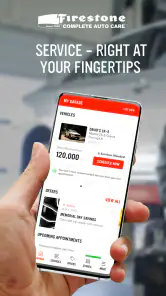
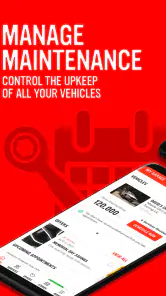

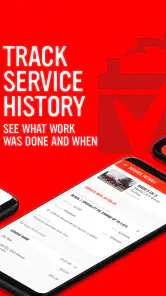
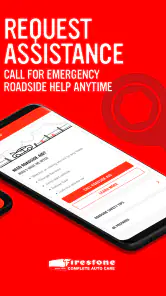
Analysis by Reviewed
I first reached for My Firestone because keeping track of car care can feel like a job in its own right. A service receipt disappears into the glove box, an oil change date slips my mind, and then I’m left guessing when the next visit is due. My experience is that this app is most useful when I treat it as a practical home for maintenance details and Firestone appointments—not as a mechanic in my pocket. That distinction shapes whether it earns a lasting place on my phone.
What Makes the First Week Useful
As someone who's not exactly a car-savvy individual, the thought of managing my vehicle's maintenance was daunting. But downloading the My Firestone app was like having a personal mechanic right in my pocket. Available on both Android and iOS, the app is designed to streamline the way you handle car services. From the moment I launched it, the user-friendly interface made it clear that even a novice like me could easily navigate through its features.
That first-week appeal is strongest when I use the app to get my car’s details and past work in one place. It is a practical starting point for someone who has recently bought a car, inherited a vehicle, or simply wants to stop relying on a glove-box full of receipts. I would enter information carefully, since the reminders are only as useful as the vehicle details and service history I provide. The app can help me keep track; it cannot inspect the car or diagnose a fault for me.
One useful way to get started is to gather whatever reliable records I already have before entering a history. Old invoices, service paperwork, and notes can help me make the record more complete, but I wouldn’t fill gaps by guessing. An inaccurate date can make a reminder less helpful than no reminder at all. If I’m unsure what a past visit covered, I’d rather leave that detail uncertain in my own notes than treat a guess as confirmed maintenance.
I also see the first setup as a chance to decide what I want the app to do for me. If my main problem is forgetting when to arrange routine care, the maintenance reminders are a natural starting point. If I mostly need a quick way to look up previous work when speaking with a shop, the service history is the more valuable habit. Choosing one clear purpose makes the initial setup feel manageable instead of turning car care into another large admin project.
Latest News
Keeping Car Care on Track
Features that Stand Out
One of the first things that caught my attention was the comprehensive vehicle profile setup. You simply input your car's details, and the app takes it from there, reminding you of upcoming maintenance needs. Another feature that I found particularly useful was the service history log. Now, instead of rummaging through old paperwork, all my car’s service details are just a few taps away.
But wait, there’s more! The My Firestone app also offers a tire guide, which is super handy. Whether you're looking to buy new tires or just need advice on maintaining them, this section of the app has got you covered. And if you’re like me and often forget when your last oil change was, the maintenance schedule will be your new best friend.
The service history is more than a tidy archive: it can help me have a clearer conversation when I bring the car in again. I can check what was done previously instead of guessing, and I can compare a suggested visit with the maintenance I have already recorded. A useful habit is to update the log soon after a service, while the paperwork is still at hand. If I put that off, the app’s central record becomes less reliable, so it is not a complete replacement for keeping important receipts or notes.
There’s a small but useful distinction between having a reminder and having a decision made for me. I use the schedule as a prompt to check what the car needs, then consider the vehicle’s manual, how it has been driven, and any advice from a professional. A reminder can bring a task back to my attention; it shouldn’t be treated as proof that a particular repair is necessary. That is especially important when an alert coincides with a new symptom, because an unexpected noise or warning light deserves attention on its own terms.
The tire guide is most useful to me as a reference point before a conversation, not as the final authority on a specific tire choice. I can use it to get oriented and think of questions, then check the vehicle’s own requirements and discuss the options with a qualified tire professional. That approach keeps the guide helpful without asking a general resource to account for every difference in vehicle, tire condition, or driving needs.
Booking Appointments Made Easy
Gone are the days of endless phone calls to schedule a service appointment. With this app, booking an appointment is as easy as pie. You can select your preferred Firestone location, choose the service you need, and pick a convenient time slot all within the app. It even sends you reminders, so you never miss an appointment again. How cool is that?
For a realistic example, I might notice that a service is approaching while planning a busy week, then use the app to arrange a visit at a Firestone location that fits my schedule. That keeps the task from slipping until it becomes urgent. I would still check that the selected service matches the issue I’m trying to address and confirm the appointment details; a booking tool makes arranging a visit easier, but it does not guarantee that every problem can be handled in one appointment.
The booking flow is a stronger reason to keep the app if I already know I want Firestone to handle the visit. It brings the scheduling step closer to the maintenance record, so I can move from noticing a due task to planning a shop visit without first switching to a separate search or calendar routine. If I’m only comparing several independent garages, though, I’d still want to check those options separately rather than assume the in-app route is the best fit for every job.
For an ordinary busy-day scenario, I might see a reminder while making plans for the week, check the service history to understand what was handled last time, and then look for a suitable appointment. The key advantage is not that the app removes every decision; it gives me a better starting point for making one. Before confirming, I would make sure I selected the right vehicle and service, and keep any appointment details somewhere I can retrieve them if my plans change.
Who Benefits Month After Month
My Firestone is most useful for drivers who already use Firestone or expect to book there, especially people who want reminders and a single place to review recorded maintenance. Firestone Complete Auto Care (FCAC) develops this free Auto & Vehicles app. It is rated for Everyone, has a 4.8 average from around 13,000 ratings, and has been installed over 500,000 times. Those figures suggest broad interest, but the real test for me is whether I keep opening it after the initial setup.
Compared with a paper notebook, the app can make service details and appointment planning easier to retrieve. Compared with a general calendar, it brings vehicle care tasks together with Firestone appointment booking and the tire guide. But if I use several independent repair shops, or want one neutral maintenance record that is not centered on Firestone, a spreadsheet or general vehicle log may suit me better. The choice depends less on how often I drive than on whether this is where I want to organize and arrange car care.
That comparison also explains who should probably skip it. A driver who rarely uses Firestone, already has a maintenance system they trust, or prefers arranging every visit by phone may not gain enough to justify another app. If I maintain several vehicles through different shops, I may value a neutral record more than a service-centered workflow. On the other hand, someone whose car care regularly runs through Firestone can get more from having booking, reminders, and recorded work together.
For a household that shares a vehicle, the service history can also make handovers less dependent on one person remembering every detail. I can check what I have recorded before asking another driver to book a visit or explain previous work. That only helps if the record is kept current and everyone knows which information is dependable. If several people update it inconsistently, a quick review of invoices and notes still matters before making a maintenance decision.
The most sustainable routine is modest: after a visit, take a moment to record what was done, then look at the app when planning the next round of car care. I wouldn’t make a point of checking it every day, because vehicle maintenance is occasional by nature. Its month-to-month value comes from being easy to return to when a reminder appears or a service question comes up, rather than from constant engagement.
The Trade-Offs Behind the Convenience
The app’s value depends on a small recurring habit: recording services and checking reminders instead of assuming the profile will stay complete by itself. That is manageable for me if I update it after visits, but it can become another chore if I already track maintenance elsewhere. The tire guide is a useful reference, yet it should not replace checking the vehicle manual or asking a qualified professional when a tire or mechanical concern needs a specific answer.
It is also worth being clear about what kind of help I expect. I would not rely on an appointment app as roadside assistance when a car will not start, and I would not use a maintenance schedule as a substitute for responding to warning lights or unusual noises. Drivers who prefer calling a shop, rarely need reminders, or do not plan to use Firestone may get little lasting benefit. For them, the app’s strongest tools may not match their routine.
There is a trade-off in keeping a digital record: it is convenient to search and review, but it depends on me entering information accurately and continuing to use the same system. I still keep important paperwork, especially when an invoice explains a repair in detail or could be useful later. The app works best as an accessible companion to those records, not as a reason to discard documents I may need.
Another possible source of fatigue is notification overload if I treat every prompt as something that must be acted on immediately. I find it more sensible to use reminders as planning cues, then decide whether the timing fits my circumstances and the vehicle’s needs. If I have no intention of booking with Firestone, appointment features are less compelling, and a basic calendar may be enough for a simple reminder. The right choice depends on whether I want a service-oriented tool or only a date on my schedule.
When a car problem is urgent, I would also separate the app’s useful planning role from the immediate next step. A booking option can help with arranging care, but it is not a diagnosis, emergency service, or promise that a shop can address the problem in a single visit. I’d seek appropriate help for a serious mechanical concern instead of waiting for a routine maintenance prompt or assuming that a scheduled appointment covers every issue.
Ending Thoughts
In a world where apps are a dime a dozen, My Firestone genuinely stands out by offering practical solutions for everyday car maintenance problems. Whether you’re a seasoned car owner or someone just starting, this app brings a level of convenience that’s hard to beat. So next time your car's dashboard lights up like a Christmas tree, don’t panic. Fire up the app, and let it guide you through the process. Trust me; it's like having a trusty co-pilot on your road to hassle-free car care.
My longer-term verdict is that it earns space on my phone when I use Firestone for service and want a steady record of what has been done and what is coming up. The app is free, and its current version is 7.0.1; it first appeared on February 27, 2012, and requires Android 10 or later. I would keep it for the practical routine, not because it can solve every car problem. Its lasting value comes from turning occasional maintenance into something I can plan, remember, and discuss with more confidence.
In the end, I would judge it by whether the small routine sticks: keep the vehicle information sensible, add service details while they are fresh, and use reminders to plan rather than panic. That is a realistic bar for an app about car care, which naturally matters in bursts instead of every day. If those steps fit the way I already handle visits, the convenience can outlast the novelty. If they feel like duplicate bookkeeping, I’d choose a simpler record and keep this app only if its Firestone booking tools become useful.
My Firestone Frequently Asked Questions
Who is My Firestone intended for?
My Firestone is intended for drivers who want to manage car care through a mobile app. Its focus is on vehicle service rather than entertainment, so it may suit people who prefer keeping maintenance tasks and service details organized in one place. If you are looking for a general automotive reference or a driving game, this app is not designed for that purpose.
Is My Firestone suitable for users of all ages?
The app has an Everyone content rating, making it suitable for a broad audience. Its subject is car care and service management, so it is most relevant to drivers and people who help look after a vehicle. Before installing, consider whether the available service tools fit your needs; the age rating itself does not mean that every feature will be useful to every user.
Who develops My Firestone, and what is the app designed to help with?
My Firestone is developed by Firestone Complete Auto Care and is designed to help users take control of their car care. It brings vehicle-service management into an app, making it a useful option for drivers who want to keep track of maintenance and arrange service more conveniently. Its focus is practical rather than entertainment-oriented, so it is best suited to people looking for automotive care tools.
What platforms is My Firestone available on?
My Firestone is available on both Android and iOS platforms. Users can download the app from the Google Play Store for Android devices and from the Apple App Store for iOS devices. Ensure your device meets the necessary system requirements for a smooth installation and optimal performance. The app is rated Everyone, and it requires Android 10 or later or iOS 10 or later.
Is My Firestone a free application?
Yes, My Firestone is free to download and use. However, it may offer in-app purchases or premium features that users can choose to purchase. These optional purchases can enhance the app experience or provide additional functionalities depending on user preferences. It has a 4.8 average from around 13,000 ratings, giving prospective users a broad sense of its reception.
Pros
- User-friendly interface for first-time users.
- Comprehensive data on financial transactions.
- Seamless integration with banking apps.
- Customizable alerts for account activities.
- Robust security features to protect data.
Cons
- Limited free features compared to competitors.
- Occasional sync issues with bank accounts.
- Customer support response can be slow.
- Requires frequent updates for smooth operation.
- Some features locked behind paywall.

- Category
- Auto & Vehicles
- Version
- 7.0.1












