Tip Calculator
- 3.44K
- 4.8
- Installs
- 500.00K
- Price
- Free

Screenshots
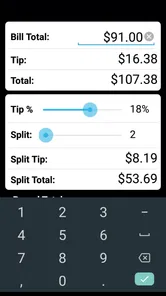
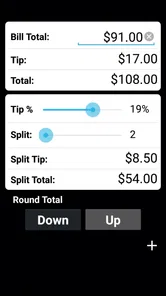
Analysis by Reviewed
I find a tip calculator most useful at the exact moment a meal ends: conversation is winding down, someone has placed a card on the table, and nobody wants to hold up the group while doing mental arithmetic. Tip Calculator is built for that small but familiar pause. It gives the calculation a dedicated place on your phone, which can make settling up feel less awkward than passing around a calculator or asking one person to work it out aloud.
When a busy connection is in the background
A restaurant’s network can be unreliable, especially in a crowded room or a basement dining area. I wouldn’t choose any calculator on the assumption that it needs or does not need a connection; what matters in practice is whether you can get to it quickly and enter the bill without being distracted by other phone tasks. If you already have the app open, the calculation itself is a short interaction. That is a useful distinction from payment apps, where a weak connection may affect the transaction, not just the arithmetic.
For a group meal, I’d settle the tip before anyone starts sending money. Enter the bill, decide on the percentage together, then work out the split. That order avoids confusing “what we owe in total” with “what each person should contribute.” If one diner had a separate item or the group is dividing the bill unevenly, agree on that arrangement first; a quick calculator can help with the agreed numbers, but it cannot decide what feels fair.
Choosing the right tool for the table
Compared with a built-in calculator, a dedicated tip tool is useful when you want the tip and split handled as one small task instead of working out each step yourself. The trade-off is flexibility: a regular calculator can handle unusual formulas or several separate amounts, while a bill-sharing service can keep track of who owes what over time. I’d use this app for one receipt and reach for those alternatives when the meal becomes a longer accounting exercise.
A practical group workflow is to nominate one person to enter the figures while another checks the receipt. That quick cross-check helps catch a mistyped total before it shapes everyone’s share. It also avoids several people independently tapping through different assumptions about the tip. If the bill has a service charge or gratuity already included, pause and clarify what the group intends to add before calculating; the tool can only produce a useful answer from the figures and choices you give it.
Useful in more than a sit-down restaurant
The same quick check can help after drinks, a café stop, or a shared meal while travelling. I especially like the idea of using it when several people are tired or in a hurry: one person can handle the total while everyone else keeps their attention on the conversation. For solo diners, it is just as practical when a receipt arrives and you want to check the final amount before paying.
Tip calculators generally do one narrow job, while a phone’s built-in calculator is more flexible but makes you perform the steps yourself. This app’s appeal is that its purpose is immediately clear: tip first, then split when sharing. That convenience is valuable if you often eat out with friends. If you rarely tip, already know your preferred calculation, or need detailed expense tracking across a group, a general calculator or a dedicated bill-sharing tool may suit you better.
More From Our News Desk

Weather by Xiaomi Review: Clear at a Glance, Less Clear Up Close

X Under Pressure: Can It Recover When Posting Goes Wrong?

Clash of Clans Is Won Between the Battles

Android Auto Makes the Case for Quieter Car Software

MobiOffice: Transforming Mobile Productivity with Seamless Integration

EA SPORTS FC™ Mobile Soccer: Redefining Mobile Sports Gaming
What the app is for—and where it fits
The Tip Calculator isn't just any ordinary app; it's like having a mini financial advisor in your pocket. Whether you're dining solo or with a group of friends, this app makes it super easy to calculate the perfect tip. It’s available on both Android and iOS, making it accessible for everyone.
What happens during a typical calculation
Using the app is a breeze. Once you’ve finished your meal and received the bill, you simply enter the total amount into the app. Next, you can adjust the tip percentage to whatever you feel is appropriate or stick with the standard 15-20%. If you're dining with friends, the app even has a nifty feature to split the bill. No more pulling out your calculator or trying to split the bill in your head!
A small habit makes the result easier to trust: check whether the amount you enter is the pre-tip bill or a total that already includes gratuity, and avoid counting a tip twice. I also find it worth agreeing on whether everyone is splitting evenly before opening the calculator. Those two decisions prevent more confusion than tapping through the calculation itself, particularly when a receipt includes several diners’ orders.
Small choices that prevent awkward totals
One useful way to handle a mixed group is to separate the decision about the tip from the decision about each person’s share. First settle on the base amount and the tip the group accepts; then decide whether everyone is contributing equally. If some diners ordered substantially different meals, an equal split may be quick but not fair to everyone. In that case, use the app for the simple total you have agreed on, and use a more flexible method for individual item accounting rather than trying to force a basic tip calculation to solve both problems.
For a realistic example, imagine friends finishing dinner while a rideshare is waiting outside. Rather than debating percentages and dividing in everyone’s head, one person can confirm the receipt total, the group can agree on the tip, and then they can check the share before paying. The time pressure makes a focused tool handy, but it also makes a second glance at the entered total worthwhile. A rushed tap is still capable of producing a confidently displayed wrong answer.
Why a focused tool can be handy
One of the things I love about this app is its simplicity. The user interface is clean and straightforward, so you're not fumbling around trying to figure out how it works. Plus, it’s super lightweight, meaning it won’t take up much space on your phone. The app also works offline, which is a lifesaver when you're in a restaurant with spotty Wi-Fi.
Another cool feature is the ability to round up or down to the nearest dollar. It helps avoid those weird amounts that can sometimes lead to confusion or mistakes when you're in a hurry. Plus, it’s always nice to leave a neat, round number, right?
Rounding is most useful when the group values a clean amount more than a precise cents-level split. I would still compare the rounded total with the unrounded bill before anyone pays, particularly if several people are sharing the difference. A tidy number can make handing over cash easier, but it can also shift a small amount between diners; being explicit about that choice keeps convenience from turning into a surprise.
Practical details and trade-offs
Skol Games LLC makes this free Food & Drink app, which is rated for Everyone. Its average rating is 4.8 from around 12,000 ratings, and it has passed 500,000 installs. It first appeared on June 27, 2012, and version 3.0.1 requires Android 9 or later. Those details make it a familiar, established option, though I’d still check that your device meets the system requirement before installing. Optional in-app purchases range from $2.99 to $7.99 per item, so the free starting point does not mean every possible purchase is included at no cost.
For someone deciding whether to install it, the main question is how often this exact pause comes up. If restaurant meals with friends are routine, having a focused calculator ready may be more comfortable than opening a general calculator and remembering the arithmetic each time. If you only need this once in a while, your phone’s built-in calculator may be enough. The app’s free starting point makes it easy to try, while the optional purchases are worth keeping in mind if you prefer to avoid in-app spending altogether.
Its Everyone age rating and straightforward purpose make the idea easy to understand, but I would not confuse a simple interface with a substitute for judgment. The app can help turn agreed numbers into a result; it cannot settle etiquette, determine whether a service charge should count as a tip, or decide how a group should treat a diner who ordered separately. Those are social choices, and handling them out loud is often quicker than trying to resolve them through a calculator.
On a phone, the main friction is the setting rather than the mathematics: you may be holding a menu, talking over restaurant noise, or trying to read a receipt under dim light. I’d enter the total once, then have someone read the result back before the group acts on it. This is especially helpful when the receipt uses a subtotal that differs from the amount the group expects to divide. A simple confirmation step is a better safeguard than tapping faster.
When the result needs a second look
One trade-off with a focused calculator is that it is not a record-keeping system. If you want to save who paid, track shared expenses over a trip, or reconcile several receipts later, a bill-splitting service designed around ongoing groups will be more useful. Here, the strength is the immediate decision at the table, not managing what happens after everyone leaves.
When a calculation looks wrong, I’d first recheck the bill total, the tip percentage, and whether the group split should be equal. Rounding can also change the final amount, so it is worth treating a rounded figure as a convenience rather than an exact record. If the phone is unavailable or the figures are unusual, a basic calculator and a quick written note are sensible backups; they are less guided, but they let you check each step yourself.
If a screen does not respond as expected or you lose your place, I’d avoid guessing from memory. Read the amount directly from the receipt again and repeat the calculation once the phone is usable. The backup is deliberately simple: a built-in calculator can reproduce the arithmetic, while a note can preserve the figures the group agreed on. That approach is useful whether the interruption comes from a low battery, a busy table, or someone needing the phone for another task.
Connectivity is only one part of recovery. A weak network may matter to a payment service, but it is sensible not to assume that a calculator’s network behavior is identical to a payment app’s. I’d separate the decision from the transaction: agree on the amount using the figures in front of you, then use whatever payment method works for the group. That keeps a temporary payment hiccup from causing a second round of tip debates.
Who is likely to get the most from it
I see the best fit as someone who eats out often enough to want a dedicated, quick way to work through a tip and a straightforward split. It is also useful for the friend who regularly ends up doing the arithmetic for the table and would rather check a result than calculate aloud. A solo diner can benefit too, especially when deciding on a final amount without doing percentages mentally.
I’d steer away from it if your usual challenge is dividing a complicated receipt by individual items, keeping a running record across a holiday, or collecting payments from people afterward. A dedicated expense-sharing service is built for those continuing responsibilities, and a general calculator is better when you want complete control over a custom formula. This app’s focus is an advantage only when the task matches that focus.
For data-conscious use, I keep the workflow plain: enter only the figures needed for the calculation, avoid putting personal details into a task that needs only an amount, and close the app when I am done. A tip calculation does not need names or a story about the meal. That is a sensible habit on any shared phone, too, where leaving a screen open can invite unnecessary questions about what someone else is paying.
A quick final check before paying
Let’s be real, we’ve all been there – trying to calculate how much to tip without looking like a fool. With the Tip Calculator app, you can handle your bill with confidence. It’s like having a cheat sheet on your phone that ensures you’re always tipping appropriately.
In conclusion, this app is a must-have for anyone who eats out regularly. It's efficient, easy to use, and takes the guesswork out of tipping. Next time you're out to eat, give it a try and see how much smoother your dining experience can be.
My connectivity verdict
I’d recommend it to someone who wants a quick, focused way to estimate a tip and divide a straightforward bill, especially when dining with friends. I’d skip it if I needed expense history, complicated individual shares, or a complete payment workflow. For data-conscious use, the practical approach is simply to enter only the bill figures needed for the calculation and close the app when finished; I wouldn’t assume anything about its network behavior beyond what I can observe. Overall, the appeal is its narrow purpose: it can make one small decision at the table quicker, while a general calculator remains the better fallback when flexibility matters more than convenience.
Tip Calculator Frequently Asked Questions
Is Tip Calculator free to download, and are there any optional purchases?
Tip Calculator is free to download, so you can try its bill-splitting and tipping tools without an upfront purchase. The app also offers in-app purchases, which are optional rather than a requirement for every user. If you are deciding whether it suits your needs, you can start with the free app and check the purchase details on your device before choosing any extras.
Who makes Tip Calculator, and is it suitable for all ages?
Tip Calculator is made by Skol Games LLC and is categorized as a Food & Drink app. It has an Everyone age rating, making it appropriate for a broad audience. Its straightforward purpose—working out tips and dividing a bill—can be useful for diners of different ages, whether you are handling a restaurant check yourself or sharing the calculation with friends.
What is the primary function of the Tip Calculator app?
The Tip Calculator app is designed to help users quickly and easily calculate the appropriate tip for a service. Whether dining out at a restaurant or using a service where tipping is customary, this app allows you to enter the total bill amount and select a tip percentage, then it calculates the total amount you should pay, including the tip. It's a handy tool for anyone looking to ensure they tip correctly and efficiently.
How user-friendly is the Tip Calculator app for beginners?
The Tip Calculator app is extremely user-friendly, even for those who are not tech-savvy. It features a simple, intuitive interface that requires minimal input from the user. Users simply need to enter the bill amount and choose their preferred tipping percentage. The app then calculates the tip and total amount instantly. Its straightforward design makes it accessible for users of all ages.
Does the Tip Calculator app allow for custom tip percentages?
Yes, the Tip Calculator app allows users to input custom tip percentages. While it offers standard tipping options like 10%, 15%, and 20%, users can also manually enter any percentage they prefer. This feature is particularly useful for those who want to tip according to their own standards or based on exceptional service. It provides flexibility and personalization in tipping.
Pros
- Quick and easy bill splitting.
- User-friendly interface.
- Customizable tip percentages.
- Supports tax calculations.
- Works offline.
Cons
- Limited currency support.
- No receipt saving feature.
- Ads in free version.
- Requires manual input for each calculation.
- No dark mode available.











