Till: Debit Card for Kids
- 318.00
- 4.5
- Installs
- 100.00K
- Price
- Free

Screenshots

Analysis by Reviewed
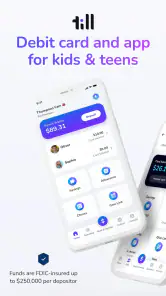
Choosing a money app for a child is different from choosing one for yourself. The useful question is not simply whether the interface looks modern, but whether it can make everyday spending easier to understand without turning every purchase into a family argument. Till is a finance app from Till Financial built around a debit card and a companion experience for kids and teens. I see it as a guided first step into spending, rather than a complete replacement for a bank account or a full budgeting platform.
That distinction matters when you install it. A young user may want a simple way to spend money, while a parent usually wants visibility, structure, and a chance to teach better habits. Till tries to sit between those needs. The app is free to download, carries an Everyone age rating, and has reached over 100 thousand installs. Its average rating is 4.5 from around 2.2 thousand ratings, which suggests that the basic idea is landing well with many families, although a rating alone cannot tell you whether its approach fits your household.
What to expect before handing over the card
My first impression is that Till is most useful when the family treats it as a learning routine, not just a payment tool. The card gives a child a more direct relationship with spending, while the app gives the adults a place to stay involved. That can make small purchases more visible and more discussable than cash disappearing from a wallet.
The experience is aimed at children and teenagers who are ready for some independence but still need boundaries. A younger child may benefit from seeing that spending is limited and purposeful. An older teen may appreciate having a practical way to pay while learning to think about available money before tapping a card. In both cases, the value comes from using the app alongside regular conversations about needs, wants, saving, and mistakes.
I would not approach Till expecting a sophisticated personal-finance dashboard. It is not the obvious choice for someone who wants detailed investing tools, complex household budgeting, or a conventional adult checking-account experience. Its strength is narrower: making a young person’s first spending decisions easier for a family to supervise and explain.
The developer is Till Financial, and the app has been available since April 27, 2022. The current version is 162.41.0, with Android support beginning at version 7.0. Those details are useful when deciding whether an older phone can handle the installation. The app also offers in-app purchases ranging from $7.99 to $79.00 per item, so I would examine the purchase flow and any plan details carefully before treating the free download as the full cost of using the service.
Who will get the most from it
Till makes the most sense for a parent who wants to introduce card spending gradually. It can be a good fit when a child is starting to buy snacks, school supplies, small gifts, or entertainment without an adult standing beside them. It is also useful for families who want a shared language around money: checking what is available, deciding whether a purchase is worth it, and reviewing what happened afterward.
I would be more cautious if your main goal is simply to give a teenager unrestricted access to money. The educational value is reduced when the app is treated as an invisible funding pipe. I would also look elsewhere if you need a single financial service for every member of the household, because Till’s child-focused design may feel too limited for adult banking tasks.
Installing it and getting the household ready
The first setup should be approached as a joint activity. I would install the app on the adult’s phone first, keep the child nearby, and decide in advance what the card is meant to cover. Is it for occasional spending, a regular allowance, school-related costs, or a mixture? That decision prevents the first week from becoming confusing, especially if the child assumes every balance is available for any purpose.
Before the card is used, agree on a simple rule for checking the balance. It could be before leaving home, before making a larger purchase, or at the end of the day. The exact routine is less important than making it predictable. A child learns more from repeatedly pausing before spending than from receiving one long explanation during setup.
I also recommend deciding how adults will respond when the balance is low. If the answer changes from one situation to another, the app may become a source of negotiation rather than a teaching aid. A clear boundary—such as waiting, choosing a cheaper option, or discussing an exception first—makes the card easier to understand.
Because Till involves a child’s spending, the adult should take the lead on reading the account terms and any purchase-related details. The app is free to download, but the presence of optional in-app purchases means I would not tap through screens automatically. This is one of those situations where a few minutes of careful reading is more valuable than rushing to get the card into use.
The first meaningful success
The first successful action should be deliberately small. I would choose a purchase the child already understands, such as a modest snack or another ordinary item, rather than making the first test a large or emotionally important purchase. The goal is to connect four steps: checking what is available, deciding, paying, and looking back afterward.
After the purchase, ask the child to explain what changed. Did the available money feel different? Would they make the same choice again? Was the item worth the amount spent? These questions turn a routine card transaction into a short lesson without making the child feel examined.
A particularly useful workflow is to have the child predict the balance before paying and compare that expectation with what appears afterward. This catches a common early misunderstanding: thinking of money as an unlimited promise rather than a limited resource. It also makes the app relevant even when the purchase itself is unremarkable.
I would avoid loading the experience with too many rules at the start. One spending habit is enough for the first week. For example, the child might check the available balance before every purchase. Once that becomes natural, the family can add a second habit, such as separating essential spending from impulse purchases in conversation.
Where families may feel confused
The biggest source of confusion is usually the difference between a card and a financial lesson. A debit card can make payment convenient, but it does not automatically teach judgment. If a child sees the card as a way to ask for more money whenever the balance falls, the educational purpose becomes weaker. Adults need to keep the boundaries visible.
Another point to clarify is who owns the decision in a shared household. The child may be allowed to choose how to spend, while the adult still controls the broader rules. Say that plainly before the first purchase. Otherwise, a declined or questioned transaction can feel like the app is malfunctioning when the real issue is an unspoken family limit.
It is also easy to confuse a current balance with a complete budget. A balance tells you what can be spent within the account’s arrangement, but it does not tell a teenager whether spending that money is wise. I would encourage the child to keep a separate mental list of upcoming needs, especially for school events, travel, or birthdays.
Parents should watch for the opposite problem too: too much supervision. If every small purchase triggers an interrogation, the child may stop thinking independently and focus only on avoiding criticism. A better approach is to review patterns at a calm time and intervene immediately only when a purchase creates a genuine problem.
Three practical habits that make Till more useful
First, use a “pause before purchase” rule for anything that was not planned. The child does not necessarily need adult approval for every small item, but a short pause creates room to check the balance and remember upcoming needs. This is more realistic than expecting perfect budgeting from the beginning.
Second, separate the learning conversation from the funding conversation. If the child makes a poor choice, discuss the choice without instantly turning it into a request for more money. Otherwise, the lesson becomes “mistakes are fixed by another deposit.” Letting the consequence remain visible can be uncomfortable, but it is often the part the child remembers.
Third, give the app a regular review moment rather than checking constantly. A weekly conversation can cover what was spent, what felt worthwhile, and what the child wants to do differently. This creates a useful record of progress without making the child feel watched every minute.
A fourth habit is especially helpful for teenagers: ask them to plan around a future event before money arrives. If they know they will need spending money later, they can practice reserving part of what they have now. That makes the card a tool for anticipation, not merely a way to pay at the register.
How it compares with cash, ordinary bank cards, and allowance tools
Cash is still a strong alternative for younger children because its physical disappearance is easy to understand. A child can see the wallet become lighter. Till has an advantage when the family wants card convenience and a shared digital routine, but cash may be better for a first lesson in scarcity or for a child who is not ready to manage a card.
An ordinary bank debit card may be more suitable for an older teenager who already understands spending and wants broader banking access. The trade-off is that a standard account can feel less deliberately educational. Till’s child-and-parent focus is more appropriate when guidance is still part of the goal, while a conventional bank becomes more attractive as independence grows.
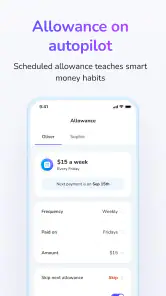
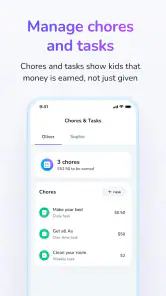
Allowance apps can be useful when the main need is scheduling chores or recurring payments. Till is a better fit when the family wants the spending card itself to be central to the learning experience. If your household mainly needs a chore chart, adding a finance card may introduce complexity without solving the real problem.
That comparison also explains why I would not call Till universally better. It is better for a family that wants a supervised bridge into card spending. It is less compelling for adults who already have a trusted banking setup and only need a simple way to record allowance.
What to do after the first week
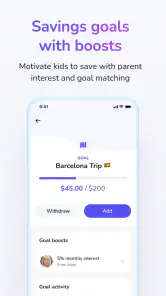
Once the child has completed a few ordinary purchases, move from transaction-by-transaction guidance to a small personal plan. Ask the child to choose one short-term goal and identify which purchases might interfere with it. The goal does not need to be expensive; the important part is learning that spending today can affect a choice later.
At this stage, I would also let the child lead the review. Have them open the app, describe what they notice, and explain one decision they feel good about. If they made a mistake, ask what they would change next time before offering advice. This shifts responsibility gradually instead of keeping the adult as the permanent interpreter.
For teens, the next step can be a more independent routine: checking available money before going out, planning for known events, and reporting unusual issues promptly. For younger children, keep the routine shorter and use concrete examples. Till works best when the expectations grow with the child rather than changing suddenly after one birthday.
Keep an eye on whether the app is reducing friction or creating it. If the child understands the rules and the adult can discuss spending calmly, the setup is doing its job. If every payment leads to confusion about permission, balance, or responsibility, simplify the household rules before adding more financial freedom.
My recommendation for a first-time user
I would recommend Till to parents who want a focused introduction to debit-card spending and are willing to stay involved during the early stage. Its free entry point makes it easy to explore, and its focus on kids and teens gives the experience a clearer purpose than a general banking app. The strongest results will come from pairing the card with small, repeatable conversations rather than expecting the software to teach everything by itself.
I would skip it if you want an adult banking replacement, a detailed budgeting suite, or a completely hands-off allowance system. I would also pause before subscribing to any optional purchase until you have decided what your family actually needs from the service. The app can support good habits, but it cannot remove the need for clear rules and consistent follow-through.
After using it as a starting point, my view is that Till: Debit Card for Kids is most valuable as a supervised practice space. The first meaningful success is not merely completing a card payment; it is helping a child understand the choice behind that payment. When the family uses the app that way, it can make the move from cash to digital spending feel manageable, visible, and genuinely educational.
Pros
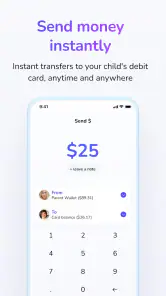
- Parents can set spending limits and manage allowances from one account.
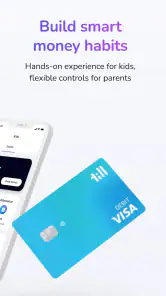
- Kids receive a physical debit card for supervised everyday purchases.
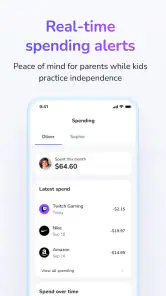
- Real-time transaction alerts help parents monitor spending activity.
- The app encourages budgeting through clear spending and saving features.
- Useful parental controls can reduce the need for cash allowances.
Cons
- Availability and features may vary depending on the country and account type.
- Some features may require a paid subscription or additional fees.
- Children may still need parental approval for certain transactions.
- A lost card can temporarily interrupt access to available funds.
- Requires internet access and a compatible smartphone for full management.

- Category
- Finance
- Version
- 162.41.0











