

ThriftAI: Profit Identifier
- 523.00
- 4.7
- Installs
- 100.00K
- Price
- Free

Screenshots
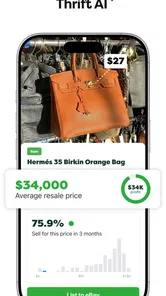
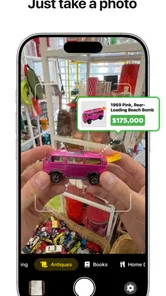
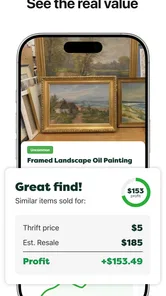
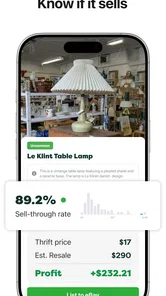
Analysis by Reviewed
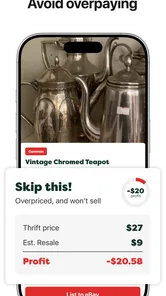
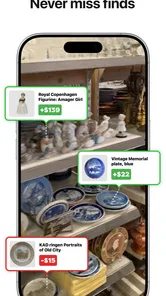
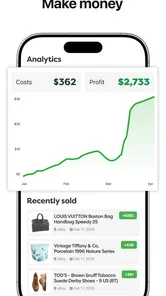
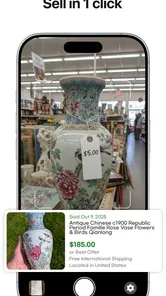
I like shopping tools that help me make a decision before I spend money, and ThriftAI: Profit Identifier is built around exactly that moment. It is a free shopping app from smallstack ApS that uses AI-powered scanning to assess the potential profit of an item. Instead of relying only on instinct while browsing a thrift shop, I can use the app as a quick second opinion before deciding whether something deserves space in my bag.
That sounds simple, but the useful part is the workflow it creates. I start with a physical item, scan it, consider the result, and then decide whether the possible return justifies the purchase and the later effort of selling it. The app does not remove the judgment from reselling; it gives that judgment a faster starting point. In my experience, that makes it most interesting for casual flippers, thrift shoppers, and anyone trying to become more selective rather than buying every item that looks promising.
From a thrift-store find to a buying decision
I use the first pass through a second-hand shop to separate items that deserve attention from those that only look tempting at a glance. The useful question is not simply whether a scan suggests an opportunity, but what I still need to verify before spending money. That practical decision leads naturally to the next step: judging how quickly the scan fits into real browsing.
The starting condition matters more than the scan
The best way to use this app is to treat it as part of a buying routine, not as an automatic profit button. I would first inspect the item myself: check its condition, look for labels, identify the model or edition, and notice anything that could affect resale value. A camera-based assessment can help organize the next step, but it cannot make a damaged, incomplete, or difficult-to-ship item attractive by magic.
This is particularly important in a physical store. Lighting may be uneven, shelves may be crowded, and the item may have tags, reflections, or packaging that make visual recognition harder. I get the most value when I pause for a few seconds and present the product clearly instead of waving the phone over it while moving through an aisle. That small change turns the scan from a novelty into a repeatable screening method.
For a beginner, the app can also reduce the temptation to buy based on excitement alone. A vintage-looking object may feel rare, while a familiar branded item may look boring but have a more practical resale path. Scanning both types encourages a more consistent comparison. I would still write down or remember the purchase cost, because a potentially profitable resale is only useful if the margin survives the original price and the work required afterward.
How I would move through the scan
The central action is straightforward: use the phone’s camera to scan an item and review the app’s assessment of its profit potential. The important habit is to scan the item that I am actually considering, not merely a similar-looking example. Small differences in condition, size, model, or included parts can change the outcome once I move from browsing to selling.
More From Our News Desk

 Instagram
Instagram’s Power Comes From Its Place in Your Phone
A close look at how Instagram turns Meta’s reach, recommendation systems and everyday camera habits into durable platform power—and what that costs users.

 Gmail
GmailGmail in a Busy Inbox: Who Benefits Most?
From first account to crowded workday, Gmail earns its place through dependable search and flexible sorting—but its best fit depends on how much inbox maintenance you can tolerate.

 Prime Video
Switching to Prime Video: What Changes in Your Viewing Routine
Prime Video can make a compelling second home for streaming, but switching means learning a different catalog, rental layer, and route from browsing to playback.

 Universal TV Remote Control
Universal TV Remote Control Works Best as a Reliable Backup
A phone remote earns its place through quick setup and reliable habits. Here is how to get more from Universal TV Remote Control—and where its limits show.

 Weather - By Xiaomi
Weather by Xiaomi Review: Clear at a Glance, Less Clear Up Close
Xiaomi’s weather app makes everyday forecasts quick to scan, but its calm surface can leave useful details and recovery paths harder to find than they should be.

 X
XX Under Pressure: Can It Recover When Posting Goes Wrong?
A resilience-focused review of X, examining setup, mistaken posts, interruptions, weak connections, and the gaps that matter when recovery needs to be dependable.
Latest News



I would use a simple sequence:
Pick up the item and inspect its visible condition before opening the scanner.
Make the identifying details easy to see, especially branding, labels, or distinctive design elements.
Scan in steady lighting and give the result a moment of attention rather than treating it as an instant yes or no.
Compare the app’s indication with the purchase price and the effort involved in listing, packing, and completing a sale.
Make the final decision myself, using the scan as evidence rather than permission to buy.
That last step is where the app earns or loses its place in my routine. An AI estimate can point me toward an opportunity, but I still need to ask whether the item is complete, cleanable, easy to describe, and realistic to sell in my own market. A low-cost item with a good theoretical margin may be less appealing than a slightly more expensive item that is easy to photograph and ship.
What the handoff looks like after the result
The app’s role ends at an important handoff: it moves me from visual discovery to human evaluation. I would not expect the scan to replace a marketplace search, a condition check, or a calculation of expenses. Instead, it helps decide which items deserve that extra research and which can be left on the shelf.
This makes it different from the usual alternatives in shopping. A normal price-comparison tool generally starts with a known product or a search query. ThriftAI: Profit Identifier starts with an object in front of me, which is useful when I do not yet know its exact name or model. Conversely, a dedicated resale workflow may offer deeper listing and inventory tools, while this app’s appeal is the earlier moment: deciding whether an item is worth pursuing at all.
For a practical handoff, I would keep a short note beside the scan result. The note could include the item’s purchase price, visible flaws, accessories, and the reason I think it might sell. This prevents the app’s result from becoming detached from reality. It also helps later when I am deciding whether to list immediately, clean the item first, or avoid buying similar examples in the future.
A realistic everyday scenario
Imagine I am in a charity shop and find a branded kitchen appliance that looks clean but has no original box. I inspect the cord, controls, and visible wear, then scan it. The app suggests that the item may have profit potential, so I do not stop there. I check whether the purchase price leaves room for packaging and possible platform costs, consider whether the appliance is practical to ship, and decide whether I can test it properly before listing.
That is a better use of the result than assuming the item is guaranteed to sell. If the appliance is heavy, fragile, or missing an essential attachment, the apparent opportunity may disappear. The scan still helped because it told me the item deserved closer attention; my inspection and resale plan determine whether I actually buy it.
The same workflow works for clothing, collectibles, electronics, or household goods, but the final checks will differ. Clothing requires attention to size, fabric, stains, and season. Electronics need testing and accurate model identification. Collectibles may depend heavily on completeness and authenticity. The app can begin the conversation, but the category-specific handoff remains my responsibility.
Where the result is genuinely useful
I see three strong uses for the app. First, it can help beginners build a habit of checking before buying. New resellers often focus on finding something interesting and only think about demand afterward. A scan creates a pause where a more deliberate decision can happen.
Second, it can speed up browsing when I have many possible items in front of me. Rather than researching every object in depth, I can use the scanner to narrow the field, then reserve detailed research for the most promising candidates. That is a useful trade-off when time in a thrift store is limited.
Third, it can help experienced sellers challenge their first impression. I may have a favorite category or assume I know which brands matter, but an AI-based tool can encourage me to inspect overlooked items. I would not follow it blindly, yet it can widen the range of products I consider.
The strongest benefit is not the promise of effortless profit; it is the faster transition from curiosity to a structured buying decision.
Practical friction before the purchase
The camera-first approach also introduces friction. A scan depends on what the phone can see, so cluttered backgrounds, poor lighting, reflective surfaces, and partially hidden labels can make the process less comfortable. In a busy shop, I may not want to hold up an item while trying several angles, especially if other shoppers are waiting or the product is awkward to handle.
There is also a social consideration. Some stores or sellers may not welcome extended photographing or scanning, and I should respect those surroundings. The app is most convenient when I can inspect an item calmly. If I need to make a decision in a few seconds, traditional knowledge may still be faster.
Another limitation is the gap between potential and completed profit. A promising result does not automatically account for every part of the resale journey in my own circumstances. I still need to think about cleaning, testing, storage, packaging, delivery, returns, and the time spent communicating with buyers. That does not make the feature useless; it defines the boundary around what the feature can responsibly do.
Who should use it, and who should skip it
I would recommend trying it if you regularly browse thrift stores, flea markets, charity shops, or second-hand listings and want a quick way to screen physical products. It is also a sensible starting point for a new reseller who has not yet developed strong category knowledge. The free entry point makes experimentation easier, although in-app purchases range from $4.99 to $199.99 per item, so I would review any purchase carefully before committing to it.
The app is less suitable for someone who wants a complete resale business system. If my main need is inventory management, detailed bookkeeping, shipping organization, or polished listing creation, I would look for tools designed around those later stages. This app is focused on identifying possible opportunity, not replacing every part of selling.
I would also skip it when I already know the item category extremely well and can judge likely demand faster than I can prepare a scan. An experienced seller with established sourcing rules may benefit more from direct marketplace research. The app becomes more valuable when uncertainty is high, the item is unfamiliar, or I am trying to avoid impulsive purchases.
Device support and everyday accessibility
On Android, the app requires version 8.0 or newer, which keeps it accessible to many phones that are not recent flagship models. It is listed for Everyone, so its intended use is not restricted to a narrowly defined age group. I would still expect the quality of the experience to depend on the phone’s camera, screen, and general responsiveness, because scanning is the central interaction.
The current version is 1.0.77, and that is worth noting for anyone comparing experiences over time. Apps built around recognition and AI can change as they are refined, so I would keep the app updated through the normal store process and judge it by how well it fits my actual sourcing routine rather than by one isolated scan.
How the reputation fits the hands-on idea
The app has a 4.7 average from around sixteen thousand ratings, with over five hundred written reviews, and it has passed one hundred thousand installs. Those figures suggest that the concept has attracted meaningful interest, but they do not remove the need for a personal trial. A tool like this can feel excellent to someone scanning common resale categories and less useful to someone dealing mostly with obscure, damaged, or highly specialized items.
That distinction matters because the result is only one part of the decision chain. I would judge the app by whether it helps me reject bad purchases, identify overlooked candidates, and spend less time researching items that were never worth buying. If it does those things consistently, it has value even when I decide not to purchase the item it highlights.
My final view of the complete workflow
ThriftAI: Profit Identifier works best as a front-end filter for second-hand shopping. I begin with a real object, use the camera to get an AI-assisted indication, hand that indication over to my own inspection and resale math, and then choose whether the item deserves money and effort. That workflow is more realistic than treating the app as a guaranteed profit calculator.
I appreciate the way it addresses a genuine problem: the hardest part of casual reselling is often not listing an item but recognizing a worthwhile opportunity before buying it. The app can make that first judgment quicker and can give beginners a repeatable process. Its weaknesses are equally clear: scanning may be awkward in real shops, visual results need context, and the final margin still depends on details the user must investigate.
For me, the right expectation is simple. Use it to narrow choices, not to switch off critical thinking. If you want a lightweight shopping companion for thrift sourcing, it is worth testing on your own phone and in the categories you actually buy. If you want a full selling platform or already have expert knowledge in a narrow niche, a more specialized alternative may fit better. As a free shopping app from smallstack ApS, it offers a useful starting point for turning a quick find into a more informed decision, provided I remain responsible for the decision that follows.
ThriftAI: Profit Identifier Frequently Asked Questions
Who develops ThriftAI: Profit Identifier, and what kind of app is it?
ThriftAI: Profit Identifier is a shopping app developed by smallstack ApS. It focuses on helping people assess secondhand products, with AI-powered scanning intended to reveal an item’s profit potential quickly. It may be useful when browsing thrift stores or researching possible resale purchases, but it is best treated as one research aid rather than a substitute for your own checks.
When was ThriftAI: Profit Identifier released, and is it actively updated?
ThriftAI: Profit Identifier was released on May 30, 2025, and its current version is 1.0.77. Knowing the version can be useful when checking whether your device is compatible and when comparing the app you install with the version described in app details. As with any shopping tool, review the app’s available information before relying on it for a purchase decision.
Is ThriftAI: Profit Identifier free to download, and are there optional purchases?
ThriftAI: Profit Identifier is free to download, so you can try the app without an upfront purchase. It also offers in-app purchases, with listed prices ranging from $4.99 to $199.99 per item. Review the purchase details in the app before confirming anything, since optional paid features may affect how much you can use certain tools. Keep any spending in proportion to your resale budget.
What devices and age groups is ThriftAI: Profit Identifier intended for?
ThriftAI: Profit Identifier is a shopping app from smallstack ApS, with an Everyone age rating. It supports devices running Android 8.0 or later, which is worth checking before downloading if you use an older phone or tablet. The app is intended to help people assess secondhand products, so its usefulness will depend on whether you are researching items to buy or resell.
What is ThriftAI: Profit Identifier and how does it work?
ThriftAI: Profit Identifier is designed to help users evaluate secondhand items and identify products that may have resale potential. Its AI-powered scanning aims to reveal profit potential quickly. You can typically enter or scan information about an item, then review estimated values, product details, or profitability indicators. Results should be treated as guidance rather than guaranteed income, because actual selling prices depend on condition, brand, demand, platform fees, shipping, and local market conditions.
Pros
- Quickly identifies potentially profitable thrift-store finds.
- Useful for estimating resale value before making a purchase.
- Simple interface suitable for casual sellers and beginners.
- Can help compare items and spot overlooked opportunities.
- Saves time researching products manually online.
Cons
- Results may be inaccurate for rare
- damaged
- or unusual items.
- Profit estimates may not include shipping
- fees
- or taxes.
- Requires clear photos and reliable product information.
- Market prices can change after the app provides an estimate.
- Best suited to experienced users who can verify listings independently.











