

TheaterEars Movies in Spanish
- 1.22K
- 3.4
- Installs
- 500.00K
- Price
- Free

Screenshots
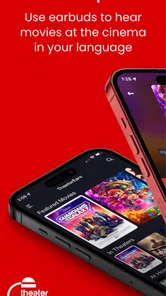
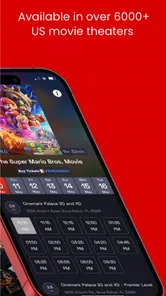
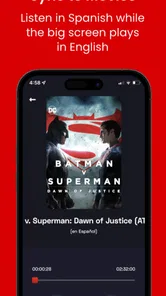
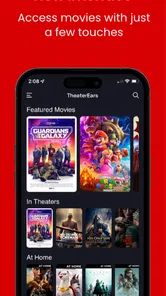
Analysis by Reviewed
I can see the first-week appeal of TheaterEars straight away: it gives Spanish-speaking moviegoers a way to follow a film at the cinema without waiting for a Spanish-language screening. That can turn a movie night that once felt uncertain into a simple plan with friends or family. The idea is focused, and that focus is its main strength: it is for listening to a Spanish version of a movie while the original plays in the theater, not for replacing a general streaming or translation app.
When the cinema plan comes together
Have you ever been in a movie theater, engrossed in a blockbuster, only to realize that understanding the dialogue is a challenge because it’s in English? Or avoided going to see a movie with friends because of the language barrier? TheaterEars gives Spanish-speaking viewers another way to join that shared outing. Its appeal is clearest when the group has picked a film and screening, but one person would otherwise struggle to follow the dialogue.
What is TheaterEars?
TheaterEars is an entertainment app from TheaterEars, built around a specific cinema use: helping Spanish-speaking audiences follow movies in the theater. It is free to install, rated for Everyone, and has reached over 500,000 installs. Its average rating is 3.4 from around 1,900 ratings, a mixed reception that makes me think it is worth approaching as a useful tool for the right movie night, not a guaranteed fit for every screening. The current version is 2.58.18, and it requires Android 10 or later. The app also offers in-app purchases, so I’d check the options and any costs shown before committing to one.
How Does It Work?
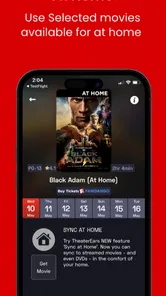
The process is pretty straightforward. First, download and install the app on your Android or iOS device. Browse the available movies and select the one you’re about to watch. At the theater, open the app, choose the movie, and sync it with the film’s audio. The app uses your phone’s microphone to recognize the audio and align the Spanish translation with your headset. The basic idea is simple, though I would not leave setup until the lights are going down.
That workflow makes preparation more important than it might seem. I’d check the movie selection before leaving home, rather than assuming every title or showtime will work. At the theater, get the selected film ready and connect your headphones before the trailers or opening scene become a distraction. If the audio does not line up immediately, a calm retry is preferable to fiddling with the phone once the story is underway. Keeping the phone accessible but the screen dimmed also helps you stay focused on the movie and avoid bothering people nearby.
Quality and User Experience
Now, let’s talk about the quality and user experience, which, in my opinion, are top-notch. The translations are professionally done, helping preserve the emotion and context of the dialogue. The app itself is user-friendly, with an intuitive interface that even a less tech-confident relative should be able to navigate. Sound quality matters just as much as the translation: a clear, comfortable listening setup makes it easier to settle into the film rather than think about the device.
The practical trade-off is that this is a cinema companion, not a universal Spanish audio track for whatever happens to be on screen. You need a supported movie and a successful sync, and the result depends on listening through your own device while the theater’s sound continues around you. I would bring comfortable headphones and make sure their battery is sufficient for the screening. If you prefer to hear the room naturally, share one headset, or keep your phone completely unused during a film, this arrangement may feel less appealing than simply choosing a dubbed showing.
More From Our News Desk

 Gmail
GmailGmail in a Busy Inbox: Who Benefits Most?
From first account to crowded workday, Gmail earns its place through dependable search and flexible sorting—but its best fit depends on how much inbox maintenance you can tolerate.

 Prime Video
Switching to Prime Video: What Changes in Your Viewing Routine
Prime Video can make a compelling second home for streaming, but switching means learning a different catalog, rental layer, and route from browsing to playback.

 Universal TV Remote Control
Universal TV Remote Control Works Best as a Reliable Backup
A phone remote earns its place through quick setup and reliable habits. Here is how to get more from Universal TV Remote Control—and where its limits show.

 Weather - By Xiaomi
Weather by Xiaomi Review: Clear at a Glance, Less Clear Up Close
Xiaomi’s weather app makes everyday forecasts quick to scan, but its calm surface can leave useful details and recovery paths harder to find than they should be.

 X
XX Under Pressure: Can It Recover When Posting Goes Wrong?
A resilience-focused review of X, examining setup, mistaken posts, interruptions, weak connections, and the gaps that matter when recovery needs to be dependable.

 Clash of Clans
Clash of Clans Is Won Between the Battles
Its raids are quick; its community is a long-term project of coordination, teaching, rivalry, and shared responsibility—with all the friction that entails.
Latest News



Where it earns a place in your routine
For occasional moviegoers, TheaterEars may be something you install for a specific outing rather than open every week. That is not necessarily a weakness: its value is tied to whether a Spanish option is available for a film you actually want to see. A family can use it to make one cinema trip work for people with different language preferences, while a Spanish-speaking viewer can join friends who chose a showing in English. Before buying tickets, I’d coordinate the title and screening with the app’s available choices; checking first is a small step that can prevent a frustrating trip.
Compared with the usual alternatives, the most direct option is a theater screening already dubbed in Spanish, which avoids using a phone and headset altogether. That is better if a suitable screening is offered and everyone wants the same audio. TheaterEars is more useful when the group has settled on a different showing or when you want to watch a film that is not being presented in Spanish at a convenient time. Subtitles are another familiar workaround, but they require reading throughout and may not be available in the language or format you want. The app’s advantage is the possibility of listening in Spanish while watching the shared cinema presentation; its limitation is that it depends on the selected movie and a good setup.
Who gets the most from it
If you’re a Spanish speaker who loves movies, this app can remove a language barrier that might otherwise keep you from joining friends at a particular screening. It is especially useful when the group wants to stay together and the available showtime is not dubbed. Families with different language preferences may also appreciate that people can attend the same film without everyone needing to choose one audio language. That shared outing is the lasting benefit: the app is valuable when it helps a group make a plan that would otherwise be inconvenient.
It is less compelling for someone who rarely visits cinemas, always chooses Spanish-dubbed screenings, or dislikes wearing headphones through a full film. It also may not suit viewers who expect one app to work with any title they happen to choose. In those cases, subtitles or a dubbed session are simpler if available. I’d think of TheaterEars as a specific solution to a specific problem, rather than an essential entertainment app for every movie fan.
A little planning makes the difference
For a realistic example, imagine your friends choose an evening screening of a new release and the group does not want to split up or wait for another show. I’d look up the movie in the app before making the plan, bring headphones, and test the setup as soon as I’m seated. That small bit of preparation is where the experience can succeed or fail: the app is most convenient when the choice of film is confirmed in advance, not when you are trying to solve a language problem after the lights go down.
One useful habit is to treat the app check as part of choosing the screening, not as a last-minute fix. Confirm the film first, then coordinate the showing and your headphones. If you are going with someone who may want to share a device, settle that before the movie starts; individual listening is a more straightforward arrangement than trying to improvise in a dark theater. And if you are unsure whether the setup feels comfortable, trying it on a film you are eager to see is a better test than relying on it for a special outing with no fallback.
What to expect after the novelty
The first use may feel especially satisfying because it makes a cinema outing possible in a way that was previously inconvenient. Over time, though, the recurring value depends on your habits: how often you go to theaters, whether the films you want are available, and whether listening through headphones feels comfortable for a full movie. I would keep it installed if I regularly attend English-language screenings and use Spanish audio; if I go only rarely or usually find a dubbed showing, it may not earn permanent space on my phone.
There is also a little maintenance involved before each visit. I’d keep the app updated, check the movie selection close to the date, and avoid assuming that a title found earlier will automatically cover every screening. Keeping it current is sensible, but updating at home rather than in a theater is the less stressful habit. For Android users, the minimum requirement is Android 10; anyone on an older device should check compatibility before planning around it. The app is free to install, while optional purchases range from $1.99 to $19.99 per item, so I’d review the in-app purchase details before spending.
What can wear thin
The main source of fatigue is not the idea itself but the extra steps around it. You have to check whether the film is available, bring a listening device, and get the sync right in a place where you are meant to sit back and watch. None of that is difficult in principle, but it makes the experience less spontaneous than choosing a dubbed screening. A busy arrival, a low battery, or discomfort with headphones can turn a clever workaround into one more thing to manage.
That is why I would avoid building an important movie night around assumptions. Check availability beforehand and have a simple alternative in mind, such as choosing another showtime or seeing the film later in Spanish. If the app works smoothly, the preparation fades into the background; if it does not, the film itself can become secondary to troubleshooting. For a first visit, arriving with enough time to settle in is a practical safeguard, not a guarantee that every screening will go perfectly.
The 1.2 thousand reviews alongside its 3.4 average suggest that experiences are not uniformly positive. That is a useful reason to treat the first outing as a trial: choose a movie you are keen to see, arrive with enough time to prepare, and have a backup plan such as watching a dubbed screening another day. If the app suits your device, the movie, and your preferred listening setup, it can make a shared cinema trip much easier. If you want every film to work without checking availability or using headphones, a theater’s own Spanish-language showing is the safer choice.
My long-term take
To sum it up, TheaterEars is a focused tool for Spanish-speaking movie lovers, and its value is practical rather than constant. It earns a place on my phone when I have a specific film and screening in mind, especially when friends want to attend together and a Spanish-language session is not convenient. I would not recommend keeping it as a habit-building app if you rarely go to theaters or have no use for its particular listening setup. Try it when the right movie night comes along, prepare before you leave, and judge it by whether it makes that outing easier. That is a more realistic promise than expecting it to change every cinema visit.
TheaterEars Movies in Spanish Frequently Asked Questions
Can I check whether a Spanish audio track is available for the movie and showtime I want?
TheaterEars is intended for experiencing a movie in Spanish at the cinema. Before your visit, open the app and look for your movie and showtime, then check whether a matching audio track is available to download. Choosing the correct film and session matters because the track needs to sync with the movie playing on screen. This check can help you prepare before you arrive.
What is TheaterEars and how does it work?
TheaterEars is an innovative app designed to enhance your movie-watching experience by providing Spanish audio tracks for movies playing in theaters. Simply download the app, select the movie and showtime, and download the corresponding audio track. Once in the theater, the app syncs the audio to the movie playing on screen, allowing Spanish speakers to enjoy films in their native language.
Is TheaterEars available for both Android and iOS devices?
Yes, TheaterEars is available for download on both Android and iOS devices. Users can find the app on the Google Play Store for Android devices and the Apple App Store for iOS devices. Ensure your device meets the necessary requirements for the app to function smoothly and deliver the best experience during your theater visit. The Android version requires operating system version 10 or later.
Do I need an internet connection to use TheaterEars in the theater?
While you need an internet connection to download the audio track before heading to the theater, you don't need to be connected to Wi-Fi or mobile data during the movie. The app works offline once the track is downloaded, allowing seamless playback of the Spanish audio track during the film, ensuring no interruptions during your viewing experience. It is a good idea to finish the download before entering the auditorium.
How much does TheaterEars cost to use?
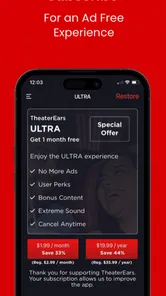
TheaterEars app is free to download, and users can access a range of audio tracks without any cost. However, some premium audio tracks may require a purchase or subscription. It's advisable to check within the app for any specific pricing details related to the audio tracks you wish to use, ensuring you have access to your desired content. Optional in-app purchases range from $1.99 to $19.99 per item.
Pros
- Allows watching movies in Spanish in real-time.
- User-friendly interface for easy navigation.
- Supports a wide variety of movie theaters.
- Offers a trial version for first-time users.
- Syncs audio seamlessly with movie playback.
Cons
- Requires stable internet for optimal performance.
- Limited to specific movie titles.
- Subscription required after trial period.
- Some minor syncing issues reported.
- Dependent on the theater's audio quality.











