

The CW
- 129.53K
- 3.6
- Installs
- 10.00M
- Price
- Free

Screenshots
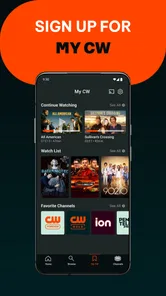


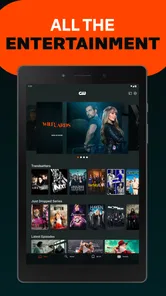
Analysis by Reviewed
I first look at this as a focused way to keep up with The CW’s own entertainment, rather than as a replacement for every streaming service in your home. The app is free, comes from The CW Network, and has been around since 2012. Its appeal is straightforward: if the shows you follow are available here, you can watch them on a phone or tablet without adding a subscription fee. That makes it an easy option to try, though the viewing experience has a few trade-offs worth knowing before you build a routine around it.
What the app is best suited to
In practical terms, I’d use it when I want a simple place to check in on CW programming, not when I’m looking for a broad catalogue spanning many networks. That distinction matters: a network app can be convenient for following its own shows, while a general streaming service is usually better for browsing across studios and genres. If you already know what you want to watch, the focused approach can save time; if you want to discover something from a wide range of providers, this is a narrower choice.
A realistic use is opening it during a commute break or after dinner to see whether there’s an episode waiting, then continuing on a larger screen when you have time. I’d keep notifications selective if the app offers controls for them: reminders can help when you’re following a release, but frequent alerts are not useful if you’re catching up at your own pace. Likewise, a watchlist is most helpful when you add a show as soon as you decide to follow it, rather than relying on memory after browsing.
How it feels in everyday viewing
Let me tell you about my recent dive into the world of The CW app. If you're a fan of CW shows and looking for a way to catch up on your favorite series, this app might just be the ticket. But before you hit that download button, let's chat about what you can expect.
All Your Favorite Shows in One Place
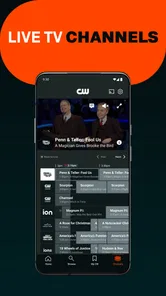
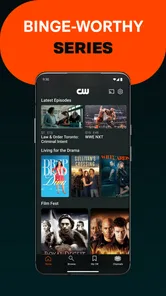
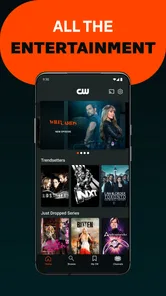
First off, the beauty of the The CW app is its simplicity in delivering what fans want most: access to their favorite shows. Whether you’re into the superhero escapades of “The Flash” or the supernatural drama of “Supernatural,” you’ll find that the app offers a comprehensive library. And it's not just the current episodes; the app is pretty good at archiving older seasons too. It’s like having a mini TV in your pocket!
User Experience
Diving into the app, the user interface is quite intuitive. Navigating through the app is a breeze with its user-friendly design. Episodes load swiftly, and the video quality is solid, which means you won’t be dealing with buffering during those crucial plot twists. However, let’s keep it real - the app is ad-supported, which can be a bit of a buzzkill during binge sessions. But hey, it’s a small price to pay for free content, right?
One practical trade-off is the difference between a short catch-up and a long binge. Ads may feel manageable when you watch one episode, but interruptions become more noticeable when you settle in for several. I’d treat the app as a convenient free viewing option and decide episode by episode whether the ad breaks fit the time I have. If uninterrupted playback matters more to you than avoiding a subscription, a paid service carrying the same program may suit you better.
More From Our News Desk

 Gmail
Gmail in a Busy Inbox: Who Benefits Most?
From first account to crowded workday, Gmail earns its place through dependable search and flexible sorting—but its best fit depends on how much inbox maintenance you can tolerate.

 Prime Video
Switching to Prime Video: What Changes in Your Viewing Routine
Prime Video can make a compelling second home for streaming, but switching means learning a different catalog, rental layer, and route from browsing to playback.

 Universal TV Remote Control
 Works Best as a Reliable Backup
A phone remote earns its place through quick setup and reliable habits. Here is how to get more from Universal TV Remote Control—and where its limits show.

 Weather - By Xiaomi
Weather by Xiaomi Review: Clear at a Glance, Less Clear Up Close
Xiaomi’s weather app makes everyday forecasts quick to scan, but its calm surface can leave useful details and recovery paths harder to find than they should be.

 X
X Under Pressure: Can It Recover When Posting Goes Wrong?
A resilience-focused review of X, examining setup, mistaken posts, interruptions, weak connections, and the gaps that matter when recovery needs to be dependable.

 Clash of Clans
 Is Won Between the Battles
Its raids are quick; its community is a long-term project of coordination, teaching, rivalry, and shared responsibility—with all the friction that entails.
Latest News



Accessibility and Features
The CW app shines when it comes to accessibility. You can easily stream content on your phone, tablet, or even cast it to your TV for a bigger screen experience. One feature I particularly appreciated is the notification system that alerts you when a new episode drops. It’s like having your personal TV guide, ensuring you never miss out on the latest drama or cliffhanger.
Moreover, the app allows you to create a watchlist, which is super handy for keeping track of what you’ve watched and what’s next on your list. It’s little things like this that enhance the overall user experience.
Making a viewing routine work
For me, the watchlist is most useful as a lightweight reminder rather than a complete viewing diary. I’d add only the series I genuinely intend to follow, then check the relevant show page before setting aside time to watch. This is a practical safeguard because a network-focused app is not the same as a permanent library: what is available at one moment may not be what you expect later. I would avoid promising guests a particular episode until I had checked it on the device I plan to use.
It also helps to decide what kind of session you’re starting. A quick episode during a break is a natural fit for a free, ad-supported app; a planned evening of several episodes makes the ad interruptions more important to weigh. If I have limited time, I’d start playback early enough to allow for those breaks rather than assuming the episode will fit neatly into a short gap. That’s a small adjustment, but it makes the viewing experience feel less rushed.
Who should choose it—and who may not
I’d recommend it first to viewers who already follow CW series and want a free, network-specific way to watch. It is also a reasonable starting point for someone curious about a particular show, provided the episodes they want are available in the app at the time they check. On the other hand, viewers who want a single service for a large mix of networks, films, and exclusive productions should compare broader streaming options instead of assuming this app will cover everything.
The app has a Teen content rating, so I’d still make viewing choices based on the individual show and the person watching; a general age label is not a substitute for checking whether a particular drama is suitable. It runs on iOS 7.1 or later, which may help users with older Apple devices, though the practical experience can depend on the device itself. Android and iOS users should also check that the current app is available for their device before making it part of a viewing plan.
How it compares with other ways to watch
The main alternative is not necessarily another app with the same design; it may be a cable or live-TV package, a broader subscription streamer, or simply waiting to watch through a service you already use. The CW app makes the most sense when the show itself is the reason you’re opening your phone. A broad service is more convenient for a household where people want unrelated programs in one place, while a paid option can be a better match for someone who values fewer interruptions and already knows the title is included there.
I wouldn’t install it expecting it to replace every source of television. Instead, I’d treat it as a targeted companion and compare the actual episode availability with the services I already have. That avoids paying for overlap or, in the other direction, assuming a free app will supply every season or episode on demand. The best choice depends less on a general ranking of streaming services and more on whether the particular CW series you want is available when you want to watch it.
What its track record tells me
The app’s audience is substantial: it has passed 10 million installs and has an average rating of 3.7 from around 373,000 ratings, alongside roughly 130,000 written reviews. I read that as a sign of a familiar, widely used service with a mixed response rather than a guarantee that every session will be flawless. For a potential user, the more useful question is whether its focused catalogue and ad-supported model match your habits.
Practical checks before settling in
If I were helping a friend set it up for a particular show, I’d first search for the series and inspect the episodes currently shown, rather than relying on a remembered schedule or an old recommendation. Next, I’d add the title to the watchlist if I want to return to it. Finally, I’d test playback on the intended screen while I still have time to troubleshoot. This order keeps the app useful for spontaneous viewing without making it the single point of failure for a planned watch party.
For travel or a weak connection, I’d be cautious about assuming that a streamed episode will behave like a downloaded file. I’d check the connection before pressing play and choose a time when interruptions are manageable. If I’m watching on a phone, headphones and a stable connection make a bigger difference than elaborate setup; for a group, casting can be convenient, but I’d test it beforehand and keep the phone available as a fallback.
Final Thoughts
So, what’s the verdict on The CW app? If you’re a die-hard fan of CW’s lineup, downloading this app is a no-brainer. It’s an excellent way to stay updated with your favorite shows without the hassle of a cable subscription. Sure, the ads can be a tad annoying, but for the price of free, it's worth it.
In conclusion, whether you’re catching up on missed episodes or discovering new ones, The CW app is a solid companion for any TV enthusiast. So go ahead, give it a whirl, and dive into the world of CW dramas and thrillers. Just remember to grab some popcorn!
What to keep in mind as you start
Before relying on it for a particular episode, I’d open the show page and confirm what is currently available, then add the series to the watchlist if I plan to follow it. That small check helps avoid building a viewing night around an episode you expected to find. If you’re casting, I’d also test the connection before settling in; watching on the phone is the simpler fallback when the bigger-screen setup is inconvenient.
My overall recommendation is conditional but clear: choose it for convenient access to CW shows when free, ad-supported viewing works for you; choose a broader or paid alternative when catalogue range or fewer interruptions matters more. The CW Network has maintained this app since its 2012 release, but its future changes are something to judge when they actually appear. I’d watch for improvements to the browsing and viewing flow, while making today’s decision on what the app currently does for your own routine.
The CW Frequently Asked Questions
What does The CW app let me do?
The CW is an entertainment app built around the network’s television programming. Its store summary is simple: “Watch all your favorite CW shows!” If you are looking for a mobile place to explore The CW’s shows, this is the app’s central purpose. The CW Network develops it, and the app is free to download.
Is The CW app available for both Android and iOS?
The CW is an entertainment app for mobile devices, and its minimum operating system requirement is version 7.1. Check that your device meets this requirement before downloading, and make sure you select the version intended for your phone or tablet. The app is free, so you can install it and explore its viewing experience without paying an upfront price.
Is The CW suitable for younger viewers?
The CW carries a Teen content rating, so families may want to consider that age guidance before installing it for a younger viewer. The app focuses on television entertainment, including shows and series, and what is suitable can vary by program. Parents and guardians should review the available titles and decide whether they are appropriate for the person using the device.
What is The CW app and what content does it offer?
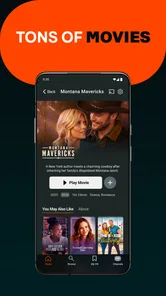
The CW app is a streaming platform that provides access to a variety of TV shows and series produced by The CW Network. Users can watch full episodes of popular shows, including new episodes the day after they air on TV. The app also features a selection of movies and special events, ensuring a wide range of entertainment options for all viewers.
Is The CW app free to use?
Yes, The CW app is completely free to use. It allows users to stream full episodes of their favorite shows without the need for a subscription or cable login. However, it is ad-supported, meaning you will encounter commercials during your viewing experience, similar to traditional television.
Pros
- Free streaming of popular CW shows
- No subscription required for access
- User-friendly and intuitive interface
- High-quality video streaming
- Regular updates with new episodes
Cons
- Limited to CW network content
- Ads interrupt the viewing experience
- Offline viewing not available
- Not available outside the U.S.
- Requires stable internet connection











