Texas Roadhouse
- 8.31K
- 4.8
- Installs
- 5.00M
- Price
- Free

Screenshots
Analysis by Reviewed
I use a restaurant app differently depending on the occasion: sometimes I want to scan a menu before leaving home, and other times I need to sort out a pickup order while everyone is already asking what’s for dinner. Texas Roadhouse is most useful when the meal is already headed toward this restaurant. It’s a free Food & Drink app from Texas Roadhouse, Inc, and its value comes from keeping restaurant-related tasks together rather than replacing the broader restaurant-search and delivery apps I might use when I haven’t chosen a place yet.
Choose it when the restaurant is already in mind
The key decision is whether you’re planning a Texas Roadhouse visit or still comparing places to eat. If you already want its menu, having the app on your phone can make checking options and preparing for an order more convenient. If you’re choosing among many nearby restaurants, a general dining app is a better starting point: it can help you explore a wider range of cuisines instead of focusing on one chain.
I’d also separate planning from availability. Looking through an app can help you decide what your group might want, but it doesn’t remove the practical need to check the choices and arrangements available for the particular visit. My useful habit is to browse before the hungry moment, then confirm the details when I’m ready to act. That small pause helps avoid building dinner plans around an item or option I haven’t checked for the occasion.
Getting Started with the Texas Roadhouse App
First things first, let's talk about the setup. Downloading and installing the app is as smooth as the famous cinnamon butter they serve. Whether you're an Android aficionado or an iOS enthusiast, you’ll find the app easy to locate in your respective app store. The interface is intuitive, with a rustic design that pays homage to the restaurant’s roots. It’s like stepping into a digital version of their cozy, wood-paneled dining rooms.
Navigation and Features
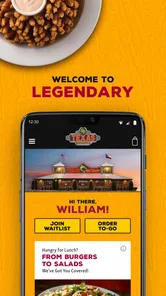
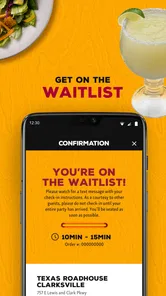
Once you’re in, the app greets you with a warm welcome, almost as if it's inviting you to take a seat and enjoy a meal. The main menu is straightforward, allowing you to quickly find what you need. Whether it’s checking out the latest promotions, placing an order for pickup, or joining the waitlist, everything is just a tap away.
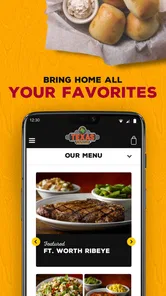
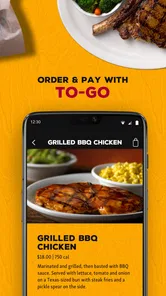
One feature that stands out is the seamless online ordering system. Ordering your favorite steak or fall-off-the-bone ribs is as easy as pie. The app offers a detailed menu with descriptions and prices, so you know exactly what you’re getting. Plus, customizing your order is a breeze, which is great for those of us who like a little extra kick in our meal.
Plan the order around the people eating
A practical way to use the menu is to settle the choices before one person becomes the unofficial order-taker for a whole group. I’d check the menu first, ask everyone to decide on a main and any changes they care about, then review the order carefully before submitting it. That is especially helpful when people want different levels of seasoning or sides: a quick double-check is easier than trying to remember several requests in a noisy car or at the table.
More From Our News Desk

Weather by Xiaomi Review: Clear at a Glance, Less Clear Up Close

X Under Pressure: Can It Recover When Posting Goes Wrong?

Clash of Clans Is Won Between the Battles

Android Auto Makes the Case for Quieter Car Software

MobiOffice: Transforming Mobile Productivity with Seamless Integration

EA SPORTS FC™ Mobile Soccer: Redefining Mobile Sports Gaming
For a realistic weeknight example, imagine you’re leaving work and your family wants pickup. You can use the app to look over the Texas Roadhouse options and organize the order while there’s still time to ask about preferences. Before placing it, I’d confirm the selected items and customizations with everyone, then use the restaurant’s current instructions for completing the pickup. The app can make the decision and ordering process more orderly, but it can’t make a busy dinner plan effortless if the group hasn’t agreed on what to eat.
Think through pickup before placing the order
Pickup works best when you treat the app as the start of the process, not a promise that every practical detail is settled. I’d check the restaurant-specific instructions after ordering and make sure the person collecting the food knows what to do. That matters if one family member places the order but another is driving over: share the name or details needed to identify it, and avoid relying on a half-remembered message sent while rushing out the door.
For a group meal, I’d also make one person responsible for the final review. When several people are calling out changes, it is easy to confuse a side request or leave a customization attached to the wrong meal. Reading the assembled order back to the group takes a moment and is a better safeguard than assuming everyone’s preferences made it into the right place. This is a small workflow tip, but it’s where a restaurant app can save real friction.
Loyalty Rewards and Special Offers
Who doesn’t love a good deal, right? The app’s loyalty program is simply fantastic. Each purchase earns you points, and before you know it, you’ve racked up enough to treat yourself to a free appetizer or a discount on your next visit. Notifications about special offers and events keep you in the loop, so you never miss out on a chance to save.
Additionally, the app occasionally sends out exclusive deals that are only available to app users. It’s like having a secret handshake with the restaurant that gives you access to perks others might miss out on.
Make rewards a bonus, not the reason to order
I’d treat loyalty perks as a pleasant extra rather than a guaranteed saving on every meal. If rewards matter to you, take a moment to check what the app currently shows before you decide what to buy; that makes it easier to judge whether a particular visit suits your plans. Notifications can be useful when you want to hear about offers, but they can also become noise if you prefer a quiet phone. I’d keep only the alerts I find worthwhile and avoid letting a promotion dictate a meal I didn’t want in the first place.
There’s also a useful distinction between a restaurant’s own app and a general delivery service. The restaurant app makes the most sense when you want to deal directly with Texas Roadhouse and use its ordering or loyalty tools. A third-party service may be more convenient when you’re comparing several restaurants or coordinating a delivery from somewhere else, but it won’t serve as a substitute for this app’s restaurant-specific experience. Which option is better depends on whether your priority is choosing among places or handling a visit you’ve already decided on.
Know what kind of convenience you’re choosing
Compared with browsing a restaurant’s website, an installed app is handy when I expect to return and want its restaurant-focused tools close at hand. A website or a quick search can be enough for a one-off menu check, especially if I don’t want another app on my phone. Meanwhile, broad dining and delivery services are more useful for comparing cuisines and places in one session. I wouldn’t install this app expecting it to solve that discovery problem; its narrower focus is the point, but also the trade-off.
There’s a similar distinction between ordering and deciding where to eat. If the group has already settled on Texas Roadhouse, opening its app can keep the menu and restaurant-related steps together. If everyone is still debating, I’d start with a wider search and only switch to the restaurant app once the choice is made. That two-step approach avoids scrolling through a single restaurant’s options while the real question is whether anyone wants that kind of meal tonight.
Who will get the most from it
I can see this being most worthwhile for regular customers, families who sometimes coordinate pickup, and diners who like checking a menu before heading out. It’s also a practical fit for someone who wants restaurant-specific rewards and is comfortable keeping track of an account or app-based offers. If I visited often enough to use those tools, having them on my phone would feel more useful than repeatedly searching for the same restaurant information.
On the other hand, a person who visits only occasionally may be better served by looking up the restaurant when needed. Someone who prefers calling, ordering in person, or keeping phone notifications to a minimum may not gain enough to justify adding a dedicated app. And for diners comparing lots of restaurants, a general-purpose service remains the more natural first stop. The right choice depends less on whether an app has features and more on whether those features match your actual routine.
Check the fit before you commit
The app is rated for Everyone, has a 4.8 average from around 19,000 ratings, and has been installed over a million times. It’s free, with version 8.2.0 listed for devices running Android 7.0 or later. Those figures suggest a well-used option, but they don’t tell me whether it fits every diner’s routine. It’s a sensible download for regular customers who want restaurant-specific convenience; someone who rarely visits, avoids ordering on a phone, or mainly wants to discover new places may have little reason to keep it installed.
What I’d check before relying on it
Would I use it for a last-minute meal? Yes, if I already knew I wanted Texas Roadhouse, but I’d still review the current menu and the options shown for the particular restaurant before promising the group a specific order. A menu can help narrow choices; the useful decision is to confirm the details in the moment rather than assume every location or occasion works the same way.
Is it worthwhile if I only want to join a waitlist or plan a dine-in visit? It can be useful for restaurant-related tasks beyond pickup, but I’d check the choices presented for the visit I have in mind and follow the restaurant’s instructions. The same principle applies to offers: look at what is currently available in the app instead of budgeting a meal around a perk you haven’t checked.
Would I keep it installed if I’m not a frequent customer? Probably not unless I had a specific upcoming visit or wanted the restaurant’s app-based tools. Since it’s free, trying it is a low-commitment way to see whether its menu, ordering, and loyalty options suit me; deleting it later is reasonable if I rarely use them. The meaningful cost is less about the download and more about attention: an app that isn’t part of your routine can become clutter.
Final Thoughts
So, what’s the final verdict on the Texas Roadhouse app? Well, if you’re a fan of their food (and let’s be honest, who isn’t?), then this app is a no-brainer. It brings the convenience of easy ordering and exclusive rewards right to your smartphone. Plus, with its user-friendly interface and helpful features, it’s like having a piece of Texas Roadhouse magic in your pocket.
In conclusion, if you haven’t downloaded the app yet, you’re missing out on a whole world of convenience and deliciousness. It’s perfect for those busy nights when you crave a hearty meal but don’t have time to dine in. So go ahead, give it a whirl, and let the Texas Roadhouse app elevate your dining experience!
Texas Roadhouse Frequently Asked Questions
Is the Texas Roadhouse app available for both Android and iOS?
Yes, Texas Roadhouse is a Food & Drink app for Android and iOS, so customers can use it on either platform. On Android, it requires version 7.0 or later, making it worth checking your device’s software before downloading. The app is free, and its Everyone age rating makes it suitable for a broad audience.
Can I browse the Texas Roadhouse menu before visiting?
The Texas Roadhouse app is designed to help customers connect with the restaurant brand and enjoy its Legendary favorites. It lets users view the menu and explore special offers, which can be useful when deciding what to order before a visit. The app is developed by Texas Roadhouse, Inc, and its short description is simply “Texas Roadhouse.”
What devices can run the Texas Roadhouse app?
The Texas Roadhouse app is a Food & Drink app for Android and iOS. On Android, it requires version 7.0 or later, so checking your device’s software version before downloading can help you avoid compatibility issues. The app is free, and its Everyone age rating makes it suitable for a broad audience.
Who develops the Texas Roadhouse app, and what is it like to use?
The app is developed by Texas Roadhouse, Inc and is focused on helping customers connect with the restaurant brand. Its short description is simply “Texas Roadhouse,” while its store summary invites users to enjoy their Legendary favorites. It has a 4.8 average from around 19,000 ratings, offering a helpful snapshot of how other users rate it.
What is the Texas Roadhouse app used for?
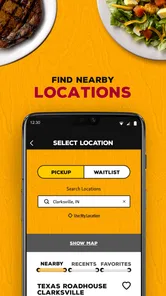
The Texas Roadhouse app is designed to enhance your dining experience by allowing you to join the waitlist remotely, view the menu, and explore special offers. By using the app, you can easily locate the nearest restaurant, check wait times, and even make a reservation, ensuring a more convenient visit to the restaurant.
Pros
- User-friendly interface
- Extensive menu selection
- Efficient online ordering
- Great customer service
- Frequent updates
Cons
- Occasional app crashes
- Limited customization options
- High data usage
- Slow loading times
- Some features require account











