

Tencent Video
- 825.00
- 3.4
- Installs
- 500.00K
- Price
- Free

Screenshots
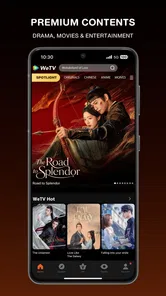
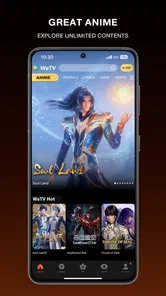
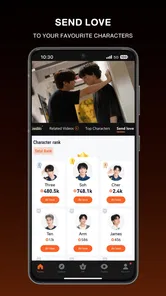
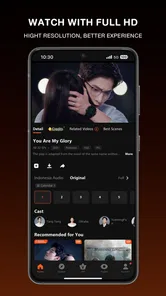
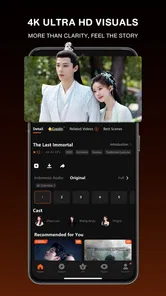
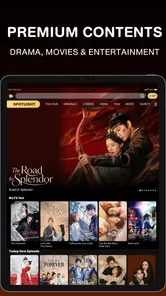
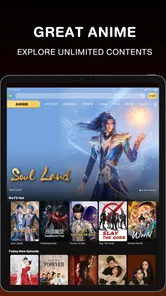
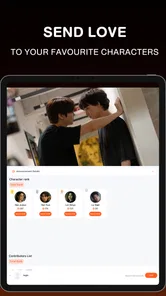
Analysis by Reviewed
When I tried Tencent Video, I approached it as a practical entertainment app rather than expecting it to replace every streaming service on my phone. It is the official WeTV app in the U.S., developed by Image Future, and its main appeal is straightforward: it gives viewers a way to explore Tencent Video content from a mobile device without needing a complicated setup. I found the experience most interesting when I treated it as a focused destination for Asian entertainment instead of a universal library.
The app is free to install, carries a Teen content rating, and has passed the half-million-install mark. Its average score sits at 3.4 from roughly two thousand ratings, with more than eight hundred written reviews. Those figures suggest a mixed but meaningful user experience: enough people use it regularly to make the catalog worthwhile, while the middling rating is a useful reminder that convenience and polish may vary from one viewer to another.
How Tencent Video fits into an everyday viewing routine
I find this kind of focused viewing app works best when I give it a clear job in my routine, rather than opening it whenever I have a spare minute and hoping something catches my eye. A short browse when I have time can help me choose a title for later, while a planned session makes it easier to settle in and follow the story. That routine also gives me a fair way to judge whether its particular catalog deserves a regular place on my device.
A simple starting workflow for casual viewers
My preferred first session was deliberately uncomplicated. I opened the app, browsed instead of searching immediately, and paid attention to how quickly I could identify something worth watching. That approach works well if you are curious about Tencent Video but do not yet know the names of the shows or films available through it. Browsing gives the service a chance to show its personality, whereas typing a title only tests whether it can find something you already know.
Once I found a promising title, I used the detail page as a decision point rather than starting instantly. I checked the available description, looked at the episode structure when applicable, and considered whether I had enough time for a full viewing session. This small habit prevents a common streaming annoyance: beginning a series during a short break and then realizing that the app is better suited to a longer evening session.
For a realistic everyday example, I would use Tencent Video after dinner when I wanted something more specific than the familiar choices in a general streaming app. I could browse with a particular mood in mind, save a title mentally for later, and return when I had time to focus. It is less useful as background noise while doing chores if the content depends on subtitles, dialogue, or careful attention.
The app also makes sense for viewers who already follow Tencent-related productions or who want a convenient place to discover dramas and other entertainment associated with its ecosystem. In that situation, the service has a clearer purpose than a broad platform chosen only because it has the largest possible catalog.
More From Our News Desk

 Gmail
GmailGmail in a Busy Inbox: Who Benefits Most?
From first account to crowded workday, Gmail earns its place through dependable search and flexible sorting—but its best fit depends on how much inbox maintenance you can tolerate.

 Prime Video
Switching to Prime Video: What Changes in Your Viewing Routine
Prime Video can make a compelling second home for streaming, but switching means learning a different catalog, rental layer, and route from browsing to playback.

 Universal TV Remote Control
Universal TV Remote Control Works Best as a Reliable Backup
A phone remote earns its place through quick setup and reliable habits. Here is how to get more from Universal TV Remote Control—and where its limits show.

 Weather - By Xiaomi
Weather by Xiaomi Review: Clear at a Glance, Less Clear Up Close
Xiaomi’s weather app makes everyday forecasts quick to scan, but its calm surface can leave useful details and recovery paths harder to find than they should be.

 X
XX Under Pressure: Can It Recover When Posting Goes Wrong?
A resilience-focused review of X, examining setup, mistaken posts, interruptions, weak connections, and the gaps that matter when recovery needs to be dependable.

 Clash of Clans
Clash of Clans Is Won Between the Battles
Its raids are quick; its community is a long-term project of coordination, teaching, rivalry, and shared responsibility—with all the friction that entails.
Latest News



What I would prepare before watching
I recommend deciding in advance whether you are watching casually or committing to a longer session. On a small phone screen, subtitles and scene details demand more concentration than a familiar English-language sitcom. If I am watching something dialogue-heavy, I put the phone somewhere stable and use headphones or a larger screen when available. That is not a special Tencent Video feature; it is simply the difference between using the app comfortably and fighting the limitations of mobile viewing.
I also found it helpful to separate discovery from watching. Browsing while tired can lead to endless scrolling, especially when several titles look similar. A better routine is to choose one or two candidates, read their descriptions, and start one deliberately. This makes the app feel less like a catalog to conquer and more like a useful evening shortcut.
Settings I would check before settling in
The first settings I would inspect are playback-related options, language or subtitle controls, and any account preferences visible in the app. These details matter more here than they might in a simple video player because international entertainment can depend heavily on readable subtitles and the right language presentation. I would not assume that the default configuration is ideal for every title or every viewer.
Subtitle readability deserves particular attention. On a phone, small text can become tiring quickly, and a viewer who sits farther away from the screen may need a different presentation than someone holding the device close. If the app offers controls for subtitle appearance or language on a particular title, I would adjust them before the episode begins rather than interrupting an emotional scene later.
Playback quality is another area worth checking when the connection is inconsistent. I prefer to begin with a stable setting and only increase quality after confirming that playback remains smooth. A sharper picture is not an advantage if it causes repeated buffering, especially during a short commute or in a crowded public network. Conversely, viewers on a reliable home connection may reasonably prefer to prioritize image quality.
Because Tencent Video includes optional purchases ranging from twenty-nine cents to two hundred ninety-nine dollars and ninety-nine cents per item, I would also review purchase controls before exploring deeply. The app itself is free, but free access and optional paid items are not the same thing. I consider this a basic household habit: if children or other family members use the device, make sure the account and device purchase settings match the way you expect the app to be used.
The Teen rating is another practical signal rather than a decoration. I would treat it as a reason to preview titles before recommending them to younger viewers, particularly when the phone or tablet is shared. A content rating cannot describe every scene or every viewer’s comfort level, so parental judgment still matters.
Small habits that make browsing faster
Experienced use is less about a secret button and more about reducing repeated decisions. I would begin by searching for a known title when I have a specific target, then switch to browsing only after finishing that task. This avoids losing time in recommendations when I already know what I want. For discovery nights, I would reverse the order: browse first, shortlist quickly, and stop once one title meets the mood.
Another useful pattern is to remember where I left off rather than relying on memory alone. If the app presents a continue-watching path, I would use it; if not, I would keep a simple note of the series and episode. This sounds basic, but it prevents the frustrating cycle of reopening several titles to find the correct one, especially when a household shares an account or device.
I would also avoid judging the entire service by one slow session. Video performance can be affected by the network, the device, and the particular viewing environment. If playback struggles, I would test a different connection or lower the quality before deciding that the app is unusable. At the same time, I would not excuse repeated problems indefinitely. A practical test is whether the app works reliably in the places where I actually watch, not whether it performs perfectly under ideal conditions.
For regular viewers, a repeatable weekly habit can work well: browse once when there is time, identify a few possibilities, and return to those choices later. This is more efficient than opening the app every night with no plan. It also helps reveal whether the catalog genuinely suits your tastes or whether the initial curiosity was stronger than the long-term value.
Where it compares well with familiar alternatives
Compared with a general streaming service, Tencent Video feels more focused. A broad platform may be easier for families with very different tastes because it combines many genres and providers in one place. Tencent Video is a better fit when its particular content direction is the reason you are opening the app. I would choose the broader alternative for maximum variety and Tencent Video when I want to explore this specific entertainment ecosystem.
Compared with watching clips through a general video platform, a dedicated app offers a more intentional viewing environment. Random clips are excellent for quick discovery, but they can make it difficult to follow a full drama or maintain continuity. Tencent Video is more suitable when I want to watch a program as a program, not merely sample isolated moments.
There is also a trade-off against paid specialist services. A specialist service may offer a more curated experience for a particular audience, while Tencent Video’s free entry point makes experimentation easier. I can install it, look around, and decide whether its selection justifies regular use without committing immediately to a subscription. The downside is that free access does not guarantee that every desired title or item will be available in the exact way I prefer.
Limits that become clearer with regular use
The 3.4 average rating is consistent with my overall impression: the app can be useful, but I would not describe it as flawless. A viewer who expects the same level of consistency from every major streaming platform may notice rough edges in navigation, playback behavior, or content access. Those issues matter more when Tencent Video is your primary entertainment app than when it is a secondary service you open for selected titles.
The most important limitation is fit. If your priority is a huge all-purpose catalog, a single app for live channels, or a completely frictionless family experience, another service may be more appropriate. Tencent Video earns its place when its content focus matches your interests. Without that match, the extra app can feel like clutter rather than a discovery tool.
Optional purchases also require restraint. The range from small individual items to much larger ones means I would never treat every visible option as part of the basic free experience. I would check what I am selecting, confirm the account being used, and avoid making a purchase simply because it appears during browsing. That workflow is especially important on shared devices.
Mobile viewing has practical limits too. Long sessions can be tiring on a phone, subtitles may be harder to follow at a distance, and changing networks can affect playback. I would recommend a larger screen or a more stable connection for viewers who plan to watch several episodes in one sitting. The app may be convenient, but convenience does not remove the physical limitations of the device.
Who should install it, and who should skip it
I would recommend Tencent Video to viewers who want a free way to explore Tencent Video entertainment in the U.S., especially those who already know they enjoy Asian dramas or related programming. It is also a sensible trial for someone who is tired of seeing the same recommendations in mainstream services and wants a more focused source of discovery.
I would be more cautious recommending it to someone who rarely watches subtitled content, needs one universal app for a whole family, or expects every feature to feel as polished as the biggest streaming platforms. Those viewers may spend more time adjusting their routine than enjoying it. Someone with very limited storage or a strict preference for keeping only essential apps should also decide whether this catalog is distinctive enough to justify the space.
For parents, I would treat the Teen rating and optional purchases as reasons to supervise setup rather than as automatic deal-breakers. For budget-conscious viewers, the free price is attractive, but I would still keep paid items in mind. For dedicated fans, the app’s value will depend less on its general reputation and more on whether the titles they want are available and comfortable to watch on their preferred device.
My verdict after building a repeatable routine
After using it as a focused entertainment destination, I see Tencent Video as a worthwhile secondary streaming app with a clear audience. Image Future has made it easy to begin without an upfront charge, and the official WeTV positioning gives the app a recognizable purpose. I like it most when I arrive with either a specific title in mind or a genuine interest in discovering Tencent Video content.
My strongest advice is to make the app work through habits: check subtitle and playback preferences, review purchase controls, shortlist titles instead of scrolling endlessly, and choose a viewing environment that suits dialogue-heavy programming. These steps do not transform the service, but they remove much of the avoidable friction.
The best reason to try Tencent Video is focused discovery, not the promise of replacing every other streaming app. Its free entry point makes that experiment easy, while the Teen rating and optional paid items call for sensible supervision. I would keep it installed if its catalog repeatedly gives me something I cannot find as conveniently elsewhere. If it does not, the app is unlikely to become essential simply because it is available.
In short, I recommend it selectively. Fans of its content direction should give it a fair trial, use the settings deliberately, and judge it over several real viewing sessions rather than one rushed test. Viewers seeking a universal, perfectly polished streaming hub should look elsewhere. For the right audience, however, Tencent Video is a useful free doorway into a more specific corner of entertainment, and that focused role is where it makes the most sense.
Tencent Video Frequently Asked Questions
Is Tencent Video suitable for younger viewers?
Tencent Video is an entertainment app with a Teen age rating, so it may include material intended for older children and adults rather than content appropriate for every age. Parents and guardians should consider that rating when deciding whether a younger viewer should use the app, and should check individual program descriptions before watching together. The app’s overall rating does not guarantee that every title has the same tone or themes.
Who develops Tencent Video, and what is the app called in the U.S.?
Tencent Video is developed by Image Future. In the U.S., the app is presented as the WeTV Official App, while its short description identifies it as Tencent Video. That naming may help explain why the app’s branding looks different from the title people search for. It is a free entertainment app, with optional in-app purchases for users who choose paid features or content.
What is Tencent Video, and what kind of content does it offer?
Tencent Video is a streaming platform that provides access to Chinese dramas, variety shows, movies, animation, documentaries, and selected international productions. Its catalog is especially strong in popular Chinese series, including exclusive and original titles. Content availability can vary by country because of licensing agreements, so the shows visible in the app may differ depending on your region.
Is Tencent Video free to use, or do I need a VIP subscription?
Tencent Video offers a mixture of free and premium content. Some programs can be watched with advertising or limited access, while VIP members generally receive earlier episodes, fewer advertisements, higher-quality playback, and access to exclusive titles. Subscription prices and benefits may differ between regions and platforms, so it is worth checking the current terms before starting a paid plan.
Does Tencent Video provide English subtitles or multiple language options?
Many Tencent Video programs include English subtitles, particularly internationally distributed dramas and popular original productions. However, subtitle availability is not guaranteed for every title, episode, or region. Before downloading the app for a specific series, check its description and playback options. Language support may also depend on the version of the application available in your country.
Pros
- Large library of Chinese dramas
- anime
- films
- and variety shows.
- Many titles offer multiple subtitle and audio language options.
- Smooth streaming with adjustable video quality for different connections.
- Personalized recommendations improve as you watch more content.
- Offline downloads let subscribers watch selected videos without internet.
Cons
- Much of the catalog is region-restricted and may vary by country.
- Premium access is required for many popular shows and newer episodes.
- The app can feel crowded with banners
- promotions
- and locked content.
- Some titles have delayed subtitles or inconsistent translation quality.
- Playback and downloads may use substantial storage and mobile data.











