

Tarot!
- 336.00
- 4.9
- Installs
- 10.00K
- Price
- $3.99

Screenshots

Analysis by Reviewed
My first piece of advice for trying Tarot! is to approach it as a way to explore images and ideas, not as a tool that makes decisions for you. A card can give you a useful prompt for reflection, but I wouldn’t let a reading replace practical judgement, especially for important choices. With that mindset, opening a deck on your phone can feel inviting rather than intimidating.
What to expect from this particular deck
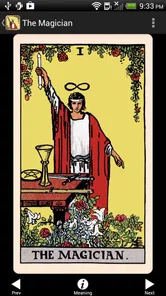
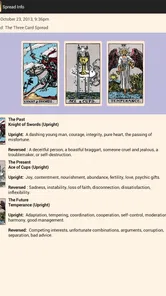
Tarot! is an entertainment app from The Fool's Dog, built around Pamela Colman Smith’s familiar tarot artwork. Its appeal is the chance to spend time with those illustrations in a phone-based format; the emphasis is not simply on getting a quick prediction. If you already know the images, seeing them together can make it easier to notice details you might pass over when reading a single card in isolation.
The app costs $3.99, so I’d think of it as a paid digital deck rather than a free sampler. It has a 5.0 average from 664 ratings, with 316 written reviews, and 5K+ installs. Those figures suggest a small but very warmly received audience, though they don’t tell you whether its style will suit your own reading habits. It is rated Mature 17+, so it is not intended for younger users.
That focused identity is worth keeping in mind before you pay. This is not the same proposition as a broad tarot reference library or a general-purpose spirituality app: the central draw is one recognizable set of images in a portable form. If that artwork is what you want to return to, the purchase makes more sense than if you are mainly looking for a catalog of different decks to sample.
Getting started without overthinking it
If you’re new to tarot, give yourself a simple first session. Open the app, choose one clear question about something ordinary—such as what you want to focus on today—and draw a card. Look at the picture before reaching for an interpretation: notice the figures, colors, and mood, then ask what detail caught your attention. That pause makes the reading feel like your own rather than a test with a right answer.
I’d keep the first question open-ended. “What should I pay attention to?” leaves room for reflection; asking a phone app to settle a major life decision puts far too much weight on a card. If a result feels confusing, write down your first reaction and revisit it later. The point is not to force a dramatic meaning, but to see whether the image helps you frame a thought you already had.
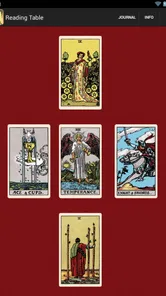
A small practical tip is to decide what you want from the session before drawing. If you are seeking a nudge to think, one card is enough; if you want to learn how images connect across a reading, you can take more time with the cards you draw rather than treating quantity as a shortcut to certainty. This keeps a first visit approachable and gives you a clear way to tell whether the app suits you: do you leave with a useful thought, or just a result you feel obliged to decode?
More From Our News Desk

 Gmail
Gmail in a Busy Inbox: Who Benefits Most?
From first account to crowded workday, Gmail earns its place through dependable search and flexible sorting—but its best fit depends on how much inbox maintenance you can tolerate.

 Prime Video
Switching to Prime Video: What Changes in Your Viewing Routine
Prime Video can make a compelling second home for streaming, but switching means learning a different catalog, rental layer, and route from browsing to playback.

 Universal TV Remote Control
 Works Best as a Reliable Backup
A phone remote earns its place through quick setup and reliable habits. Here is how to get more from Universal TV Remote Control—and where its limits show.

 Weather - By Xiaomi
Weather by Xiaomi Review: Clear at a Glance, Less Clear Up Close
Xiaomi’s weather app makes everyday forecasts quick to scan, but its calm surface can leave useful details and recovery paths harder to find than they should be.

 X
X Under Pressure: Can It Recover When Posting Goes Wrong?
A resilience-focused review of X, examining setup, mistaken posts, interruptions, weak connections, and the gaps that matter when recovery needs to be dependable.

 Clash of Clans
 Is Won Between the Battles
Its raids are quick; its community is a long-term project of coordination, teaching, rivalry, and shared responsibility—with all the friction that entails.
Latest News



Where it fits in a real routine
A realistic use is a quiet moment before work: draw a card while having coffee, take a minute to study the artwork, and choose one small intention for the day. You might decide to listen more carefully in a meeting or make time for a task you have been avoiding. That turns a reading into a practical prompt without treating it as a promise about what will happen.
Compared with a physical tarot deck, a phone version is easier to keep close and doesn’t require table space or carrying cards around. A printed deck is still better if you enjoy shuffling, handling the cards, or laying out a spread with other people. Compared with generic tarot content online, an app centered on a particular illustrated deck offers a more focused way to look at its artwork; online explanations may be preferable if you want to compare many traditions or interpretations.
There is also a useful difference between a quick phone reading and a longer study session. A spare minute can be enough to look at one image and make a note, but it is less suited to spreading cards across a table, keeping a book open beside them, and comparing several interpretations at once. I would use the app for access and continuity, then turn to a physical deck or printed guide when the aim is hands-on practice or deeper research.
Discovering the Magic
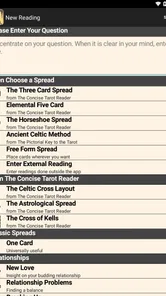
First off, let's talk about the sheer convenience of having a Tarot deck on your phone. Gone are the days where you need to carry a bulky deck around. With just a few taps, you're ready to unveil what the universe has in store. Most apps come loaded with a variety of spreads, from the classic Celtic Cross to a simple three-card layout. It's like having a personal fortune teller in your pocket!
User-Friendly Features
What I love most about these apps is how user-friendly they are. Even if you’re new to Tarot, the guided readings and detailed explanations make it easy to understand the meanings behind each card. You can even save your readings to reflect on them later. Plus, some apps offer daily card pulls, which are a great way to start your day with a little insight and inspiration.
Another cool feature is the inclusion of card history and symbolism. For those of you who are more into the history and depth of Tarot, these apps often provide a rich background on each card. It's not just about divination; it's about connecting with centuries of tradition and wisdom.
It helps to separate what belongs to tarot as a broad practice from what you should expect from this specific purchase. The app’s confirmed identity is a digital presentation of Smith’s art; I would not buy it on the assumption that every tarot app feature mentioned in general discussions—such as extensive lessons, saved journals, or a daily reminder—will be part of this particular experience. Check what you need from a deck before spending, and treat the artwork itself as the reliable reason to consider it.
A Community at Your Fingertips
Many Tarot apps also come with community features where you can share readings and insights with other users around the world. It’s fascinating to see how different interpretations can be. You might even learn a new perspective or two, which adds another layer of depth to your readings.
Some apps even include forums and groups where you can discuss everything from the basics of Tarot to advanced techniques. It’s like having a global Tarot community, always ready to lend a hand or share a story.
For a beginner, community can be helpful, but it is not a substitute for deciding what a card means to you in context. If you do compare readings with other people, bring a specific observation to the conversation—what caught your eye, or what question you asked—instead of presenting the card as proof that an event will occur. That makes discussion more grounded and keeps someone else’s confident interpretation from crowding out your own judgement.
The Verdict
So, should you download a Tarot app? If you're even slightly curious about what the cards might reveal, I say go for it. With the combination of convenience, detailed guidance, and community support, these apps are a fantastic way to explore the world of Tarot without any pressure. Just remember, the real magic lies not in the cards themselves, but in how you interpret them. Happy reading!
For this particular app, I’d make the decision more specific: choose it if a portable version of Pamela Colman Smith’s imagery is what you want, rather than because tarot apps as a category sound convenient. If you are undecided, first consider whether you enjoy studying illustrated cards at all. Someone who likes visual symbolism may find a single image gives them plenty to work with; someone who wants a step-by-step course or a busy social space may get more value from another kind of resource.
Reading the artwork, not just the result
A useful habit with this deck is to let the illustration lead before you consult any explanation. Pick one visible detail—a posture, a color, or the way figures relate to each other—and describe it in plain language. Then connect that observation to your question. This is especially helpful when a card’s traditional meaning feels abstract: a concrete visual detail gives you a personal starting point without requiring you to memorize a whole system.
For a second session, try revisiting the same card later in the day rather than drawing again immediately. Ask whether your perspective changed after the events of the day. That comparison can make the practice more thoughtful and reduce the temptation to keep drawing until you get an answer you prefer. If you want structured study, a book or physical deck with a guide may offer more room for side-by-side notes; this app is better suited to quick, focused time with the imagery.
One trade-off with any artwork on a phone is that viewing it on a screen is not the same as handling a printed card. Brightness, screen size, and the moment you happen to look can affect how much detail you notice. I find it helps to pause rather than swipe quickly from one image to the next, and to look for the overall arrangement before zooming in on a single symbol. That deliberate pace makes a compact digital deck feel less like a random-card novelty and more like a small visual study.
Who will enjoy it—and who may prefer something else
I can see this working well for someone who is curious about tarot, appreciates Smith’s illustrations, and wants a convenient way to pause and reflect. It may also suit an experienced reader who already has a physical deck but wants a compact option for a spare moment. The Fool's Dog released it on Oct 25, 2013, and the current version is 2.2.2; it requires iOS 8.0 or later. It is a focused, established app rather than a reason to expect the newest presentation or a broad social platform.
I would skip it if you mainly want a free way to browse many decks, lively group discussion, or the tactile ritual of shuffling physical cards. The app belongs to entertainment, and I’d keep that distinction in mind: it can support a reflective habit, but it should not be treated as professional advice or a dependable forecast. At $3.99, the choice comes down to whether having this particular artwork with you is worth paying for.
It is also not the option I would reach for when I need an answer that depends on outside facts. A card cannot tell you what a contract means, diagnose a health problem, or decide whether a financial commitment is safe. In those situations, practical information and qualified help matter more than a reflective exercise. The app works best when the question is personal and low-stakes—for example, what attitude you want to bring to a conversation—not when someone is asking it to carry responsibility for a consequential decision.
If you are choosing between this and another tarot app, compare the experience you actually want rather than the broad label. Pick this one for the appeal of Smith’s deck and for having that imagery readily at hand. Choose a multi-deck reference if variety and comparing artistic traditions matter more; choose a physical pack if touch, shuffling, and reading with friends are central; choose a book if you want sustained explanations and room to annotate. Those alternatives are not shortcomings of this app so much as different tools for different habits.
A sensible next step
After your first card, choose one question that can lead to an action you control, then note what you noticed and what you plan to do. If that small exercise feels useful, continue at your own pace; if it feels forced, there is no need to turn it into a daily routine. I like that the best outcome is modest: a striking image, a moment to think, and perhaps a clearer intention for the next part of the day.
To make that first success concrete, try a short evening check-in after a day that felt scattered. Ask what deserves your attention tomorrow, study the card without rushing, and write down one small action you can take before noon. The next day, look back at the note rather than drawing again straight away. This gives the reading a practical endpoint and lets you judge its usefulness by whether it helped you notice or act on something, not by whether it appeared to predict the day.
That simple routine also answers a common beginner worry: you do not need to know every traditional meaning before you can begin. Start with what you see, connect it carefully to a modest question, and treat any interpretation as a possibility rather than a command. If you later want more structure, learn the card meanings at a pace that suits you or use a printed guide alongside the images. The app can be an entry point, but it does not have to become your only way of learning.
My overall recommendation is therefore narrow but genuine. If the artwork is the part that draws you in and you want a discreet, portable way to spend time with it, this is an appealing paid deck to consider. If your priority is breadth, instruction, social features, or the feel of real cards in your hands, another option will fit better. I’d use it as a thoughtful companion for small questions and visual reflection, while keeping important decisions firmly in the real world.
Tarot! Frequently Asked Questions
What kind of tarot deck and artwork does Tarot! feature?
Tarot! presents Pamela Colman Smith’s beloved tarot art restored in its original vivid colors. The artwork is a central part of the app’s appeal, giving users a digital way to spend time with a classic deck rather than a generic set of card illustrations. If the look and visual character of a tarot deck matter to you, the restoration is a notable reason to consider this app.
What is the main purpose of the Tarot app?
The Tarot app is designed to provide users with a digital platform for exploring tarot card readings. Whether you are a beginner or an experienced tarot enthusiast, the app offers a variety of spreads and interpretations to help you gain insights into your life's questions and challenges. It’s an excellent tool for personal reflection and guidance.
Is the Tarot app suitable for beginners?
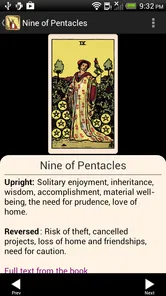
Yes, the Tarot app is suitable for both beginners and experienced users. It offers a user-friendly interface with detailed explanations of each card and its meaning. Beginners will find it easy to navigate through the app and understand the basics of tarot reading, while experienced users can delve deeper into more complex interpretations and spreads.
Can I use the Tarot app offline?
Yes, the Tarot app can be used offline, allowing you to access tarot readings and card interpretations without needing an internet connection. This makes it convenient for users who wish to have access to tarot insights anytime and anywhere, without being restricted by connectivity issues.
Does the Tarot app offer personalized readings?
The Tarot app offers personalized readings based on user input and selected spreads. Users can choose specific questions or areas of their life they wish to explore, and the app provides tailored insights and interpretations. This personalized approach enhances the relevance and accuracy of the readings.
Pros
- Intuitive interface for easy navigation
- Extensive card database for in-depth readings
- Customizable reading layouts
- Regular updates with new features
- Available in multiple languages
Cons
- Ads can be intrusive at times
- Limited free features
- Requires internet for full functionality
- Some interpretations may seem vague
- In-app purchases can be costly











