

Tarnished Checklist Premium
- 26.00
- 4.7
- Installs
- 1.00K
- Price
- $2.99

Screenshots
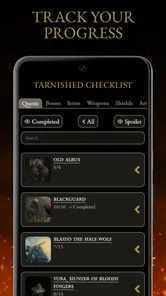
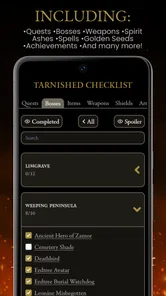
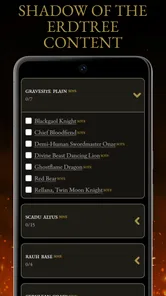
Analysis by Reviewed
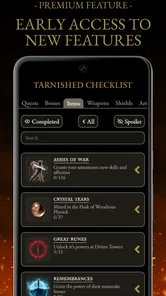
Before paying for a game companion, I’d ask how I actually play Elden Ring: do I lose track of unfinished threads, or do I enjoy letting the world pull me in whatever direction it does? That distinction matters more than any checklist feature. Tarnished Checklist Premium is an entertainment app from LOCW that gives players a place to follow quests, bosses, progress and other goals. I see its best use as a memory aid between sessions, not a route planner that should decide what I do next.
Where players can get stuck
The main value of a tracker is easy to understand if you have ever returned to a save and struggled to remember which NPC thread you were following or which boss you meant to revisit. Elden Ring rewards wandering, but that freedom can make a long-running personal to-do list hard to hold in your head. A checklist gives those intentions somewhere to live, so the next session can start with a useful reminder rather than a long search through memory.
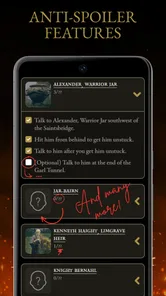
There is a trade-off: tracking everything can turn discovery into administration. I would use the app to record goals I genuinely care about, not to make every optional detour feel mandatory. If you enjoy being surprised by the world, leaving some tasks unchecked—or not tracking them at all—can preserve that feeling. The app is most appealing to completion-minded players and anyone who takes breaks between sessions; a player who prefers an unplanned, spoiler-light run may be happier relying on memory.
A realistic way to use it between sessions
Imagine I have a short evening to play after several days away. Rather than scrolling through a long list of unfinished tasks, I can use the tracker to remind myself of one next step, then decide in the game whether I still feel like pursuing it. At the end of the session, I can mark what I completed and leave a brief reminder for the next time. This small routine is more useful than trying to document every turn, and it keeps the checklist from becoming a chore in its own right.
I would also treat a task I have merely noticed differently from one I have completed. A quick note about a place to revisit can preserve a useful lead without turning it into a commitment. That distinction is especially handy when exploration takes me somewhere unexpected: I can keep the original plan visible without pretending the detour was wasted or that everything on the list must be handled in order.
Organizing Your Elden Ring Journey
First off, the Tarnished Checklist Premium is an organizational lifesaver. If you're anything like me, you tend to get lost exploring the Lands Between, often forgetting which notorious boss you need to tackle next or what rare item you're still missing. This app swoops in to save the day by providing a detailed checklist that mirrors the game’s expansive map.
Simplicity at Its Best
The interface is straightforward and user-friendly, which means you can spend less time figuring out how the app works and more time slaying dragons. The developers clearly understand that we want to jump right back into action without unnecessary distractions. You can easily tick off tasks as you complete them, and the app automatically updates your progress.
More From Our News Desk

 Gmail
Gmail in a Busy Inbox: Who Benefits Most?
From first account to crowded workday, Gmail earns its place through dependable search and flexible sorting—but its best fit depends on how much inbox maintenance you can tolerate.

 Prime Video
Switching to Prime Video: What Changes in Your Viewing Routine
Prime Video can make a compelling second home for streaming, but switching means learning a different catalog, rental layer, and route from browsing to playback.

 Universal TV Remote Control
 Works Best as a Reliable Backup
A phone remote earns its place through quick setup and reliable habits. Here is how to get more from Universal TV Remote Control—and where its limits show.

 Weather - By Xiaomi
Weather by Xiaomi Review: Clear at a Glance, Less Clear Up Close
Xiaomi’s weather app makes everyday forecasts quick to scan, but its calm surface can leave useful details and recovery paths harder to find than they should be.

 X
X Under Pressure: Can It Recover When Posting Goes Wrong?
A resilience-focused review of X, examining setup, mistaken posts, interruptions, weak connections, and the gaps that matter when recovery needs to be dependable.

 Clash of Clans
 Is Won Between the Battles
Its raids are quick; its community is a long-term project of coordination, teaching, rivalry, and shared responsibility—with all the friction that entails.
Latest News



My practical advice is to check your list at a natural stopping point, such as after a boss attempt or before putting the controller down, rather than interrupting every short stretch of play. That keeps the tracker useful without making it a second game to manage. For a short evening session, I would pick one clear objective and mark only what I actually finished; that makes it easier to resume later without treating every unexplored branch as a forgotten obligation.
Features to Enhance Your Gameplay
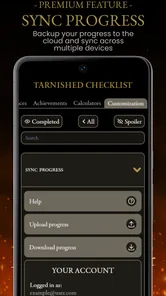
Besides the basic checklist functionality, the app offers customizable lists where you can add personal notes. Found a shortcut to a hidden dungeon? Jot it down. Keeping track of NPC questlines? Check. The premium version even includes cloud synchronization, so you never lose your progress, even if you switch devices. Now that's a feature worth the upgrade!
Additionally, the app provides detailed maps and locations of all items and bosses, making sure you won't miss a single piece of loot or lore. It feels like having a seasoned adventurer whispering tips in your ear as you traverse the game’s mysterious landscapes.
Making a tracker work for your play style
A useful workflow is to separate a concrete next step from a vague long-term ambition. A note such as “return to this area” can preserve a discovery without forcing you to abandon your current route, while a boss or quest objective gives you a focused starting point next time. I would also avoid marking something complete just because I found its location: keeping “seen” and “done” mentally distinct prevents a tidy list from giving a misleading picture of progress.
Compared with a paper notebook, a dedicated checklist is easier to scan when you want a quick reminder and can organize game-related goals in one place. Compared with a general notes app, it is built around Elden Ring rather than requiring you to invent your own structure. A notebook or ordinary notes app may still be better if you want complete freedom, detailed session logs, or a personal spoiler policy that you control line by line. The best choice depends on whether you value a ready-made game-focused structure more than flexibility.
Why a game-specific checklist may suit you
The useful difference from a general notes app is not that every player needs more reminders; it is that a ready-made structure can reduce the work of setting up your own tracking system. If I am juggling a few bosses, quest threads and places to revisit, having those game-related goals together is more convenient than maintaining separate notes from scratch. The trade-off is that a dedicated companion gives me less freedom to shape the system around every personal habit than a blank notebook does.
I would be most likely to use it on a return visit to a save, during a completion-focused run, or when I have limited time and want to begin with a clear target. I would be less likely to recommend it to someone who enjoys working out every mystery unaided, or who already keeps a dependable handwritten log. In those cases, adding another place to update can create more friction than it removes.
Setup checks and sensible expectations
The app costs $2.99, so I would decide whether a structured companion fits my habits before paying for it. It has a 4.7 average from around 85 ratings, and more than 1,000 installs; those figures offer a little context, but they do not tell me whether its approach will suit an individual player. LOCW’s release is version 1.0.2, is rated for Everyone, and requires iOS 8.1 or later. I would check that my device meets the requirement and that I am opening the intended premium app before setting up a long-term routine.
A simple setup check is to choose what I want the app to do for me before entering a lot of progress: remind me about unfinished quests, keep a boss list, or hold onto places and items I intend to revisit. Starting with one purpose makes it easier to tell whether the routine is helping. If I try to track everything at once, I may spend more attention maintaining the list than getting value from it.
If a checklist seems out of step with what I have done in the game, I would first review the relevant entry and correct my own progress marks before assuming anything more serious. For a device change, I would make sure I am using the same app and account context before relying on cloud synchronization to carry work across. That is a cautious way to handle a tracker, not a promise that every lost or mismatched entry can be recovered. Keeping brief notes for particularly important discoveries can also reduce the cost of an occasional tracking mistake.
Recovering a routine when progress looks wrong
When a list no longer matches my memory, I would avoid trying to repair every entry in one sitting. I would start with the next thing I am certain about, correct that marker, and use any personal notes to reconstruct the rest gradually. This is a practical way to keep one uncertain item from making the whole tracker feel unreliable. If I have changed devices, checking that I am using the same app and account context is sensible before assuming a sync has failed.
For an especially important thread, I would keep a short reminder in my own words as well as relying on a checkbox. That does not replace the dedicated checklist; it gives me context when a simple completion mark is not enough to remember why I cared about an objective. The trade-off is a little extra upkeep, so I would reserve this for discoveries I would genuinely be annoyed to forget.
When the app is not the cause
A checklist can record intentions, but it cannot decide what a confusing in-game moment means or make a quest unfold in the way a player expects. If an objective appears stalled, I would distinguish between forgetting to update the tracker and being unsure what to do in Elden Ring itself. The former is a list-keeping issue; the latter calls for deciding whether to explore, consult guidance, or leave the mystery unresolved. That distinction helps prevent blaming the companion for a game-state question it cannot settle.
This also explains why I would not recommend tracking every clue during a first, discovery-focused run. Detailed notes and maps can make it easier to stay organized, but they can also reduce the pleasure of getting lost and finding something unexpectedly. For a second playthrough, a completion goal, or a save revisited after a long break, that structure is much more likely to feel helpful than intrusive.
Keeping the checklist from taking over
The most useful boundary is to let the game set the pace and the app keep track of intentions. I would not treat an unchecked task as proof that I have played badly or missed the “correct” route. Some sessions are for wandering, experimenting or simply returning to a familiar area; a tracker should support those choices rather than turn them into a backlog to clear.
That is also why I would not use the app as my only source of interpretation when I am unsure what an in-game event means. A checklist helps me remember what I planned to do, while deciding whether to seek outside guidance is a separate choice. Keeping those roles separate makes the companion more useful and helps preserve the amount of mystery I want.
Why Go Premium?
You might wonder if the premium features are worth it. Trust me, they are. The premium version ensures you're not interrupted by ads, which keeps your focus on the game, not on closing pop-ups. Plus, the additional features like cloud sync and expanded checklists are game-changers for completionists out there.
In conclusion, if you're serious about your journey in Elden Ring, the Tarnished Checklist Premium is more than just a helpful tool—it's an essential companion. It takes the stress out of game management, letting you focus on what truly matters: becoming the Elden Lord. So, if you're ready to level up your gaming experience, this app might just be the key to unlocking your full potential in the Lands Between.
My recommendation is narrower than “everyone who plays should get it”: I would choose this app if I want a game-specific place to track progress, especially across sessions, and I am comfortable paying for a premium tool. If I rarely forget where I left off, prefer handwritten notes, or want to avoid outside prompts while discovering the game, I would skip it. Used selectively, it can make returning to a sprawling adventure feel more deliberate without needing to dictate how that adventure should go.
Tarnished Checklist Premium Frequently Asked Questions
What is Tarnished Checklist Premium, and what does it help players track?
Tarnished Checklist Premium is an entertainment app designed as a companion for Elden Ring. It helps players track quests, bosses, progress, and more, giving you a checklist-style place to keep an eye on what you have completed and what you still want to explore. It may suit players who prefer an organized overview while working through the game’s many activities.
Is Tarnished Checklist Premium suitable for new Elden Ring players as well as returning players?
It can be useful whether you are just starting Elden Ring or returning to continue a playthrough. New players can use a checklist to keep track of quests and bosses as they encounter them, while returning players may find it handy for reviewing progress and organizing what to do next. The app is focused on tracking, so it complements playing the game rather than replacing it.
What is Tarnished Checklist Premium and how does it differ from the free version?
Tarnished Checklist Premium is an enhanced version of the popular app designed to help users manage and track their tasks efficiently. It offers additional features such as ad-free experience, priority customer support, and advanced customization options. Unlike the free version, the premium version allows for more in-depth tracking and management of multiple projects, making it ideal for users who require a comprehensive tool to stay organized.
Is Tarnished Checklist Premium available on both Android and iOS platforms?
Yes, Tarnished Checklist Premium is available for download on both Android and iOS platforms. The app is designed to offer a seamless experience across different devices, ensuring that users can access their tasks and projects from their smartphone or tablet, regardless of the operating system. This cross-platform availability makes it versatile for users who may switch between devices.
What are the main features of Tarnished Checklist Premium that make it worth purchasing?
Tarnished Checklist Premium offers several standout features that justify its purchase. These include unlimited task creation, advanced project management tools, seamless synchronization across devices, and integration with popular productivity apps. Additionally, the premium version provides enhanced security features to protect your data and offers customizable reminders and notifications to keep you on track with your tasks.
Pros
- Comprehensive tracking system
- User-friendly interface
- Syncs across devices
- Customizable task lists
- Regular updates
Cons
- Paid version lacks trial
- Limited free features
- No offline mode
- Occasional sync issues
- Complex initial setup











