Talk to me Slimy: Talking Pet
- 148.00
- 3.6
- Installs
- 1.00M
- Price
- Free

Screenshots


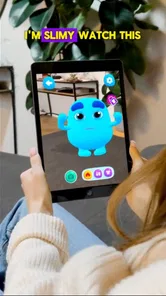
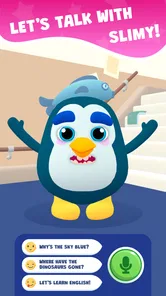
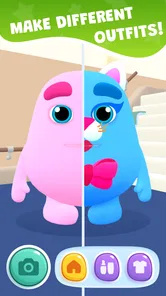
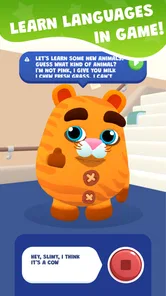


Analysis by Reviewed
Before I tried Talk to me Slimy: Talking Pet, I wanted to know what kind of first session it was likely to offer. I found it easiest to approach as a playful digital companion: a little character to talk with, customize, and spend a few spare minutes around. That framing makes the experience more reassuring for a first-time user, because the goal is not to master a complicated system. It is to find one small interaction that feels fun enough to repeat.
What to Expect from a Chatty Slime
Before downloading, it helps to think of Slimy as a playful entertainment app rather than a practical assistant or a deep, open-ended chatbot. Its appeal is the novelty of interacting with a character, mixing conversation with a light pet-like experience. I’d recommend it to someone who enjoys silly exchanges and wants a small creative distraction; I’d skip it if you want reliable answers, a serious learning tool, or a pet simulator with demanding care routines.
That distinction matters when you judge the conversation. A talking character is most fun when you give it a short, clear prompt or try a phrase that invites a playful response. If you approach it expecting detailed advice or consistently meaningful discussion, the limitations of a character-based entertainment app may show quickly. I found it works best as a little moment of amusement, not something I’d rely on to answer important questions.
For a first-time user, the useful question is not whether Slimy can hold every kind of conversation, but whether its particular style makes you smile. I’d treat the first visit as a quick trial rather than a commitment: explore the character, try one interaction, and then decide whether you want to keep experimenting. That small expectation check helps avoid confusing a deliberately light experience with a general-purpose AI assistant.
First Impressions: A Slimy Companion
Upon launching Talk to me Slimy: Talking Pet, I was greeted by a charmingly animated little slime who, surprisingly, had quite a personality. The app’s interface is vibrant and engaging, making it easy to navigate through the various features. It’s clear right off the bat that this app aims to provide a fun and lighthearted experience for users of all ages.
Getting to Know Your Slime
One of the first things you’ll do is customize your slimy friend. Whether it’s changing colors or adding quirky accessories, the personalization options are quite generous. Once you’ve got your pet looking just right, it’s time to interact. The app uses voice recognition, so you can actually have a conversation with your slime. Granted, the responses aren’t quite Shakespearean, but the playful banter adds a layer of fun to the experience.
For a first session, I’d keep the setup simple: choose a look you like, then try one short spoken phrase before experimenting with longer conversation. That gives you a quick sense of how the voice interaction behaves without turning the first few minutes into a test. If Slimy misunderstands you, I’d rephrase rather than repeat the same sentence louder; a simpler prompt is often a better way to keep the exchange light and moving.
More From Our News Desk

Weather by Xiaomi Review: Clear at a Glance, Less Clear Up Close

X Under Pressure: Can It Recover When Posting Goes Wrong?

Clash of Clans Is Won Between the Battles

Android Auto Makes the Case for Quieter Car Software

MobiOffice: Transforming Mobile Productivity with Seamless Integration

EA SPORTS FC™ Mobile Soccer: Redefining Mobile Sports Gaming
A useful way to decide whether the voice side suits you is to try it in two different settings: once when it’s quiet and once during an ordinary busy moment. Voice recognition can feel less convenient when there’s background noise, and you may prefer brief interactions then. If you’d rather not speak aloud, this may not be the right kind of companion for you, so it’s worth checking how you prefer to interact before settling into a routine.
I’d also avoid making the first interaction a long, carefully planned speech. A short, playful line gives you a clearer read on the experience and makes it easier to adjust if the response misses your intent. If you’re sharing the phone with a child, taking turns with simple prompts can make the first try less frustrating: one person suggests a phrase, and the other decides what to try next. It keeps the focus on having a laugh rather than judging whether the recognition is perfect.
Engaging Features to Explore
Besides chatting, there are several mini-games that you can play with your slime. These games are simple yet entertaining, perfect for killing some time or just taking a break from the daily grind. I found the variety of games refreshing, as they keep the interaction lively and prevent the app from becoming monotonous.
Another cool feature is the ability to teach your slime new phrases and tricks. It’s amusing to see how it imitates your voice or attempts to perform a trick. The app encourages creativity, allowing users to experiment with different phrases and actions.
These activities also give the app a practical place in an everyday routine. I can imagine opening it during a short break, trying a new phrase, then spending a few minutes with a mini-game before putting my phone away. For a child, a parent might make the interaction collaborative by suggesting funny, harmless phrases to try together. The trade-off is that the fun depends on enjoying repetition and playful experimentation; anyone looking for a longer, goal-driven game may prefer a more substantial game instead.
If you want to get more out of the phrase and trick side, treat it like a small creative prompt rather than a test with a right answer. Try a phrase with a distinct rhythm, or change one part of a familiar line and see whether the result makes you laugh. Keeping a mental note of the attempts that get the most entertaining reactions can make later sessions feel more personal without needing to spend a long time in the app.
One useful way to keep a session from feeling repetitive is to give each visit a different purpose. I might spend one break trying a fresh phrase, then use another to see whether a mini-game is more appealing when I have little time. That simple rotation helps reveal which part of the app actually suits you, instead of assuming every feature will be equally enjoyable. It also makes it easier to stop when the novelty fades rather than stretching a short distraction into a chore.
For a realistic everyday example, imagine opening Slimy while waiting for a friend or taking a quiet pause between tasks. I’d pick a quick prompt, let the response set the tone, and move to a mini-game only if I still wanted a little more interaction. It is a better fit for that kind of in-between moment than for a commute where speaking aloud is awkward or for a session when you need to focus on something important. The app’s value is in filling a small pocket of free time, not in taking over the day.
Why It Stands Out
What makes Talk to me Slimy: Talking Pet stand out from other virtual pet apps is its unique blend of humor and interactivity. The developers have done a fantastic job of keeping the app light-hearted and engaging. It’s not just an app for kids; adults can find joy in it too, especially if you’re looking for something to brighten your day.
Compared with a conventional chatbot, Slimy gives the exchange a character and a playful focus, but that also means I wouldn’t choose it for broad research or dependable explanations. Compared with a typical virtual pet, the talking and phrase-teaching angle is a more natural reason to interact, while the mini-games offer an easy fallback when conversation runs dry. The right alternative depends on what you want: a standard chatbot for useful answers, a fuller game for progression, or Slimy for a quick, silly interaction.
That comparison is also a practical way to decide whether it belongs on your phone. If you already use a chatbot to explain a topic or help draft something, Slimy is not a replacement for that workflow; its character-first approach is more about playful back-and-forth. If you usually play games for levels, unlocks, or a clear long-term objective, the lighter mini-games may not hold your attention for long. I’d choose it when personality and a brief laugh matter more than depth or measurable progress.
Pixeland OU is the developer, and the app sits in the entertainment category. It’s free to download, rated for Everyone, and supports Android 7.0 or later. Its current version is 2.4.4. The app has an average rating of 3.6 from around 5,900 ratings, with more than a million installs, so there is a sizable audience, though the rating suggests experiences are not uniformly glowing. In-app purchases range from $0.99 to $79.99 per item, so I’d check the purchase details before confirming anything and treat optional spending as separate from the basic free download.
The app also runs smoothly without any noticeable glitches, which is always a plus. It’s compatible with both Android and iOS devices, making it accessible to a wide range of users.
Because the app is free to download but includes optional purchases, I’d make the spending decision separately from the question of whether I enjoy Slimy. A short trial of the basic experience is enough to tell me whether I like the character and its style; I wouldn’t treat an in-app purchase as necessary just to find out. If a purchase prompt appears, pause to read what it covers and make sure it is something you actually want, especially if a child is using the device.
The Everyone age rating makes the app approachable for a broad audience, but I’d still treat voice interaction and spending as things worth guiding for younger users. A parent can help choose lighthearted phrases and check any purchase screen before proceeding. For adults, the same guidance is useful in a different way: decide whether the entertainment is worth continued use before spending, rather than assuming more options will make a casual app more engaging.
Making the First Visit Feel Worthwhile
My preferred first-visit routine is deliberately small: settle on a look for Slimy, try a short voice prompt in a quiet place, and then test either a phrase or a mini-game. That sequence answers the questions most likely to matter early on: do I enjoy the character, does speaking to it feel comfortable, and is there another activity I’d return for? If the answer to those is mostly no, I’d leave it at that rather than searching for a hidden reason to like it.
If the first response feels off, I wouldn’t immediately conclude that the whole app is unusable. I’d simplify the wording, speak naturally, and try again when background noise is lower. But I also wouldn’t keep troubleshooting indefinitely: if voice interaction is the main reason you downloaded it and it consistently feels inconvenient, a text-based chatbot or a non-voice game is likely a better match for your habits.
That is the main trade-off I noticed in recommending it. A character can make an ordinary exchange feel warmer than a blank chat screen, but character-led responses may not be as useful when you want precision. Likewise, customization makes the pet feel more like your own, but it is worthwhile only if you enjoy choosing a look; it won’t turn a brief entertainment app into a deeper simulation. Knowing which of those parts appeals to you makes the decision much clearer.
Final Thoughts
All in all, Talk to me Slimy: Talking Pet is a delightful app that brings a smile to your face with its adorable slime companion. Whether you’re looking to pass time or need a virtual buddy to chat with, this app provides a delightful experience that’s hard to resist. So, if you’re in the mood for some fun and laughter, why not give this app a try? You might just find your new digital best friend!
My recommendation is to start with one small goal: customize Slimy, try a short voice exchange, and then see whether a mini-game or a new phrase keeps you interested. That makes it easy to judge the app on what it does best, without expecting it to replace a full game or a general-purpose assistant. If you enjoy the character and the playful back-and-forth, it can be a cheerful little diversion; if you don’t, there’s no need to force a daily habit. Released on November 24, 2023, it’s an easy free download to sample, with optional purchases worth keeping in mind.
For me, the clearest reason to recommend it is also the clearest limit: Slimy is best when you want a light, character-based moment, not when you need a tool to solve a problem or a game to occupy a long evening. I’d suggest it to someone who enjoys trying silly prompts and appreciates a companion with a visual personality. I’d point someone else toward a regular chatbot, a more involved virtual-pet game, or a quiet non-voice activity if those fit their needs better.
If you decide to give it a try, there’s no complicated benchmark to meet. Find one small interaction that makes you grin, notice whether you want to explore another feature, and let that guide your next step. That is a more useful test than judging it by the promise of endless conversation. As an entertainment app from Pixeland OU, it works best when you let it be exactly that: a playful option for a spare moment, with the choice to return only if the experience feels genuinely fun.
Talk to me Slimy: Talking Pet Frequently Asked Questions
What kind of interaction does Talk to me Slimy: Talking Pet offer?
Talk to me Slimy: Talking Pet is an entertainment app centered on Slimy, a virtual pet. Its description presents Slimy as a smart AI friend for chatting, learning, creating, and sharing fun moments. If you are looking for a lighthearted digital companion, that combination gives you several ways to spend time with the character rather than treating it as a traditional pet-care game.
Who develops Talk to me Slimy: Talking Pet, and what do users think of it?
Talk to me Slimy: Talking Pet is developed by Pixeland OU. It has an average rating of 3.6 from around 5,900 ratings, with about 148 written reviews, and has been installed over one million times. Those figures can help set expectations, but individual experiences may differ, so consider whether a talking virtual pet and casual entertainment are what you want before downloading.
What is Talk to me Slimy: Talking Pet about?
Talk to me Slimy: Talking Pet is an interactive app that allows users to engage with a virtual pet named Slimy. Slimy can repeat whatever you say in a funny voice, perform various tricks, and play mini-games. It's designed to be a fun and entertaining app for users of all ages, providing a unique way to interact with a digital pet.
Is Talk to me Slimy: Talking Pet free to download and use?
Yes, Talk to me Slimy: Talking Pet is free to download. While the app is free to use, it does include in-app purchases, priced from $0.99 to $79.99 per item. These purchases can enhance the user experience by unlocking additional features, games, or content. However, the core functionalities of the app are accessible without spending any money.
What are the system requirements for installing Talk to me Slimy: Talking Pet?
To install Talk to me Slimy: Talking Pet on Android, you need a device running version 7.0 or higher. The app requires a moderate amount of storage space, so ensure your device has enough free space available. It’s also recommended to have a stable internet connection to access all features smoothly and download updates.
Pros
- Engaging and interactive gameplay.
- Cute and visually appealing graphics.
- Variety of customization options.
- Easy to learn for all ages.
- Encourages creativity in players.
Cons
- In-app purchases can be costly.
- May contain repetitive dialogues.
- Requires internet for full features.
- Limited functionality offline.
- Ads can be intrusive at times.













