SuperCook - Recipe Generator
- 3.27K
- 4.6
- Installs
- 1.00M
- Price
- Free

Screenshots



Analysis by Reviewed
I often reach the end of the day with a few ingredients but no clear dinner plan. That’s where SuperCook - Recipe Generator can be useful: it turns a list of what I already have into a starting point for choosing a meal, rather than sending me straight to the store. I see its strongest appeal in those ordinary moments when I want to use food before it gets forgotten.
The current pantry-first approach
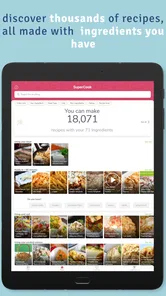
What makes this app distinct is the direction of the search. Instead of choosing a dish and then building a shopping list around it, I start with what is already in my kitchen and see which recipes might fit. That reversal is especially useful when the ingredients are a bit mismatched or when I have bought food for one meal and need a second idea before it spoils.
The approach also changes how I think about leftovers. A half-used bag of vegetables, a tin at the back of the cupboard, and a basic staple can feel like separate problems; ingredient-led discovery gives me a reason to consider them together. I still decide whether the resulting dish sounds good, but the app can help me get past the blank-page moment that often leads to ordering food or buying more groceries.
Making the pantry work harder
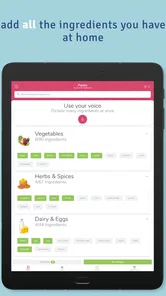
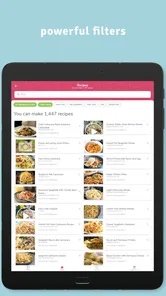
The first time I launched SuperCook, I was intrigued by its straightforward interface. It’s incredibly easy to use - just input the ingredients you have on hand, and voila! The app generates a plethora of recipes tailored to your pantry. No more last-minute grocery store dashes or dinner dilemmas. It’s like having a personal chef who knows exactly what you’ve got in your kitchen.
How the ingredient search helps
One of the features I absolutely love is the ingredient-based search. You simply enter the ingredients you have, and SuperCook does the magic. It categorizes recipes based on what’s available, ensuring you make the most of what you’ve got. This not only helps in reducing food waste but also encourages you to try out new recipes you wouldn’t have thought of otherwise.
A useful habit is to enter the ingredients you are genuinely willing to cook with, not every item in the cupboard. If I add a condiment or an ingredient I only have a spoonful of, a recipe may look more achievable than it is. I would check quantities and missing essentials before settling on a result; an ingredient match is a discovery tool, not a guarantee that dinner needs no shopping or substitutions.
Keeping the ingredient list useful
I would treat the ingredient list as a working pantry note, not a complete inventory that needs perfect upkeep. Before searching, I would add the main items I want to use and a few dependable staples, then leave out foods that are technically present but not available in a useful amount. This keeps the results closer to a real meal and reduces the disappointment of opening a recipe only to discover that its key ingredient is nearly gone.
More From Our News Desk

Weather by Xiaomi Review: Clear at a Glance, Less Clear Up Close

X Under Pressure: Can It Recover When Posting Goes Wrong?

Clash of Clans Is Won Between the Battles

Android Auto Makes the Case for Quieter Car Software

MobiOffice: Transforming Mobile Productivity with Seamless Integration

EA SPORTS FC™ Mobile Soccer: Redefining Mobile Sports Gaming
There is a small trade-off here: a broader list can reveal more possibilities, but it can also make browsing feel less focused. When the results are not appealing, I would remove one or two ingredients and search again, or add an item I am happy to buy if the rest of the recipe is worth it. That turns the app into a flexible decision aid rather than a strict “use only these items” challenge.
Planning around real routines
The app also organizes recipes into various categories such as breakfast, lunch, dinner, and even snacks. This makes meal planning a breeze, especially on busy days when you don’t have the energy to think about what’s for dinner.
For example, after work I might have eggs, vegetables, and a little cheese that need using. I can enter those items, browse the dinner ideas, and decide whether one suits the time and effort I have. If nothing fits, I can adjust what I search for rather than treating the first suggestion as a command. That small change in approach makes the app more useful for flexible home cooking than for following a fixed menu.
A realistic weeknight workflow
Imagine getting home with vegetables that should be used soon, a few eggs, and no energy for a complicated plan. I would search with the ingredients that can form the meal, look through the dinner ideas, and open only the recipes that sound manageable. Then I would check what is missing, whether I have the right equipment, and whether the cooking steps fit the evening. If a recipe needs one ordinary extra item, I can decide whether it is worth picking up; if it calls for several things, I can move on without feeling that the search has failed.
This is where the app is more useful than simply asking a general search engine for “dinner with eggs.” It gives the pantry itself a central role and can surface combinations I would not have thought to search for. The final choice remains mine, which matters because a technically possible recipe is not automatically the meal I want after a long day.
Simple tools, with a practical caveat
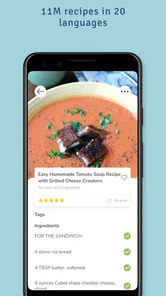
Another aspect worth mentioning is the user-friendly design. The app is intuitive, guiding you step-by-step through each recipe. Plus, the detailed instructions and the option to adjust serving sizes are a godsend for those of us who hate doing math while cooking.
What’s more, the app’s ability to sync across devices means you can start planning on your tablet and continue cooking in the kitchen with your phone. This seamless integration is ideal for tech-savvy cooks who like to keep things organized.
In practice, I would still read a recipe through before starting. Ingredient-led suggestions can help me find possibilities, but they do not replace checking preparation time, equipment, or whether a dish suits the people eating it. Serving adjustments are handy, though baking and seasoning do not always scale as neatly as a simple ingredient count, so I would use judgment rather than rely on arithmetic alone.
Where it fits among recipe apps
Many recipe apps begin with a cuisine, a dish name, or a meal plan and then ask me to shop for what the recipe needs. This one starts from the other end: what is already in my kitchen? That makes it a better fit for using up odds and ends or avoiding an unnecessary grocery run. If I already know I want a particular dish, a conventional recipe search may be faster; if I need tightly controlled nutrition planning or a dependable weekly shopping workflow, I would choose a tool built around those priorities instead.
I also treat the results as inspiration rather than a promise that every combination will be appealing. Pantry entries can be incomplete, and a recipe may call for a staple I have run out of. Keeping a short, accurate mental inventory and being ready to skip unsuitable ideas prevents the search from becoming frustrating. This is especially helpful for cooks who are comfortable swapping ingredients, but less satisfying for someone who wants exact, guaranteed matches.
When a different cooking tool makes more sense
I would not choose this as my main tool if the task is to follow a tightly planned week of meals, track nutrition closely, or find recipes that meet a strict dietary requirement. In those situations, an app built specifically around meal schedules, nutrition targets, or carefully filtered dietary needs is a more dependable starting point. I would also use a trusted recipe source when a particular technique matters, rather than assuming that a pantry match is the best version of a dish.
For someone who enjoys improvising, however, the less rigid approach is a strength. It helps narrow the field without dictating what to cook. If I am a beginner, I can still use it, but I should choose a recipe whose instructions feel clear and whose ingredients are familiar. The app can help me discover an idea; it cannot make an unfamiliar technique effortless or judge whether I am comfortable making substitutions.
A social feature and a sensible fit
SuperCook also has a social aspect. You can share your culinary creations with a community of fellow food enthusiasts. It’s a fantastic way to get feedback, share tips, and even discover new recipes that others have tried and tested. It’s like having a global potluck at your fingertips!
For me, that community element is a pleasant extra, while the pantry search is the main reason to try the app. It is suited to curious cooks, busy households, and anyone trying to make better use of groceries already at home. Someone who dislikes browsing, prefers a strict meal plan, or needs recipes tailored to a specific dietary rule may be happier with a more specialized service. I would also verify ingredients and instructions carefully when cooking for a guest with an allergy or other dietary need.
Who is likely to enjoy it
I think the best fit is a person who shops without following a rigid menu, keeps some basic ingredients around, and is willing to make small choices while cooking. It can also be useful in a shared household: whoever is making dinner can look at what needs using and suggest a few directions, instead of relying on one person to remember every item in the fridge. The benefit is less about producing a perfect plan and more about making the next meal easier to decide.
On the other hand, a cook who wants a fixed answer with exact ingredient quantities and no substitutions may find the browsing stage less satisfying. People with allergies or medically important dietary restrictions should not rely on a broad ingredient match as a safety check. I would read the full recipe and verify every ingredient, and choose a specialist resource if the consequences of a mistaken assumption are serious.
Current version and what to expect
SuperCook is a free food-and-drink app from developer SuperCook, with a 4.7 average from around 18,000 ratings and more than 1 million installs. It is rated for Everyone, and version 2.0.29.1 is the current version. The app’s release date was September 23, 2019, and it runs on Android 7.0 or later. Those details make it straightforward to judge whether it suits your device and whether you want to try it without paying.
The version number gives existing users a clear reference point for the app they are using, but it is not a reason to assume particular changes or future additions. I would judge any later evolution by whether the core workflow stays easy: entering realistic ingredients, finding usable ideas, and moving from browsing to cooking without needless friction. For now, the main practical question is whether ingredient-first discovery matches how you make decisions in your own kitchen.
What I would watch in everyday use
For a new user, the first useful test is not how many suggestions appear but how many feel cookable with the food actually on hand. I would try a search with a few ingredients I know I want to use, then see whether the results offer a realistic path to dinner. If I repeatedly have to dismiss ideas because of missing essentials or unsuitable steps, the app may not fit my cooking style as well as a conventional recipe collection.
For someone already using it, the most meaningful measure is whether it continues to shorten the gap between “I have these ingredients” and “I know what to make.” I would pay attention to how easy it is to keep the pantry list honest and whether the recipes remain practical for the time available. Those are the everyday qualities that matter more to me than any expectation that a version change will automatically transform the experience.
In conclusion, SuperCook - Recipe Generator is a useful option for anyone looking to make the most of their kitchen ingredients. Whether you’re a seasoned chef or a kitchen newbie, it can make exploring meal ideas feel more manageable. I would recommend trying it if your usual dinner problem is figuring out what to do with what you have; if you need strict planning or highly tailored dietary guidance, another kind of cooking app may serve you better.
SuperCook - Recipe Generator Frequently Asked Questions
What is SuperCook’s average rating, and how many people have reviewed it?
SuperCook has an average rating of 4.7, with around 18,000 ratings and 3,100 written reviews. Those figures offer a quick sense of how it has been received, but whether it suits you will depend on how you like to plan meals and what ingredients you keep at home. Its central idea is to turn your available groceries into recipe suggestions.
Does SuperCook help reduce food waste?
Yes. SuperCook is built around finding recipes that use ingredients you already have, which can help you put items in your kitchen to use instead of letting them go to waste. Add the ingredients on hand and explore the dishes the app suggests. You can then choose a recipe that suits your plans and make better use of what is already in your pantry or fridge.
What is SuperCook and how does it work?
SuperCook is a recipe generator app that helps you make the most out of the ingredients you already have at home. By inputting the ingredients you have on hand, SuperCook searches its vast database of recipes to find dishes you can prepare without needing to shop for additional items. This makes meal planning efficient and reduces food waste.
Is SuperCook free to use, or does it require a subscription?
SuperCook is free to use, offering a wide range of features at no cost. Users can access the recipe generator, explore various cuisine types, and save their favorite recipes without any charge. There is no mandatory subscription required, although there might be optional in-app purchases for premium features in the future.
Can I use SuperCook offline?
SuperCook requires an internet connection to access its recipe database and update your ingredient list. While you can save recipes for offline viewing, generating new recipes or searching for specific dishes will need online connectivity to ensure you have access to the most current and comprehensive recipe options.
Pros
- User-friendly interface for easy navigation.
- Generates recipes from on-hand ingredients.
- Includes diverse cuisine options.
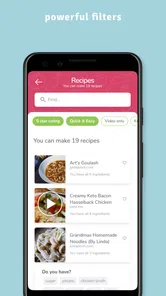
- Offers dietary preference filters.
- Saves favorite recipes for quick access.
Cons
- Limited offline functionality.
- Ad-supported free version.
- Requires account for full features.
- Occasional app crashes reported.
- Some ingredients may be unavailable.











