Subpilot
- 1.67K
- 4.1
- Installs
- 100.00K
- Price
- Free

Screenshots

Analysis by Reviewed
If recurring charges have started to feel like background noise in your bank account, Subpilot is designed to make them easier to see and manage. I tested it as a finance app from Linerios Limited, and its central idea is refreshingly practical: bring subscription tracking and cancellation into one place instead of making you search through old emails, banking screens, and individual services.
The first thing to understand is that this is not a general budgeting app trying to do everything. Its focus is narrower and more useful for a particular problem: identifying the subscriptions you still pay for, deciding which ones deserve to stay, and taking action on the unwanted ones. That makes it appealing to anyone who has signed up for trials, forgotten about annual renewals, or accumulated several entertainment, productivity, shopping, and digital-service memberships.
My overall impression is that Subpilot is most valuable as a subscription clean-up tool, not as a complete replacement for a bank app. It can give your recurring spending a clearer shape, but you still need to pay attention to how each service handles cancellation and billing. Used with that expectation, it has a sensible role in a personal finance routine.
What to expect before you begin
Subpilot is free to install and carries an Everyone content rating, which makes it approachable for a broad audience. It has reached over 100 thousand installs and holds a 4.1 average from around 4.2 thousand ratings, with roughly 1.7 thousand written reviews. Those figures suggest a real user base without implying that every financial situation will fit the same workflow.
The app was released on September 2, 2025, and the current version is 1.24.1. It requires Android 8.0 or later, so people using reasonably recent Android phones should be able to try it without changing devices. The developer is Linerios Limited, and the store summary presents the app around tracking and cancelling subscriptions rather than broad financial planning.
That narrow focus is important. If you want detailed spending categories, investment monitoring, debt planning, or a full household budget, a traditional banking app or dedicated budgeting service may be a better centre of your financial system. Subpilot makes more sense beside those tools, especially when recurring payments are the part you keep overlooking.
There is also a cost consideration after installation. The app is free to download, while optional in-app purchases range from $4.99 to $99.99 per item. I would not treat that range as a reason to subscribe immediately. First use the basic experience long enough to decide whether seeing and managing recurring charges actually changes your habits. A paid upgrade is only worthwhile if it saves you time or prevents enough unwanted spending to justify it.
More From Our News Desk

Clash of Clans Is Won Between the Battles

Android Auto Makes the Case for Quieter Car Software

MobiOffice: Transforming Mobile Productivity with Seamless Integration

EA SPORTS FC™ Mobile Soccer: Redefining Mobile Sports Gaming

How Microsoft OneDrive Became a Mobile Productivity Giant

How Google Translate Breaks Language Barriers Effortlessly
Why subscription tracking needs a different approach
Subscriptions are easy to ignore because each individual payment can look small. The problem appears later, when several services renew in the same month or an old trial continues long after the original reason for joining has disappeared. A normal bank statement shows the transaction, but it does not always explain the service, renewal pattern, or next decision you should make.
That is where an app like this can be more useful than scrolling through transactions. Instead of asking, “What was this charge?” every time it appears, you can approach the question as a review of ongoing commitments. That change in viewpoint is one of Subpilot’s strongest practical ideas.
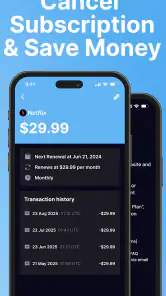
I also like the fact that cancellation is part of the app’s purpose rather than an afterthought. Tracking alone can become another list you never act on. A useful subscription manager should help you move from recognition to a decision, and then from a decision to the correct cancellation route.
From installation to your first meaningful result
Start with a small, honest inventory
When opening Subpilot for the first time, I recommend resisting the urge to add every possible service at once. Begin with the recurring payments you already remember: the video service you use most, the cloud storage plan, the fitness membership, or the app subscription that appears on your statement every month. This gives you a quick way to understand the app’s rhythm without turning setup into a second budgeting project.
Keep your bank statement or payment history nearby while you work. Memory is unreliable with subscriptions, especially when the charge comes from a parent company or payment processor rather than the brand name you recognize. Comparing what you see in the app with an actual statement helps prevent two common mistakes: adding a service twice and forgetting a subscription because its billing name looks unfamiliar.
A useful first pass is to separate services into three groups: essential, actively used, and uncertain. Essential might include storage or a work tool. Actively used covers services you enjoy and open regularly. Uncertain is where the savings opportunity usually sits. This simple classification is more helpful than judging every subscription by price alone, because an inexpensive service can still be wasteful if you never use it.
Use the first session to verify, not just collect
Subscription information is only useful when it is accurate. After adding an item, check its name, billing frequency, and the account or service it belongs to. If you are unsure whether two entries refer to the same membership, pause before cancelling anything. A duplicate-looking charge may represent separate accounts, a family plan, or a different service from the same company.
This verification step is a small detail, but it is one of the most important habits in a finance app. A clean list creates confidence; a rushed list can create confusion. I would rather spend a few minutes confirming five subscriptions than import or enter a large collection that I do not understand.
Another practical tip is to review subscriptions around your actual renewal cycle, not only when you feel motivated to save money. If a service renews soon, it deserves attention before a cancellation window closes. If it renewed yesterday, you may still decide to keep it until the next cycle, but you should record that decision rather than letting the charge disappear from view.
Your first successful action should be specific
The best first result is not simply seeing a dashboard populated with services. It is making one clear decision. Choose the subscription you have not used recently, open its details, and follow the cancellation path if you are certain it should go. If you are not ready to cancel, mark it as a deliberate keep-or-review choice and set a personal reminder to reassess it before the next renewal.
That approach prevents a common failure with financial apps: confusing organisation with progress. A tidy list feels productive, but the real benefit arrives when the list changes your behaviour. Even one cancelled or consciously retained subscription proves whether Subpilot fits the way you manage money.
Be careful not to assume that pressing a cancellation option automatically ends every billing obligation immediately. Digital services often have different rules for cancellation timing, refunds, and access continuing until the end of a paid period. Read the confirmation screen shown by the service itself and keep any confirmation message. Subpilot can help direct your attention, but the service provider remains the place where the billing status is ultimately decided.
A realistic everyday scenario
Imagine that I notice three recurring charges after moving to a new phone: one streaming service I still watch, one storage plan I need for files, and one learning app I joined for a short course. Without a dedicated review, the first two feel familiar and the third is easy to overlook. In Subpilot, I would record all three, label the first as active, keep the second as essential, and investigate the third before its next renewal.
The important part is not the labels themselves. It is that the learning app receives a decision instead of remaining invisible. If I am halfway through the course, I might keep it temporarily. If I finished the course months ago, cancellation becomes the obvious next action. This is the kind of small, repeatable workflow where the app can earn its place.
Where new users may become confused
The phrase “cancel a subscription” sounds simpler than it often is. Some services bill through an app store, while others use their own website or payment system. A subscription may also be connected to a different email address from the one you normally use. If Subpilot shows a service but the cancellation route does not match what you expect, check the account that originally made the purchase before assuming the app is wrong.
Another point of confusion is the difference between removing an item from a tracking list and ending the underlying subscription. Those are not necessarily the same action. Treat the list as your control centre, but confirm the result with the service that charges you. After cancelling, keep the entry visible until you have seen the final expected charge or received clear confirmation. Removing it too early can make it harder to spot an unwanted renewal.
Users may also wonder whether every recurring payment will appear automatically. I would approach Subpilot as a tool that still requires review and judgement rather than a perfect financial record that can be ignored. Look at your bank or payment history, compare names carefully, and add anything that deserves attention. The more unusual your billing arrangements are, the more important that manual check becomes.
How it compares with familiar alternatives
Your bank app is usually the quickest place to see whether money has left your account. It is also the most authoritative place to verify a charge. However, bank transaction lists are built for account history, not necessarily for decisions about ongoing memberships. They may show a merchant name without giving you a useful subscription-focused view.
Email search is another common alternative. Searching for words such as “renewal,” “receipt,” or “subscription” can uncover forgotten services, especially when you have several email accounts. The weakness is that email becomes difficult to maintain as a long-term list. Messages can be deleted, receipts can arrive under unexpected names, and cancellation instructions may be buried in old correspondence.
A spreadsheet gives you flexibility and costs nothing beyond your time. It can be excellent for people who want custom formulas, shared household tracking, or a complete history of price changes. Subpilot is more convenient for someone who does not want to design and maintain that system. The trade-off is control: a spreadsheet can be shaped exactly around your needs, while an app asks you to work within its own structure.
Dedicated budgeting apps may offer more complete financial analysis, but that breadth can make subscription review less prominent. If your main goal is to understand total income and spending across accounts, choose the broader budget tool. If your main problem is recurring services that quietly continue, Subpilot’s narrower purpose may make the task easier to revisit.
Privacy and trust deserve your attention
Any finance-related app deserves a slower installation decision than a casual game. Before connecting accounts or entering sensitive details, read the permissions and privacy explanations presented during setup. Use the least access necessary for the workflow you choose, and avoid entering information you do not understand how to protect.
I would also keep the app as one part of a verification process rather than the only record of your finances. Save cancellation confirmations, review your bank statement, and make sure the service itself shows the correct status. This is not a criticism unique to Subpilot; it is simply good practice whenever software sits between you and a recurring payment.
Who will benefit most from it
Subpilot is a strong fit for people who have several digital memberships and regularly lose track of renewal dates. It is also useful after a busy period of signing up for trials, during a move between banks, or when reviewing expenses after a change in income. People who dislike spreadsheets but still want a dedicated place for recurring charges may appreciate its focused design.
It can also help couples or families during a monthly money check, provided everyone agrees on which account and services are being reviewed. The most useful conversation is not “Can we afford this?” in isolation, but “Does this subscription still earn its place?” A visible list makes that question easier to answer without relying on memory.
Who should choose another approach
I would skip Subpilot if you only have one or two subscriptions and already review them reliably through your bank or app-store account. Adding another tool may create more maintenance than value. It is also not the right first choice if you need detailed cash-flow forecasting, investment features, bill negotiation, or a complete household ledger.
People who want total customisation may prefer a spreadsheet. Users who already have a trusted budgeting app with excellent recurring-payment tools may not gain much from a separate manager. And anyone expecting a fully automatic solution should adjust that expectation: subscription management still depends on recognising accounts correctly and confirming cancellations at the provider.
Turn the first success into a routine
After the initial clean-up, I would revisit the list before major spending decisions, at the start of a new month, or whenever a free trial begins. New trials deserve immediate attention because the future charge is easier to forget than the original sign-up. Record the reason you joined and the date you want to reassess it while the decision is still fresh.
A second useful routine is an annual-plan check. Monthly charges are visible because they appear often; annual renewals can be more surprising because they disappear from attention for longer. Review services with longer billing cycles well before renewal and decide whether the value is still there. This is where a focused tracker can complement, rather than replace, your normal account review.
Finally, do not cancel automatically just to make the list shorter. A service you use for work, health, storage, or family access may be worth keeping even if it is not cheap. The goal is intentional spending. Subpilot is at its best when it helps me distinguish forgotten payments from worthwhile commitments, not when it turns every recurring charge into a target.
My final recommendation
Subpilot is a focused finance app for turning subscription clutter into decisions. I like its clear purpose, its emphasis on both tracking and cancellation, and the way it encourages a practical review rather than another abstract spending chart. The free entry point makes it reasonable to test, while the optional purchases mean I would evaluate the value before paying for anything beyond the basic experience.
Its limitations are equally clear. It should not replace your bank statement, provider confirmation, or a full budgeting system. Setup requires careful checking, cancellation may still depend on the original billing channel, and people with very few subscriptions may find the extra app unnecessary.
For a first-time user, my advice is simple: install it, begin with a handful of known recurring payments, verify each one against your payment history, and make one real keep-or-cancel decision. If that process reveals a forgotten charge or gives you a repeatable monthly habit, Subpilot has already demonstrated its value. If your finances are more complex than subscription management, keep it as a specialised companion rather than expecting it to manage everything.
Subpilot Frequently Asked Questions
What devices can run Subpilot?
Subpilot is a finance app from Linerios Limited, and it is available for devices running Android 8.0 or later. If you use an older Android version, check your device’s system settings before downloading. The app is free to install, so you can try its subscription-management approach without paying upfront, while keeping in mind that some features may involve in-app purchases.
What is Subpilot and what can I use it for?
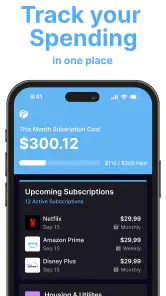
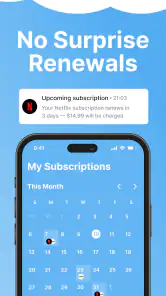
Subpilot is a subscription-management app designed to help you keep track of recurring payments in one place. After adding your services, you can review billing dates, renewal frequency, estimated monthly or yearly spending, and upcoming charges. It is useful for organizing entertainment, software, fitness, cloud-storage, and other subscriptions, although the exact features may vary depending on the platform and app version.
Does Subpilot automatically detect my subscriptions and cancel them for me?
Subpilot may help identify or organize recurring subscriptions, but users should not assume that every service will be detected automatically or that cancellation happens without confirmation. Many subscriptions are controlled by Apple, Google, banks, or the individual provider. Before downloading, check which integrations are supported and whether cancellation is completed inside Subpilot or requires visiting the original service, App Store, or Google Play settings.
Is Subpilot free to download, or does it require a subscription?
The download is free, but some Subpilot functions can require a paid plan, trial, or in-app purchase. In-app purchases range from $4.99 to $99.99 per item. Premium features may include advanced tracking, reminders, spending analysis, account connections, or cancellation assistance. Review the pricing page and subscription terms before starting a trial, especially the renewal date and cancellation procedure, because deleting the app generally does not automatically end an active paid plan.
Is my financial and subscription information safe in Subpilot?
Because a subscription-management app can involve billing details, privacy deserves careful attention. Before using Subpilot, read its privacy policy and verify what information is collected, where it is stored, and whether third-party services are involved. If account or bank connections are offered, confirm the security method used and provide only the permissions necessary for the features you actually need.
Pros
- Creates subtitles automatically for videos and podcasts.
- Supports multiple languages for wider audience reach.
- Saves time compared with manually transcribing and captioning.
- Useful for improving video accessibility and engagement.
- Simple workflow for generating and editing subtitle files.
Cons
- Transcription accuracy can drop with noise or strong accents.
- Some advanced features may require a paid subscription.
- Processing times can increase with longer video files.
- Subtitle timing may need manual corrections after generation.
- Export options may vary depending on the selected plan.
- Category
- Finance
- Version
- 1.24.1











