

StorageTreasures Auction App
- 318.00
- 3.6
- Installs
- 100.00K
- Price
- Free

Screenshots
Analysis by Reviewed
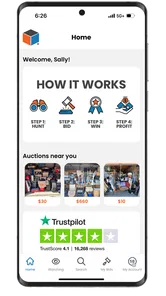
I approached StorageTreasures Auction App as someone looking for a practical way to follow local storage auctions without constantly checking scattered listings or making a separate trip just to see what might be available. It is a free shopping app from OpenTech Alliance, aimed at people who want to discover storage-unit auctions nearby and place bids from a phone. That sounds simple, but the useful question is whether it supports the whole process well: finding an interesting unit, judging the risk, bidding sensibly, and dealing with what happens after winning.
My overall impression is that the app is most valuable as a focused auction-finding tool rather than as a complete replacement for careful research. It can make the first part of the process much more convenient, especially if local storage auctions are already part of your buying routine. At the same time, it does not remove the uncertainty that makes these sales different from ordinary online shopping. You still need discipline, a realistic budget, and a plan for collection and disposal before you commit.
From a vague search to a realistic buying plan
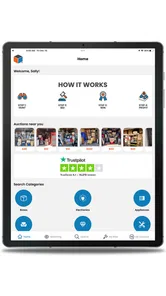
The starting condition for many users is familiar: you are curious about storage auctions, but you do not know which facilities are holding them, when listings will appear, or how to compare several opportunities without wasting time. StorageTreasures brings that search into a mobile shopping setting. Instead of treating the app like a general marketplace full of unrelated products, I found it more useful to think of it as a local stream of potential inventory that requires investigation.
That distinction matters. A normal shopping app usually helps you judge a clearly described item, compare prices, and decide whether delivery is convenient. A storage auction listing can be much less predictable. The contents may be visible only in limited images or descriptions, and the value depends on condition, quantity, transport, cleaning, resale potential, and the possibility that much of the unit will not be useful to you. The app helps you reach the opportunity; it cannot turn an uncertain unit into a guaranteed bargain.
The first practical step is deciding what kind of buyer you are. A casual bargain hunter may be interested in furniture, household goods, tools, or collectibles. A reseller may be looking for lots that can be sorted and sold individually. Someone with a van, storage space, and experience clearing properties will approach the same listing very differently from a person who only has a small car and a free afternoon. I recommend making that decision before browsing, because an attractive image can encourage a bid that does not fit your actual resources.
The app’s free price makes it easy to try without making a financial commitment just to access the marketplace. It is listed for mature users aged seventeen and over, which is worth keeping in mind if you are considering it for a younger family member. The application was released in August 2023 and is currently at version 1.22.0, with support beginning at Android 7.0. Those details make it approachable for many Android users, although an older phone may still affect how comfortable browsing and bidding feels.
Finding auctions without confusing activity with opportunity
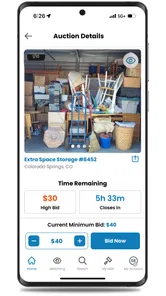
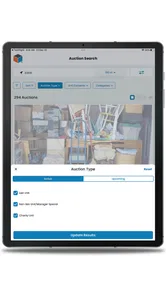
Once I moved into the browsing stage, the main habit I would recommend is separating discovery from bidding. The app is designed to help you find nearby online storage auctions, but seeing a listing is not the same as finding a good purchase. I would first scan the available opportunities and note location, closing timing, visible contents, and the likely effort involved. Only after that would I return to the strongest candidates and examine them more carefully.
More From Our News Desk

 Instagram
Instagram’s Power Comes From Its Place in Your Phone
A close look at how Instagram turns Meta’s reach, recommendation systems and everyday camera habits into durable platform power—and what that costs users.

 Gmail
GmailGmail in a Busy Inbox: Who Benefits Most?
From first account to crowded workday, Gmail earns its place through dependable search and flexible sorting—but its best fit depends on how much inbox maintenance you can tolerate.

 Prime Video
Switching to Prime Video: What Changes in Your Viewing Routine
Prime Video can make a compelling second home for streaming, but switching means learning a different catalog, rental layer, and route from browsing to playback.

 Universal TV Remote Control
Universal TV Remote Control Works Best as a Reliable Backup
A phone remote earns its place through quick setup and reliable habits. Here is how to get more from Universal TV Remote Control—and where its limits show.

 Weather - By Xiaomi
Weather by Xiaomi Review: Clear at a Glance, Less Clear Up Close
Xiaomi’s weather app makes everyday forecasts quick to scan, but its calm surface can leave useful details and recovery paths harder to find than they should be.

 X
XX Under Pressure: Can It Recover When Posting Goes Wrong?
A resilience-focused review of X, examining setup, mistaken posts, interruptions, weak connections, and the gaps that matter when recovery needs to be dependable.
Latest News



This two-pass approach is more useful than reacting to every appealing photograph. A unit that appears packed with boxes may contain valuable stock, but it may also contain damaged, incomplete, or ordinary household items. A relatively plain-looking unit may be easier to clear and resell, even if its possible upside is lower. The important trade-off is not simply “more stuff versus less stuff”; it is potential value versus the work needed to turn that potential into money or useful possessions.
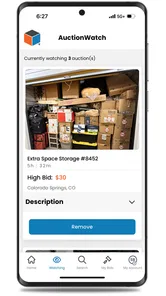
I would also keep a separate note for each serious candidate. Record the auction location, your maximum bid, the transport plan, and an estimate for rubbish removal. This is one of the less obvious ways to use a phone-based auction app effectively: the mobile screen encourages quick decisions, while a written limit forces you to account for the costs that are not visible in the listing. Even a short note can prevent two common mistakes—forgetting which unit had which condition and raising your bid because you have already spent time investigating it.
Location deserves more attention than it usually receives in ordinary online shopping. A nearby unit may be worth more to you than a seemingly better unit farther away because collection time, fuel, helpers, and vehicle rental can change the final result. If you are buying for resale, the distance also affects how quickly you can process the contents and put money back into your next purchase. I would judge the auction as a complete local errand, not as an isolated digital transaction.
How I would evaluate a listing before bidding
The strongest workflow is deliberately cautious. Start with the visible evidence, then list what you do not know, and finally decide whether the unknowns fit your budget. Do not treat an image as an inventory. It is better to ask yourself what would happen if the most valuable-looking item were damaged, incomplete, or difficult to sell. If the answer is that the whole purchase would become a loss, the bid is already too aggressive.
I find it helpful to divide possible contents into three groups. The first group contains items you could use or sell with little preparation. The second contains items that might have value but need cleaning, testing, repair, or better photographs. The third is disposal: broken furniture, unwanted clothing, damaged boxes, and anything that will cost time or money to remove. This simple division gives a more honest picture than adding up the imagined resale value of every visible object.
Another useful test is whether you can identify a clear exit route. If you win, where will the contents go? Which items can you sell locally, which can be donated, and which may need disposal? If you cannot answer those questions, the listing may be unsuitable even if the visible contents look promising. Storage auctions reward organization as much as intuition. The app makes it easier to reach the auction, but your offline plan determines whether the purchase becomes manageable.
For resellers, I would be especially careful with mixed lots. A unit full of unrelated objects can create more individual listings than expected, and each listing needs photographs, descriptions, messages, and handoff time. A buyer who only wants one attractive item may not have a practical plan for everything else. In that situation, an ordinary second-hand marketplace may be better because you can choose individual products instead of accepting an entire uncertain lot.
The bidding stage and the handoff from screen to real life
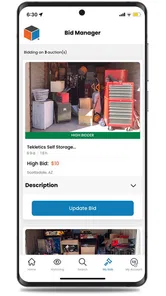
When you decide to bid, the most important handoff is from browsing to commitment. The app can put the auction in front of you, but your personal rules need to take over. Set the maximum amount before the excitement of competition begins. Include the value of your own time, transport, cleaning, and disposal. If the bid passes that limit, leaving is not failure; it is the part of the process that protects the rest of your budget.
I would avoid treating a winning bid as the end of the task. It is better understood as the point where digital convenience hands the responsibility back to you. The next steps involve arranging collection, bringing suitable transport, preparing space, and sorting the contents. Those tasks may not feel connected to a shopping app, but they are exactly what determines whether the auction was worthwhile.
This is also where a careful buyer should distinguish between the app and the facility involved in the auction. StorageTreasures is the mobile route to the opportunity, while the local storage business is part of the practical handoff. Before bidding, read the listing details closely and make sure you understand the collection expectations shown there. Do not assume that a normal parcel-delivery experience applies. A storage unit is a physical space that must be cleared, and the timing and effort can be very different from receiving a boxed purchase at home.
A realistic example would be a Saturday buyer who notices a nearby unit containing what appears to be household furniture and several sealed boxes. The buyer has a vehicle, a friend available to help, and enough room at home to sort the contents. Instead of bidding immediately, they estimate fuel, lifting time, possible disposal, and the number of items they can realistically sell. They set a ceiling, win only if the total still makes sense, then reserve the rest of the day for collection and sorting. That workflow is much safer than viewing the unit as a quick bargain picked from a phone.
For someone without transport or help, the same listing may be a poor choice. The app can still show the auction, but it cannot solve the physical problem of moving bulky items. This is a key limitation that is easy to miss when the first part of the experience happens entirely on a small screen. Before placing a bid, I would confirm that the collection plan is realistic for the largest and heaviest items you might receive, not merely for the items you hope are inside.
What the result looks like after a successful purchase
A successful outcome is not necessarily a high-value discovery. For me, success would mean that the final contents justify the bid and the work, even if only some items are resold. A unit can be worthwhile because it supplies useful furniture, provides stock for a small resale operation, or offers a manageable learning experience. The important measure is the complete result after collection, sorting, and disposal—not the most exciting object visible in a photograph.
I would sort the contents immediately into keep, sell, donate, recycle, and dispose groups. Doing this on the collection day reduces the chance that a temporary pile becomes a long-term storage problem. It also reveals the true cost of the purchase. If most of the unit needs work, the result may still be acceptable, but only if you knowingly bought a project rather than imagining an effortless profit.
The app is particularly suited to users who enjoy that process. It can be a useful source of local opportunities for people who already have a resale routine, access to transport, or experience judging second-hand goods. It may also suit someone who wants to explore storage auctions gradually and is willing to begin with a conservative budget. Because it is free, testing the browsing experience is relatively easy; the financial risk comes from the auction decisions and the physical follow-through, not from downloading the app.
On the other hand, I would steer away from it if you need predictable products, clear condition reports, delivery to your door, or a simple return path. Buyers who dislike uncertainty will probably feel more comfortable with a standard retail app or a person-to-person marketplace where they can select one item at a time. StorageTreasures is built around the possibility that the contents may be mixed and imperfect. That is its appeal for some users and its central drawback for others.
Where the workflow breaks down
The biggest friction comes from the gap between what can be judged online and what must be handled offline. Images and listing details can guide a decision, but they cannot fully communicate smell, hidden damage, missing parts, weight, access difficulty, or the amount of rubbish. That uncertainty is not a small inconvenience; it is the central trade-off of storage-unit auctions. Anyone expecting the confidence of a normal product page may find the experience stressful.
Another possible break occurs when browsing turns into impulsive bidding. A mobile interface makes it easy to check opportunities during spare moments, but that convenience can encourage decisions made without calculating transport or disposal. I would never bid while distracted, rushed, or unable to review the listing carefully. If you cannot pause to write down your ceiling and collection plan, you are not ready to commit.
There is also a practical handoff between winning and collecting that can expose poor planning. A buyer may focus on the auction result and only afterward realize that the vehicle is too small, the contents require more helpers, or the home has nowhere to place them. The solution is simple but important: prepare the collection plan before bidding, not after the win. Treat the unit as a physical job with a schedule, not as a digital purchase that ends at confirmation.
The app’s average rating is 3.6 from around 619 ratings, with roughly 318 written reviews, and it has passed 100,000 installs. I read that as a sign of a useful but not universally smooth experience rather than a reason to dismiss it. A focused auction app will naturally appeal more to people who understand its niche. If you have never bought storage-unit contents before, begin with observation and small, controlled decisions instead of assuming that the app alone will teach you every offline detail.
Version 1.22.0 is the version I would look for when installing, and the Android requirement of 7.0 keeps the entry barrier fairly low for compatible devices. Still, the quality of your experience will depend on more than compatibility. A larger screen can make photographs and listing details easier to inspect, while a reliable connection matters when you are trying to follow an active auction. If your phone is old or cramped, I would use it for discovery and planning rather than making rushed decisions from a difficult-to-read display.
My recommendation after following the complete process
After considering the journey from finding a local auction to clearing the resulting unit, I see StorageTreasures as a practical specialist tool with a very specific audience. It is not a magic shortcut to cheap goods, and it is not the best alternative to ordinary shopping when you want certainty. Its real strength is bringing local storage-auction opportunities into a convenient mobile workflow so that experienced buyers and prepared newcomers can investigate them more easily.
I would recommend it to a friend who already has transport, storage space, and a clear idea of what they can resell or use. I would also recommend it to a patient beginner who treats the first few auctions as research, sets strict limits, and plans the collection before bidding. The app is free, and the developer is OpenTech Alliance, but the meaningful cost is the time and physical work that begins once a bid succeeds.
I would not recommend it to someone looking for guaranteed value, effortless delivery, or a quick way to make money from a phone. In those cases, a conventional shopping service or a second-hand marketplace with individual listings is usually a better match. Those alternatives offer less mystery, even if they also offer less chance of finding an unexpectedly useful lot.
My practical rule is simple: bid only when the unit still makes sense after you count the unwanted contents, the collection effort, and your worst reasonable outcome. Used that way, StorageTreasures can be a helpful doorway into local storage auctions. The app handles the discovery and bidding side; your judgment handles everything that turns a winning bid into a result worth keeping.
StorageTreasures Auction App Frequently Asked Questions
Do I need an account to browse or bid on auctions?
You can use StorageTreasures Auction App to explore local online storage auctions from your phone, but placing bids requires signing in to an account. Setting up an account before you find a unit you want can make it easier to review the listing and participate before bidding closes. Read the auction details carefully, since each facility may have its own requirements.
What is the StorageTreasures Auction App?
StorageTreasures Auction App is a mobile platform for browsing and participating in online storage-unit auctions. Users can view available units, inspect listing photos and descriptions, follow auction activity, and place bids from a compatible Android or iOS device. It is designed to make the process more convenient, although auction rules and availability may vary by location and facility.
How do I place a bid on a storage unit?
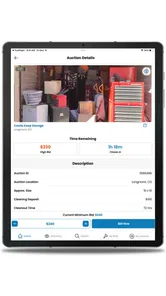
After creating an account and signing in, you can search for nearby or available auctions, open a unit listing, review its information, and enter your bid. Before confirming, check the current price, bidding deadline, buyer’s premium, taxes, and any facility-specific charges. A bid may become binding, so only bid an amount you are prepared to pay.
Are the items inside an auctioned storage unit guaranteed to be accurately shown?
No. Listing photos and descriptions are provided to help you evaluate a unit, but they may not show every item or condition detail. Contents can be partially hidden, damaged, incomplete, or different from what you expected. It is important to read the listing carefully, review all available images, and understand the auction provider’s terms before bidding.
What happens if I win an auction through StorageTreasures?
Winning an auction usually means you must complete payment and collect the unit within the deadline specified by the facility. The app may provide auction or seller information, but pickup arrangements, accepted payment methods, deposits, cleaning requirements, and access hours can differ. Contact the facility promptly after winning and confirm every requirement before traveling.
Pros
- Browse and bid on storage units directly from your mobile device.
- Auction listings include photos
- locations
- and closing times.
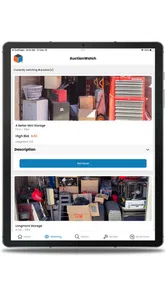
- Push notifications help track watched auctions and bidding activity.
- Search and filters make it easier to find nearby storage auctions.
- Useful for discovering clearance and resale opportunities on the go.
Cons
- Listing quality and detail can vary between individual sellers.
- Winning bids may involve pickup deadlines and additional buyer fees.
- Some auctions may attract heavy competition from experienced resellers.
- You usually need transportation and labor to remove purchased contents.
- App availability and auction coverage may depend on your local area.











