Stock Screener
- 747.00
- 4.2
- Installs
- 100.00K
- Price
- Free

Screenshots
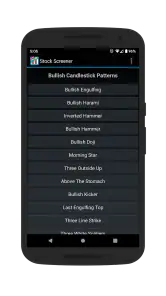
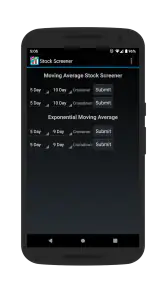
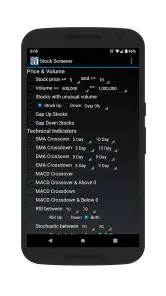
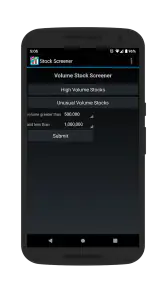
Analysis by Reviewed
I approached Stock Screener as a practical finance tool rather than a complete investing platform. Its purpose is focused: help me filter US-listed stocks through technical-analysis criteria, then narrow a large market into a more manageable watchlist. That narrow purpose is also its main appeal. I do not open it expecting portfolio management, financial education, or a replacement for a broker. I open it when I want a faster way to explore market candidates before doing deeper research elsewhere.
That distinction matters for trust. A stock filter can save time, but it can also make a complicated decision feel deceptively simple. In my experience, the app is most useful when I treat its results as a starting point, not as a recommendation. The developer is Financept, and the app has built a respectable presence with over 100 thousand installs, a 4.2 average from around 2.7 thousand ratings, and hundreds of written reviews. Those figures suggest that many people find the basic concept useful, although popularity alone should never be confused with investment reliability.
How the screening workflow feels in everyday use
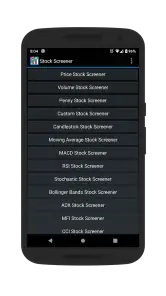
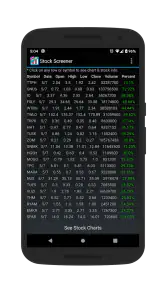
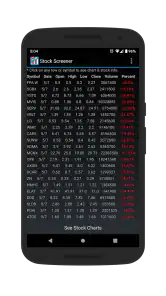
The central workflow is easy to understand: choose technical conditions, apply them to the US stock market, and inspect the companies that remain. This is more efficient than manually opening chart after chart, especially when I already have a rough idea of the setup I want to investigate. Instead of beginning with a familiar company name, I can begin with a market behavior and see which symbols fit that description.
That change in starting point is one of the app’s most valuable qualities. A traditional finance app often pushes me toward quotes, news, or a portfolio I already follow. A screener encourages a question such as, “Which stocks currently match this pattern?” That makes it particularly useful for building a research list, checking whether a trading idea produces too many candidates, or finding alternatives when a familiar stock no longer fits the conditions I had in mind.
I would use it in a simple evening routine. After deciding to review possible momentum setups, I would select the relevant technical filters, examine the resulting symbols, and write down only a handful for further checking. I would then move to a fuller charting or brokerage service to study price history, company information, liquidity, news, and my own risk limits. The screener handles the first reduction of choices; it does not remove the need for the second stage.
A less obvious benefit is that filtering can expose the weakness of an idea. If a supposedly selective strategy returns a very long list, the conditions may be too loose. If it produces almost nothing, the setup may be unusually restrictive or poorly suited to current market conditions. I find this feedback more useful than simply looking for one exciting result, because it tells me something about the screening method itself.
What the technical focus does well
The app’s technical-analysis orientation makes it more purposeful than a basic quote viewer. A quote app tells me what a stock is doing now; a screener lets me define a group of conditions and look for matching behavior. That difference is important for users who already understand terms such as trend, momentum, moving averages, or relative price behavior and want a repeatable way to search.
It is also a better fit for a watchlist-building workflow than for casual market browsing. If I only want to check the price of a company I already own, a broker or general finance app may be quicker. If I want to compare many US stocks against the same technical idea, this tool has a clearer advantage. The trade-off is that the technical lens can leave out the questions that matter most to a long-term investor, including business quality, valuation, debt, management, industry conditions, and changes in company fundamentals.
I would therefore avoid treating a filtered result as a shortlist of “good” companies. It is a shortlist of companies that match selected technical rules. Those are not the same thing. A stock can satisfy a chart-based condition and still be unsuitable for my goals, too volatile for my tolerance, or exposed to a business risk that a technical screen cannot reveal.
Another practical tip is to change one condition at a time when testing an idea. If I alter several filters together, I may not know which choice caused the result to expand or disappear. Keeping the process controlled makes the output easier to interpret and helps prevent me from adjusting settings simply to produce a more attractive list.
Where it fits beside brokers and larger finance apps
Compared with a brokerage app, this screener is more specialized and less likely to distract me with order entry or account activity. That can be an advantage when I am still researching. I can concentrate on screening rather than accidentally confusing analysis with execution. However, a broker remains the necessary destination for checking holdings, reviewing order details, and making transactions. This app should sit before that stage, not replace it.
Compared with a broad finance portal, the advantage is focus. Large finance services often combine news, company profiles, market summaries, watchlists, alerts, and charts. That breadth is convenient, but it can make a specific screening task feel buried. Stock Screener is appealing when the exact job is narrowing US stocks through technical criteria. The disadvantage is equally clear: anyone wanting a single destination for research, news, fundamental comparison, portfolio tracking, and trading may find the experience too limited.
Compared with a desktop charting platform, the mobile app is likely to be more convenient for quick checks away from a workstation, while a desktop environment is generally better for complex comparisons and extended analysis. I see this app as a mobile research companion rather than the place where I would build an entire trading system. Its value comes from reducing friction at the beginning of the process.
Trust, controls, and moments that deserve caution
When I review a finance app, I pay attention to what I can actually control instead of assuming that a financial label automatically makes the product trustworthy. Here, the visible product identity is straightforward: it is a free finance app from Financept, rated for Everyone, with a current version of 2.29 and support for devices running Android 6.0 or later. The app has been available since April 30, 2015, which gives it a longer public history than a newly appearing tool.
Those details help me understand what I am installing, but they do not turn the app into a regulated adviser or guarantee that every screen will suit my needs. I would still read the app’s current store disclosures and device prompts carefully before granting access or entering anything sensitive. A finance tool can be useful without needing the same level of access as a banking or brokerage application, so I prefer to keep permissions and personal information limited to what the task genuinely requires.
The free price makes it easy to try without committing money at the start. At the same time, in-app purchases ranging from $2.79 to $9.99 per item mean that some parts of the experience may involve optional paid items. I would check what each purchase unlocks before confirming it, especially if I am only testing the screening workflow. A free download is not the same as an entirely cost-free experience, and that distinction is worth keeping visible when comparing it with other screeners.
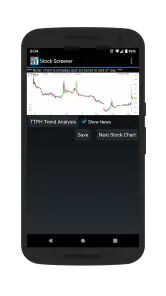
I also separate the app’s interface from the quality of its market output. A clean list can feel authoritative even when the underlying interpretation is mine. Before acting on a result, I would verify the symbol, look at the chart over more than one time frame, and check information outside the screener. This is particularly important when a filter produces an unfamiliar company or a result that appears unusually attractive.
The most data-sensitive moment is not necessarily opening the app; it is deciding what to do with the list it produces. A filtered result may influence a purchase, a sale, or a decision to ignore a stock. I would avoid entering account credentials, payment details, or private financial information unless the app clearly explains why they are needed and gives me a meaningful choice. For ordinary screening, I prefer a workflow that keeps the app separate from my brokerage account.
There is also a privacy habit I recommend: do not treat a watchlist or screenshot as harmless if it reveals personal strategy, holdings, or intended trades. Even when I am only exploring technical patterns, I would avoid sharing screen captures that expose more than necessary. The app’s usefulness does not require me to make my entire investing process visible to other people.
Who will get the most from it
This is a good match for a user who already knows what kind of technical condition they want to investigate. It can help an active market participant reduce a large universe of US stocks, a learner practice turning an idea into explicit filters, or a cautious researcher create a repeatable first pass before consulting richer sources. It is also handy for someone who dislikes scrolling through an enormous watchlist and would rather begin with rules.
The app may be less suitable for a beginner who expects it to explain every result. Technical filters can identify patterns, but they do not automatically teach risk management or explain why a company deserves investment. A new investor may be better served by an educational resource and a transparent brokerage research area first, using this screener later as a search tool rather than as a decision engine.
Long-term investors focused mainly on dividends, financial statements, valuation, or business durability may also prefer a fundamental-analysis service. The technical approach can complement that research, but it cannot answer those questions by itself. Likewise, a user who needs international markets, advanced chart layouts, integrated trading, or detailed portfolio accounting should compare it with a broader platform before settling on it.
One useful compromise is to pair the app with a written checklist. After a screen produces candidates, I would record why each symbol appeared, then verify the company’s business, recent developments, financial position, and position size before taking any action. This prevents the technical result from becoming the entire argument. It also makes it easier to notice when I am keeping a stock simply because I like the chart.
Small workflow choices that improve the experience
I get more value when I begin with a question instead of randomly trying filters. For example, I might ask whether a trend-following idea identifies a manageable group of US stocks, or whether tightening one condition removes too many useful candidates. The question gives the results a purpose and makes it easier to judge whether the screen is helping.
I would also keep separate lists for discovery and conviction. A discovery list contains symbols that deserve more research; a conviction list contains only ideas that have survived checks outside the app. Mixing them encourages me to mistake an early technical match for a finished investment decision. This two-stage structure is simple, but it is one of the best ways to use a focused screener responsibly.
Another trade-off is speed versus context. The faster I filter, the easier it is to overlook unusual price behavior, low trading interest, a recent corporate event, or a chart that looks different on a longer time frame. I would use the app for speed, then deliberately slow down before making a decision. That rhythm suits the product better than trying to force it into the role of a complete research terminal.
Because the app is free to install but includes optional purchases, I would test the basic workflow first. If the free experience already supports my screening routine, there is no reason to pay simply because an upgrade is available. If a paid item appears useful, I would judge it against how often I screen and whether it removes a real obstacle rather than adding convenience I rarely need.
My cautious verdict
After using it as a focused research aid, I see Stock Screener as a practical option for technical stock discovery on Android. Its strongest quality is not that it predicts the market; it is that it gives me a structured way to narrow US stocks and turn a vague chart-based idea into a repeatable search. The app’s long availability, broad install base, and solid average rating make it reasonable to try, while the Everyone age rating and free entry point keep the initial barrier low.
My recommendation comes with clear boundaries. I would not use it as my only source of investment information, as a substitute for a broker, or as proof that a filtered stock is safe. I would be especially careful with unfamiliar results and with any optional purchase, and I would review current permission and privacy choices before using it with sensitive information.
For me, the right way to think about this app is as a first-pass filter: useful when I have a technical question, efficient when I need to reduce a large market, and incomplete when I need to understand the company behind the chart. If that is the job you want done, it is worth trying. If you want full portfolio control, fundamental research, international coverage, or built-in trading, a broader finance platform will probably be the better home.
My bottom line: Stock Screener earns a place in a careful investor’s toolkit when its results are treated as prompts for research rather than instructions to trade. That balance preserves its real strength—fast, focused discovery—without asking a small screening app to carry responsibilities it was never designed to handle.
Pros
- Quickly filters stocks using customizable technical and fundamental criteria.
- Provides real-time market data for faster monitoring of price movements.
- Useful charts and indicators help identify potential trading opportunities.
- Watchlists make it easy to track selected companies in one place.
- Supports research across multiple markets and stock exchanges.
Cons
- Some advanced screening tools may require a premium subscription.
- Market data can be delayed depending on the exchange or account type.
- The large number of filters may feel overwhelming for beginners.
- Screening results depend heavily on data quality and selected criteria.
- It does not guarantee accurate predictions or profitable investment decisions.

- Category
- Finance
- Version
- 2.29











