Stick Nodes Pro - Animator
- 2.67K
- 4.7
- Installs
- 100.00K
- Price
- $3.99
Screenshots
Analysis by Reviewed
When I first opened Stick Nodes Pro - Animator, I liked that the basic idea was easy to grasp: move a stick figure through a sequence of poses and watch a small scene take shape. If you have never animated before, that is a reassuring place to start. It is an entertainment app from ForTheLoss Games, but its appeal is less about passive viewing and more about making something yourself, one frame at a time.
What to expect from a frame-by-frame tool
This is a hands-on animation app, not a feed of ready-made clips or an automatic cartoon generator. The fun comes from making decisions about poses and seeing how they connect. That distinction is worth knowing before you install it: a little patience can turn a basic stick figure into a clear action, but the app will not make the creative choices for you.
For a first session, I would think in terms of a tiny visual idea rather than a complete story. A character noticing a dropped object, reacting, and picking it up is enough to practice anticipation and movement without committing to a long sequence. The smaller the action, the easier it is to tell whether the poses communicate what you intended.
The app is a paid download at $3.99, so I would treat the purchase as a choice about whether you want to spend time animating, not just as a way to collect another creative app. Its Everyone age rating makes the intended audience broad, but the manual workflow will suit some people much more than others. If you like tinkering with movement, that focus is appealing; if you want instant, polished output, it may not be.
Unleashing Creativity with Ease
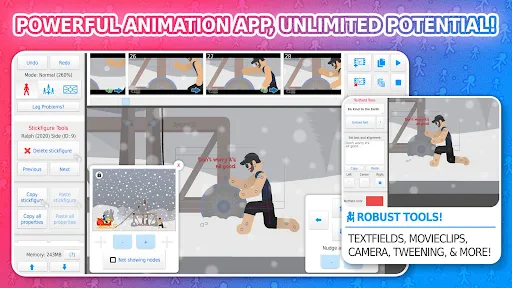
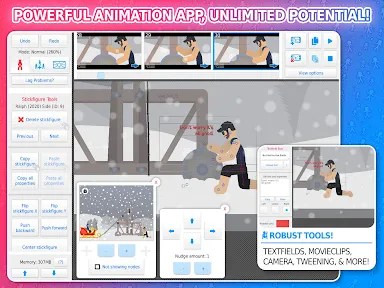
First things first, let’s talk about the interface. Stick Nodes Pro - Animator offers a user-friendly experience that even a beginner can navigate without feeling overwhelmed. The app is designed to make the animation process as intuitive as possible, with a layout that’s clean and straightforward. You start with a blank canvas and a single stick figure, and from there, the possibilities are endless.
For a first session, I would keep the goal deliberately small: make a figure wave, take a few steps, or turn its head. A short action is easier to judge than a complicated fight scene, and it teaches you how changing a pose affects the next frame. Once that movement reads clearly, you can decide whether you want to add more figures or give the scene a setting. That small first success is more useful than trying to make a polished clip immediately.
Features that Pack a Punch
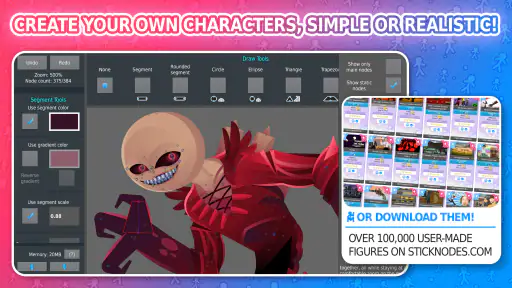
One of the standout features is the frame-by-frame animation capability. This might sound a bit daunting at first, but trust me, it’s a breeze once you get the hang of it. You can add multiple figures, change their sizes, and even tweak the colors. The onion skinning feature is a game-changer. It allows you to see multiple frames at once, so you can easily adjust your animations to be as smooth as butter.
More From Our News Desk

Clash of Clans Is Won Between the Battles

Android Auto Makes the Case for Quieter Car Software

MobiOffice: Transforming Mobile Productivity with Seamless Integration

EA SPORTS FC™ Mobile Soccer: Redefining Mobile Sports Gaming

How Microsoft OneDrive Became a Mobile Productivity Giant

How Google Translate Breaks Language Barriers Effortlessly
My practical tip is to use the previous and neighboring poses as a guide rather than moving every part dramatically in every frame. For a walk or a punch, smaller changes between poses generally make motion easier to follow; large jumps can make a figure appear to teleport. Onion skinning is especially helpful for spotting that problem before you add extra detail. I would also test a simple movement before building a long sequence, because the same adjustment repeated across many frames can take time to correct.
That workflow makes this a good fit for a student sketching a short visual gag, a hobby animator practicing timing, or someone who wants to turn a doodle into a clip to send to a friend. It is less suited to a person who wants an automatic template to do the creative work, or who needs a full desktop-style production environment for complex scenes. The hands-on frame-by-frame approach is the point, but it also means patience matters.
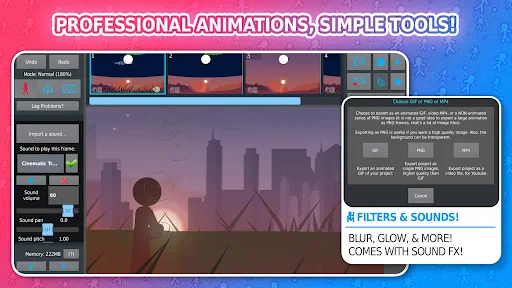
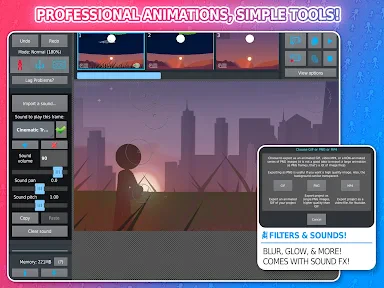
And let’s not forget the sound effects. Yes, you heard it right! You can add sound to your animations, which elevates the whole experience. Whether it’s a swoosh, a smack, or even some background music, this feature really brings your creations to life.
I’d add audio after the motion is already working. A sound can make an action feel more convincing, but it can also distract from a movement that is hard to read on its own. For a quick everyday project, such as animating a stick figure dropping a pencil during a study break, I’d first make the fall clear in silence, then add a fitting sound and check that the timing still feels right. That order keeps the animation itself in control.
Making a first project manageable
One way I avoid getting bogged down is to decide what the viewer should notice first. If the point is a surprised reaction, I would make the pause and change in posture clear before adding a second character or extra action. This gives the sequence a readable rhythm and makes it easier to spot whether the idea is working. Details can wait until the central movement feels convincing.
On a phone, it also helps to think about the screen as a small work area. I would keep a new scene uncluttered, make adjustments in short bursts, and play the sequence back regularly instead of trying to perfect every pose before seeing it move. That habit can catch awkward transitions early. It is a practical trade-off: frequent checks interrupt the flow a little, but they reduce the chance of discovering late that a whole passage needs reworking.
Community and Sharing
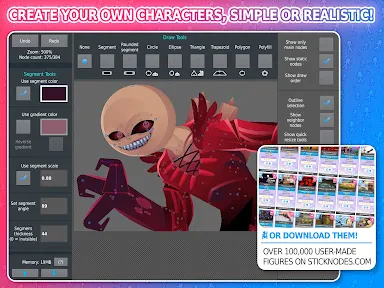
What’s really cool about Stick Nodes is the community aspect. The app has a built-in platform where you can share your animations and check out what others have created. It’s like an endless gallery of creativity and inspiration. Plus, you can download other users’ projects to see how they’ve pulled off certain effects, which is a fantastic way to learn and improve your own skills.
Looking at another person’s project can be more instructive than simply watching a finished animation: you can inspect how a pose is built and how the movement develops across frames. I’d treat other people’s work as a study aid, then make a small variation of your own rather than trying to reproduce a complicated scene straight away. It is a useful way to move past a blank canvas when you are unsure what to animate next.
If you are new, it is easy to mistake a striking finished clip for a reasonable first target. I would instead borrow one narrow idea, such as how a character leans before moving, and test that idea in a tiny scene. Studying a project this way turns browsing into practice rather than comparison. It also lets you learn from a particular construction choice without needing to understand or recreate every part of someone else’s animation.
Sharing your animations is as simple as pie. You can export your projects in various formats, including GIFs and MP4s, making it super easy to share on social media or with friends. It’s incredibly satisfying to see your animations get the recognition they deserve.
For someone choosing between this and a usual drawing or video-editing app, the key difference is the workflow. A drawing app is better when the main aim is a still image, while a video editor is generally a better match for assembling existing footage. This app is the more natural choice when you want to construct movement pose by pose with stick figures. If your priority is detailed illustration, complex camera work, or editing live-action clips, I would choose a tool built around those jobs instead.
Where it fits among creative apps
Compared with a general-purpose animation editor, the stick-figure focus gives this app a straightforward starting point: the visual style can stay simple while you concentrate on timing and body movement. That makes it useful for learning how an action reads before worrying about elaborate artwork. The flip side is that the same focus can feel limiting if you want detailed character design or a production workflow centered on layers of painted imagery.
A video editor solves a different problem. It is usually the better choice when you already have footage and want to trim, arrange, or polish it. Here, you create the movement itself, so it makes sense when the idea exists in your head rather than in a camera roll. I would not pick it as a substitute for a drawing app either: it is aimed at animated action, not making a carefully finished still illustration.
That makes the app particularly appealing for casual experiments, short jokes, simple explanations, or practice clips shared with friends. It can also be a useful way for a beginner to understand why a movement feels stiff: the poses are visible and adjustable rather than hidden inside a recorded video. For a professional project with demanding visual requirements, I would use a more specialized tool and treat this as a sketching space, not a complete production pipeline.
Getting Comfortable with the Process
New users may wonder whether they need animation experience before starting. I don’t think so: begin with one figure and a simple action, and let the frame sequence teach you. The more useful question is whether you enjoy adjusting poses patiently. If you do, the basic workflow gives you room to build skill; if you expect a finished scene from a single tap, the manual approach may feel slow.
A common point of confusion is expecting every frame to require a completely new idea. In practice, the action becomes easier to plan when you identify a few important poses first: the starting position, the moment of change, and the ending position. Then you can make the transitions between them readable. This is not a shortcut around frame-by-frame work; it is a way to give that work direction and avoid adding motion that does not help the scene.
Another sensible question is whether to begin with one or several figures. I would start with one, even if the eventual scene involves a conversation or a small scuffle. A second figure brings more relationships to keep track of: where each character is looking, how their movements relate, and whether the action remains clear. Once a single character can perform the main beat, adding another feels like a deliberate next step rather than extra complexity from the outset.
The app costs $3.99, has an Everyone age rating, and runs on Android 6.0 or later. Its current version is 4.2.6. It has a 4.7 average from around 9,100 ratings, with over 100,000 installs. Those figures suggest that it has found an audience, but I would still base the decision on whether frame-by-frame stick-figure animation sounds fun to you. I see the price as easiest to justify if you expect to make more than one quick experiment and want to keep developing your own little scenes.
For a first-time user, I would set aside a short stretch of free time and aim for one complete, modest action rather than an ambitious film. Make the movement, replay it, correct the least convincing transition, and only then decide whether to add sound or share it. That sequence offers a clear stopping point, which matters on a small screen: you can finish something satisfying without feeling that every project needs to become a major undertaking.
Stick Nodes Pro is developed by ForTheLoss Games and has been available since August 19, 2014. Its current version is 4.2.6, and it supports Android 6.0 or later. I would keep those compatibility details in mind before buying, especially if you plan to animate on an older device. The app’s age rating is Everyone, but the practical question is less about who can open it and more about who enjoys the careful, hands-on process once they do.
Final Thoughts
In a nutshell, if you have a passion for animation or just love playing around with creative apps, Stick Nodes Pro - Animator is a must-have. It’s not just an app; it’s a doorway to a world where your stick figures can do more than just stand still. They can jump, run, fight, and even tell a story. So why wait? Dive into the world of animation and let your imagination run wild!
My more measured recommendation is to try it if you want a focused, approachable way to learn how motion is built, especially through short, playful projects. I would skip it if you mainly want polished results without doing the frame-by-frame work, or if your creative goal depends on tools outside stick-figure animation. Start with a wave, make the timing readable, and add sound only when the action works; that path gives a first-time user a satisfying result without turning the app into a chore.
I would also recommend it to someone who likes learning by doing more than following a formal lesson. A simple pose change immediately shows the effect of timing and spacing, and the onion-skin view gives a practical visual cue for refining transitions. For a parent, teacher, or student looking for a playful way to make a short visual example, that direct connection between adjustment and result can be more engaging than explaining motion in the abstract.
There are clear reasons to choose something else. If your priority is drawing expressive, detailed characters, a painting app will give you a better canvas. If you want to cut together a family video, a video editor will get you there with less effort. And if you do not enjoy repeating small adjustments, the core process here may feel like a chore rather than a creative outlet. I would not buy it expecting those other jobs to be handled equally well.
For me, the strongest reason to give it a chance is that a tiny idea can become a finished, shareable animation without needing to begin with elaborate artwork. The limitation is the same as the strength: you have to shape the movement yourself. If that sounds satisfying, start with one figure, keep the action short, and let each successful little sequence teach you what to try next.
Stick Nodes Pro - Animator Frequently Asked Questions
Does Stick Nodes Pro - Animator work on my device?
Stick Nodes Pro - Animator is designed for mobile devices and is available for Android and iOS. On Android, it requires version 6.0 or later, so it is worth checking your device’s system version before downloading. The app is an entertainment tool focused on creating stick figure animations, making it a natural fit for users who want to work on animation projects from a phone or tablet.
How much does Stick Nodes Pro - Animator cost, and is it a one-time purchase?
Stick Nodes Pro is listed at $3.99. That makes it a paid option rather than a free download, so consider whether its animation tools and export features match what you want before purchasing. The Pro version is positioned for creators who want features beyond basic animation, including exports without a watermark, sound effects, and additional export choices.
What is Stick Nodes Pro - Animator and what can I do with it?
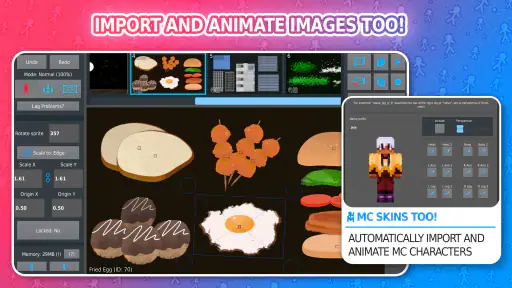
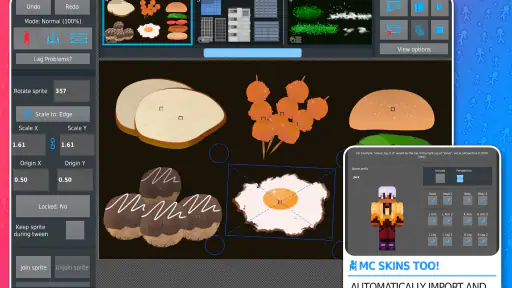
Stick Nodes Pro - Animator is a powerful stick figure animation app available for Android and iOS platforms. It allows users to create animations using stick figures, providing a range of tools and features to build complex animations. Users can add sound effects, export animations in GIF or MP4 formats, and use an extensive library of stick figures. Ideal for both beginners and advanced animators, it offers a user-friendly interface to explore creative animation projects.
Is Stick Nodes Pro - Animator suitable for beginners?
Yes, Stick Nodes Pro - Animator is suitable for beginners. It offers a user-friendly interface and a range of tutorials to help newcomers get started with stick figure animation. The app provides intuitive tools that are easy to learn, making it accessible for users with no prior animation experience. Additionally, the app includes a community where users can share tips and seek advice, which further supports beginners in their animation journey.
What are the differences between Stick Nodes and Stick Nodes Pro versions?
The main difference between Stick Nodes and Stick Nodes Pro is the range of features available. Stick Nodes Pro is a paid version that offers advanced features not available in the free version, such as no watermark on exports, sound effects, and a greater range of export options including MP4. While the free version is excellent for basic animations, the Pro version is ideal for users looking to create more professional and polished animations.
Pros
- Intuitive interface for easy animation.
- Wide range of tools for creativity.
- Smooth export to GIF/video formats.
- Regular updates with new features.
- Supports multi-layered animation.
Cons
- Steep learning curve for beginners.
- Limited sound effects library.
- Occasional app crashes on older devices.
- In-app purchases might be needed.
- No cloud backup for projects.
- Category
- Entertainment
- Version
- 4.2.6