Steak 'n Shake
- 5.35K
- 4.5
- Installs
- 1.00M
- Price
- Free

Screenshots
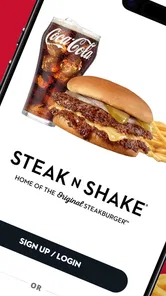
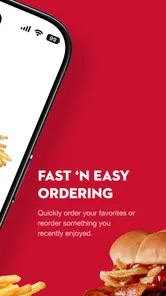
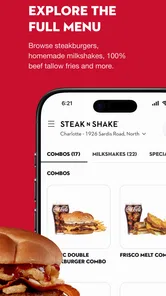
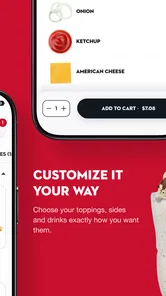
Analysis by Reviewed
I tend to judge a restaurant app by what it makes easier and how much control it leaves in my hands. Steak 'n Shake is free, and its main appeal is practical: browse food, place an order, and earn points without turning a quick meal into a complicated errand. The app is from Steak 'n Shake Enterprises, and its 4.5 average across around 12,000 ratings suggests many customers find it useful, though ratings alone can’t tell you whether it suits your local routine.
Convenience, with a few choices to check
The useful question is less “Can I order?” than “Does this fit how I’m picking up dinner today?” The app supports pickup, delivery, and a Car Hop option, giving you alternatives to the usual restaurant app flow. If I’m already near a participating location, pickup may be the simplest choice; if I’m staying in, delivery can save a trip. Car Hop is another option to consider when I’d rather remain with my vehicle. I would check the available choices for my location before building an order, since the best plan depends on what is offered where I am.
A realistic use case is ordering on the way home when I know what everyone wants but don’t want to decide at the counter. I can look over the menu, make any available adjustments, and review the cart before committing. That final pause matters: it gives me a chance to catch an unwanted topping or an order that doesn’t match the pickup plan. For a group meal, I’d have each person settle their choices first, then check the combined order carefully rather than rushing through several customizations.
Points and the trade-off of ordering ahead
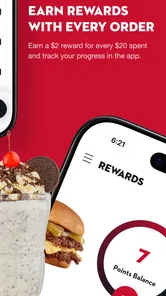
Points can make repeat visits more rewarding, but I’d treat them as a bonus rather than the reason to choose a meal. Before placing an order, I’d look at the app’s current rewards and the total in the cart, then decide whether ordering ahead is genuinely more convenient. This is a useful habit with any restaurant loyalty app: a reward is only valuable if it fits what I already planned to buy.
Compared with ordering in person, the app gives me a chance to review choices before I’m at the counter and use the ordering options available on my phone. Compared with a general delivery app, it is more directly tied to Steak 'n Shake and its points, while a third-party service may be more convenient if I’m comparing several restaurants in one place. I’d choose based on the meal and the route, not assume one channel is always better.
Trust and practical user control
When an app involves an account, a saved order, or payment, I prefer to make deliberate choices rather than tap through automatically. I’d review the order details and payment selection before submitting, and use only the account information needed to place an order. If I’m ordering for someone else, I’d confirm their customizations with them instead of guessing. Those small checks are more useful than assuming an app handles every preference correctly.
The app is rated for Everyone, has more than a million installs, and has been available since 2012. Its current version is 4.9.0, with Android 7.0 as the minimum operating system. Those details make it worth checking compatibility if you’re using an older device. I wouldn’t treat popularity or an age rating as a substitute for reading the screens and choices in front of me; the important thing is to stay attentive while setting up an order.
More From Our News Desk

Weather by Xiaomi Review: Clear at a Glance, Less Clear Up Close

X Under Pressure: Can It Recover When Posting Goes Wrong?

Clash of Clans Is Won Between the Battles

Android Auto Makes the Case for Quieter Car Software

MobiOffice: Transforming Mobile Productivity with Seamless Integration

EA SPORTS FC™ Mobile Soccer: Redefining Mobile Sports Gaming
Getting Started with the App
First things first, downloading the Steak 'n Shake app was a breeze. It's available on both Android and iOS, so whether you're an Apple aficionado or an Android enthusiast, you're covered. Once installed, setting up an account was straightforward. Just a few basic details and I was ready to dive into the world of burgers and fries.
Exploring the Menu
The app's interface is super user-friendly. It's like having the whole Steak 'n Shake menu right in the palm of your hand. You can browse through categories like burgers, shakes, sides, and more. What I loved most is how detailed the descriptions are. You get to see all the ingredients listed, which is great for those picky eaters or anyone with dietary restrictions.
And here's the best part – customization! You can easily tweak your order to suit your taste. Want extra cheese or no pickles? No problem! Just a few taps and your perfect meal is ready to be added to the cart.
Ordering and Payment
Ordering through the app is as smooth as their milkshakes. Once you've finalized your order, you can choose between pick-up or delivery. I opted for delivery, because let's be honest, there's nothing better than having a delicious meal delivered right to your doorstep.
Payments are secure and hassle-free. You can pay using a credit card, debit card, or even through PayPal. Plus, the app often has exclusive deals and discounts, which is a nice bonus.
Overall Experience
Using the Steak 'n Shake app was an absolute delight. It's intuitive, efficient, and made my fast food experience seamless. From browsing the menu to customizing my order, everything was just a tap away. The added convenience of delivery and secure payment options made it even better.
If you're a fan of Steak 'n Shake or just love fast food in general, this app is a must-have. It brings the joy of their delicious offerings directly to your fingertips. So go ahead, give it a try, and indulge in some tasty goodness!
Who will get the most from it
I’d recommend it most to people who already visit Steak 'n Shake and want to plan orders ahead, earn points, or choose between collection, delivery, and Car Hop. It’s less compelling if you rarely eat there, prefer comparing many restaurants at once, or would rather decide everything face-to-face. In those cases, a general food-ordering app or simply ordering at the restaurant may be a better fit.
My cautious verdict: this is a convenient way to manage a Steak 'n Shake meal, especially when I value browsing and checking an order before placing it. I’d still review the location’s available options, the cart, and my payment choice each time. If those basics suit your routine, it’s worth trying; if not, the app doesn’t need to become part of every meal.
A calmer way to handle a busy meal
The app is most useful when the meal is already decided but the timing is awkward. Think of leaving work later than expected, needing to collect dinner on a route you already drive, or feeding a few people who have different topping preferences. Browsing first can reduce the pressure of making choices while others wait. I’d still avoid placing an order so early that my plans might change; ordering ahead helps most when I have a reasonably clear arrival plan.
For a family or small group, I find it helpful to treat the cart as a final checklist rather than merely a checkout screen. Read each item from top to bottom, confirm the requested changes, and make sure the chosen handoff matches the way you’ll arrive. This is a simple way to catch a mismatch between pickup and delivery, or a customization that was accidentally applied to the wrong meal. It takes a moment, but it is easier than trying to explain the problem after submission.
Another practical use is deciding between Car Hop and ordinary pickup before you begin. If staying in the vehicle is the point, choosing that option early keeps the plan clear; if I’m happy to go inside, I can compare that with the other available choices. I would not assume every option is available at every location or time. Check what appears for the location you intend to use, then build the order around that rather than making plans based on a feature you may not be able to select.
Making the menu work for your decision
Menu browsing has value beyond speed. When I’m choosing for someone with a strong preference, I can inspect the item and its listed ingredients before adding it, then use customization where the app offers it. That is more reliable than trying to remember a menu from a previous visit. Still, ingredient descriptions are not a promise that a meal meets a particular dietary requirement, so anyone with a serious allergy or strict restriction should confirm details directly with the restaurant rather than relying on a quick scan of the screen.
For repeat orders, I would use familiarity as a shortcut, not as a reason to skip checking. Menus and available choices can vary by location, and an old assumption about a topping or option can lead to a disappointing cart. Read the current item details, especially when ordering for another person. This small habit also helps distinguish between a preference that can be changed in the app and a request that may need to be discussed with staff.
The same care applies to rewards. Before I spend time adjusting an order to fit a points offer, I’d look at the terms shown in the app and make sure the reward suits the meal I actually want. Points are a nice extra for someone who already orders from the chain; they are a poor reason to buy food that was not part of the plan. If the benefit is unclear or doesn’t fit the cart, I’d finish the order on its own merits rather than let the loyalty feature steer the decision.
Where this fits among food-ordering options
Restaurant-specific apps and general delivery services solve different problems. This one makes more sense when I have already chosen Steak 'n Shake and want its own ordering route and points in one place. A broader service may be better when I’m undecided between restaurants, want to compare menus across several places, or already use it to coordinate a shared order. Ordering in person remains a reasonable alternative when I’m nearby, have questions about an item, or would rather speak to staff before committing.
There is a trade-off to choosing a direct restaurant app: it keeps the experience focused on one chain rather than turning dinner into a comparison session. For a regular customer, that focus can be convenient. For an occasional visitor, it may mean downloading and setting up another app for a single meal, while ordering at the counter avoids that step. I’d use it when advance browsing, points, or a particular handoff option makes a real difference, not simply because mobile ordering is available.
Delivery deserves its own check. It can be the right choice when staying home matters more than going out, but it is not automatically the best route for every order. Compare the final order details and the available handoff choices before confirming, and consider whether pickup fits more naturally into your day. If timing is uncertain, I’d rather avoid relying on an exact arrival plan that I cannot keep. The value is convenience, not a guarantee that every meal will suit every schedule.
Trust without assumptions
I’m cautious about food apps because ordering involves personal choices and, often, a payment step. My practical approach is to read each screen before moving on: check the account details I choose to enter, inspect the cart, and confirm the payment selection before submitting. I don’t infer privacy protections from a polished interface or from the app’s popularity. If data or account controls matter to you, review the choices presented in the app and the relevant privacy information before deciding what to provide.
It is also worth separating what the app lets me do from what I need to verify myself. I can choose items and available order options on screen, but that does not remove the need to check the order summary or ask the restaurant about a sensitive ingredient question. The strongest user control is often a deliberate pause before the final tap. That is especially useful when ordering for someone else, using a payment method you do not normally select, or placing a larger group order.
I would also be mindful of the device I use. The app’s minimum Android requirement is version 7.0, so an older phone should be checked for compatibility before relying on it for a time-sensitive meal. The listing has a Everyone age rating, which is useful context for families, but it is not a substitute for an adult checking what information is entered during setup or ordering. That is ordinary care with any account-based service, rather than a reason to assume something about this app’s data practices.
Who should skip it, and when
If you rarely eat at Steak 'n Shake, the points and chain-specific ordering may not justify making the app part of your routine. A general food app is more useful when your main goal is to compare restaurants, while in-person ordering is better if you prefer conversation or want help deciding. People with complex ingredient questions should also contact the restaurant directly instead of treating the menu screen as a complete answer. The app is a practical ordering tool, not a replacement for every kind of assistance.
On the other hand, regular customers who know what they like are likely to get more out of it. They can use the menu to check details, make available adjustments, and choose a suitable way to receive the order without starting from scratch at the counter. If you are new to the chain, browsing before visiting can help you make a more considered choice, but I would not expect an app alone to settle questions about the dining experience or local availability.
Overall, I see this as a focused convenience rather than an essential food app. Its strongest case is a repeat customer who wants to plan a Steak 'n Shake order, collect points, and choose among the options shown for a particular location. The sensible approach is to check availability first, read the order carefully, and treat rewards as a bonus. If those steps fit how you like to order, it can make a familiar meal easier to arrange; if you need broad restaurant comparisons or personal guidance, another route will serve you better.
Steak 'n Shake Frequently Asked Questions
What platforms and devices can run the Steak 'n Shake app?
The Steak 'n Shake app is available for Android and iOS, so you can use it on a compatible phone or tablet. Before downloading, check that your device meets the minimum operating-system requirement: Android 7.0 or later. The app is free, and its Everyone age rating makes it suitable for a broad audience. Keeping your device’s software up to date can also help with compatibility.
What is the Steak 'n Shake app and what does it offer?
The Steak 'n Shake app is designed to enhance your dining experience at Steak 'n Shake restaurants. It offers features such as mobile ordering, loyalty rewards, and the ability to locate nearby restaurants. Users can place their orders directly through the app for pickup or delivery, earn rewards points for every purchase, and redeem exclusive offers and discounts. The app aims to make ordering more convenient and rewarding for customers. The app also supports a Car Hop option.
How can I place an order using the Steak 'n Shake app?
To place an order using the Steak 'n Shake app, first download and install the app from your device's app store. Once installed, create an account or log in. Navigate to the menu section, select your desired items, customize them as needed, and add them to your cart. Proceed to checkout where you can choose between pickup, delivery, or the Car Hop option. After confirming your payment details, submit the order and track its status through the app.
What are the benefits of joining the Steak 'n Shake rewards program?
Joining the Steak 'n Shake rewards program through the app provides several benefits. Members earn points with every purchase, which can be redeemed for free food and drinks. Additionally, members receive exclusive offers and promotions not available to non-members. The app also provides a convenient way to track your points balance and available rewards. Joining the program is free and enhances your overall dining experience with added value.
Is the Steak 'n Shake app free to download and use?
Yes, the Steak 'n Shake app is completely free to download and use. It is available on both Android and iOS platforms. Users can enjoy all the features of the app, such as mobile ordering, rewards tracking, and exclusive offers, without any subscription fees. However, standard data charges from your mobile carrier may apply when using the app.
Pros
- User-friendly interface that's easy to navigate.
- Quick and efficient order processing.
- Wide range of menu options available.
- Easy location finder for nearby outlets.
- Frequent updates with new features.
Cons
- Limited customization for orders.
- Occasional app crashes reported.
- Requires stable internet connection.
- Some features are region-locked.
- Notifications can be overwhelming.











