

STARZ
- 58.17K
- 4.4
- Installs
- 10.00M
- Price
- Free

Screenshots
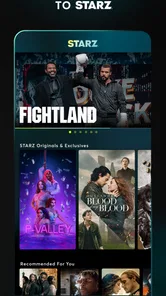
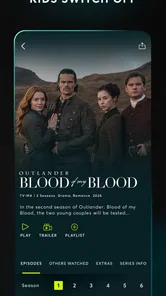
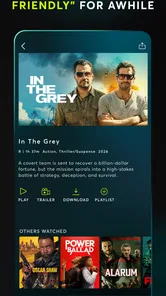

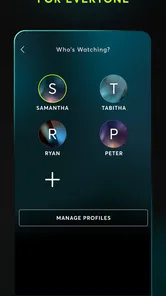

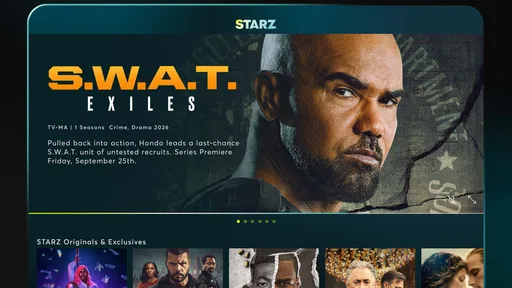
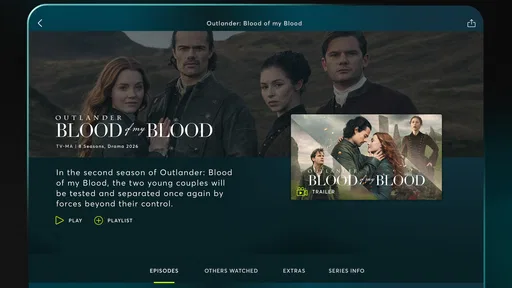
Analysis by Reviewed
I think STARZ makes the most sense as a focused streaming pick: it is strongest when you want a few distinctive series and a rotating movie selection, rather than one app that tries to cover every taste. I’d consider it for a specific watchlist or a stretch of evenings at home, but I wouldn’t choose it as my only entertainment service if I wanted the broadest possible catalog.
A focused service, not an all-purpose replacement
My main advice is to approach STARZ with a title or two in mind. That makes it easier to judge whether the service earns a place in your routine, because a focused catalog can be satisfying when it matches your mood and frustrating when it doesn’t. If I were deciding whether to install it, I’d first ask what I actually want to watch this week, then check whether those titles are available before thinking about the size of the library.
This is also a sensible way to avoid subscription drift. Streaming apps are easy to add and easy to forget, so I’d make a simple viewing plan: choose a series, set aside time for it, and reassess once I’ve watched what brought me in. That approach suits STARZ better than keeping it indefinitely just because it might someday have something interesting.
What STARZ does best
STARZ is an entertainment app from Starz Entertainment, LLC. Its emphasis on original series and films gives the library a clearer identity than services built mainly around an enormous mix of licensed titles. The app is free to install, but watching its subscription content may involve in-app purchases, with listed items ranging from $0.49 to $69.99. I’d check the purchase terms shown in the app before committing, rather than assuming that installation means the full catalog is free.
The service has a 4.4 average from around 177,000 ratings, and it has been installed over 10 million times. Those figures suggest it has found a substantial audience, though they can’t tell you whether its particular shows match your taste. Its Teen content rating is also worth bearing in mind if you’re choosing something to watch with younger family members: I’d check the rating and details of an individual title instead of treating the app’s overall age label as a guarantee about every program.
The app was released on May 6, 2013, and it remains a familiar name in entertainment streaming. That history may help explain why some viewers already arrive with a show in mind, but it doesn’t remove the need to check what is currently available. Catalogs change, and the practical value of any streaming service depends on whether its present selection lines up with your plans.
The app’s best case is a viewer who already knows what kind of story they want. If you’re in the mood for a long-running drama, an exclusive series can give you a reason to stay with one service rather than browse endlessly across several. I find that kind of focused catalog more useful when I’m choosing a show for the week, not when I’m hoping to discover something in every genre.
More From Our News Desk

 Gmail
Gmail in a Busy Inbox: Who Benefits Most?
From first account to crowded workday, Gmail earns its place through dependable search and flexible sorting—but its best fit depends on how much inbox maintenance you can tolerate.

 Prime Video
Switching to Prime Video: What Changes in Your Viewing Routine
Prime Video can make a compelling second home for streaming, but switching means learning a different catalog, rental layer, and route from browsing to playback.

 Universal TV Remote Control
 Works Best as a Reliable Backup
A phone remote earns its place through quick setup and reliable habits. Here is how to get more from Universal TV Remote Control—and where its limits show.

 Weather - By Xiaomi
Weather by Xiaomi Review: Clear at a Glance, Less Clear Up Close
Xiaomi’s weather app makes everyday forecasts quick to scan, but its calm surface can leave useful details and recovery paths harder to find than they should be.

 X
X Under Pressure: Can It Recover When Posting Goes Wrong?
A resilience-focused review of X, examining setup, mistaken posts, interruptions, weak connections, and the gaps that matter when recovery needs to be dependable.

 Clash of Clans
 Is Won Between the Battles
Its raids are quick; its community is a long-term project of coordination, teaching, rivalry, and shared responsibility—with all the friction that entails.
Latest News



Discovering the Vast Library of STARZ
One of the first things I noticed about STARZ is its impressive library of content. Unlike other platforms that might overwhelm you with quantity over quality, STARZ offers a curated selection of movies and TV shows that cater to diverse tastes. From gripping dramas to laugh-out-loud comedies, there's something for everyone. I was particularly impressed with how up-to-date their movie collection is. It's like having a mini-cinema right at your fingertips!
The TV shows are another highlight. STARZ features exclusive series that you won't find anywhere else. If you're into historical dramas, "Outlander" is a must-watch. It's a perfect mix of romance, adventure, and time-traveling fun. And for those who enjoy a bit of crime drama, "Power" and its spin-offs keep the adrenaline pumping. I found myself binging through these series in no time, eagerly waiting for the next episode release.
Planning a watch around real life
A realistic use case is a quiet weeknight when I have enough time for one episode but don’t want to spend half the evening choosing. I’d decide on a series ahead of time, open the app, and use search to get to it rather than treating the home screen as a browsing destination. The smaller decision is often the useful one: choose the show before sitting down, and STARZ becomes a way to watch rather than another source of indecision.
For a trip, I’d handle offline viewing as a little preparation task. While connected to reliable Wi-Fi, I’d download a specific episode or film and check that it is ready before leaving. That is more dependable than assuming I can sort everything out in a station or on a weak mobile connection. It also changes how I choose: downloads are best for planned viewing, not for a sudden craving for a title I haven’t prepared.
Choosing what to watch—and when
A practical way to use a service with a strong selection of series is to pick one show before you settle in, then use search to go directly to it. That keeps the decision from turning into another long session of scrolling. For a relaxed evening, I’d choose a film; for a longer stretch, I’d start a series whose tone and subject appeal to me, rather than assuming every exclusive will be a fit.
Offline viewing can help when you expect a commute or a patchy connection. My tip is to download an episode or film while you’re on reliable Wi-Fi and check that it is ready before leaving; don’t wait until you’re already offline to sort it out. Downloads are useful for planned viewing, but they don’t make the library itself available without preparation, so they’re less helpful for spontaneous choices on the go.
One trade-off is that a download only solves the connection problem for the content you prepared. If you are the sort of viewer who changes plans after browsing, offline access may feel less flexible than it first sounds. I’d pick a short queue before travel—one episode for a commute, perhaps another for the return—rather than downloading a random pile and hoping it matches my mood later.
User Experience and Interface
Now, let's talk about the user experience. One thing that stands out is how intuitive the app's interface is. Whether you're tech-savvy or not, navigating through STARZ is a breeze. The layout is clean and user-friendly, with easy access to your favorite shows and movies. Plus, the search function works like a charm, making it easy to find exactly what you're in the mood for.
Another feature I appreciate is the ability to download content for offline viewing. This is a lifesaver for those long commutes or when you're stuck without Wi-Fi. Just download your favorite episodes or movies when you're connected, and enjoy them anytime, anywhere.
Finding the right fit for your household
I’d recommend STARZ most readily to someone who likes a particular drama, wants a defined selection of films, or is happy to subscribe around a short viewing project. It can also work for a couple or a household that agrees on a few titles and checks suitability before watching together. The app’s Teen rating is a broad guide, not a substitute for reviewing an individual program, so I would make that check part of choosing what to put on.
I’d be more cautious if several people in the home have very different tastes. A service with a wider everyday spread may be easier when one person wants a film, another wants children’s programming, and someone else wants a reality series. STARZ is not a poor choice in that situation, but its value becomes more dependent on whether the household’s actual shortlist overlaps with what it offers.
It is also not the right pick if your main goal is watching without paying for access. The free installation can be misleading if you interpret it as free viewing across the catalog; I’d inspect the purchase options and terms before starting anything. Since purchases can differ in price, I’d also confirm exactly what an option covers and whether it matches how long I expect to use the service.
Where it fits among streaming alternatives
Compared with a general-purpose streaming service, STARZ is more appealing when its particular originals and movie selection are what you want. A broader service may be a better everyday choice if your household needs a wider spread of genres and viewing options. I’d treat STARZ as a complement when a specific series draws me in, or as a short-term choice when I have a clear watchlist, rather than paying for several services without a plan.
It is also a weaker fit if you mainly want free, ad-supported viewing or prefer to browse a very large mix of content before deciding. Since in-app purchases vary in price, I’d review the available purchase option carefully and make sure it suits how long I expect to watch. The useful question is not simply whether the app is free to download, but whether the titles I want justify the cost attached to access.
That distinction matters when comparing it with the usual alternatives. A broad subscription service is often easier to keep as a household default because it can cover more moods, while a free ad-supported app may be a better fit for someone who is willing to watch around ads and wants to avoid a paid commitment. I see STARZ as the more deliberate choice: it makes sense when a specific program or film selection is the reason for opening the app, not simply because I want the largest possible menu.
Pricing and Subscription Options
When it comes to pricing, STARZ is quite competitive. They offer a free trial for new users, which is a great way to explore the platform without any commitment. After that, the monthly subscription fee is reasonable, especially considering the quality and exclusivity of the content offered. It's good to know that you can cancel anytime, giving you the flexibility to manage your subscriptions according to your needs.
STARZ also frequently provides special deals and discounts, so keep an eye out for those. It's always nice to save a few bucks while enjoying top-notch entertainment!
Before I start watching, I’d make sure I understand which purchase path I’m choosing and how it is billed. The app’s download price and the cost of accessing content are separate questions, and it is worth reading the terms displayed at the point of purchase rather than relying on assumptions about a trial or promotion. If I only want one show, I’d compare the length of time I expect to watch with the available option instead of treating a discount as a reason to keep a subscription I no longer use.
A sensible way to decide
If I were considering STARZ for a household, I’d first identify the series or films everyone actually wants to watch, then compare that list with the service’s current selection. That small check matters more than the size of the catalog in the abstract. It also helps answer the practical question of whether the app is worth keeping: if the titles you came for are finished, reassess before another billing period rather than letting an unused subscription linger.
The app is marked for Teen audiences, but that doesn’t remove the need to choose titles thoughtfully. I’d preview a program’s subject and suitability for the people watching, especially when children are involved. For a viewer who wants one particular drama, a focused subscription can be straightforward; for a family expecting a broad, universally suitable library, another service may be easier to make work.
One helpful habit is to keep a short list of the exact titles that motivated the decision and check them off as you watch. That turns a vague impression of “getting value” into a concrete choice: if the list is nearly done and nothing else currently interests you, it may be time to pause or cancel rather than letting a quiet month pass unnoticed. If the app is still serving a regular viewing habit, the same list can show that it has earned its place.
Final Thoughts
In conclusion, STARZ is a fantastic streaming service that deserves more recognition. With its extensive library, user-friendly interface, and reasonable pricing, it's a strong contender in the streaming world. Whether you're a movie buff or a TV series enthusiast, STARZ offers a little something for everyone. So, why not give it a shot? You might just find your next favorite show!
My recommendation is more specific: I’d try STARZ if its exclusive dramas or current film choices already appeal to you, and I’d use downloads for trips I can plan ahead. I’d skip it as a default subscription if you need maximum variety, a guaranteed free catalog, or a single service that suits every viewer at home. Used with a clear watchlist and a quick check of purchase terms, it can be a worthwhile, convenient part of a streaming routine.
STARZ Frequently Asked Questions
Can I use STARZ on both Android and iOS?
STARZ is an entertainment app for mobile devices, so it can be considered by viewers using Android or iOS. Before downloading, make sure you select the version intended for your device and that your operating system is compatible. This is especially worth checking if you plan to watch on more than one kind of device.
Does STARZ include original series as well as movies?
Yes. STARZ’s offering includes bold original series and hit movies, making it an option for viewers who want both television and film in one entertainment app. The mix may appeal to people looking for programming that goes beyond a single genre or format. Browse the available titles in the app to decide whether its selection suits your tastes.
Is STARZ free to download, and what should I expect to pay?
STARZ is free to download, but watching its entertainment content requires a subscription, and in-app purchases are available. The app’s purchase options can range from low-cost items to higher-priced ones, so check the current subscription choices and terms shown in the app before signing up. This helps you understand the commitment and choose an option that suits you.
What age is STARZ intended for, and is its content suitable for teens?
STARZ is rated Teen, and its entertainment offering includes original series and hit movies. That rating can help families make an initial decision, but it is still worth considering the suitability of individual titles for each viewer. If younger people will use the app, review its parental-control settings and choose restrictions that match your household’s preferences.
What is STARZ and what content does it offer?
STARZ is a premium streaming service available on Android and iOS devices, offering a wide array of movies, TV shows, and exclusive original series. Subscribers can enjoy high-quality content spanning various genres including drama, comedy, action, and more. With STARZ, users have access to both current hit movies and classic films, providing a comprehensive entertainment experience.
Pros
- Wide selection of original content
- Offline viewing available
- Supports multiple profiles
- High-quality streaming
- Ad-free experience
Cons
- Limited international content
- Higher price compared to competitors
- No live TV option
- Requires stable internet for streaming
- Content library varies by region











