

Stars & Stripes: Military News
- 89.00
- 3.6
- Installs
- 10.00K
- Price
- Free

Screenshots



Analysis by Reviewed
When I want military news without sorting through a general news feed, Stars & Stripes: Military News has a clear reason to exist. It comes from Stars and Stripes, the independent U.S. military news organization, and its focus is much narrower than the usual headline apps. That focus is its strongest quality: the app is aimed at readers who care about service members, military communities, defense developments, and the people connected to them.
I approached it as a daily news reader rather than as a complete replacement for every source I use. In that role, it is useful and easy to understand, although the experience is not as polished or as broad as the biggest mainstream news platforms. The app is free to download, is rated for Everyone, and belongs in the News & Magazines category. Its average rating is 3.6 from around 300 ratings, which suggests a mixed but reasonably established user experience rather than universal satisfaction.
My main takeaway is simple: this is a focused military-news reader, not an all-purpose news ecosystem. That distinction matters when deciding whether it deserves a permanent place on your phone. If military-related reporting is part of your everyday information routine, the focused coverage can save time. If you mainly want breaking national headlines, local news, business updates, or a highly customizable feed, a larger news app will probably serve you better.
What the app is really for
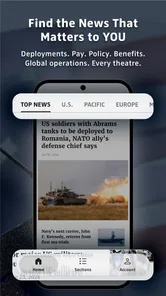
The best way to understand this app is to think of it as a direct window into the Stars and Stripes editorial world. Instead of asking a broad aggregator to discover military stories among thousands of unrelated articles, I can open this app expecting the subject matter to stay close to the armed forces and military life. That makes the first few minutes of reading more efficient for a specific audience.
That audience includes active-duty personnel, veterans, military families, civilian employees connected to defense communities, and readers who follow U.S. military affairs closely. It can also be useful for relatives who want a more relevant stream of reporting than the general news cycle provides. The value is not that it covers everything; the value is that it starts from a subject area many general apps treat as occasional coverage.
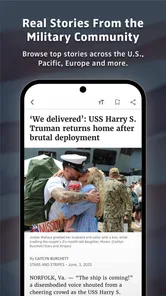
In everyday use, I would open it during a commute, before work, or while checking the phone in the evening. A military family member might use it to scan developments affecting service communities, then share a particular article with someone at home. A veteran could use it as a quick way to keep military news in the same reading routine as other morning sources. Those are realistic strengths because the app’s narrow editorial identity removes some of the searching involved in a general feed.
There is also a useful difference between an organization-specific news app and a social media timeline. A social feed may surface military stories, but it mixes reporting with reactions, reposts, commentary, and unrelated material. Here, the purpose is easier to recognize. I am opening a publication-oriented app, not a conversation platform. That can make reading feel calmer and makes it easier to separate an article from the noise surrounding it.
More From Our News Desk

 Gmail
GmailGmail in a Busy Inbox: Who Benefits Most?
From first account to crowded workday, Gmail earns its place through dependable search and flexible sorting—but its best fit depends on how much inbox maintenance you can tolerate.

 Prime Video
Switching to Prime Video: What Changes in Your Viewing Routine
Prime Video can make a compelling second home for streaming, but switching means learning a different catalog, rental layer, and route from browsing to playback.

 Universal TV Remote Control
Universal TV Remote Control Works Best as a Reliable Backup
A phone remote earns its place through quick setup and reliable habits. Here is how to get more from Universal TV Remote Control—and where its limits show.

 Weather - By Xiaomi
Weather by Xiaomi Review: Clear at a Glance, Less Clear Up Close
Xiaomi’s weather app makes everyday forecasts quick to scan, but its calm surface can leave useful details and recovery paths harder to find than they should be.

 X
XX Under Pressure: Can It Recover When Posting Goes Wrong?
A resilience-focused review of X, examining setup, mistaken posts, interruptions, weak connections, and the gaps that matter when recovery needs to be dependable.

 Clash of Clans
Clash of Clans Is Won Between the Battles
Its raids are quick; its community is a long-term project of coordination, teaching, rivalry, and shared responsibility—with all the friction that entails.
Latest News



Focused coverage versus broad news apps
Compared with Google News, Apple News, or another large aggregator, this app gives up breadth in exchange for relevance. A broad service is better when I want one place for world news, sports, technology, weather, and local reporting. It can also be better at combining many publishers around one developing story. Stars & Stripes: Military News is more appropriate when the military angle itself is the reason I am reading.
Compared with a social network, the app should be easier to use deliberately. I am less likely to lose a few minutes scrolling through unrelated posts, but I also do not get the same instant stream of public reaction. Compared with visiting a mobile website, a dedicated app can feel more convenient for repeated reading, while a browser may be preferable for people who do not want another app installed or who want to keep their news use in one tab.
That trade-off is important. I would not install this expecting a full replacement for a national newspaper app. I would install it as a specialist source that complements one. The combination is more sensible than choosing it alone if I need a balanced reading routine across military, national, international, and local subjects.
Trust begins with a recognizable editorial purpose
The developer is listed as Stars and Stripes, which gives the app a clear identity instead of leaving the publisher hidden behind a generic feed name. The store summary describes it as a U.S. military news organization providing independent news and information. For me, that context is useful because I know what editorial perspective and subject area I am entering before I start reading.
That does not mean I should treat every article as the only source I need. Independent reporting still benefits from comparison, especially when a story involves policy, operations, legal questions, or fast-moving events. My practical habit would be to use this app for discovery and focused reading, then consult another reputable source when a claim affects an important personal decision.
The app has been available since February 2013, so it is not a brand-new experiment. Its current version is 4.21.1, and the minimum operating-system requirement is 8.1. Those details make it accessible to people using older compatible devices, although anyone with a very old phone should still check performance before relying on it as a primary news tool.
Controls, privacy choices, and moments that deserve attention
I treat controls and privacy choices as part of a deliberate reading routine, not as proof of any particular feature or policy. Checking notification and permission prompts before relying on the app helps me decide how much attention it should claim, while careful sharing matters when military stories touch close-knit communities. That same measured approach leads naturally to the practical habits that make a focused news reader easier to use day after day.
What I can responsibly judge from the app context
When I evaluate a news app, I separate the editorial trust question from the data-control question. Knowing who publishes the journalism helps me understand the content, but it does not automatically answer how the app handles device information, notifications, account details, or purchases. I do not treat a familiar publisher name as proof of a particular privacy practice.
For that reason, I would review the permissions and privacy information shown on my device before settling into regular use. I would pay special attention to notification access, any request for location, and any sign-in or registration screen. Those are the moments when a reader has the clearest opportunity to decide whether a feature is worth the information or attention it requires.
I also avoid granting a permission simply because an app asks for it during first launch. If a news reader requests something that does not seem necessary for reading articles, I would deny it initially and see whether the core reading experience still works. This is a practical habit rather than a claim about what this particular app requests. It keeps control with me and prevents a rushed setup from becoming the default.
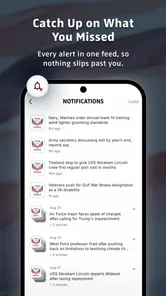
Notifications deserve their own decision. Alerts can be valuable when I want timely military headlines, but they can also interrupt work, family time, or sleep. I would begin with a restrained notification setting if the operating system presents that choice, then adjust it after seeing whether the alerts genuinely improve my routine. A focused app can make notifications feel more relevant, but “relevant” does not always mean “worth receiving immediately.”
Data-sensitive reading situations
Military news can touch on deployments, bases, personnel matters, security concerns, and family circumstances. Even when I am only reading public journalism, I would avoid treating a public news app as a private place for sensitive discussion. I would not enter personal service details, operational information, or identifying family information into any optional form unless I understood why it was needed and how it would be handled.
The same caution applies when sharing articles. Sending a public story to a family group is ordinary, but adding personal commentary about a current assignment or location can create a different level of exposure. My approach is to share the article itself and keep sensitive context out of the message, especially in large groups or channels where I cannot control later forwarding.
Reading on public Wi-Fi is another small but realistic consideration. I would keep the app updated through the normal device store, use the phone’s standard security protections, and avoid mixing news reading with account changes on an unfamiliar network. None of this makes the app suspicious; it is simply sensible behavior for any service that may involve optional accounts, subscriptions, or in-app transactions.
The app is free, but it includes in-app purchases ranging from $0.99 to $49.99 per item. That makes it especially important to notice purchase prompts and understand what I am being offered before confirming anything. I would use the operating system’s purchase authentication and, on a shared family device, make sure children cannot approve transactions accidentally. The Everyone age rating describes the app’s content classification; it should not be confused with permission to make purchases without supervision.
Where user agency matters most
The most useful control is the ability to decide how much the app participates in my day. I can choose whether it is an occasional reference, a morning reader, or a source of alerts. I would not let the app dictate that routine by leaving every notification enabled automatically. A news app works best when it supports a habit I choose rather than turning every update into an interruption.
I would also keep the app’s role clearly defined. If I use it alongside a general news service, I can compare coverage without expecting either app to do everything. This reduces the temptation to judge a focused military publication by the standards of a broad aggregator. It also gives me a practical way to notice when a story needs wider context.
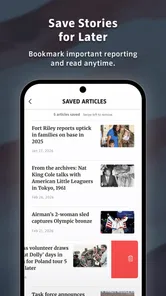
For readers who dislike accounts, the important question is whether the app allows useful reading without creating a profile. I would test the opening experience and any save, alert, or personalization tools separately rather than assuming all features require the same level of commitment. If a feature asks me to register, I would decide whether its convenience is worth maintaining another account. If I only want occasional reading, the answer may be no.
For readers who do want personalization, the trade-off can be worthwhile if it makes military coverage easier to follow. Still, I would use the smallest amount of profile information necessary and avoid reusing a password from another service. This is a general account-control practice, but it matters more when an app becomes part of a regular information workflow.
Small workflow choices that improve the experience
One useful habit is to read the headline, date, and full article context before forwarding a story. Military reporting can be shared quickly because it feels relevant to a close community, yet a headline alone may not explain whether a report concerns a policy proposal, a confirmed event, or a developing situation. I would treat the app as a starting point for understanding, not merely a source of snippets to repost.
A second tip is to use a two-source routine for consequential stories. I would read the Stars and Stripes report for its military focus, then check a broader publication or an official source when the information could affect travel, benefits, work, or family planning. This preserves the app’s specialist advantage while avoiding the weakness of relying on one publication for every angle.
A third is to separate “must know” alerts from “interesting to read” articles. If the app’s notification controls allow that distinction, I would reserve immediate alerts for the topics I genuinely follow and leave the rest for manual browsing. If the controls are limited, I would turn alerts off and open the app at a chosen time instead. That simple change can make a focused news reader feel much less intrusive.
I would also keep an eye on storage and battery behavior during the first few days, especially on an older device. News applications can vary in how much they cache images or refresh content. Rather than assuming the impact, I would check the phone’s own battery and storage screens. If the app is used only occasionally, manual opening may be more sensible than allowing frequent background activity.
Who should use it and who should skip it
I recommend giving it a try if military news is a regular part of your life and you want a dedicated reading destination. It is particularly suitable for people who are tired of searching a general feed for defense coverage or who want reporting connected to military communities rather than only occasional national headlines.
It is also a reasonable choice for family members who need a simple way to stay informed without building a complicated collection of websites. The focused subject matter can reduce the time spent filtering unrelated stories. Veterans and defense-focused readers may appreciate that the app’s identity is immediately clear when they open it.
I would be more cautious about making it the only news app on a phone. Readers who need local reporting, international coverage, financial news, sports, or extensive customization will likely find a general news platform more complete. People who prefer newsletters, podcasts, or browser reading may also see little reason to install a dedicated app. The app’s value depends heavily on whether its military focus matches your actual reading habits.
I would also skip it if I am looking for a private messaging space or a place to discuss sensitive military matters. This is a news reader, not a secure community forum. Public articles and personal conversations should remain separate, and I would not use optional fields or account areas for information that does not need to be there.
The store shows over ten thousand installs, which indicates that the app has reached a meaningful audience while remaining specialized rather than mass-market. Its rating of 3.6 is a useful reminder to keep expectations realistic: I would try it for its editorial focus, not because I expect the smoothest interface or the widest feature set in the entire news category.
My cautious verdict after weighing the trade-offs
Stars & Stripes: Military News succeeds when I use it for the job it was built around: finding military reporting in one focused place. The publisher identity is clear, the audience is easy to define, and the free entry point makes testing the app straightforward. I like the idea of pairing it with a broader news source rather than forcing it to cover every subject.
Its limitations are equally clear. A specialist feed can feel narrow on quiet news days, and it may not satisfy someone who wants a single application for every headline. The mixed average rating also tells me to judge the actual reading experience on my own device instead of assuming that the publication’s usefulness guarantees perfect app performance. In-app purchases mean I would review prompts carefully, even though the app itself is free.
My recommendation is therefore conditional but positive. If you follow the U.S. military, have a personal connection to military communities, or want a dedicated source for this kind of reporting, I think it is worth trying. I would configure notifications conservatively, avoid sharing sensitive personal context, and use another reputable source when a story carries serious consequences.
If your needs are broader, I would choose a general news app and perhaps visit Stars and Stripes when a military story matters. But for the reader who wants military coverage to be visible instead of buried among unrelated headlines, this app has a sensible place in the daily routine. Use it as a focused reporting tool, keep control of alerts and purchases, and let its narrow purpose be an advantage rather than expecting it to become your entire news world.
Stars & Stripes: Military News Frequently Asked Questions
Who publishes Stars & Stripes: Military News?
Stars & Stripes: Military News is published by Stars and Stripes, a U.S. military news organization that provides independent news and information. The app is intended as a mobile way to follow its reporting, so it may appeal to readers who want coverage connected to military life and communities rather than a general-purpose news feed.
What is Stars & Stripes: Military News?
Stars & Stripes: Military News is a news app focused on U.S. military coverage, service members, veterans, defense developments, and military communities. It brings together reporting and updates from Stars and Stripes in a mobile-friendly format, allowing readers to follow important stories, official developments, and issues affecting personnel and their families while on the go.
What kind of news and topics does the app cover?
The app generally covers U.S. military branches, deployments, operations, defense policy, personnel matters, veterans’ affairs, military benefits, overseas communities, and stories involving service members and their families. Coverage may also include breaking news, analysis, photographs, and regional reporting. The available content can change as new events develop and as the publication updates its sections.
Is Stars & Stripes: Military News free to download and use?
The app is free to download, but in-app purchases are available and may cost between $0.99 and $49.99 per item. Users should review the app’s purchase options and terms before paying, since access conditions can vary by platform and may change over time. Before subscribing or making a purchase, check the pricing details, renewal terms, and cancellation instructions.
Does the app require an internet connection?
An internet connection is normally needed to load the latest articles, images, breaking updates, and other online content. Performance may depend on your Wi-Fi or mobile data connection, especially when viewing media-rich stories. Some app versions may offer limited reading features after content has loaded, but users should not assume that every article or update will be available offline.
Pros
- Covers U.S. military news
- service members
- and defense developments in one place.
- Articles are generally easy to scan during short breaks or commutes.
- Useful for readers following military policy
- operations
- and personnel issues.
- Helps service members and families keep up with relevant community updates.
- Content can provide context beyond headlines through interviews and field reporting.
Cons
- Coverage is strongly U.S.-focused and may feel limited for international defense news.
- Some stories may require familiarity with military terms and organizations.
- News frequency can vary depending on current events and editorial priorities.
- Opinion and analysis pieces may not appeal to readers seeking only brief updates.
- Advertising or promotional content may occasionally interrupt the reading experience.











