

Split Pay: Split Bills in Two
- 476.00
- 4.9
- Installs
- 100.00K
- Price
- Free

Screenshots
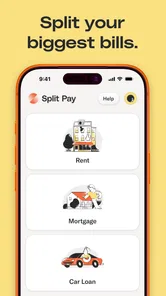
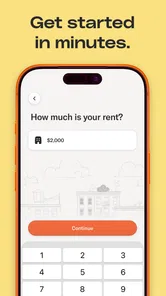
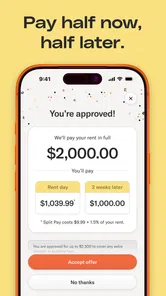
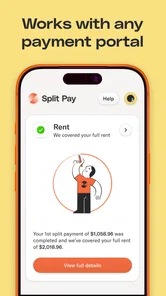
Analysis by Reviewed
Managing a large payment is rarely difficult because of the arithmetic. The harder part is making sure the money leaves your account on time without forcing your monthly budget into an uncomfortable corner. Split Pay: Split Bills in Two is built around that practical problem. It is a free finance app from Split Pay that focuses on rent, mortgage, and car payments, giving users a way to divide one major obligation into two smaller payment moments.
After spending time with it, my view is fairly clear: this is most useful as a budgeting aid for people whose income arrives in stages, not as a complete replacement for a bank account, bill-pay service, or personal finance suite. Its appeal comes from its narrow purpose. Instead of surrounding the user with investment charts, spending categories, and financial jargon, it concentrates on making a few intimidating bills easier to approach.
How Split Pay changes the way a large bill feels
The central idea is simple. Rather than treating rent, a mortgage payment, or a vehicle payment as one large event, I can think about it in two portions. That change sounds modest, but it can make a meaningful difference when payday timing and due dates do not line up neatly.
Imagine someone paid twice during a month, with the first paycheck arriving several days before the second. A single large housing payment may leave the first half of the month feeling tight, even when the person can afford the bill overall. A two-part approach encourages that user to reserve money from both pay periods instead of waiting until the deadline is close. In my experience, that is where the app’s value is strongest: it turns an abstract monthly obligation into a repeatable routine.
I also like that the concept is easy to explain to another person. If a household shares responsibility for a car payment or rent, the conversation can begin with a straightforward question: how much should be set aside from each income cycle? That is more approachable than asking someone to learn a full budgeting system before they can make progress.
The app belongs in the finance category, but it feels more focused than many tools in that space. Traditional budgeting apps usually ask me to connect broad parts of my financial life, classify purchases, monitor accounts, and maintain a larger plan. Split Pay: Split Bills in Two takes a more limited route. Its store summary points directly to rent, mortgage, and car payments, so I would approach it as a targeted payment-planning companion rather than an all-purpose money manager.
A practical workflow for uneven cash flow
The most useful way to use the app is before the payment becomes urgent. I would start by identifying the recurring obligation that causes the most pressure, then decide how the two portions fit around my actual income schedule. The important step is not merely dividing a number by two; it is choosing two moments that match when money is realistically available.
More From Our News Desk

 Instagram
Instagram’s Power Comes From Its Place in Your Phone
A close look at how Instagram turns Meta’s reach, recommendation systems and everyday camera habits into durable platform power—and what that costs users.

 Gmail
GmailGmail in a Busy Inbox: Who Benefits Most?
From first account to crowded workday, Gmail earns its place through dependable search and flexible sorting—but its best fit depends on how much inbox maintenance you can tolerate.

 Prime Video
Switching to Prime Video: What Changes in Your Viewing Routine
Prime Video can make a compelling second home for streaming, but switching means learning a different catalog, rental layer, and route from browsing to playback.

 Universal TV Remote Control
Universal TV Remote Control Works Best as a Reliable Backup
A phone remote earns its place through quick setup and reliable habits. Here is how to get more from Universal TV Remote Control—and where its limits show.

 Weather - By Xiaomi
Weather by Xiaomi Review: Clear at a Glance, Less Clear Up Close
Xiaomi’s weather app makes everyday forecasts quick to scan, but its calm surface can leave useful details and recovery paths harder to find than they should be.

 X
XX Under Pressure: Can It Recover When Posting Goes Wrong?
A resilience-focused review of X, examining setup, mistaken posts, interruptions, weak connections, and the gaps that matter when recovery needs to be dependable.
Latest News



For example, if the first portion is reserved immediately after the earlier paycheck, I would treat that money as committed rather than available spending. When the second income arrives, the remaining portion can be handled with less last-minute stress. This creates a small behavioral safeguard: the bill is no longer competing with every other purchase at the end of the month.
A less obvious benefit is that the split can expose an affordability problem earlier. If either portion repeatedly forces me to delay groceries, utilities, or other essentials, the issue is not solved simply because the payment has been divided. The app can help reveal that tension, but it cannot make an unaffordable obligation affordable. I would use the two-part plan as an early warning system, not as permission to stretch my budget beyond its limits.
Another useful habit is to keep the split consistent. Changing the amount or timing every month may create more mental work than it removes. Once I know which part belongs to which paycheck, the routine becomes easier to remember and easier to discuss with a partner. That consistency is especially valuable for people who are organized enough to follow a plan but do not want to maintain a complicated spreadsheet.
Where it is stronger than a spreadsheet
A spreadsheet can certainly divide a payment into two. In fact, someone who enjoys building formulas may prefer that flexibility. The advantage of a dedicated app is not mathematical power; it is focus. A spreadsheet often becomes a general ledger filled with unrelated categories, while a purpose-built tool keeps attention on the payment that needs a plan.
That focused design may also be less intimidating for a first-time budgeter. I would rather recommend a small, understandable routine than tell a friend to construct a complete financial dashboard for one recurring problem. Split Pay is particularly appealing when the user already knows the main bill and simply needs a clearer way to stage the money.
Compared with a bank’s ordinary bill-pay feature, the distinction is even clearer. A bank can be the place where a payment is actually sent, but it may not help someone mentally reserve money from two separate paychecks. Split Pay addresses the planning side. I would still verify the final payment arrangements through the relevant lender, landlord, or financial institution, because planning a split and receiving approval for split payment timing are not automatically the same thing.
That distinction is one of the most important practical points. A user should not assume that every landlord, mortgage servicer, or auto lender accepts two separate payments on the schedule they prefer. Before relying on the routine, I would check the recipient’s rules, processing times, late-payment policy, and whether partial payments are credited as expected. The app can organize the intention; the biller controls the terms.
The limitation that matters most
The narrow focus that makes the app approachable also limits its reach. Someone looking for complete household accounting may quickly outgrow it. If I need detailed transaction categorization, debt payoff projections, investment tracking, shared account visibility, or a broad overview of recurring subscriptions, I would choose a more comprehensive finance tool instead.
There is also a psychological risk in dividing a payment. Seeing two smaller targets can feel easier, but the total obligation remains the same. Users who are prone to treating the first portion as a reduced bill rather than a reservation toward the full bill could create a shortfall later. I would therefore pair the app with a separate checking-account habit, such as keeping reserved money in a dedicated space or mentally marking it as unavailable for everyday purchases.
People with irregular income need to be especially careful. A two-part schedule works naturally when pay arrives predictably. For freelancers, seasonal workers, or anyone whose income changes sharply, the better approach may be to save toward the bill whenever money arrives rather than force every month into equal portions. The app’s basic concept can still be useful, but the user has to adapt the routine to cash flow instead of assuming equal timing will always work.
I would also avoid using it as a substitute for emergency savings. Splitting a regular payment can improve monthly organization, but it does not create a cushion for repairs, medical costs, job interruptions, or an unexpectedly high bill. If dividing the payment leaves no room for surprises, the larger budgeting issue deserves attention alongside the app.
Who will get the most from it
My strongest recommendation is for people with a predictable two-paycheck rhythm who feel the weight of one large recurring payment. Renters, homeowners, and drivers may all recognize the problem, especially when the due date arrives shortly after other major expenses. For these users, the app offers a concrete routine instead of another broad financial project.
It can also suit couples or housemates who want a simple shared conversation about responsibility. One person might reserve the first portion while another handles the second, or both might contribute to each portion. The important thing is to agree on the arrangement outside the app as well, because clarity between people matters more than the tool itself.
I would be more cautious recommending it to someone who frequently misses payments because of forgetfulness rather than cash-flow timing. A split plan may help, but that person also needs reliable reminders and a clear confirmation process. Likewise, anyone dealing with several debts, changing interest rates, or a complicated repayment strategy will probably benefit more from a dedicated debt-management solution.
The app is free, which makes experimenting with the method relatively easy. Its content rating is Everyone, so it is positioned as a broadly accessible financial utility rather than a product aimed at a restricted age group. Still, accessibility should not be confused with financial simplicity: the consequences of a missed housing or vehicle payment can be serious, so I would test the routine with a noncritical planning cycle before depending on it completely.
What the current release tells me about using it
Split Pay was released on December 5, 2023, and the current version is 2.0.4. It requires operating system version 10 or later, so I would check the device before recommending it to someone using an older phone. That requirement is not demanding for many recent devices, but compatibility is worth confirming when a budgeting routine is meant to be dependable.
The app has an average rating of 4.8 from around 3,300 ratings, and it has passed 100,000 installs. Those figures suggest that the focused idea has found an audience, although they do not remove the need to judge whether the method fits a particular biller or income pattern. I see the numbers as encouraging evidence of usability, not proof that the app can handle every payment arrangement.
One practical tip I would give a new user is to begin with one obligation only. Adding rent, a mortgage, and a car payment at once may sound efficient, but it makes it harder to tell whether the method itself is helping. Starting with the bill that causes the most monthly strain gives a clearer test. After a full cycle, I would decide whether the same two-part rhythm works for another obligation.
A second tip is to compare the planned portions with the dates money actually becomes usable, not merely the dates a paycheck is announced. Bank processing, weekends, and holidays can affect availability. Even without turning the process into a complicated forecast, leaving a little timing awareness between income and payment can prevent a plan that looks correct on paper from becoming late in practice.
A third insight is that the app may be most valuable during transitions. Someone moving from weekly to twice-monthly pay, changing jobs, or taking on a new vehicle payment may already understand the total cost but struggle with the new timing. Using a two-part structure during that adjustment period can make the change easier to observe. Once the household has a stable routine, the user may decide whether the app remains necessary or whether the habit has become automatic.
My final assessment
I recommend Split Pay: Split Bills in Two to people who want a focused way to prepare for one large recurring payment using two income moments. The app’s best quality is its restraint. It does not need to become a complete financial command center to be useful; its job is to make a large obligation feel more manageable without disguising the total amount.
That same restraint is why I would not recommend it as the only finance app for a household with broader needs. It will not replace careful checking of biller rules, a realistic emergency fund, or a full plan for debt and spending. Users with irregular income should customize the idea rather than follow an equal split automatically, and anyone relying on partial payments must confirm that the recipient accepts them.
For the right person, though, the approach is sensible and easy to put into practice. If your main problem is not overspending in general but the uncomfortable timing of rent, a mortgage, or a car payment, this free app is worth trying. Use it as a payment-planning habit, not as a promise that a difficult bill has become smaller. That is the honest reason I would suggest it to a friend: it can bring structure to a common cash-flow problem while leaving the important financial decisions in the user’s hands.
Split Pay: Split Bills in Two Frequently Asked Questions
What devices can run Split Pay: Split Bills in Two?
Split Pay: Split Bills in Two is a finance app for Android devices running Android 10 or later. Before downloading, check your device’s operating system version and make sure you are using the official app store for your platform. The app is free to download, and its Everyone age rating makes it broadly suitable for general audiences.
Who develops Split Pay, and is it widely used?
The developer is Split Pay. The app has more than 100,000 installs, with an average rating of 4.8 from around 3,300 ratings and 462 written reviews. Those figures can help you gauge its reach and user feedback, but it is still worth reading recent reviews to see how people describe their experience and whether the app suits your needs.
What is Split Pay: Split Bills in Two, and how does it work?
Split Pay: Split Bills in Two is designed to make shared expenses easier to manage by dividing a bill between two people. After entering the total amount, users can assign the appropriate share to each person and review the calculation before settling up. It is useful for meals, rent, subscriptions, travel costs, and other everyday payments where two people need a clear and quick breakdown.
Can Split Pay divide a bill equally and unequally?
Yes, the app is intended for both equal and customized bill splitting. You can divide the total into two matching portions when both people owe the same amount, or adjust the shares when one person paid for additional items or used more of a service. This flexibility makes it more practical than simply calculating half of the total manually.
Does Split Pay include taxes, tips, or additional charges?
Split Pay can be useful for working out a final amount that includes extra costs, but you should carefully check how the current version handles taxes, tips, service fees, and other additions. In some situations, it may be easier to add these charges to the total before splitting. Always review the displayed amounts to ensure the calculation matches the receipt.
Pros
- Quickly divides shared expenses between two people
- Useful for dinners
- trips
- rent
- and everyday purchases
- Simple interface makes bill splitting easy to understand
- Helps avoid awkward payment calculations with friends
- Supports clearer tracking of who owes what
Cons
- Designed mainly for two-person splits
- limiting larger group use
- Both users may need the app for the smoothest experience
- Extra details may be needed for uneven or itemized bills
- Accuracy depends on entering prices and payments correctly
- Some features may require in-app purchases or subscriptions











