

SoloPro - Offline Player
- 443.00
- 4.8
- Installs
- 1.00M
- Price
- Free

Screenshots
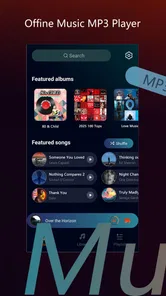
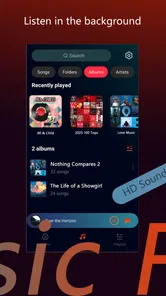
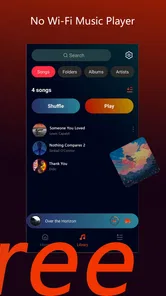
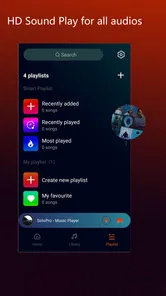
Analysis by Reviewed
I approached SoloPro - Offline Player as the kind of entertainment app people open when they want a straightforward way to enjoy something on a phone without turning the experience into a complicated project. Its simple store identity is appealing, but the real test is what happens after installation: whether setup feels clear, whether playback remains dependable, and whether the app fits naturally into an everyday routine. My experience is that it can be useful for focused, offline listening or viewing, but it rewards a little preparation rather than completely hands-off use.
Developed by TingCoco Player, SoloPro sits in the entertainment category and is available free of charge. It is aimed at Everyone, so it is broadly accessible for households and casual users. The current release is version 1.3.4, and it supports devices running Android 8.0 or later. Those requirements make it practical for many older phones, although the experience will still depend on the device’s available storage, file organization and general performance.
Getting past the first setup hurdles
The first place I would expect users to get stuck is not the basic installation itself, but the transition from installing the app to actually having something ready to play. An offline player is only as convenient as the material it can find and open. If your files are scattered across several folders, stored on removable media, or named inconsistently, the first session can feel less immediate than the short description suggests.
My advice is to prepare one clearly named folder before exploring every option in the app. Keeping the files you want to test together makes it easier to tell whether a problem comes from SoloPro or from the way the phone stores the content. It also creates a repeatable starting point if you later need to refresh the library, reopen a file or move the same collection to another device.
There is another small but important habit: test with one ordinary file first. Do not begin by importing an entire collection and then trying to diagnose a problem from dozens of possible causes. A single known-good file gives you a baseline for opening, pausing, seeking and returning to the app. Once that works, add more content gradually. This is less exciting than immediately filling the player, but it saves time when something fails.
Because the app is free, it is easy to install it on an older spare phone and expect it to behave exactly like a newer device. The minimum operating-system requirement is Android 8.0, but meeting that requirement does not guarantee identical results. Older hardware may have slower storage, less free space or more aggressive background-management settings. If the app opens slowly or a large collection takes time to appear, I would check the phone itself before assuming the player is broken.
SoloPro has a 4.8 average from around 11 thousand ratings, with more than 400 written reviews, and it has passed one million installs. That level of adoption suggests that many people find the basic experience worthwhile. Still, a strong average should not be treated as a promise that every file, phone and personal workflow will behave the same way. Offline playback is especially sensitive to local conditions that a rating cannot show.
More From Our News Desk

 Gmail
GmailGmail in a Busy Inbox: Who Benefits Most?
From first account to crowded workday, Gmail earns its place through dependable search and flexible sorting—but its best fit depends on how much inbox maintenance you can tolerate.

 Prime Video
Switching to Prime Video: What Changes in Your Viewing Routine
Prime Video can make a compelling second home for streaming, but switching means learning a different catalog, rental layer, and route from browsing to playback.

 Universal TV Remote Control
Universal TV Remote Control Works Best as a Reliable Backup
A phone remote earns its place through quick setup and reliable habits. Here is how to get more from Universal TV Remote Control—and where its limits show.

 Weather - By Xiaomi
Weather by Xiaomi Review: Clear at a Glance, Less Clear Up Close
Xiaomi’s weather app makes everyday forecasts quick to scan, but its calm surface can leave useful details and recovery paths harder to find than they should be.

 X
XX Under Pressure: Can It Recover When Posting Goes Wrong?
A resilience-focused review of X, examining setup, mistaken posts, interruptions, weak connections, and the gaps that matter when recovery needs to be dependable.

 Clash of Clans
Clash of Clans Is Won Between the Battles
Its raids are quick; its community is a long-term project of coordination, teaching, rivalry, and shared responsibility—with all the friction that entails.
Latest News



Simple checks that prevent confusing failures
Before troubleshooting anything complicated, I would check four practical details. First, confirm that the file is actually stored on the phone or an accessible card rather than appearing in a cloud folder that is not available offline. Second, check that the file has finished copying; a partially transferred item can look normal in a file list while failing when opened. Third, make sure the device has enough free storage for normal temporary operations. Finally, close other demanding apps if the phone is older or already running slowly.
File names can also create unnecessary confusion. A short, readable name makes it easier to identify the correct item and notice whether the app is displaying an old copy. I prefer avoiding long strings of symbols and keeping related files in separate folders. This is not a special SoloPro feature; it is a practical way to reduce mistakes when an offline library grows.
If the app does not immediately show newly added content, I would avoid repeatedly reinstalling it. First close and reopen it, then check the folder location and confirm that the file is visible through the phone’s own file manager. A refresh or rescan, where available in the normal interface, is a more sensible next step than deleting everything. Reinstallation should be a last resort because it can remove local settings or force you to rebuild a carefully arranged collection.
One useful test is to open the same file from the player and from the phone’s file browser, if that route is offered by the device. If the file fails in both places, the problem is probably the file or its transfer. If it opens elsewhere but not in SoloPro, then the player’s handling of that particular format may be the issue. That distinction prevents a lot of blind trial and error.
Recovering a routine after playback goes wrong
When playback stops unexpectedly, I would begin with the smallest possible recovery step: return to the file list and open the item again. If that does not help, fully close the app and relaunch it. Then try a different file from the same folder. The result tells you more than immediately changing several settings at once. One failed item points toward the content; every item failing points toward the app, the device or the file location.
For a file that repeatedly stops at the same point, make a fresh local copy and test that copy. A damaged transfer can preserve enough information to open successfully while still failing later. If the new copy behaves differently, the original transfer was likely the real source of the trouble. I would also avoid testing from a nearly full memory card or a connection that may disconnect during access.
A practical recovery workflow is to keep a small “test” folder containing one short, reliable file. After an update, a device cleanup or a change in storage, use that file first. If it plays normally, move on to the larger collection. This turns troubleshooting into a quick comparison instead of a vague feeling that the whole app has become unreliable.
Version 1.3.4 is the current version, so keeping the installation current is sensible when an update is available through the normal app store. At the same time, an update can change how an app behaves with an existing library. I would note the folder locations and remember which sample file worked before updating. That simple record gives you something concrete to compare afterward.
In-app purchases range from $2.99 to $19.99 per item. Since the app itself is free, I would treat any optional purchase as a separate decision rather than assuming it is necessary for basic testing. Use the free installation to establish whether the player fits your device and routine first. If you later consider spending money, do so because a specific extra is useful to you, not merely because playback needs troubleshooting.
Recognizing when SoloPro is not responsible
It is tempting to blame the player whenever a video or audio file refuses to cooperate, but local media problems are often caused earlier in the chain. A corrupted download, an incomplete transfer, an unsupported encoding or a storage card beginning to fail can all produce symptoms that look like an app crash. Testing a second file is the fastest way I know to separate those possibilities.
The phone’s power-saving behavior can also interfere with a long session. If playback pauses after the screen has been inactive or the app has been left in the background, check the device’s battery-management settings. I would not change several system options at once; adjust only the setting relevant to the test, then observe whether the behavior changes. If the issue disappears, the operating system was part of the explanation.
Storage deserves special attention. An almost-full phone may still display files and launch applications, yet behave unpredictably when an app needs room for ordinary temporary work. Removing unneeded downloads and leaving sensible free space can improve the whole device, not just SoloPro. Likewise, if files are on a removable card, test one item stored internally. A difference between internal and removable storage is valuable evidence.
Network troubleshooting is usually less relevant to the actual offline moment, but it can matter during preparation. If content was downloaded through another service, verify that the download completed while connected. An item that is only partially available may appear in a folder without being ready for reliable offline use. SoloPro cannot repair a file that never arrived intact.
Privacy-conscious users may also want to review the phone’s normal app settings before settling into a routine. I prefer checking what the operating system shows about storage access and notifications, then granting only what is needed for the intended workflow. If a permission prompt appears, read it rather than tapping through automatically. This is good practice with any entertainment app, especially when using personal files.
How it compares with familiar alternatives
The main alternative is often the media player already installed on the phone. That option wins when you want the fewest installations and your files are already recognized correctly. It may also integrate more naturally with the device’s file browser. SoloPro becomes more interesting when you want a dedicated offline-player workflow rather than relying on whatever app happens to open a file by default.
Streaming services are a different comparison. They are better for discovering new content, maintaining large online catalogs and switching between devices without manually organizing files. Their weakness is dependence on accounts, connectivity or download rules. SoloPro’s appeal is the opposite: it is centered on content you already have locally. If your priority is discovery, recommendations and synchronized libraries, a streaming service is likely the better fit. If your priority is control over a personal offline collection, a local player makes more sense.
More advanced media players may be preferable for users who need extensive format controls, detailed subtitle handling, network-library support or highly technical playback adjustments. I would choose one of those tools for a mixed, complicated archive where fine-grained compatibility matters more than simplicity. SoloPro is easier to justify for someone who wants a focused entertainment tool and does not want to manage a long list of specialist settings.
There is also a trade-off with file-management apps. A file manager can locate, rename and move content, but it is not always the most comfortable place for repeated viewing or listening. I find the best workflow is to use the file manager for preparation and SoloPro for playback, keeping each tool responsible for the job it handles best. That separation makes it easier to diagnose whether a problem is organizational or related to playback.
Who will get the most from it
I think SoloPro is a good match for someone who keeps a modest offline collection on an Android phone and wants a free, direct way to open it. It can also suit travelers, commuters or people who spend time in places where a reliable connection is not guaranteed. The key is that the user must be comfortable doing a little file preparation. This is not a magic library that removes every organizational task.
A realistic everyday example would be preparing a few files at home, placing them in one folder, checking one sample before leaving, and then using the app during a commute. If one item fails, the user still has the tested sample and can identify whether the issue is isolated. That small preparation step is more valuable than carrying a large untested collection and discovering a problem when there is no connection available to fix it.
I would be less enthusiastic for someone who expects automatic cataloging across several devices, online recommendations or a service that supplies content by itself. It is also not my first choice for a technically demanding archive where every unusual format must work perfectly. In those situations, a more specialized player or a streaming platform may save time, even if it offers less control over local files.
Families should appreciate the Everyone age rating, but that label does not replace sensible supervision of the files placed on a shared phone. The app can be broadly accessible while the locally stored content remains the responsibility of the device owner. I would organize shared folders clearly and avoid mixing personal and family material if several people use the same installation.
My practical verdict after using the workflow
My overall impression is positive, with one important qualification: SoloPro is most convincing when treated as a dependable part of a prepared offline routine, not as a solution to every media problem. Its free entry point, broad device compatibility and strong user response make it easy to try. The developer, TingCoco Player, has positioned it as a simple entertainment option, and that simplicity is its strongest reason to exist.
The app is not the right choice if you dislike managing local files, need a cloud-synchronized collection or expect advanced controls for every unusual format. In those cases, the usual built-in player, a streaming service or a specialist media tool may be more appropriate. Choosing the alternative is not a failure of SoloPro; it simply reflects a different priority.
For everyone else, I recommend starting with one known-good local file, a clearly organized folder and a short playback test. Keep the app updated, separate content problems from device problems, and avoid reinstalling before checking storage and file integrity. The most useful SoloPro habit is simple: test the workflow before you depend on it offline.
After that initial check, the app becomes pleasantly uncomplicated. I would install SoloPro - Offline Player for personal offline entertainment, especially on a compatible Android device where I want a dedicated player without an upfront charge. Just remember that its success depends as much on clean files and sensible phone storage as it does on the app itself.
SoloPro - Offline Player Frequently Asked Questions
Who develops SoloPro - Offline Player, and is it suitable for all ages?
SoloPro - Offline Player is an entertainment app from TingCoco Player, and its content rating is Everyone. That rating makes it suitable for a broad audience, though parents can still review the app’s permissions and features before a child uses it. The app is free to download, with in-app purchases available for users who want to explore paid options.
What is SoloPro - Offline Player?
SoloPro - Offline Player is designed for listening to music and other supported audio files without relying on a constant internet connection. After importing or downloading compatible content to your device, you can play it offline, which makes the app useful during travel, in areas with weak coverage, or when you want to reduce mobile data usage. Its usefulness depends on the audio formats and library-management options supported by the current version.
Can I use SoloPro - Offline Player without an internet connection?
Yes, offline playback is the main reason many users choose an application like SoloPro. Once your audio files are available locally on the phone, you should be able to listen without Wi-Fi or mobile data. Internet access may still be required for the initial download, importing content from an online source, checking updates, or using any cloud-based feature. It is best to prepare your library before going offline.
Which audio files are compatible with SoloPro - Offline Player?
Compatibility can vary according to the app version and the operating system, so users should check the supported-format information on the official download page. Common formats such as MP3 may work, while less common files, protected tracks, or files with unusual codecs may not play correctly. If a particular album is important, test a few files first rather than transferring your entire collection immediately.
Does SoloPro - Offline Player support playlists and background playback?
The app is intended to provide a convenient local listening experience, but the exact organization tools can differ between releases. Depending on the version, you may find options such as playlists, queue management, repeat, shuffle, lock-screen controls, or background playback. Before downloading, review the current feature list and permissions, especially if you need advanced library sorting or uninterrupted playback while using other apps.
Pros
- Plays downloaded music without an internet connection.
- Supports background playback while using other apps.
- Simple interface makes browsing local files straightforward.
- Uses minimal mobile data since playback is offline.
- Useful for keeping music available during travel or poor reception.
Cons
- Requires users to manage and transfer their own music files.
- May lack streaming-service catalogs and discovery features.
- Compatibility can vary with uncommon audio file formats.
- Offline playback offers fewer social and recommendation tools.
- Battery use may increase during extended background listening.











