

SNIPES - Shoes & Streetwear
- 393.00
- 4.8
- Installs
- 100.00K
- Price
- Free

Screenshots
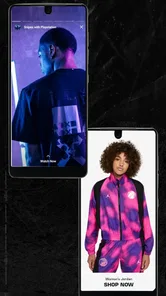
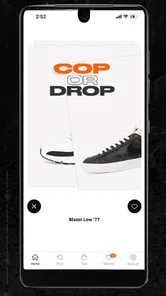
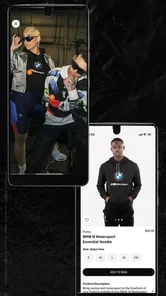
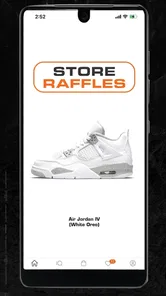
Analysis by Reviewed
Shopping for sneakers on a phone sounds simple until the experience becomes more complicated than choosing a pair. A product may be difficult to find, a size decision may need more thought than expected, or the app may appear unresponsive when the real problem is a weak connection or an outdated installation. I spent time with SNIPES - Shoes & Streetwear as a shopping app, paying particular attention to those moments where a normal browsing session can lose momentum.
My overall impression is that it is most useful for people who already know the kind of footwear or streetwear they want and prefer checking a specialist retailer from their phone. It is free to install, aimed at Everyone, and comes from Snipes USA. The app has been around since September 2015, so it is not a new experiment in mobile shopping. Its current version is 2025.AW-1.1.1, and it works on Android 8.0 or later.
Getting from browsing to a confident purchase
I use this section to focus on the moment when browsing turns into a real buying decision: checking whether a style fits my needs, reviewing the details that matter, and resisting the urge to choose from an image alone. A short checklist before I commit can make a focused sneaker search feel much more deliberate.
Where the first friction usually appears
The first challenge is not necessarily finding something attractive. A sneaker-focused catalog can be visually busy, especially when footwear, clothing, and accessories sit close together. I found it helpful to begin with a clear purpose: looking for a particular model, comparing styles for everyday wear, or building an outfit around one item. Opening the app without that intention can turn a quick check into a long scroll through possibilities.
Search is naturally the fastest route when I know what I want, but browsing is better when I am still exploring. I treat those as separate tasks rather than expecting one method to do everything. For a known product, I use distinctive words instead of a broad term such as “shoes.” For discovery, I narrow my attention by product type and then compare the details that matter to me, including color, silhouette, and whether the item fits a casual or more active wardrobe.
A common mistake is judging a product from the first image alone. On a small screen, color and material can be hard to assess, while a side view may show a shape that is not obvious in the main image. I slow down before making a decision and read the available product information instead of treating the catalog image as the complete description. This is particularly important when two similar-looking sneakers differ in construction or intended use.
The app is strongest when it shortens the distance between a specific idea and a specialist catalog. It is less satisfying if I want a broad marketplace comparison across many unrelated retailers. A general shopping app may offer more sellers and a wider price landscape, while SNIPES is more focused on sneakers and streetwear. That focus is useful, but it also defines the app’s limits.
More From Our News Desk

 Instagram
Instagram’s Power Comes From Its Place in Your Phone
A close look at how Instagram turns Meta’s reach, recommendation systems and everyday camera habits into durable platform power—and what that costs users.

 Gmail
GmailGmail in a Busy Inbox: Who Benefits Most?
From first account to crowded workday, Gmail earns its place through dependable search and flexible sorting—but its best fit depends on how much inbox maintenance you can tolerate.

 Prime Video
Switching to Prime Video: What Changes in Your Viewing Routine
Prime Video can make a compelling second home for streaming, but switching means learning a different catalog, rental layer, and route from browsing to playback.

 Universal TV Remote Control
Universal TV Remote Control Works Best as a Reliable Backup
A phone remote earns its place through quick setup and reliable habits. Here is how to get more from Universal TV Remote Control—and where its limits show.

 Weather - By Xiaomi
Weather by Xiaomi Review: Clear at a Glance, Less Clear Up Close
Xiaomi’s weather app makes everyday forecasts quick to scan, but its calm surface can leave useful details and recovery paths harder to find than they should be.

 X
XX Under Pressure: Can It Recover When Posting Goes Wrong?
A resilience-focused review of X, examining setup, mistaken posts, interruptions, weak connections, and the gaps that matter when recovery needs to be dependable.
Latest News



Setup checks that prevent avoidable problems
Before blaming the app for a stalled session, I check the basics. I make sure the phone is running a supported Android release, confirm that the installation is current, and reopen the app after a system or store update. These steps sound ordinary, but shopping apps can behave differently after an update, particularly when a page was left open during the change.
I also check whether the problem affects one screen or the whole app. If the catalog opens but a product page does not, I treat that differently from an app that cannot open at all. A single page may be a temporary loading issue, while a complete failure points more toward the device, connection, or installation. Closing and reopening the app is a sensible first move before making more disruptive changes.
Connection quality matters more than many users expect. A weak signal can make images appear late, leave a page looking empty, or interrupt a transition without giving a clear explanation. I test another ordinary webpage or app on the same connection. If everything is slow, switching between Wi-Fi and mobile data is a more useful check than repeatedly tapping the same button in SNIPES.
On Android, I avoid clearing storage casually. Clearing temporary cache can be a reasonable troubleshooting step, but clearing app data may remove local session information and force me to start again. I use that option only after closing the app, checking the connection, and confirming that the issue is not limited to one product page. The goal is to recover the shopping flow without creating a second problem.
Because the app supports Android 8.0 and later, an older compatible phone may still run it while feeling less comfortable for image-heavy browsing. That does not automatically mean the app is broken. Limited memory, a crowded device, or aggressive battery management can cause reloads and delays. I leave enough free space for normal phone operation and avoid testing the app while many demanding apps are running.
A practical workflow when a session goes wrong
My preferred recovery routine is simple. First, I note what I was doing: opening the catalog, searching, viewing a product, or moving toward checkout. Then I close the app completely and reopen it. If the same action fails, I test a different product or section. This tells me whether the issue follows the entire app or only one item.
If a search produces an unexpected result, I try a more specific phrase and then a broader one. This is not just a technical workaround; it helps separate a search-term problem from a loading problem. A broad query that works while a detailed query does not may indicate that the wording needs adjustment. I also avoid entering a long sentence as a search request. Short product terms are easier to revise and compare.
When a product page loads inconsistently, I return to the catalog and open it again rather than repeatedly refreshing the same screen. If the item still behaves strangely while other products work normally, I continue browsing and revisit it later. That approach is less frustrating than assuming every failed tap means the product or account is permanently unavailable.
I also keep a written note of the details that matter before restarting: the product name, selected size, color, and any questions I still need to answer. A restart should not erase my decision-making process. This small habit is especially useful when I am comparing several similar sneakers and do not want to rely on memory.
For sign-in or account-related trouble, I first verify that I am using the intended account details and that the keyboard has not inserted an accidental space. I do not repeatedly submit the same form when the app is visibly struggling to load. Waiting briefly, reopening the app, and checking the connection are safer than creating multiple confusing attempts.
When the app is not the cause
Not every disappointing shopping result is caused by the interface. A size that is unavailable, a product that changes status, or a purchase step that does not proceed may relate to live catalog conditions rather than a fault on the phone. I separate technical symptoms from stock and selection issues. If the rest of the app works normally, I do not treat one unavailable choice as proof that the whole service has failed.
My own device settings can also influence the experience. Battery-saving modes may limit background activity, while a nearly full phone can make image browsing feel sluggish. A poor connection can affect product images without affecting text, which makes the page look incomplete even though it is still loading. Testing the app under a stable connection and after closing unnecessary apps gives a clearer answer.
There is also a human factor: I may be searching with the wrong expectation. SNIPES is designed around sneakers and streetwear, not as a universal store for every type of merchandise. If I need household goods, formal office clothing, or a marketplace with many independent sellers, I am asking the wrong tool to solve the problem. A broader retailer will be more efficient in those cases.
Likewise, people who need extensive comparison across competing stores may prefer a price-comparison service or several retailer apps. SNIPES gives me a focused place to browse its own offering, but that focus means I should not expect a complete view of every alternative available elsewhere. I compare externally when the purchase is expensive, the fit is uncertain, or the same style is sold by multiple retailers.
Who will get the most from it
I would recommend the app to someone who regularly wears sneakers, follows streetwear, or wants a mobile-first way to browse a specialist selection. It is also useful for a shopper who prefers to research at home before deciding whether to continue with a purchase. The free price makes trying it low-risk, and the Everyone age rating keeps the basic audience broad.
A realistic everyday use case is checking footwear before leaving for work or school. I might open the app during a commute, search for a familiar style, inspect the available options, and save the details I need for a later decision. If the connection is unreliable, I would avoid making that the only moment for careful comparison. A stable connection and a few uninterrupted minutes make the experience much better than hurried tapping between stations or busy locations.
It can also help when I am building an outfit rather than shopping for one isolated item. I look at sneakers first, then consider whether the available streetwear suits the same look. That approach makes the app feel more like a focused style catalog than a simple product search. The trade-off is that I still need to be disciplined: attractive images can encourage impulse browsing, so I decide my budget and purpose before I begin.
I would tell a user with very specific fit requirements to be more cautious. The app can help with discovery, but no phone screen replaces knowing how a particular brand or shape fits my feet. If I have had problems with sizing before, I check the product information carefully and compare it with my own experience of similar footwear. For a first-time buyer who needs extensive fitting guidance, an in-person store or a retailer with particularly detailed fit support may be the better choice.
What the numbers suggest, without replacing experience
The app has an average rating of 4.8 from around 2.3 thousand ratings, with roughly 393 written reviews and more than 100 thousand installs. Those figures suggest that many people find it worthwhile, but I would not use them as a substitute for checking whether the app suits my shopping habits. Ratings often reflect the full experience, including product selection and ordering expectations, not just the quality of the mobile interface.
I also pay attention to the developer shown for the app: Snipes USA. That context matters because I am dealing with a retailer-specific shopping experience rather than an independent catalog that aggregates many brands and sellers. The benefit is a clearer identity and a more focused purpose. The limitation is that my comparison options inside the app are naturally narrower than they would be in a general marketplace.
Small habits that make browsing more useful
I begin with a short list of requirements: preferred type of sneaker, acceptable colors, intended use, and the size I normally wear. This prevents the visual catalog from making the decision for me. I then inspect only the products that meet those basic conditions before considering style details. It is a simple way to turn casual scrolling into a repeatable shopping process.
When comparing two items, I write down the difference that actually matters. One may suit daily walking, while another may fit a particular outfit better. If I cannot explain why I prefer one after checking the product information, I wait rather than buying immediately. This is a useful safeguard against choosing based only on the first appealing photograph.
I also treat a failed load as a reason to pause, not to tap faster. Rapid repeated taps can make it difficult to know which action the app has received. I wait for the page to respond, check whether the connection is stable, and then try one deliberate action. That habit improves the experience on any phone, but it is especially helpful when browsing image-rich retail pages.
For users who switch between devices, I keep expectations realistic. A session may not feel identical on every phone because screen size, memory, and system behavior affect browsing comfort. I test the app on the device I actually plan to use for shopping, not only on a newer phone belonging to someone else. This gives me a more honest sense of how quickly I can inspect products and move through the catalog.
My practical verdict
After using it as a focused shopping tool, I see SNIPES - Shoes & Streetwear as a good fit for sneaker and streetwear shoppers who value a dedicated catalog over a huge general marketplace. I like the clear retail purpose, the low barrier of a free installation, and the convenience of researching styles from a phone. The experience is most rewarding when I arrive with a goal and use the app to narrow choices rather than wander without a plan.
Its weaknesses are mostly about expectations and context. It is not the right choice for someone seeking every retailer in one place, extensive cross-store price comparison, or guaranteed fit guidance for an unfamiliar style. Some apparent failures may also come from connection quality, device limits, or catalog conditions rather than the app itself. Knowing that distinction helps me troubleshoot sensibly and avoid abandoning a useful shopping session too quickly.
My recommendation is straightforward: install it if sneakers and streetwear are already part of your shopping routine, then test it with a specific search and a stable connection. Keep your size and style requirements in mind, inspect product information carefully, and compare elsewhere when the purchase calls for broader research. Used that way, SNIPES - Shoes & Streetwear is a practical specialist app rather than a replacement for every kind of online shopping.
SNIPES - Shoes & Streetwear Frequently Asked Questions
Is the SNIPES - Shoes & Streetwear app free to download?
Yes, SNIPES is free to download and is a shopping app for browsing sneakers and apparel. The app itself does not have a download price, though purchases made through it are separate. It is rated for Everyone, so its age rating is suitable for a broad audience. Before installing, make sure you are using the official app store listing for your device.
What devices and operating systems can run the SNIPES app?
The SNIPES app is available for Android and iOS, with the Android version requiring Android 8.0 or later. Check your device’s operating system before downloading so you can confirm compatibility. The app is developed by Snipes USA and is intended for mobile shopping, making it a convenient way to browse sneakers and apparel from a phone.
What can I buy in the SNIPES - Shoes & Streetwear app?
The SNIPES app focuses on sneakers, streetwear clothing, sportswear, accessories, and selected lifestyle products from popular brands. During our review, the catalog was organized by categories, brands, sizes, and product types, making it easier to browse current releases and everyday essentials. Availability, colors, and sizes can vary depending on your country and stock levels.
Is the SNIPES app available for both Android and iPhone?
SNIPES - Shoes & Streetwear is designed for mobile shopping and is generally available through the official app stores for Android and iOS, although availability may differ by region. Before downloading, check that your device meets the store requirements and that the app is offered in your country. Using the official Google Play or Apple App Store listing is the safest option.
Can I order sneakers and clothing directly through the SNIPES app?
Yes, the app is intended to let users browse products, select available sizes or variants, add items to a shopping bag, and complete an order through the supported checkout process. You may need to create or sign in to a SNIPES account, enter delivery information, and choose an available payment method. Shipping options and order conditions depend on your location.
Pros
- Exclusive sneaker drops and limited-edition streetwear releases
- Loyalty rewards can provide discounts and member-only benefits
- Store locator helps find nearby SNIPES shops and pickup options
- Product images and size details make browsing straightforward
- Supports multiple payment methods for convenient checkout
Cons
- Popular sizes and limited releases can sell out very quickly
- Prices may be high for premium sneakers and branded apparel
- Some items may only be available in selected countries
- App performance can vary on older phones or slower connections
- Returns and exchanges may require checking regional store policies











