Smashburger - Burgers & Shakes
- 1.59K
- 4.6
- Installs
- 500.00K
- Price
- Free

Screenshots
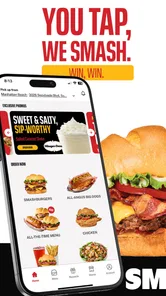
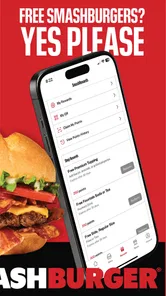
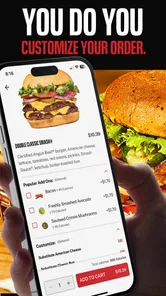
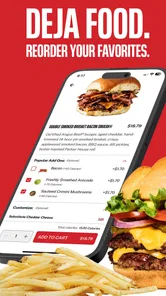
Analysis by Reviewed
When I want Smashburger without turning dinner into a long decision, I treat the app as an ordering tool first and a menu to browse second. Smashburger - Burgers & Shakes is a free Food & Drink app from Smashburger/JFC, and its focus is simple: help me choose a burger, add sides or a shake, and place an order. That narrow purpose is useful, though it also means the experience makes the most sense when Smashburger is already what I’m craving.
A reliable order starts with the basics
My best approach is to decide whether I’m ordering for myself or a group before opening the menu. For a solo meal, I can focus on the burger and one add-on; for a shared order, I take a moment to review each person’s choices before moving on. That small habit helps avoid the familiar delivery mistake of mixing up similar-looking meals or forgetting a side. I also check the selected restaurant and ordering option before settling in, especially when I’m away from home.
The app is most helpful when I have a clear destination in mind: pickup when I’m passing a restaurant, or delivery when I’d rather stay put. It is less useful as a general food-discovery app, since its menu is built around one restaurant rather than comparing nearby cuisines. If I’m undecided about what kind of dinner I want, a broader restaurant app gives me more variety; if I already want a Smashburger, the focused menu saves me from scrolling through unrelated choices.
Small habits that make ordering smoother
I’d check any available account, offer, or ordering preferences before placing a regular order, rather than assume a deal will apply automatically. The app is free to install, but that doesn’t make every meal free, and an offer should be reviewed in the order flow before I count on it. For a repeat order, I also read the basket from top to bottom: burger modifications, sides, drinks, and the final order details. It’s a quick double-check that matters more when several people are eating.
One useful trade-off is customization. Being able to shape a burger around what I want is a plus, but changes can make it harder to remember what I chose last time. I’d use a consistent order for a familiar lunch and experiment when I have time to review every selection. If I have a dietary requirement or a strong allergy concern, I wouldn’t treat a menu choice as a guarantee; I’d verify the ingredients and preparation details with the restaurant before ordering.
The Delicious World of Smashburger
Opening up the Smashburger - Burgers & Shakes app is like stepping into a virtual burger joint. The interface is clean, straightforward, and super easy to navigate, which is great when you're hangry and just need to get that order in. Right off the bat, I was impressed with how the app showcases their mouth-watering menu. From their classic Smashburgers to the savory Spicy Jalapeño Baja, it’s all laid out with tantalizing images that make you want to order one of everything.
Features That Keep You Coming Back
One of the standout features of the app is the seamless ordering process. You can customize your burger just the way you like it. Want extra cheese or maybe swap out the bun for a lettuce wrap? No problem! The app makes it super easy to tweak your order, so you get exactly what you're craving. Plus, if you're a fan of saving, the app offers exclusive deals and rewards. Every order gets you closer to earning free food, which is a huge bonus in my book.
More From Our News Desk

Weather by Xiaomi Review: Clear at a Glance, Less Clear Up Close

X Under Pressure: Can It Recover When Posting Goes Wrong?

Clash of Clans Is Won Between the Battles

Android Auto Makes the Case for Quieter Car Software

MobiOffice: Transforming Mobile Productivity with Seamless Integration

EA SPORTS FC™ Mobile Soccer: Redefining Mobile Sports Gaming
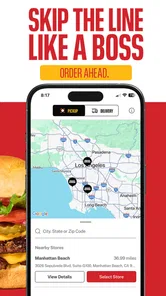
Another neat feature is the location finder. Whether you’re traveling or just exploring your local area, the app helps you locate the nearest Smashburger. This is perfect for those spontaneous burger cravings when you're out and about.
Shake It Up with Side Options
Of course, I couldn't forget to mention the shakes. The app makes it easy to add one of their thick, creamy shakes to your order. Whether you're a fan of the classic Vanilla or want to try something adventurous like the Salted Caramel, the options are all there. The app even suggests pairings with your burger choice, which I thought was a fun touch.
A realistic use for me is a late workday when I’m heading home and want pickup ready rather than stopping to browse in person. I can check the location, make my selections, then review the order before committing. For a family meal, I’d build the basket slowly and confirm each customization with the person who asked for it. The menu presentation helps make choices, but the photos are inspiration, not a substitute for checking the actual selections and order details.
Worthwhile for a Smashburger regular?
The app suits people who order from Smashburger often enough to appreciate having the menu and ordering in one place, and it can be handy for someone who wants to locate a nearby restaurant while out. It may not be the right pick for someone seeking the widest local selection, comparing lots of restaurants, or looking for a meal outside Smashburger’s menu. In those situations, a general delivery service or the restaurant’s in-person menu is a better fit.
Smashburger - Burgers & Shakes has an average rating of 4.6 from around 4.9 thousand ratings, with about 1.5 thousand written reviews and over 500 thousand installs. It is rated for Everyone, first released in March 2017, and its current version is 27.18.0 for devices running Android 9 or later. Those details give a sense of an established ordering app, but the practical question is whether its restaurant is available where you are and whether its menu suits your meal.
Final Thoughts
Overall, the Smashburger - Burgers & Shakes app is a must-have for any burger enthusiast. It's user-friendly, offers great deals, and makes getting your burger and shake fix a breeze. Whether you’re ordering for pickup, delivery, or just browsing the menu, it’s an enjoyable experience from start to finish. So, if you haven’t already, give it a download and let the burger cravings commence!
I’d recommend it most to someone who already likes Smashburger and wants a direct route from craving to order, with a quick menu check before paying. I’d skip it if I mainly need restaurant comparisons or dependable options for dietary restrictions without confirming details first. Used with a simple routine—choose the location, customize carefully, check the basket, then place the order—it can make a familiar meal easier without pretending to replace broader food apps.
Make the app fit the moment
The most useful way to approach this app is to match the order method to the actual situation instead of assuming delivery is always the point. If I’m already near a restaurant, pickup can make more sense than browsing delivery choices from the sofa. If I’m at home and don’t want to leave, delivery is the more convenient path, provided the restaurant serves my area. Checking the location and available option early saves time: there’s little value in carefully building a basket before discovering that the selected restaurant isn’t the one I need.
For a group, I’d use a simple handoff routine: ask everyone to settle on their main item first, then collect the sides and drinks, and only then review the basket together. That keeps the order from becoming a stream of last-minute changes. It also makes customization easier to verify, since the person who requested a change can confirm it before checkout. For a solo order, the opposite works well: decide on a familiar burger and use the menu to consider just one new side or shake, rather than turning a quick lunch into an open-ended browse.
Check the details before you rely on them
Offers and rewards can be appealing, but I would treat them as a bonus to verify rather than the reason to choose a meal. Before placing an order, I’d look at the final basket and check whether any offer I intended to use is reflected there. If it isn’t clear, I wouldn’t assume it will be applied later. That habit is especially useful when ordering for a group, where a deal may affect only part of the basket or depend on the choices made. The practical test is the total and order summary shown before committing, not the excitement of spotting a promotion while browsing.
I’d also separate menu exploration from a time-sensitive order. When I have a few minutes, browsing the burgers, sides, and shakes is a pleasant way to decide what sounds good. When I’m hungry and in a hurry, I’d use a repeatable order and resist changing several things at once. That approach reduces the chance of overlooking a selection, and it gives me a fair comparison if I’m trying a different combination. The app’s visual menu can inspire an order, but the names and selected options in the basket are what I’d use to confirm what I’m actually requesting.
Where a single-restaurant app helps—and where it doesn’t
Compared with a broad delivery service, this app has a narrower job. I’d choose the Smashburger app when the restaurant is already my preference and I want to work directly with its menu and ordering flow. A general delivery app is more useful when I’m choosing between several cuisines, trying to compare nearby restaurants, or need a backup because one location is unavailable. Those alternatives offer breadth; this focused app is better suited to making a decision within one restaurant’s menu.
There’s also a difference between ordering convenience and certainty about a meal. Customization gives me more control over a burger, but it doesn’t replace checking ingredients or asking the restaurant about a serious allergy concern. Likewise, a menu photo can help me choose, but I wouldn’t use it to judge exact portion size or assume every location has the same availability. If a specific ingredient or preparation detail determines whether I can eat the meal, I’d contact the restaurant rather than treating the app as an ingredient guarantee.
Who gets the most from it
I’d point this app toward a Smashburger regular, someone who already knows what they like, or a customer who wants to browse the restaurant’s choices before deciding between pickup and delivery. It can also be useful for a household that orders from the same place repeatedly: a consistent basket-checking habit makes it easier to catch a missed side or an unwanted modification. Its free download lowers the barrier to trying it, while the app’s Everyone content rating makes it suitable for a general audience; the food order itself, of course, still depends on the customer’s preferences and circumstances.
I’d be less enthusiastic about recommending it to someone whose main goal is comparing restaurants, finding the broadest set of local meals, or making a choice based on detailed dietary assurances. In those cases, a broader service or a direct conversation with the restaurant is a better tool. It also may not save much effort for someone who only wants Smashburger occasionally and is already comfortable ordering another way. The value comes from having a familiar menu and order process close at hand, not from replacing every way of finding food.
A sensible routine beats rushing
My repeatable routine would be to confirm the restaurant, select pickup or delivery, build the order, and then check every line in the basket before placing it. For a burger, I’d pay particular attention to any changes I made; for a shared meal, I’d match each item to the person who requested it and make sure the sides and drinks are present. If I’m using an offer, I’d confirm it in the final order details instead of assuming it worked. These steps are simple, but they address the most likely sources of avoidable frustration without relying on shortcuts the app may not provide.
That routine also gives me a better way to judge whether the app suits my habits. If I regularly order the same meal, the app’s focused menu and ordering path may feel efficient. If I enjoy comparing a dozen nearby places before choosing, its single-restaurant scope will feel restrictive. And if a particular location or ordering option isn’t available when I need it, I’d switch to another way of ordering rather than spending time rebuilding the same plan. Convenience is real here, but it depends on the restaurant, the menu choice, and the moment.
My verdict after weighing the trade-offs
For me, this is best understood as a practical companion to a restaurant I already want, rather than a universal answer to “what should I eat?” Its strengths are the direct menu, burger customization, location help, and a path to arrange an order without sorting through unrelated restaurants. The trade-offs are just as clear: the selection is limited to Smashburger, and careful review still matters when changing items, ordering for other people, or relying on a deal. Using it thoughtfully makes the experience more dependable than tapping through in a rush.
If you’re curious, I’d try it when you already have a Smashburger meal in mind and check whether your nearby restaurant and preferred ordering option fit your plans. Keep the first order straightforward, review the basket, and decide afterward whether the app is convenient enough to become part of your routine. That’s the kind of modest, practical value I think it offers: not a reason to choose Smashburger every time, but a focused tool that can make choosing and arranging a familiar burger meal easier when it’s the right choice.
Smashburger - Burgers & Shakes Frequently Asked Questions
Is Smashburger - Burgers & Shakes free to download?
Yes, Smashburger - Burgers & Shakes is free to download. It is a Food & Drink app from Smashburger/JFC, designed for people who want to order Smashburger meals from their phone. The app focuses on burgers, fries, shakes, and other menu choices, giving you a convenient way to browse and place an order without paying to install it.
What should I know about the app before installing it?
Smashburger - Burgers & Shakes is intended for Everyone and is available on Android devices running version 9 or later, as well as on iOS. It has an average rating of 4.6 from around 4.9K ratings, with about 1.5K written reviews and over 500K installs. The current version is 27.18.0, and the app was released on March 20, 2017.
What features does the Smashburger - Burgers & Shakes app offer?
The Smashburger app offers a seamless experience for ordering your favorite burgers and shakes. Users can customize their orders, choose from various menu items, and select their preferred pickup or delivery options. The app also features exclusive promotions and rewards for loyal customers, making it a must-have for Smashburger enthusiasts.
How does the rewards system work in the Smashburger app?
The Smashburger app features a rewards system that allows users to earn points with each purchase. These points can be redeemed for discounts or free menu items. The app tracks your points automatically, so all you need to do is order through the app to benefit from these rewards. It's a great way to save money while enjoying your favorite meals.
Is the Smashburger app available for both Android and iOS devices?
Yes, the Smashburger - Burgers & Shakes app is available for both Android and iOS devices. You can download it from the Google Play Store for Android phones or from the Apple App Store for iPhones. The app is designed to provide a smooth user experience across both platforms, ensuring that all users can easily order their favorite Smashburger meals.
Pros
- User-friendly interface makes ordering a breeze.
- Customizable burger options for unique tastes.
- Quick delivery service
- often earlier than expected.
- Loyalty program offers free items and discounts.
- Easy navigation with clear menu categories.
Cons
- Limited delivery areas restrict availability.
- App occasionally crashes during peak hours.
- Longer wait times for customer support.
- No option to modify order once placed.
- In-app payment issues reported by some users.











