Slim Chickens
- 2.59K
- 4.6
- Installs
- 500.00K
- Price
- Free

Screenshots
Analysis by Reviewed
For a first visit, I’d keep the goal simple: use the Slim Chickens app to find a suitable restaurant, build an order, and see whether the process feels easier than your usual way of buying a meal. It is most useful when Slim Chickens is already what you want to eat; it is not a general guide to every restaurant nearby.
Before you install, consider your routine
This free Food & Drink app is made by Slim Chickens App, and it is rated for Everyone. It has a 4.8 average from around 12,000 ratings and more than 500,000 installs. Those figures point to a well-used restaurant app, but they cannot tell you whether a particular location, order, or visit will suit your plans.
I’d consider installing it if I visit the chain often enough to make saved convenience and rewards worthwhile. If I only want to try Slim Chickens once, I’d compare the effort of installing another app with simply ordering in person or using the options I already have. The app is free, so the main cost is not money but time spent setting it up and keeping it around.
Getting from install to a useful first order
After opening it, I’d first look for a restaurant that makes sense for the meal I’m planning. Then I’d choose pickup or delivery based on the situation, rather than filling a basket before deciding how I’ll receive it. This order of steps is a small but practical safeguard: it keeps the location and the plan connected while I choose food.
For a first order, I’d avoid treating every customization as an afterthought. Decide what you actually want, add any sides or sauces that matter, and take a moment to review the basket before confirming. That final check is especially worthwhile when ordering for more than one person, because it is easy to overlook a small preference while concentrating on the main items.
The app is on version 3.2 and first arrived on October 16, 2017. I would still judge it by how it works for my own location and routine rather than assuming an established app will make every step effortless. If something about the order or available option is unclear, pausing to check the choice is better than guessing and hoping it can be fixed later.
Make rewards a bonus, not the whole plan
The loyalty program gives regular customers a reason to check the app before ordering: purchases earn points that can be redeemed for food, and offers may appear from time to time. I’d look at the rewards area while deciding what to order, but I wouldn’t let a promotion dictate a meal I didn’t want. That keeps the benefit in perspective and makes it easier to compare an offer with my actual plans.
More From Our News Desk

Weather by Xiaomi Review: Clear at a Glance, Less Clear Up Close

X Under Pressure: Can It Recover When Posting Goes Wrong?

Clash of Clans Is Won Between the Battles

Android Auto Makes the Case for Quieter Car Software

MobiOffice: Transforming Mobile Productivity with Seamless Integration

EA SPORTS FC™ Mobile Soccer: Redefining Mobile Sports Gaming
For someone who visits occasionally, rewards may feel less meaningful than they do for a regular. I’d treat them as a gradual extra rather than assume a single order will make the app worthwhile. If I’m choosing between two ways to order, the clearest reason to use the app is that it helps me organize a Slim Chickens meal; any points or offer are a secondary advantage.
When this app is the better fit
It suits people who already know they want Slim Chickens and would benefit from arranging pickup or delivery in advance. It can also help when a family or group needs a little time to settle on a meal: one person can work through the choices, check the details, and avoid making the decision at the counter while everyone is waiting.
By contrast, a general delivery service is a better starting point if I am hungry but have not decided on a restaurant, want to compare several cuisines, or need a broader selection. Calling or ordering in person can also be more natural if I have a question that the app’s choices do not make clear. The focused experience is convenient when I know the destination, but it is not a substitute for restaurant discovery.
A low-pressure way to try it
I’d make the first attempt when I have enough time to review the menu and order details, not during a rushed moment when I’m already late or hungry. Choose a nearby location, set the order type, and check the basket before confirming. If that path feels straightforward, the app has already shown its main value; there’s no need to explore every feature in one sitting.
For a first-time user, the most reassuring expectation is modest: this is a restaurant-specific tool for arranging a Slim Chickens meal and keeping an eye on rewards, not a promise that every order will be faster or every option will suit every location. With that in mind, I’d give it a try if the chain is part of my regular routine and skip it if I only need a one-off way to find food.
Let's talk about Slim Chickens, an app that's been making waves among food enthusiasts and chicken lovers alike. If you're a fan of finger-lickin' chicken, then you're probably already familiar with this popular restaurant chain. But what about their app? Is it worth downloading? Well, I took it for a spin, and here's what I found out.
First Impressions
When I first launched the app, I was greeted with a clean and user-friendly interface. It's got that inviting vibe that makes you feel at home, sort of like walking into one of their cozy restaurants. The app's design is simple yet effective, ensuring that even the least tech-savvy among us can navigate with ease.
What to Expect Before You Order
This is a Food & Drink app from Slim Chickens App, aimed at people who already want food from the chain rather than shoppers comparing restaurants in general. It is free, rated for Everyone, and currently at version 3.2; the app first arrived on October 16, 2017. Its 4.8 average from around 12,000 ratings, alongside more than 500,000 installs, suggests it has found a steady audience, though that does not guarantee every visit or order will feel equally smooth.
For a first-time user, the simplest goal is not to explore every screen: find a restaurant you can actually visit, choose a meal, and complete one order. That gives you a useful sense of whether the app fits your routine. If you rarely eat at Slim Chickens, the convenience may not outweigh adding another restaurant app to your phone.
Ordering Made Easy
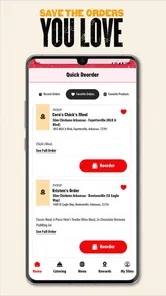
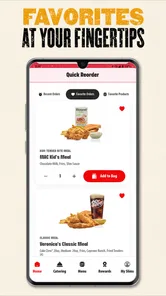
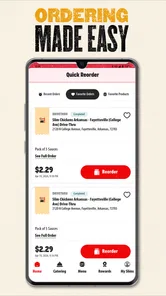
One of the standout features of the app is its seamless ordering process. Whether you're craving their famous tenders, wings, or mouth-watering sandwiches, placing an order is a breeze. You can customize your meal to your heart's content, adding extra sauces or sides without any hassle. And the best part? You can do it all from the comfort of your couch.
There's also an option to schedule your order for a later time, which is super convenient for those busy days when you're juggling work, kids, and everything else life throws at you. Plus, they offer both delivery and pickup options, so you can choose what suits you best.
A Practical First Order
I would start by checking the location before spending time building a meal. That small step helps avoid the common frustration of choosing items and then discovering the restaurant you need is not the right one for your plans. Once you have the location in mind, decide whether pickup or delivery suits the occasion, then review your meal and extras before placing the order.
For example, on a busy evening when I am leaving work and heading home, I could schedule a pickup instead of waiting until I arrive to decide what to eat. The useful trade-off is that planning gives me a clearer routine, while ordering spontaneously leaves less room to catch a wrong location or missed customization. I would still check the order details before confirming; convenience does not replace a final read-through.
Rewards and Offers
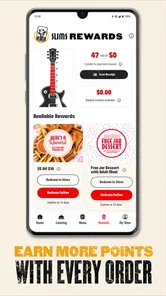
Who doesn't love a good deal? The app features a loyalty program that rewards you for being a regular. Every purchase you make earns you points that can be redeemed for free food. It's like getting a little bonus every time you satisfy your chicken cravings. And let's not forget about the exclusive offers that pop up from time to time, giving you even more reasons to keep coming back.
The rewards make the most sense if Slim Chickens is already somewhere you visit. I would treat points and offers as a pleasant extra, not a reason to make a special trip or add food I did not want. Before ordering, it is worth checking the rewards area so you can see whether there is something relevant to your meal; that quick glance is more useful than assuming every visit will bring the same offer.
Finding Your Nearest Slim Chickens
The app also includes a location finder, which is a handy tool for discovering the nearest Slim Chickens restaurant. Whether you're at home or on the go, you can quickly find a location to satisfy your hunger without any detours. Just a few taps, and you're all set to enjoy a delicious meal.
Where It Fits—and Where It Doesn't
Compared with calling a restaurant, the app gives me a more direct way to review menu choices, set up an order, and make adjustments before I commit. Compared with a general food-delivery app, it is more focused on Slim Chickens rather than helping me weigh a broad range of restaurants. That focus is a strength when I already know what I want, but a limitation when I am undecided or looking for a different cuisine.
I would recommend it to regular customers, families coordinating a pickup, and anyone who likes to plan a meal before heading out. I would skip it if I only want to discover nearby food options or if I do not expect to return to the chain; a general restaurant or delivery app is a better starting point in those cases. Delivery and pickup can be useful choices, but I would check what is available for the location and order I have in mind rather than assuming every option works everywhere.
Final Thoughts
Overall, the app is a useful choice for fans of the franchise. It's designed with the user in mind, making it easy to order your favorite dishes, earn rewards, and find nearby locations. If you're someone who appreciates convenience and delicious food, then this app should definitely be on your radar.
So, if you haven't already, give the Slim Chickens app a try. It's a tasty addition to your phone that promises to make your dining experience all the more enjoyable. Happy eating!
Slim Chickens Frequently Asked Questions
Is the Slim Chickens app free to download, and what devices can run it?
The Slim Chickens app is free to download and is listed for users of all ages. It is a Food & Drink app, so its main purpose is helping customers interact with the restaurant on the go. The current version is 3.2 and requires operating system version 9 or later, making it worth checking your device’s software before installing.
Who makes the Slim Chickens app, and how popular is it?
Slim Chickens App is the developer behind this mobile app. It has earned an average rating of 4.8 from around 12,000 ratings, with about 2,400 written reviews and over 500,000 installs. Those figures suggest that many customers use it to access Slim Chickens ordering and rewards features, while individual experiences can naturally vary.
What is the main purpose of the Slim Chickens app?
The Slim Chickens app is designed to enhance the customer experience by offering a convenient way to order food, earn rewards, and stay updated with the latest promotions. Users can browse the menu, customize their orders, and choose between pick-up and delivery options directly from their mobile devices.
How does the rewards program work on the Slim Chickens app?
The Slim Chickens app includes a rewards program where users can earn points for each purchase made through the app. These points can then be redeemed for free food items or discounts on future orders. The app tracks your rewards progress, making it easy to see how close you are to earning a reward.
Is it possible to customize food orders on the Slim Chickens app?
Yes, the Slim Chickens app allows users to customize their food orders to suit their preferences. You can modify ingredients, choose specific sides, and adjust portions directly from the app, ensuring your meal is exactly how you like it before finalizing your order.
Pros
- User-friendly interface makes navigation easy.
- Variety of menu options to suit all tastes.
- Quick service for a better dining experience.
- Offers nutritional information for meals.
- Loyalty program rewards frequent customers.
Cons
- Limited delivery areas restricts accessibility.
- App occasionally crashes during peak times.
- Requires constant updates for new features.
- Some users report slow customer service.
- Limited payment options available.











