

Skool
- 665.00
- 4.2
- Installs
- 1.00M
- Price
- Free

Screenshots
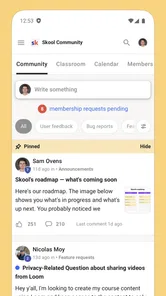
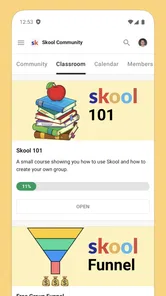
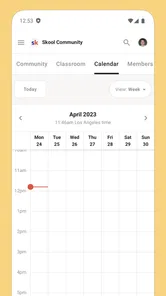

Analysis by Reviewed
I’d look at Skool less as a family learning tool and more as a way for people to keep up with communities they already belong to. That distinction matters in a shared household: one person might use it for a course group, another for a professional community, and a third may not need it at all. The app is social, so its value comes from the groups and conversations you choose to follow, rather than from a ready-made set of lessons for everyone at home.
Making shared-device use work
If a phone or tablet gets passed around, I’d treat Skool as an individual account rather than a shared household hub. Before anyone signs in, agree whose account is being used and make sure the person using the device knows how to leave it in that account’s state. That simple boundary helps prevent someone from reading or posting in another person’s community by mistake. I wouldn’t assume a shared device automatically means shared access should be appropriate.
A realistic use might be a parent checking a community during a quiet moment while a teenager uses the same tablet later for something else. The useful habit is to make the handoff deliberate: finish what you’re doing, sign out if that suits your account setup, and let the next person use their own account when needed. That is ordinary device hygiene, not a special household control built into the app.
Choosing the right role for it
Skool makes most sense when you have a specific community you want to keep within reach. It can be handy for checking in between other tasks, following a discussion, or staying connected while away from a computer. I’d be less enthusiastic if you want a general-purpose family calendar, a private messaging tool for coordinating chores, or a complete school platform. Those jobs call for tools designed around scheduling, direct communication, or formal learning rather than community participation.
Compared with a group chat, a community app can give ongoing discussions a more organized home, but it also asks you to visit and keep up with another space. If the people you need to coordinate with already use a chat everyone checks, moving them to Skool may create more friction than value. I’d start by asking whether the community itself is active and useful to you; installing an app cannot make a quiet group worth following.
Discovering New Ways to Learn
First off, the interface of Skool is incredibly user-friendly. It's designed with students in mind, offering a colorful and intuitive layout that makes navigation a breeze. You know how some educational apps can feel like a maze? Well, this one’s more like a stroll in the park. You’ve got your subjects neatly organized, and it’s super easy to find what you’re looking for. Whether it’s mathematics, science, or arts, everything is just a tap away.
Engaging Content That Keeps You Hooked
What really sets Skool apart is its content. We’re talking interactive lessons that make learning feel more like a game than a chore. There are quizzes, videos, and even challenges that test your knowledge and keep you on your toes. I found myself getting so wrapped up in a history lesson that an hour flew by without me even noticing. Now, that’s what I call effective learning!
More From Our News Desk

 Gmail
GmailGmail in a Busy Inbox: Who Benefits Most?
From first account to crowded workday, Gmail earns its place through dependable search and flexible sorting—but its best fit depends on how much inbox maintenance you can tolerate.

 Prime Video
Switching to Prime Video: What Changes in Your Viewing Routine
Prime Video can make a compelling second home for streaming, but switching means learning a different catalog, rental layer, and route from browsing to playback.

 Universal TV Remote Control
Universal TV Remote Control Works Best as a Reliable Backup
A phone remote earns its place through quick setup and reliable habits. Here is how to get more from Universal TV Remote Control—and where its limits show.

 Weather - By Xiaomi
Weather by Xiaomi Review: Clear at a Glance, Less Clear Up Close
Xiaomi’s weather app makes everyday forecasts quick to scan, but its calm surface can leave useful details and recovery paths harder to find than they should be.

 X
XX Under Pressure: Can It Recover When Posting Goes Wrong?
A resilience-focused review of X, examining setup, mistaken posts, interruptions, weak connections, and the gaps that matter when recovery needs to be dependable.

 Clash of Clans
Clash of Clans Is Won Between the Battles
Its raids are quick; its community is a long-term project of coordination, teaching, rivalry, and shared responsibility—with all the friction that entails.
Latest News



Another cool feature is the ability to track your progress. Skool lets you see how you’re doing in each subject, which is great for setting goals and staying motivated. Plus, there’s a community aspect where you can connect with other learners. It’s like having a study group right there in your pocket. Pretty awesome, right?
Why You Might Want to Give It a Go
If you’re someone who struggles with traditional learning methods, this app could be a game-changer. Its interactive and visual approach caters to different learning styles, making it accessible for everyone. Also, if you’re a parent or teacher, it’s a fantastic tool to supplement education. It’s like having a virtual tutor available 24/7.
In terms of accessibility, Skool is available on both Android and iOS, so no worries about compatibility. It’s one of those apps that just works, and it doesn’t require a super tech-savvy person to get started. Just download, sign up, and you’re ready to explore a world of knowledge.
So, if you’re eager to make learning more exciting and efficient, why not give Skool a try? It’s an engaging way to expand your horizons and maybe even discover a new passion. Happy learning!
Coordination without making it another chore
For household coordination, I’d use a Skool community only when the group already has a shared purpose that benefits from ongoing discussion. For example, adults in a hobby or learning community could check updates while away from home, then bring useful ideas back to a family conversation. I would not rely on it for urgent plans: a community feed is not the same as a direct, guaranteed message to a particular person. Keep time-sensitive arrangements in the channel everyone already watches.
A practical tip is to decide what deserves attention before joining several communities. If you follow multiple groups, checking them can become its own small task. I’d pick the one or two spaces that genuinely matter, visit at a time that fits my routine, and avoid treating every new post as something that needs an immediate response. That keeps the app useful without letting it compete with family time.
Age, account boundaries, and trust
The app is rated Teen, which gives households a useful age-context starting point, but it is not a substitute for deciding whether a particular community is suitable for a young person. I’d talk through who runs the group, what its topic is, and what kind of participation is expected before encouraging a teen to join. The same conversation is worthwhile for adults too: community spaces work best when members understand what they are comfortable sharing and keep personal details private.
Skool is free, and its average rating is 4.1 from around 4.1 thousand ratings, with over 1 million installs. It is made by skool.com, and version 1.0.39 is the current version. It was released on June 1, 2023, and requires Android 9 or later. Those details make it easy to judge basic fit, but I’d still check that the device’s software is compatible before setting it up.
The main trade-off is that community participation depends on the people and groups you connect with. If you want a quiet, private space for household plans, or a structured course with lessons laid out for you, I’d choose a tool built for that job instead. If you already have a relevant Skool community and want a mobile way to stay involved, the app is a reasonable companion. For a household, my verdict is to use it person by person, with clear account boundaries and sensible expectations about what a community app can—and cannot—coordinate.
Skool Frequently Asked Questions
What is Skool’s age rating, and is it suitable for teens?
Skool is a social app with a Teen content rating. That makes the age guidance worth checking before downloading, especially if the app will be used by a younger family member. Parents and teens can consider that rating alongside the communities they plan to join and the way they intend to use the app.
What is Skool and how does it benefit users?
Skool is an innovative online learning platform designed to enhance educational experiences for both students and educators. It offers a wide range of courses and resources, making it easier for users to access quality education from anywhere. The app's user-friendly interface and interactive features facilitate a more engaging and effective learning process.
Is Skool available for both Android and iOS devices?
Yes, Skool is available for download on both Android and iOS platforms. Users can easily find the app on the Google Play Store and Apple App Store, ensuring accessibility for a wide audience. This cross-platform availability allows users to access their courses and educational resources on their preferred devices.
Are there any subscription fees or hidden costs associated with Skool?
Skool is free to download. While Skool offers a variety of free courses, some premium content may require a subscription or one-time purchase. Users should be aware of potential costs before downloading. It's advisable to review the app’s pricing structure and decide if the investment aligns with personal educational goals. Fortunately, Skool is transparent about its fees, ensuring no hidden costs.
What types of courses and resources does Skool offer?
Skool provides an extensive range of courses across various subjects, including technology, business, arts, and sciences. The app also features resources like video lectures, quizzes, and community forums to support learning. This diversity caters to different learning preferences and educational needs, making Skool a versatile platform for users seeking to expand their knowledge.
Pros
- User-friendly interface
- Comprehensive educational content
- Interactive learning modules
- Regularly updated resources
- Cross-platform compatibility
Cons
- Limited offline access
- Requires stable internet
- Subscription fees for full access
- Ads in free version
- Limited language options











