Shake Shack
- 4.62K
- 4.1
- Installs
- 1.00M
- Price
- Free

Screenshots
Analysis by Reviewed
I think of the Shake Shack app as a convenience for people who already enjoy the restaurant, rather than a reason on its own to choose it. It is a free food-and-drink app from Shake Shack, and its central appeal is straightforward: place an order digitally instead of relying on the usual in-person queue. Whether that is useful depends on how often you visit, how you like to order, and whether the available pickup or delivery option suits the moment.
A familiar brand, with a practical trust question
Ordering food through an app involves more than choosing a meal: you may also be deciding what to share, when to place an order, and how to manage an account. I prefer to judge that experience by the choices I can actually see while using it, rather than assume anything about behind-the-scenes practices. The app is rated for Everyone, has an average rating of 3.9 from around 15,000 ratings, and has passed one million installs. Those figures suggest it has found a substantial audience, though they do not tell me whether its ordering flow will fit your local routine.
The key practical question is whether ordering ahead saves you effort at the Shake Shack you plan to visit. Before building a complicated order, I would check the location and the available fulfillment choices in the app. A digital menu can make browsing calmer, but it cannot make an unsuitable pickup plan convenient. If you are already nearby and the line is moving quickly, ordering at the counter may be just as simple.
Where I would pause before placing an order
Food orders can involve personal choices such as customizations, contact details, and payment steps. I recommend reviewing each screen before confirming, especially when ordering for someone else or using delivery. Check the selected items and any changes carefully; a saved choice can speed up a repeat order, but it is still worth making sure it matches what you want today.
I also would not treat order progress as a guarantee of an exact arrival time. Updates can help you understand what stage an order has reached, but plans can change, and delivery depends on the circumstances of that order. If timing is critical, leave yourself a buffer rather than arranging a tight handoff around an estimate.
Useful choices, with a few limits
The app is on version 2.73.0 and requires Android 9 or later. I would keep it updated and use the account controls presented in the app to manage my own access and preferences. If you are not comfortable entering information needed to complete an order, you can still use the restaurant’s ordinary ordering route instead. The app is most useful when its digital steps feel easier than that alternative, not when you feel obliged to use it.
For a simple weekday lunch, I would browse before leaving, settle on the order, then choose pickup only if the timing and location make sense. That can reduce decision-making when you arrive, while ordering in person remains a sensible choice if you want to ask a question before committing. Compared with general food-delivery apps, this one is focused on Shake Shack; that focus may suit a planned visit, while a broader service is more useful when you want to compare several restaurants in one place.
More From Our News Desk

Weather by Xiaomi Review: Clear at a Glance, Less Clear Up Close

X Under Pressure: Can It Recover When Posting Goes Wrong?

Clash of Clans Is Won Between the Battles

Android Auto Makes the Case for Quieter Car Software

MobiOffice: Transforming Mobile Productivity with Seamless Integration

EA SPORTS FC™ Mobile Soccer: Redefining Mobile Sports Gaming
Making a pickup plan that actually works
A useful way to use a restaurant-specific ordering app is to decide the collection plan before spending time customizing a meal. I would first make sure I am choosing the location I can realistically reach, then look at the available ordering options and only then build the basket. This order of operations matters on a busy day: it avoids getting attached to a carefully arranged order before discovering that the location or fulfillment choice does not fit my schedule.
For example, if I have a short break between errands, I would place an order only when I know where I will be and can leave enough time to collect it. If the route is uncertain, I would wait until my plans settle or order at the counter. Digital ordering is most helpful when it removes a predictable step; it is less helpful when it forces me to coordinate around an uncertain journey.
What the focused menu does—and does not—solve
The dedicated menu is a real advantage if I have already chosen Shake Shack. I can concentrate on that restaurant’s choices instead of scrolling through unrelated places, which is useful when I know what kind of meal I want and simply need to arrange it. But that same focus is a trade-off: it does not help me weigh Shake Shack against other nearby restaurants, compare their menus, or find a different cuisine in the same browsing session.
I would use a general delivery service when the restaurant itself is still undecided, especially if the group has mixed preferences. Once everyone agrees on Shake Shack, the official app may be the more direct route for that particular order. If I want to ask a detailed question before choosing, a conversation with staff can be clearer than trying to resolve it through menu selections.
Ordering for more than one person
For a shared meal, the main benefit is having a moment to collect everyone’s choices before submitting one order. I would ask each person to specify any changes clearly, then read back the basket rather than treating the first draft as final. That small check is particularly worthwhile when several meals look similar or when someone has a specific preference. It reduces the chance of confusing one person’s customization with another’s.
I would also be cautious about relying on a saved order as a group template. It can be a convenient starting point for a familiar meal, but a group’s needs can change from one visit to the next. Check every item and modification, and make sure the person placing the order is comfortable taking responsibility for the final selection. If the order involves an important ingredient question, asking staff directly is the safer, clearer approach.
One question people often have is whether the app is useful without delivery. Yes: pickup can be the better fit when you are already heading past a location and want to arrange the order before arriving. The key is to make sure the chosen location and timing work for you. If you are already at the restaurant or want to decide after seeing the situation, ordering in person remains a perfectly reasonable alternative.
First Impressions: A Feast for the Eyes
The moment I opened the Shake Shack app, I was greeted by a sleek and modern interface that immediately got me in the mood for a ShackBurger. Navigating through the app is a breeze, thanks to its intuitive design. Everything from the menu to placing an order is just a tap away, making it incredibly convenient for those who, like me, hate fumbling around trying to find what they need.
Ordering Made Easy
One of the standout features is the seamless ordering process. Whether you're craving a juicy burger or a hand-spun shake, the app allows you to customize your order to your heart's content. You can easily add or remove toppings, choose your preferred bun, or even make your meal a combo. And the best part? You can save your favorite orders for quick access anytime that hunger pang strikes.
Perks and Rewards
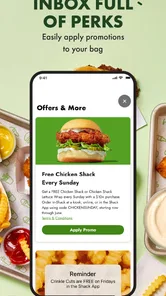
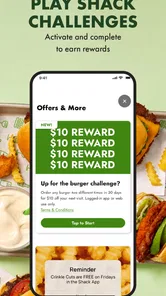
Who doesn't love a good reward system? Shake Shack's app offers a generous rewards program that truly feels like it gives back. Every purchase earns you points, which you can later redeem for free items. It's a great way to keep customers coming back, and it certainly worked on me. I mean, who can resist earning a free ShackBurger?
Real-Time Updates
A nifty feature I particularly appreciated is the real-time order tracking. Once you've placed your order, you can track its progress from the kitchen to your doorstep. This not only adds a layer of transparency but also builds excitement as you watch your meal making its way to you.
Final Thoughts: More Than Just an App
In conclusion, the Shake Shack app is more than just a tool for ordering food. It’s a bridge connecting you to a delightful dining experience, whether you're on the go or cozying up at home. With its user-friendly interface, personalized ordering options, and rewarding loyalty program, it's an app I find myself coming back to again and again. So, if you haven't tried it yet, I highly recommend downloading the app and diving into the delicious world of Shake Shack.
That convenience matters most when you have a repeatable routine. I would save a familiar order only after checking its details, then use it as a starting point rather than assume it still suits everyone at the table. For a group, the app can make it easier to collect individual preferences before ordering, but one person should review the final basket so customizations are not accidentally carried over or missed.
When another way to order is better
This is not the right choice for every meal. If you are deciding between several nearby restaurants, a broad delivery app gives you a wider comparison; if you want to ask about an ingredient or make a request that is hard to express in menu options, speaking with staff may be clearer. And if you rarely visit Shake Shack, installing a dedicated app may add little value over ordering directly when you get there.
The app first appeared on July 9, 2017, and its current release reflects an ongoing digital ordering option rather than a novelty. Still, I would judge it by the actual choices shown for the location and order in front of me. Delivery is handy when leaving home is inconvenient; pickup is a better fit when you can collect the meal yourself and want to avoid coordinating a handoff. Neither removes the need to check the order before confirming.
Who gets the most from it
I would recommend trying it if Shake Shack is already part of your routine, you tend to order the same kinds of things, and planning ahead feels easier than deciding at the counter. It is also a reasonable fit for someone who wants to arrange a pickup while on the way, provided the location and timing are suitable. The strongest use case is not every meal; it is the repeat visit where the digital steps save a little attention at a busy moment.
On the other hand, someone who only visits occasionally may not gain much from installing a dedicated restaurant app. A person who wants to compare several restaurants, prefers to ask questions face to face, or would rather not manage another account may be happier with a broader service or an in-person order. I would not download it simply because digital ordering is available; I would use it when it solves a real inconvenience for me.
Making the choice with confidence
Before confirming, I would treat the basket as the final check: verify the selected location, fulfillment choice, items, and any customizations. If I am ordering for another person, I would confirm their choices rather than assume a saved favorite still applies. Those checks are especially useful when I am in a hurry, because a few seconds of review can prevent a more awkward correction later.
As for trust, I find it more sensible to focus on the choices visible during the order and account process than to make assumptions about data handling. Consider what information the app asks for at the steps you use, and decide whether that exchange is worth the convenience. If you are uncomfortable with the information needed to complete an order, the counter remains an available route. For me, that is a practical boundary rather than a reason to avoid the app altogether.
My cautious recommendation is to try it if you already buy from Shake Shack and expect to use digital ordering more than once. Treat saved orders and progress updates as conveniences, not substitutes for reviewing the details or allowing time for plans to shift. If you value choosing from many restaurants, prefer not to make an account, or simply enjoy ordering face to face, the usual alternatives may feel more natural. The app is free, but its real value is the time and decision-making it can save on the visits that fit its workflow.
Shake Shack Frequently Asked Questions
Is the Shake Shack app suitable for first-time customers?
Yes. The app is intended to make ordering from Shake Shack more convenient, whether you already know what you want or are exploring the menu for the first time. You can review food options, customize an order, and choose from the ordering options available at a selected location. Its purpose is to help you skip the line, get delivery, and find exclusive treats.
Can I find a nearby Shake Shack through the app?
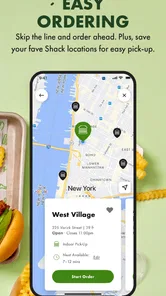
The app is designed to help users locate nearby Shake Shack outlets, which can be useful when deciding where to place an order. Selecting a location also helps show the ordering options available for that restaurant. If you are planning to order ahead or arrange delivery, checking the location in the app first can make it easier to see what works for your visit.
Do I need an account to browse or place an order?
The app is built around ordering and paying for food from a smartphone, but whether a particular task requires signing in can depend on the step you are completing. You can explore the app and its available features before deciding how you want to order. If you plan to make a purchase, follow the prompts shown in the app and review your order details before submitting it.
Can I use the Shake Shack app outside the United States?
The app is meant to connect customers with Shake Shack locations and their available ordering options. Its usefulness while traveling depends on whether a participating location is available where you are and what services that location supports. If you are away from your usual area, use the location feature to check what appears nearby before relying on the app to arrange a meal.
Does the app make ordering faster than ordering at the counter?
The app is intended to help you skip the line by letting you place an order from your phone rather than starting at the counter. You can also arrange a meal ahead of time, which may make ordering more convenient when you are busy. The exact experience depends on the location and the ordering options available there, so check the selected restaurant before placing your order.
Pros
- User-friendly interface
- easy navigation
- Provides real-time order tracking
- Customizable menu options available
- Rewards system with various perks
- Frequent updates with new features
Cons
- Limited delivery areas
- Occasional app crashes
- High data usage when browsing
- Account setup can be time-consuming
- Limited payment options











