Schlotzsky's Deli
- 3.58K
- 4.6
- Installs
- 500.00K
- Price
- Free

Screenshots

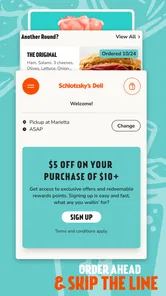

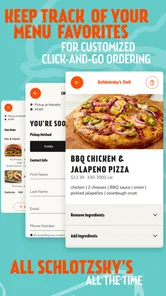
Analysis by Reviewed
I’d judge the Schlotzsky's Rewards Program by a simple question: does it make visits to Schlotzsky’s easier or more worthwhile without turning lunch into an account-management chore? My take is that it can, especially if you already eat there and want a handy place to check rewards, menu details, and nearby locations. If you only stop in occasionally, the benefit is less obvious; the app is most useful when it fits a routine you already have.
A practical fit for regular visits
For a regular customer, the main appeal is having the rewards experience alongside useful restaurant information. Before heading out, I’d check the menu and location details, then decide whether ordering through the app or handling the purchase in person suits that visit. That small bit of planning can make a quick meal feel less improvised, particularly when you’re choosing for more than one person.
It’s also worth thinking about how you usually order. If you already place orders digitally, keeping the rewards app in that same routine may be convenient. If you prefer talking through a change or question with staff, ordering in person may still be simpler. I wouldn’t change a comfortable ordering habit just for the sake of using an app; the value comes from making a visit smoother, not adding steps.
A low-pressure way to try it
Because the app is free, trying it does not require a purchase up front. I’d install it before a planned Schlotzsky’s visit rather than while standing in a busy line. That gives me time to look around, sign in if needed, and understand where the menu and rewards information sit before I’m deciding what to eat.
One useful test is to use it for a visit I would make anyway. Check whether the location information helps with the trip, whether the menu is easy to browse, and whether the reward step fits naturally into checkout. If those things save a little effort, keeping the app makes sense. If I find myself opening it only to manage an account or chase an offer, I’d reconsider whether it deserves a place in my routine.
Getting Started with the App
First things first, downloading the Schlotzsky's Rewards Program app is a breeze. Available on both Android and iOS, it’s just a quick search away in your app store. Once installed, setting up an account is simple and straightforward. The user interface is intuitive, making it easy to navigate through various features.
Why You’ll Love It
The app is packed with features that make every visit to Schlotzsky's more enjoyable. As soon as you open it, you're greeted with a sleek design and easy access to your rewards dashboard. Earning points with every purchase is as simple as scanning your receipt or ordering directly through the app. The more you dine, the more rewards you rack up, which can be redeemed for free menu items.
More From Our News Desk

Weather by Xiaomi Review: Clear at a Glance, Less Clear Up Close

X Under Pressure: Can It Recover When Posting Goes Wrong?

Clash of Clans Is Won Between the Battles

Android Auto Makes the Case for Quieter Car Software

MobiOffice: Transforming Mobile Productivity with Seamless Integration

EA SPORTS FC™ Mobile Soccer: Redefining Mobile Sports Gaming
One of my favorite features is the personalized offers. Based on your dining habits, you receive exclusive deals and promotions tailored just for you. It’s like they know exactly what I’m craving!
Using the rewards flow without slowing down lunch
The easiest way to avoid a last-second scramble is to decide in advance how I plan to order. If I want to buy at the counter, I can keep the receipt-scanning route in mind; if I already know my choices, I can consider ordering through the app. I wouldn’t assume those options work interchangeably for every purchase. I’d follow the instructions shown for the method I actually use, and check the rewards section before paying rather than trying to reconstruct the visit later.
For a workday lunch, for example, I might check the menu while walking over, choose something familiar, and then open the rewards area before I reach the counter. That quick sequence keeps the app from becoming a distraction when other people are waiting. When I’m ordering for a group, I’d focus first on getting names, custom requests, and pickup plans right; a reward is secondary if using the app makes coordination harder.
There’s also a practical reason not to treat offers as a shopping list. A personalized deal is only useful when it matches what I actually want. I’d compare the offer with my normal choice and let it influence the decision only if it genuinely makes sense. That keeps the rewards program from encouraging an extra purchase just because a promotion is visible.
Staying Connected
The app isn't just about rewards; it's a comprehensive guide to everything Schlotzsky's. From finding the nearest location to exploring the full menu, it's all at your fingertips. I love being able to quickly pull up the menu and see what's new or find nutritional information when I’m trying to keep things healthy.
Plus, the app keeps you up to date with the latest news and events at Schlotzsky's. Whether it's a new sandwich launch or a special event, you’ll be the first to know.
Planning around a real-world visit
Location information is most helpful when I’m away from my usual neighborhood or deciding whether a Schlotzsky’s stop fits into an errand. I’d check the location before setting off, then use the menu to narrow down choices while I have a moment to think. This is a more useful role for the app than expecting it to plan an entire day of food stops: it supports a chain-specific decision rather than comparing every nearby restaurant.
If I’m meeting someone, I’d share the location and menu details separately in whatever way we already use to coordinate. The app can help me prepare, but I wouldn’t assume the other person needs it just to decide what to order. That distinction matters for mixed groups, where one person may be a regular and everyone else simply wants a quick meal.
For anyone checking nutrition information, I’d use it as an early filter—for instance, to compare options before arriving—rather than relying on a quick glance to answer every dietary question. If an ingredient or preparation detail is important to my health, I’d confirm it with the restaurant before ordering. The convenience of having menu information nearby is real, but it should support careful choices, not replace them.
How it compares, and where it can fall short
Compared with a general restaurant-finder or a delivery service, this app is more focused: it brings Schlotzsky’s menu and rewards into one place rather than helping me compare many restaurants. That focus is useful when I’ve already chosen Schlotzsky’s; it is less useful when I’m deciding among several nearby places or want to browse across different chains. For those situations, a map or a broader food-ordering app may be the better first stop.
The trade-off is that rewards depend on remembering to use the app’s process. A busy lunch break is exactly when it’s easy to skip a scan or forget to check an offer, so I’d make a quick check part of deciding what to order. The program is not a reason by itself to buy food I didn’t want, and occasional diners may find that opening a dedicated app adds more friction than value. I’d also use the menu information as a planning aid, then confirm details that matter to my order before placing it.
Who should install it?
The app is free, rated for Everyone, and developed by Schlotzsky’s. It has a 4.4 average from around 14,000 ratings, with over 500,000 installs, which suggests it has found an audience among customers who want a dedicated way to engage with the chain. Its current version is 5.7, and the app first appeared on June 2, 2014; those facts show a product with a long-running presence, though they don’t tell me what any particular update changed. On Android, version 5.7 requires OS 11 or later.
I’d recommend trying it if Schlotzsky’s is already part of your lunch rotation and you’re comfortable keeping a restaurant account on your phone. If you rarely visit, dislike managing accounts, or want one app to compare lots of restaurants, you can skip it without missing a universal dining tool. The useful question is whether you’ll remember to check the rewards and menu when a real visit is coming up.
What regulars may want to weigh
For someone who visits often, the main trade-off is whether the convenience of one chain’s menu and rewards justifies another account and app to maintain. I’d keep it if I routinely use those tools, especially when I want to check a location or see whether an offer fits my meal. If my visits are sporadic, I’d be less likely to remember the app at the right moment, so the practical benefit could fade even if the features sound appealing.
People who usually order in person can still have a reason to use it, since the receipt-scanning path suits that habit. But I’d make sure I understand the current instructions before relying on a receipt after the fact. A useful personal safeguard is to open the rewards area before leaving the restaurant and confirm that I completed the step the app asks for. That small check is easier than hoping I remember later.
For digital-order regulars, the app may be most worthwhile when it combines planning and rewards in a single stop. Still, I’d avoid placing an order through it solely because that seems like the “right” way to earn something. If I need to ask staff about a substitution or clarify a request, a direct conversation may be the safer and simpler choice. The better workflow is the one that gets the meal right first and handles rewards without extra confusion.
Product history and what to watch
Schlotzsky’s released the app on June 2, 2014, and the current Android version is 5.7. That gives the product a substantial history, but I wouldn’t infer specific redesigns or new capabilities from a version number alone. The useful point for an existing user is that the app remains an active way to access the chain’s digital experience; the exact changes between releases are a separate question.
If I already use it, I’d pay attention after an update to whether the parts I rely on—the menu, location details, account access, and rewards steps—are still easy to find. If I’m a new user, I’d focus less on the version label and more on whether the current app fits my normal ordering style. What I’d like to see over time is a consistently clear path from checking an offer to understanding how to use it, since that is where a rewards tool either feels helpful or becomes a chore.
It is also sensible to keep expectations grounded. The app’s role is centered on Schlotzsky’s, so I wouldn’t look to it for broad restaurant discovery or a complete solution for coordinating a group meal. I’d use it as a companion to a visit I’ve already decided to make, and turn to a map, a general food app, or direct contact with the restaurant when the question falls outside that narrow job.
Final Thoughts
Overall, the Schlotzsky's Rewards Program app is a game-changer for anyone who frequents this beloved eatery. It's user-friendly, packed with perks, and makes the entire dining experience more rewarding. Whether you're a sandwich aficionado or just someone who enjoys a good meal, this app is worth checking out.
So next time you find yourself craving that signature Schlotzsky's taste, make sure you have the app ready to make the most of your visit. Trust me, your taste buds and your wallet will thank you!
What I’d watch on future visits
My practical advice is to check the app shortly before ordering, especially if you’re planning to use a particular offer or earn rewards from that purchase. That timing makes it easier to choose between ordering in the app and buying in person, and helps avoid relying on memory once the meal is over. If the app’s current options don’t suit the visit, I’d simply order the way that’s easiest and treat any reward as a bonus.
Overall, I see this as a focused companion for existing Schlotzsky’s customers, not a replacement for comparing restaurants or deciding where to eat. Its strongest case is convenience across repeat visits: checking a menu, locating a restaurant, and keeping the rewards step in view. Whether it becomes part of your routine depends less on the feature list than on how often you go and whether using it feels effortless to you.
Schlotzsky's Deli Frequently Asked Questions
What kind of app is Schlotzsky's Rewards Program?
Schlotzsky's is a Food & Drink app from Schlotzsky's, built around helping guests connect with the restaurant and earn rewards. It is intended for people who want the rewards program available on a mobile device, whether they are exploring the brand or visiting a location. Its focus is straightforward: access Schlotzsky's and the rewards experience in one app.
What age group is the Schlotzsky's app suitable for?
The app is rated Everyone, so its content rating is intended to be suitable for a broad audience. It focuses on Schlotzsky's and its rewards program rather than entertainment content, making it most relevant to customers and people interested in the restaurant. Parents and other users can still review the app’s store page and permissions before installing, as they would with any app.
Is Schlotzsky's Rewards Program app free to download?
Yes. Schlotzsky's is a free Food & Drink app from Schlotzsky's, designed to let guests connect anywhere, anytime and earn rewards. You can use it on a compatible Android or iOS device, making it a convenient option if you want to keep the program accessible while you browse or visit Schlotzsky's.
What devices can run the Schlotzsky's app?
The app requires iOS 11 or later, so check your device’s operating system before downloading if you use an iPhone or iPad. The app is also available for Android. Schlotzsky's is listed for Everyone, and its straightforward focus on connecting with the restaurant and earning rewards makes it relevant to customers considering the program.
When was the Schlotzsky's app released, and what is its current version?
Schlotzsky's was released on June 2, 2014, and its current version is 5.7. That gives prospective users a useful sense of the app’s history and the version they can look for when installing. As with any mobile app, checking the store page on your device is a practical way to confirm compatibility and see the release offered for your platform.
Pros
- User-friendly interface for easy navigation.
- Exclusive offers for loyal customers.
- Quick and effortless sign-up process.
- Rewards can be redeemed in-store and online.
- Regular updates with new features.
Cons
- Limited to participating locations only.
- Requires internet connection to access.
- Occasional app crashes reported.
- Rewards expire if not used in time.
- Limited payment options available.











