Save A Lot
- 1.07K
- 4.6
- Installs
- 100.00K
- Price
- Free
Screenshots



Analysis by Reviewed
I’d treat Save A Lot as a companion to a grocery trip, not as a general budgeting tool: it’s a free Food & Drink app from Moran Foods, built around helping shoppers find savings and rewards. That distinction matters. If I’m deciding whether to try it, the useful question is whether it fits the way I already plan and shop, rather than whether it can replace a spreadsheet or a full finance app.
Before the shopping list becomes a trip
My ideal starting point is a planned grocery run: I know roughly what the household needs, but I’m open to adjusting a few choices if there’s a worthwhile saving. A store-focused app can be useful at that moment because it keeps the shopping task connected to the retailer, instead of asking me to manage a whole household budget in a separate system. I’d check it before leaving home, when there’s still time to compare the offers with the list.
That timing is more than a convenience. A deal is only valuable if it fits something I would actually buy. I’d use the app to inform a decision, not let a reward prompt turn a short essentials run into a larger basket. If I shop at Save A Lot regularly, the chance to check savings and rewards could make the app worth keeping close; if I rarely visit, a general grocery planner may be more useful.
Using Save A Lot from planning to checkout
Hey there, app enthusiasts! Today, we're diving into the world of budgeting and savings with the incredibly handy app, Save A Lot. If you're anything like me, managing finances can sometimes feel like wrestling an octopus. But fear not, because this app promises to simplify the chaos! Let's see if it lives up to the hype.
Getting Started with Save A Lot
First things first, downloading Save A Lot is a breeze. It's available on both Android and iOS platforms, so no one's left out. Once installed, the app greets you with a clean, user-friendly interface. You know, that kind of design that just makes you want to dive right in and start exploring? Yeah, they've nailed it.
Making an offer useful in real life
On a weekday evening, I might open the app before a quick shop, compare what catches my eye with the dinner plan, then keep the list focused on what we need. That’s a practical way to approach rewards: first decide what belongs in the basket, then see whether the app gives me a reason to choose one eligible option over another. I would avoid buying extra items just to chase a perk; the saving only counts if the purchase still makes sense for the household.
At the store, the important handoff is from the phone to the actual checkout. I’d review any offer details in the app before relying on them, and keep the phone available while shopping in case I need to check what I planned. That small habit can prevent the familiar frustration of remembering an offer only after paying. I’d also make sure the app is ready before I reach the checkout, rather than trying to sort through screens while other shoppers are waiting.
More From Our News Desk

Clash of Clans Is Won Between the Battles

Android Auto Makes the Case for Quieter Car Software

MobiOffice: Transforming Mobile Productivity with Seamless Integration

EA SPORTS FC™ Mobile Soccer: Redefining Mobile Sports Gaming

How Microsoft OneDrive Became a Mobile Productivity Giant

How Google Translate Breaks Language Barriers Effortlessly
Save A Lot is not the same kind of tool as a receipt-scanning rewards service or a broad coupon marketplace. Those alternatives may suit shoppers who compare many retailers or want to organize savings across different stores. This app makes more sense when the trip is already centered on Save A Lot and I want a direct route to its rewards and savings. The trade-off is focus: a store-specific helper can be more relevant to a regular customer, but less useful to someone who shops wherever the best deal happens to be.
Features That Make a Difference
What's really cool about Save A Lot is how it breaks down budgeting into digestible chunks. You can set up different categories for your expenses, like groceries, entertainment, or those sneaky coffee shop visits. It even lets you set spending limits, so you can keep track of where your money is going without feeling like you're depriving yourself of fun.
Another feature that stands out is the savings goals. Whether you're saving for a vacation, a new gadget, or just a rainy day fund, the app helps you visualize your progress. It's like having a little financial cheerleader in your pocket, motivating you every step of the way.
What I’d check before depending on it
For someone deciding whether to install it, two practical questions are whether it costs anything and whether the phone is compatible. The app is free, and it runs on Android from version 5.0; its age rating is Mature 17+. Its current version is 1.7.0. The app has a 4.6 average from around 11,000 ratings, and more than 100,000 installs. Those figures suggest a well-used app, but they don’t tell me whether a particular offer will fit my shopping habits, so I’d judge it by the usefulness of the savings I personally find.
I’d also think about who needs a different solution. A shopper who wants one place to compare several chains, plan recipes, and manage a detailed household budget may be better served by separate multi-store or finance tools. Someone who prefers not to use a phone during shopping may also find a paper list simpler. Save A Lot is most compelling for people who already shop there and are comfortable checking a retailer’s app as part of their routine.
User Experience and Performance
Now, let's talk about performance. During my time with Save A Lot, I found it to be incredibly responsive. No lagging, no annoying crashes – just smooth sailing. The developers have clearly put a lot of effort into making sure the app runs seamlessly, which is always a big plus in my book.
One thing I particularly appreciated was the app's ability to sync across multiple devices. So, whether you're checking your budget on your phone or your tablet, everything is right where you left it. It's little touches like these that really enhance the user experience.
Where the routine can snag
Even a smooth app adds a step to a grocery run: I have to remember to check it before shopping and connect whatever I see there to the choices I make in-store. A reward can also be less compelling if it doesn’t match my list, or if I’m making a one-off trip and won’t use the retailer often. I’d rather skip an offer than make the app dictate a purchase I didn’t want.
That’s why I’d keep expectations specific. Save A Lot can be a helpful stop in a shopping routine, but I wouldn’t treat a rewards app as proof that every trip will be cheaper or as a replacement for comparing the total cost of the items I need. If an offer has conditions, I’d check them before checkout; if I can’t tell whether it applies, I’d plan the trip without counting on it. That cautious approach makes the app useful without letting a possible saving become a source of checkout stress.
Choosing a routine that fits your household
For a household with a fairly steady grocery pattern, I’d make the app part of the list-making step rather than something I open only when I’m already in the aisle. First, write down the essentials in whatever way is easiest, then review the app and adjust only when a relevant saving improves a choice you were already considering. This keeps the app in a supporting role and makes it easier to notice whether it is genuinely helping over several trips.
A useful test is to separate planned savings from tempting extras. If an offer matches a staple or a meal ingredient, it may fit naturally. If it introduces something that wasn’t on the list, I’d pause and ask whether I’d still buy it without the reward. That quick check is especially useful for shoppers who are trying to keep the basket predictable, because a small incentive can otherwise make a trip feel cheaper while increasing what goes into the cart.
The app is a better fit for someone who shops at Save A Lot often enough to build a repeatable routine. It is less compelling for a person whose grocery stops change from week to week, or for someone who needs a complete view of prices across several stores before choosing where to go. In that case, a multi-retailer comparison tool or a plain list may be the more practical first stop, with this app reserved for visits that already make sense.
Making the phone-to-store handoff less stressful
One small workflow choice can make a difference: do the browsing at home, then use the store visit to confirm the decisions rather than to discover everything from scratch. I’d keep my shopping list accessible separately if that is already part of my routine, and use the app as a reference for rewards and savings. That way, a slow moment or distraction in the aisle is less likely to derail the original plan.
I’d also avoid leaving offer checks until the payment line. The app is most useful when there is room to consider whether an offer matches the basket and to read the terms calmly. If I’m shopping with children, in a hurry, or handling a large list, that preparation matters even more; checkout is the wrong moment to make a new decision or search for a detail I could have checked earlier.
There is a trade-off here. Keeping a retailer app in the routine asks me to spend a little attention before I shop, and that effort only pays off when the savings or rewards are relevant. If I find myself opening it out of habit but never changing a sensible purchase, I would stop treating it as essential. A useful shopping tool should reduce uncertainty, not create another chore.
Questions I’d settle on the first few trips
Before relying on the app, I’d want to learn how its rewards fit my own shopping pattern: which offers are relevant, what conditions apply, and what I need to do before paying for an eligible purchase. Those are practical questions to answer by checking the details shown in the app rather than assuming every promotion works the same way. I would start with one planned trip and avoid building the household budget around a saving until I have seen how it applies.
I’d also think about whether the app can serve everyone involved in the grocery run. If one person checks it and another does the shopping, the handoff needs to be simple: share the relevant choices in the same way you already communicate the list, and make clear which offers are worth checking. If that coordination becomes more work than the potential benefit, a shared grocery list without a rewards step may suit the household better.
For a first-time visitor, I would treat the initial trip as a low-pressure trial rather than a promise of a cheaper shop. Keep the list normal, check any relevant reward before leaving, and notice whether using the app changes the final choices in a way that feels worthwhile. That gives a much more honest answer than judging it by the number of promotions that look attractive on screen.
Final Thoughts
So, what's the verdict? Honestly, I'm pretty impressed with Save A Lot. It's an app that truly delivers on its promise to make budgeting less of a chore and more of a manageable task. The intuitive interface, useful features, and reliable performance make it a must-try for anyone looking to get a handle on their finances.
If you're ready to take control of your spending and start saving like a pro, give Save A Lot a shot. It's like having your very own financial advisor, minus the hefty fees. Happy saving!
My recommendation is narrower and more practical: I’d try it if Save A Lot is already part of my shopping week, then keep it only if checking its rewards changes a real purchase or makes planning easier. For occasional visitors, a general list and price comparison may be enough. The best outcome is not collecting every offer; it’s finishing the trip with the groceries I came for and a saving that genuinely suited the plan.
Save A Lot Frequently Asked Questions
Can I use Save A Lot without creating an account?
Save A Lot is intended to help shoppers browse grocery deals, digital coupons, and weekly ads. Whether you need to create an account may depend on the feature you want to use, so check the app’s sign-in prompts when you install it. Browsing available offers can help you decide whether it fits your shopping routine before you rely on it for a trip.
What kind of savings can I find in Save A Lot?
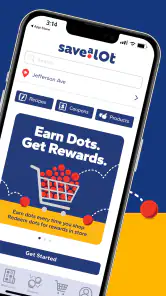
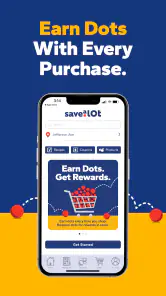
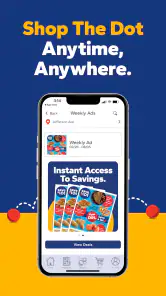
Save A Lot focuses on ways to save on groceries and household items. The app brings together deals, digital coupons, weekly ads, and in-app promotions, giving shoppers several places to look for current offers. It is most useful if you are willing to check the app before shopping and compare the listed discounts with the items on your grocery list.
What is Save A Lot and how does it work?
Save A Lot is a shopping app designed to help users find the best deals and discounts on groceries and household items. By using the app, users can easily browse through various categories, compare prices, and locate nearby stores that offer the best savings. The app also provides digital coupons and weekly ads to maximize savings.
Is Save A Lot available for both Android and iOS devices?
Yes, Save A Lot is available for download on both Android and iOS platforms. Users can find the app in the Google Play Store for Android devices and the Apple App Store for iOS devices. The app is designed to be user-friendly and easily navigable on both operating systems.
Does Save A Lot offer any loyalty rewards or membership programs?
Currently, Save A Lot does not offer a specific loyalty rewards or membership program. However, the app provides numerous opportunities to save through digital coupons, weekly ads, and exclusive in-app promotions. Users can stay updated on the latest deals and discounts by regularly checking the app.
Pros
- Easy to navigate user interface.
- Wide variety of products available.
- Frequent discount offers and promotions.
- Efficient customer support service.
- Compatible with both Android and iOS.
Cons
- Limited payment options available.
- Occasional app crashes reported.
- Requires frequent updates.
- No offline shopping mode.
- Limited delivery areas.
- Category
- Food & Drink
- Version
- 1.7.0











