

Rotten Tomatoes - Movies & TV
- 1.27K
- 4.4
- Installs
- 100.00K
- Price
- Free

Screenshots
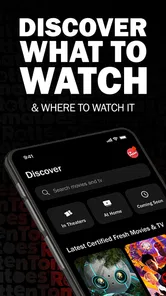
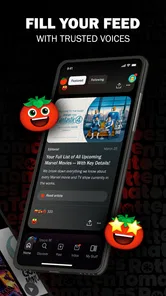
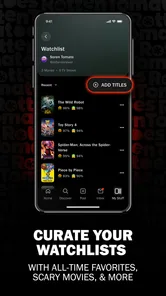
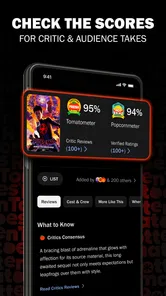
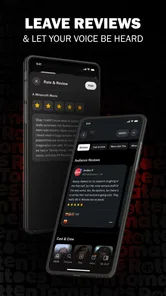
Analysis by Reviewed
I use Rotten Tomatoes - Movies & TV when I want a quick sense of whether a film or series deserves my evening, but I do not want to rely on one person’s taste. The app brings reviews, social discussion, and entertainment news into one place, which makes it more useful than a simple score viewer. It is a free entertainment app from Fandango, aimed at a Teen audience, and its main appeal is helping me move from “What should I watch?” to a more informed choice without opening several different services.
That sounds straightforward, yet the value depends on how you use it. I would not treat it as a replacement for a streaming subscription or a complete movie database. I see it more as a decision-making companion: something to check before pressing play, during a conversation about a new release, or when I want to understand why a title is attracting attention. Its strongest moments come from reducing that small but familiar frustration of browsing endlessly without choosing anything.
How Rotten Tomatoes - Movies & TV feels in everyday use
I find the app most useful when I treat it as a place to check opinions, not as a final authority on what I should watch. Its mix of reviews, social conversation, and entertainment news can help me understand why a title is drawing attention, while my own preferences still have the last word. That distinction matters even more when I’m deciding how much to rely on an app, so next I’d look closely at the choices and controls a user can actually verify.
A quick starting point for choosing what to watch
The first thing I appreciate is the app’s focused purpose. Rather than trying to become a general social network, it centers the conversation around movies and television. That makes the experience easier to understand: look up a title, consider the critical and audience reaction, read around the discussion, and decide whether it belongs on my watchlist or in my “not tonight” pile.
The familiar Rotten Tomatoes identity also gives the app an immediate advantage for people who already use the service on the web. I do not have to learn an entirely new way of judging entertainment. The app is especially handy when I am standing in front of a streaming menu and need a second opinion. A title may have an attractive poster and a recognizable cast, but the surrounding reception can reveal whether it is a serious recommendation or merely something with a strong marketing push.
I found the social element more useful when I treated it as context rather than authority. A review or reaction can explain a score, point out a common complaint, or highlight a detail that matters to a particular audience. At the same time, no rating system can predict my personal response perfectly. A low consensus may reflect a style I enjoy, while a widely praised production may simply not suit my mood.
Where the app fits beside usual alternatives
Compared with searching the web, the app feels more purposeful because the entertainment information is gathered around the title I am considering. A general search can lead me through trailers, articles, advertisements, and unrelated pages before I find a useful answer. Here, the subject remains the film or series, so the browsing task is less scattered.
More From Our News Desk

 Gmail
GmailGmail in a Busy Inbox: Who Benefits Most?
From first account to crowded workday, Gmail earns its place through dependable search and flexible sorting—but its best fit depends on how much inbox maintenance you can tolerate.

 Prime Video
Switching to Prime Video: What Changes in Your Viewing Routine
Prime Video can make a compelling second home for streaming, but switching means learning a different catalog, rental layer, and route from browsing to playback.

 Universal TV Remote Control
Universal TV Remote Control Works Best as a Reliable Backup
A phone remote earns its place through quick setup and reliable habits. Here is how to get more from Universal TV Remote Control—and where its limits show.

 Weather - By Xiaomi
Weather by Xiaomi Review: Clear at a Glance, Less Clear Up Close
Xiaomi’s weather app makes everyday forecasts quick to scan, but its calm surface can leave useful details and recovery paths harder to find than they should be.

 X
XX Under Pressure: Can It Recover When Posting Goes Wrong?
A resilience-focused review of X, examining setup, mistaken posts, interruptions, weak connections, and the gaps that matter when recovery needs to be dependable.

 Clash of Clans
Clash of Clans Is Won Between the Battles
Its raids are quick; its community is a long-term project of coordination, teaching, rivalry, and shared responsibility—with all the friction that entails.
Latest News



It also occupies a different space from a streaming service’s recommendation system. Streaming apps are naturally motivated to keep me inside their own catalog, while Rotten Tomatoes - Movies & TV is useful earlier in the process, when I am still comparing possibilities. That distinction matters if I subscribe to more than one service or watch titles across different platforms.
On the other hand, a dedicated streaming app is usually better for actually watching something, managing playback, or organizing a library tied to my subscription. This app should not be judged by those standards. Its job is research and discovery, not video delivery. If I already know exactly what I want to watch and only need a play button, opening it may add an unnecessary step.
Speed expectations when browsing reviews and news
For ordinary use, I expect the app to feel quickest when I already know the title or have a clear browsing goal. Searching for one film, checking its reception, and moving on is a naturally efficient workflow. The experience becomes less immediate when I move through many pages of news, social reactions, and recommendations in one sitting, because every extra layer gives me more to inspect before reaching a decision.
That is not necessarily a flaw in the app itself. Information-rich entertainment services can feel slower simply because they ask me to process more material. My practical tip is to begin with a specific question: “Is this worth watching?” or “What are people saying about this season?” Starting with a purpose keeps the app from turning into an endless scroll.
The current release is version 1.1.0, and I would approach it as a relatively focused companion rather than a mature replacement for every movie-related tool. The most satisfying speed comes from short sessions: check a title, compare a couple of opinions, and leave with a decision. Long browsing sessions are more likely to feel heavy because the content itself keeps inviting another tap.
What happens during heavier use
My heavier-use scenario would be a weekend planning session. I might compare several films, read reactions to a newly released series, switch between news and reviews, and then return to an earlier title to reconsider it. That kind of session tests more than launch speed. It tests whether the app helps me maintain a thread instead of making every discovery feel disconnected.
The app is most useful in that situation when I impose my own structure. I make a short list of candidates before opening it, then use the available reviews and social material to narrow the list. Without that limit, entertainment news can distract me from the original task. The app can support discovery, but it cannot decide whether I have spent too long researching a movie instead of watching one.
Another realistic use is a group chat disagreement. Someone recommends a title, another person dismisses it, and I want a neutral place to inspect the wider response. I can use the app as a conversation starter rather than bringing a single score into the argument. Looking at the reasoning behind reactions is more valuable than announcing that one number has settled the matter.
For families, the Teen content rating is worth considering before handing the app to a younger viewer. It is not a child-focused entertainment guide, so parents should remain involved when the app is being used to explore films, series, reviews, or social conversation. The rating does not tell me whether every individual title is suitable for a particular child; it simply signals the intended maturity level of the app experience.
Reliability and recovering from interruptions
Reliability matters here because the app’s usefulness depends on returning to a title without losing the reason I opened it. If I am checking a review while commuting, answering a message, or switching briefly to a streaming service, a good recovery experience should let me continue the same research habit rather than forcing me to reconstruct it from memory.
I would use the app in short, repeatable bursts for that reason. Search for a title, read enough to form an opinion, and note the conclusion mentally before leaving. This is more dependable than opening a large news feed with no clear destination. When an entertainment app offers several content types, a simple personal routine becomes a useful form of reliability control.
Its social and news material also means that the experience can change depending on what is currently attracting attention. That is helpful for discovering timely conversation, but it can make the app feel less predictable than a static catalog. I prefer it when I want to know what people are discussing now; I would choose a conventional database when I need a stable reference for older titles or a very specific piece of film information.
One important trade-off is that reviews can improve confidence while also introducing spoilers. I recommend reading headlines and broad reactions first, then stopping once I have enough information to decide. If I am especially sensitive to plot details, I would avoid deep social discussion until after watching. The app is better at helping me judge interest than at protecting every user from accidental context.
Device constraints and practical expectations
The app supports devices running Android 8.0 or later, so anyone using an older Android phone should check compatibility before planning around it. On supported hardware, the sensible expectation is that a review-and-news app should be easier to handle than a video-streaming application because it is not responsible for delivering a full movie. Still, browsing content, images, and social material can make any entertainment app feel more demanding during long sessions than during a quick title lookup.
I would be cautious about judging resource use from a single short visit. A brief search tells me little about how comfortable the app is after repeated browsing. If my phone is older or has limited free space, I would keep sessions focused, close unrelated apps when necessary, and avoid treating the service as something that needs to remain open all day.
On a larger screen, the app may be more comfortable for comparing several reactions or reading longer pieces of entertainment news, while a phone is better suited to quick decisions. That is an important distinction for travelers and commuters. The app’s role changes with the device: on a phone it is a pocket reference, while on a more spacious display it can become a browsing desk for planning a movie night.
Because it is free, trying it carries little financial risk. That does not mean it is automatically the right choice for everyone. People who dislike review aggregation, prefer to avoid public discussion, or already have a trusted personal recommendation system may find the extra layer unnecessary. The absence of a subscription cost makes experimentation easy, but usefulness still depends on whether I value outside opinions.
Who will get the most from it
I think the app is a strong fit for indecisive viewers, people who split their time between several streaming services, and anyone who enjoys discussing releases before or after watching them. It is also useful for someone who wants a fast way to separate promising options from titles that are receiving consistently weak reactions.
It is less suitable for viewers who want one definitive answer. Rotten Tomatoes - Movies & TV can show a broad reception, but it cannot know my preferred pacing, humor, tolerance for violence, or interest in a particular genre. I get better results when I use the app to ask, “What should I investigate?” rather than, “What am I required to like?”
It may also be the wrong tool for detailed production research. If I need a complete technical record, a deep cast biography, or a precise availability check across every service, I would probably combine it with a specialist database or the relevant streaming app. Its strength is the intersection of reviews, social conversation, and news, not being the only source for every entertainment question.
My performance verdict after using it as a companion
Rotten Tomatoes - Movies & TV succeeds when I treat it as a fast opinion filter and conversation hub. The app feels most efficient when I arrive with a title or a narrow choice to make. It becomes less efficient when I allow the news and social material to take over the session, although that can also be part of its appeal for people who enjoy entertainment browsing.
Fandango has positioned it as a free entertainment app rather than a viewing destination, and that distinction explains both its usefulness and its limits. I would not install it expecting playback, a replacement for my streaming subscriptions, or a perfectly personal recommendation engine. I would install it to make the decision before playback easier, especially when several attractive options are competing for my time.
The app has built a noticeable audience, with an average rating of 4.4 from around four and a half thousand ratings and more than one hundred thousand installs. Those figures suggest that it has found an interested audience, but I still recommend judging it by your own viewing habits. A score can indicate broad approval; it cannot replace the practical test of whether the app helps you choose faster.
My final recommendation is positive for movie and television fans who want reviews, social reactions, and news in one focused place. I would use it before a movie night, during a debate about a new series, or when I am stuck between several titles. I would skip it if I only want to watch content immediately or if outside opinions make entertainment feel like homework. For the right viewer, its best feature is not any single rating; it is the way it turns a vague browsing session into a more informed choice.
Bottom line: this is a useful, free companion for deciding what deserves attention, with the most value coming from focused searches and careful reading rather than endless scrolling. If you keep that boundary in mind, Rotten Tomatoes - Movies & TV can save time without pretending to make every viewing decision for you.
Rotten Tomatoes - Movies & TV Frequently Asked Questions
Is Rotten Tomatoes – Movies & TV suitable for younger users?
The app has a Teen content rating, so it is intended for a teen audience rather than being designed specifically for young children. Its subject matter includes movies and television shows across a range of genres, along with reviews, ratings, trailers, and entertainment news. Parents may want to consider the titles and review content their child is likely to explore.
Will the app run on my Android device?
Rotten Tomatoes – Movies & TV requires Android 8.0 or later. Before downloading, check your device’s operating system version in its settings and make sure you have enough available space for the installation. The app is an entertainment guide for browsing movie and television information, so a compatible operating system is the key starting point for deciding whether it can run on your device.
What is Rotten Tomatoes – Movies & TV used for?
Rotten Tomatoes – Movies & TV helps you discover movies and television shows, check critic and audience ratings, read reviews, watch trailers, and find basic information such as cast, genre, release details, and where a title may be available. It is particularly useful when you want a quick overview before deciding what to watch, although availability and streaming options can vary by location.
How are the Tomatometer and audience ratings calculated?
The Tomatometer represents the percentage of approved professional critics who gave a movie or show a positive review, while the audience score reflects ratings submitted by verified or general users, depending on the title and platform rules. These scores are useful indicators, but they do not guarantee that you will enjoy a title. Reading individual reviews and checking the rating breakdown can provide better context.
Can I watch movies and TV shows directly in the Rotten Tomatoes app?
Rotten Tomatoes is primarily a discovery and review service rather than a complete streaming platform. The app may show trailers, clips, and information about services where a title can be watched, rented, or purchased. Whether you can access a particular provider depends on your country, subscriptions, and the services installed on your device, so availability should always be confirmed before downloading or renting content.
Pros
- Quickly shows critics’ and audience scores in one place.
- Useful filters help discover movies and shows by genre or rating.
- Trailers
- cast details
- and synopses support faster viewing decisions.
- Tomatometer rankings make it easy to compare titles at a glance.
- Personalized recommendations can help users find new content.
Cons
- Some listings may vary by region or have incomplete streaming availability.
- Scores can oversimplify opinions and may not reflect individual preferences.
- The app may redirect users to external services for tickets or streaming.
- Advertising and promotional content can make browsing feel less focused.
- Certain features may require an account or location permissions to work fully.












