

RepairSolutionsPRO
- 36.00
- 3.9
- Installs
- 50.00K
- Price
- Free

Screenshots
Analysis by Reviewed
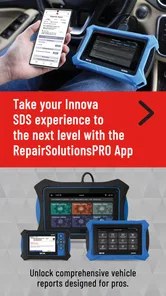
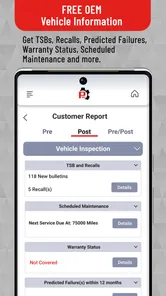
When a warning light appears on a dashboard, the hardest part is often not finding a code. It is turning that code into a sensible next step without jumping straight to an expensive repair. I tested RepairSolutionsPRO as an auto diagnostic app for that exact situation, and I found its value in the bridge between a vehicle scan and a repair decision. It is made by Innova Electronics Corporation, is free to install, and sits in the Auto & Vehicles category.
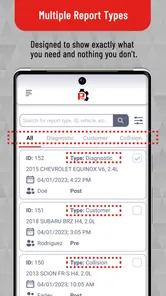
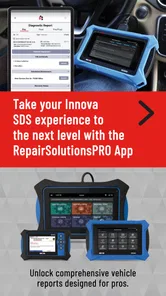
The app is aimed at people who already use compatible diagnostic equipment and want more useful guidance than a bare alphanumeric fault code. That distinction matters. This is not simply a digital owner’s manual, and it is not a replacement for a mechanic’s inspection. Its job is to help organize diagnostic information, explain what a detected issue may mean, and make the conversation with a repair professional more informed.
My overall impression is positive but practical: RepairSolutionsPRO is most useful when it is treated as a workflow tool, not as an automatic diagnosis machine. It can reduce confusion at the beginning of a repair, but it cannot remove the need for testing, experience, or physical inspection.
From the first warning light to a clearer repair plan
I’ll begin with the moment a dashboard warning turns into a practical question: what should I check next, and how do I avoid mistaking a code for a diagnosis? From there, I’ll look at how RepairSolutionsPRO fits into the handoff between a scan and a repair plan, including where a careful workflow matters more than a quick answer.
The starting condition: a code without enough context
Imagine leaving work and seeing the check-engine light come on. The car still drives, so it is tempting either to ignore the warning or to search the code online and choose the first repair that sounds plausible. Both reactions can lead to trouble. A fault code usually points toward a system or condition; it does not automatically identify the failed part.
This is where the app makes sense. Instead of keeping a code in a notes app and trying to interpret it later, I can use a connected diagnostic workflow to keep the vehicle information and diagnostic result together. That is a small change, but it makes the next conversation much easier. I can show a technician what appeared, describe when it happened, and avoid relying on memory.
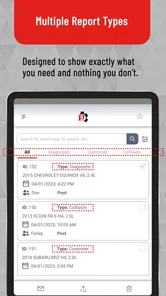
The app’s audience also includes people who work on several vehicles. For a home mechanic, a small repair business, or someone responsible for family cars, separating one vehicle’s issue from another is more useful than a one-off web search. The information becomes part of a repeatable process rather than a disposable lookup.
More From Our News Desk

 Gmail
GmailGmail in a Busy Inbox: Who Benefits Most?
From first account to crowded workday, Gmail earns its place through dependable search and flexible sorting—but its best fit depends on how much inbox maintenance you can tolerate.

 Prime Video
Switching to Prime Video: What Changes in Your Viewing Routine
Prime Video can make a compelling second home for streaming, but switching means learning a different catalog, rental layer, and route from browsing to playback.

 Universal TV Remote Control
Universal TV Remote Control Works Best as a Reliable Backup
A phone remote earns its place through quick setup and reliable habits. Here is how to get more from Universal TV Remote Control—and where its limits show.

 Weather - By Xiaomi
Weather by Xiaomi Review: Clear at a Glance, Less Clear Up Close
Xiaomi’s weather app makes everyday forecasts quick to scan, but its calm surface can leave useful details and recovery paths harder to find than they should be.

 X
XX Under Pressure: Can It Recover When Posting Goes Wrong?
A resilience-focused review of X, examining setup, mistaken posts, interruptions, weak connections, and the gaps that matter when recovery needs to be dependable.

 Clash of Clans
Clash of Clans Is Won Between the Battles
Its raids are quick; its community is a long-term project of coordination, teaching, rivalry, and shared responsibility—with all the friction that entails.
Latest News



There is a useful psychological benefit too. A dashboard warning can make a driver feel that the car has suddenly become mysterious. A structured diagnostic screen gives the problem a starting point. It does not promise certainty, but it helps replace panic with questions: Is the vehicle safe to drive? Is the issue urgent? What should be checked before replacing anything?
Step one: connect the physical diagnostic process
The first handoff is between the vehicle and the diagnostic tool. RepairSolutionsPRO depends on that relationship, so the experience begins before the app itself can provide much value. I would start by parking safely, following the scanner’s instructions, and making sure the vehicle is in the correct state for a scan. Rushing this part can create misleading results or an incomplete picture.
This is also the point where expectations need to be realistic. A phone application cannot read information that the connected hardware does not obtain. If the scanner is unsuitable for the vehicle, not properly connected, or unable to access a particular system, the app cannot compensate for that limitation. The best results come from treating the scanner, vehicle, and phone as one diagnostic chain.
For a first-time user, I recommend recording the dashboard symptoms before clearing anything. Note whether the light appeared during acceleration, after refueling, at startup, or while the engine was idling. A code viewed without those details can be interpreted too narrowly. Keeping the original symptoms beside the scan result is one of the simplest ways to avoid overconfidence.
Step two: read the result as a lead, not a verdict
Once a diagnostic result is available, the app’s role becomes clearer. It helps translate technical information into a more approachable repair discussion. That is valuable for a driver who understands that something is wrong but does not know whether the likely next action involves wiring, a sensor, a fluid issue, an air leak, or a mechanical component.
I particularly like the idea of using the result to build a short inspection list. Rather than ordering a part immediately, I would ask what related conditions should be checked first. A code associated with a sensor, for example, does not prove that the sensor itself has failed. The connector, wiring, power supply, vacuum system, or another component can produce a similar symptom.
This is one of the app’s most important trade-offs. Its explanations can make a code less intimidating, but a convenient explanation can also tempt an inexperienced owner to treat a possibility as a confirmed repair. I would use the app to prepare questions and prioritize checks, not to authorize a parts swap without testing.
For professionals, the same information can serve as a starting point before the vehicle enters a bay. For a private owner, it can make an estimate easier to understand. In both cases, the useful outcome is not merely knowing the code; it is knowing what information still needs to be gathered.
Step three: preserve the handoff to another person
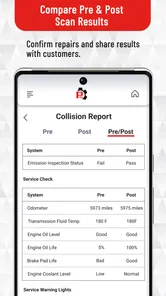
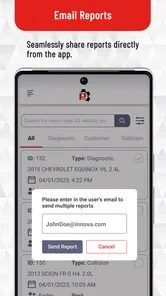
Real repairs rarely involve only one person. A driver may scan the car at home, speak with a family member, and then take it to a shop. A technician may receive the vehicle from a service adviser. A small business may have one person perform the scan and another carry out the repair. RepairSolutionsPRO fits best when the diagnostic result survives those handoffs instead of being lost in a verbal explanation.
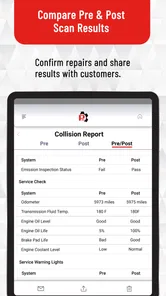
I would use the app as a shared reference during that exchange. The owner can describe the original symptom, show the scan information, and ask the technician which tests will confirm or reject the likely causes. That helps prevent a common misunderstanding: assuming that the first code is the same thing as the final diagnosis.
There is also a practical advantage when a warning light disappears before the appointment. Even if the symptom is no longer visible, the earlier diagnostic event may still be useful context. I would not assume that a light going out means the underlying condition is fixed. A record of what happened gives the technician something concrete to investigate.
For a shop, the app is more compelling when it supports consistent communication across multiple jobs. For a casual driver, the benefit is simpler: it gives you a better vocabulary. Instead of saying “the car said something about the engine,” you can bring a specific result and ask what evidence supports the proposed repair.
The result: better decisions, not instant repairs
The best outcome is a shorter path from warning light to appropriate action. Sometimes that may mean arranging a prompt inspection. Sometimes it may mean checking a simple condition before paying for a major repair. The app can help separate those conversations from guesswork, especially when the driver is comfortable collecting information but not performing mechanical work.
I would not judge success by whether the app names a replacement part immediately. I would judge it by whether I leave the diagnostic session knowing what I have observed, what remains uncertain, and what should happen next. That is a more honest measure of an automotive diagnostic tool.
It can also help when comparing the usual alternatives. A generic web search is quick, but it often mixes different vehicle years, engines, and symptoms. A paper code list may explain terminology but does not create a useful record. A basic scanner can display a code, yet leave the owner to interpret it alone. A mechanic’s inspection remains the strongest option for confirmation, but the app can make the appointment more productive by improving the information brought to the shop.
That does not make it superior in every case. If you already have professional diagnostic software, manufacturer-level information, and a tested workshop process, this app may add less value. Its strength is accessibility and organization around a scan, not replacing advanced equipment or expert diagnosis.
Three ways I would use it beyond a quick code lookup
First, I would use it before approving a repair estimate. If a shop recommends replacing a component because of a stored code, I can ask which tests confirmed that component was actually defective. The app helps me begin that conversation with the original diagnostic information rather than an internet guess.
Second, I would use it during a recurring problem. If the same warning returns after a repair, keeping the earlier result and the circumstances around it can reveal whether the issue is intermittent, unresolved, or possibly related to a different condition. That history is more useful than repeatedly starting from zero.
Third, I would use it when handing a vehicle to someone else. If a family member borrows the car or another technician takes over the job, a clear diagnostic trail reduces the chance that the symptom gets described inaccurately. This is especially helpful when the warning appears only under a particular driving condition that the next person has not experienced.
A fourth practical use is deciding how much confidence to place in an online parts recommendation. If a search result says a particular sensor is a common fix, I would compare that suggestion with the app’s diagnostic context and then look for supporting tests. The app does not eliminate bad advice, but it gives me a better anchor for evaluating it.
Where the flow breaks
The workflow becomes less comfortable when the user expects a one-tap answer. Automotive faults can have several causes, and the app cannot inspect a loose connector, a damaged wire, a vacuum leak, a weak battery, or a mechanical failure through the phone screen. Anyone who wants a guaranteed diagnosis from a code reader will probably be disappointed.
There is also friction around the hardware dependency. The app is not equally useful if you do not already have the appropriate diagnostic setup. That makes it less attractive as an impulse download for someone whose only goal is to understand a warning light once. In that situation, borrowing a scanner or visiting a trusted parts store or repair shop may be more sensible.
Another limitation is the risk of information overload for beginners. Technical descriptions can be useful, but they may still leave a new driver unsure which checks are safe to perform. I would avoid working under a vehicle, probing electrical circuits, or clearing a warning simply to make the dashboard look normal unless I understood the procedure and the consequences.
The app is also not the right choice for urgent symptoms. If the vehicle is overheating, losing braking power, smoking, making severe mechanical noise, or behaving dangerously, I would stop driving and seek qualified help rather than spend time interpreting a screen. A diagnostic result should never override basic safety judgment.
Who should install it, and who should skip it?
I think it is a good fit for a careful car owner who wants more context from a compatible scan, a hands-on hobbyist who works through repairs methodically, and a small automotive operation that needs a clearer handoff between scanning and service. It is also useful for someone who regularly communicates with repair shops and wants to ask more precise questions.
I would skip it if I do not have compatible diagnostic hardware, if I expect manufacturer-specific certainty from a general diagnostic workflow, or if I am unwilling to verify a suspected cause before buying parts. A person who rarely handles vehicle issues may get more value from going directly to a reputable technician and using the app only if that technician’s process supports it.
The age rating is Everyone, which fits its general audience, but that should not be confused with mechanical simplicity. The app may be suitable for a broad range of users; vehicle repairs themselves still involve safety risks and varying levels of skill.
Cost, availability, and day-to-day fit
RepairSolutionsPRO is free to install, while in-app purchases range from around six dollars to around two hundred fifty dollars per item. That wide range makes it important to think about the workflow before spending money. Occasional users should understand what they need before committing to an optional purchase, while frequent users may find expanded capabilities easier to justify.
The app has been available since November 2017 and currently appears as version 2.25.0, with Android support beginning at version 6.0. Its reach is reflected in more than fifty thousand installs, while its average store score is about 3.9 from roughly one hundred twenty ratings and around thirty-six written reviews. I read those figures as a sign of a useful but specialized tool rather than an app that works equally well for every driver.
That specialization is important. The store summary presents it as a professional-oriented product, and my experience supports that positioning: it makes the most sense when the user is prepared to connect diagnostic information with real repair work. It is less convincing as a standalone learning app or a substitute for a full workshop platform.
My final take after following the complete workflow
I like RepairSolutionsPRO because it addresses a real gap between “the car has a warning light” and “a qualified person has confirmed the repair.” Its strongest contribution is not dramatic automation. It is the organization of diagnostic information, the improvement of conversations, and the encouragement to investigate before replacing parts.
The app becomes genuinely useful when I follow the whole chain: document the symptom, perform the scan correctly, read the result cautiously, preserve the information during handoffs, and confirm the repair with appropriate testing. Skip those steps and it can become just another code lookup that encourages false confidence.
My recommendation is conditional but clear: install it if you already work with compatible automotive diagnostic equipment and want a more structured path from scan to service decision. If you need emergency help, advanced manufacturer-level diagnosis, or a guaranteed answer from one code, choose a qualified mechanic or more specialized equipment instead. Used within its proper role, this free Auto & Vehicles app can make vehicle troubleshooting less confusing and repair conversations considerably more productive.
RepairSolutionsPRO Frequently Asked Questions
Is RepairSolutionsPRO free to download, and can it involve extra costs?
RepairSolutionsPRO is free to download, but some features may involve in-app purchases. The available purchase options range from $5.99 to $249.99 per item, so it is worth checking the price and terms for anything you plan to use before making a purchase. The app’s usefulness may also depend on the scanner you connect and the features available for your account.
What phones can run RepairSolutionsPRO?
RepairSolutionsPRO is available for Android devices running version 6.0 or later. Before downloading, check your device’s operating system version and make sure you have enough storage and a reliable connection for setup and use. The app is intended to work alongside compatible vehicle-diagnostic hardware, so having a supported phone alone does not replace the need for an appropriate scanner.
Who makes RepairSolutionsPRO, and what kind of app is it?
RepairSolutionsPRO is an Auto & Vehicles app from Innova Electronics Corporation. Its store summary describes it as “By Pros for Pros,” reflecting its focus on vehicle diagnostics and repair information. The app is listed for Everyone, though that age classification is not a substitute for careful handling of vehicle repairs or a reason to attempt work beyond your skills.
What is RepairSolutionsPRO used for?
RepairSolutionsPRO is a vehicle diagnostics and repair-information app designed to work with compatible OBD2 scanners. After connecting a supported scanner to a car, the app can help read diagnostic trouble codes, explain possible causes, and provide repair suggestions. It is mainly intended to make check-engine-light diagnosis easier, although the exact information available depends on the vehicle, scanner, and subscription or account features.
Is RepairSolutionsPRO compatible with every car and OBD2 scanner?
No, compatibility is not universal. Most OBD2-equipped vehicles may support basic code reading, but advanced functions and coverage can vary by make, model, year, engine, and region. The app also requires a compatible RepairSolutionsPRO scanner or supported hardware. Before downloading, check the official compatibility information and confirm that your vehicle and adapter are supported, especially if you need ABS, airbag, transmission, or other manufacturer-specific diagnostics.
Pros
- Provides guided diagnostic steps for many common vehicle issues.
- Can help users understand warning lights before visiting a repair shop.
- Stores vehicle information for more personalized troubleshooting.
- Useful reference for DIY mechanics and automotive technicians.
- May reduce unnecessary diagnostic time and repair-related uncertainty.
Cons
- Coverage may vary depending on the vehicle make
- model
- and system.
- Some repairs still require professional tools or hands-on mechanical skills.
- The app cannot replace a certified technician for complex problems.
- Diagnostic information may be limited without compatible vehicle data.
- Certain features or content may require an account or paid access.












