RepairSolutions2
- 8.96K
- 4.7
- Installs
- 1.00M
- Price
- Free

Screenshots
Analysis by Reviewed
What I value most in a car-diagnostics app is not a promise that it can replace a mechanic, but a clearer starting point when a warning light appears. RepairSolutions2 aims to make vehicle information easier to understand and act on, which can help turn an alarming dashboard symbol into a more informed next step. I see it as a useful companion for owners who want to ask better questions and plan ahead, rather than a substitute for professional diagnosis.
A practical first step when a warning light appears
In an everyday situation, a check-engine light might come on during a commute, with the car still driving normally. Instead of guessing whether the issue is urgent, I would use a compatible OBD2 device with the app to check the available diagnostic information, note what it reports, and decide whether to arrange a repair promptly. That record can also make a conversation with a technician more specific. A code is a clue, though, not proof of a failed part, so I would avoid buying components or attempting a repair based only on a scan.
This distinction is important: a diagnostic app can help explain what the vehicle is reporting, but symptoms, vehicle history, and a hands-on inspection still matter. If the car is losing power, making unusual noises, overheating, or otherwise feels unsafe, I would stop somewhere safe and seek appropriate help instead of treating an app result as permission to keep driving.
Getting Started: User-Friendly or Not?
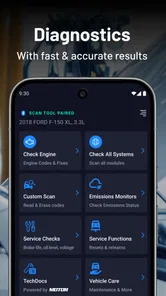
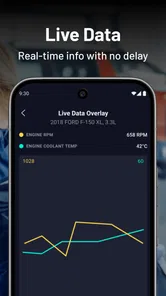
First off, downloading and installing RepairSolutions2 was a breeze. It's available on both Android and iOS, and setting it up was as simple as pie. Once you open the app, you're greeted with a straightforward user interface that even the least tech-savvy among us could navigate. I was impressed by how the app quickly connected to my car's OBD2 port using Bluetooth, and within seconds, it started analyzing my vehicle's diagnostics.
What the app can—and cannot—replace
RepairSolutions2 is an app in the Auto & Vehicles category from Innova Electronics Corporation. It is free to install, has an Everyone age rating, and its current version is 2.6.1; in-app purchases are listed at $9.99 to $29.99 per item. It has a 4.7 average from around 24,000 ratings, with more than 1 million installs. Those figures suggest broad interest, but the useful question for a new user is whether the app fits the diagnostic device and vehicle they plan to use.
That makes checking OBD2-device compatibility a sensible first step, before spending time pairing anything. Compared with a basic code-reader app, a guided diagnostic experience can be more approachable for someone who wants context and possible next actions. Compared with a mechanic’s inspection, however, it cannot physically test a component or account for every symptom. I would treat its information as preparation for a repair decision, not as a guaranteed diagnosis or a reason to skip expert help.
Features That Stand Out
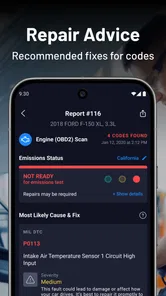
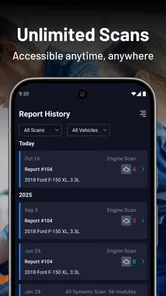
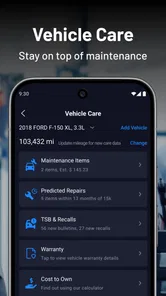
Now, here's where things get interesting. The app provides a comprehensive report on your car's health, detailing everything from engine performance to battery status. One feature that really caught my eye was the predictive maintenance alert system. It's like having a crystal ball for your car, predicting potential issues before they become major headaches.
More From Our News Desk

 Gmail
Gmail in a Busy Inbox: Who Benefits Most?
From first account to crowded workday, Gmail earns its place through dependable search and flexible sorting—but its best fit depends on how much inbox maintenance you can tolerate.

 Prime Video
Switching to Prime Video: What Changes in Your Viewing Routine
Prime Video can make a compelling second home for streaming, but switching means learning a different catalog, rental layer, and route from browsing to playback.

 Universal TV Remote Control
 Works Best as a Reliable Backup
A phone remote earns its place through quick setup and reliable habits. Here is how to get more from Universal TV Remote Control—and where its limits show.

 Weather - By Xiaomi
Weather by Xiaomi Review: Clear at a Glance, Less Clear Up Close
Xiaomi’s weather app makes everyday forecasts quick to scan, but its calm surface can leave useful details and recovery paths harder to find than they should be.

 X
X Under Pressure: Can It Recover When Posting Goes Wrong?
A resilience-focused review of X, examining setup, mistaken posts, interruptions, weak connections, and the gaps that matter when recovery needs to be dependable.

 Clash of Clans
 Is Won Between the Battles
Its raids are quick; its community is a long-term project of coordination, teaching, rivalry, and shared responsibility—with all the friction that entails.
Latest News



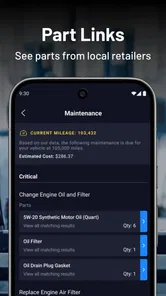
The app also offers repair cost estimates, which is a lifesaver if you're trying to budget for upcoming repairs. Plus, it gives you handy tips and instructions on how to tackle minor fixes yourself. For someone like me, who knows more about coding than car engines, this was a goldmine.
Make the information useful
I find these tools most helpful when I use them to organize questions rather than jump straight into repairs. If an estimate appears, I would treat it as a planning reference and compare it with a real quote, since the actual job can depend on the vehicle, local labor, and what a technician finds. For a do-it-yourself task, I would read the instructions first, check that the work is genuinely within my comfort level, and stop if it involves safety-critical systems or specialized tools.
A small habit can make the app more valuable over time: keep track of when a warning appears, what the car was doing, and whether the symptom changes. That context may help distinguish a recurring concern from a one-off event when you speak with a repair shop. It also helps prevent a common mistake—assuming that a newer or more detailed report automatically identifies the root cause.
Using it before and after a garage visit
The app can be useful even when I have no intention of doing the repair myself. Before calling a shop, I can note the warning, the conditions under which it appeared, and the diagnostic information available through the compatible reader. That gives me a more precise way to describe the issue without telling the technician what part to replace. The distinction matters: a well-prepared symptom report is helpful, while arriving with a firm diagnosis based on a code can distract from the actual fault.
After a visit, I would use the same notes to keep the car’s story straight. If a warning returns, knowing whether it is the same issue or a new symptom can make the follow-up conversation clearer. I would not treat an earlier scan as a permanent health certificate, though. A clean result at one moment cannot guarantee that a problem will not develop later, and a scan should never override a change in how the vehicle behaves.
Small habits that improve a scan
For a more useful reading, I would park safely and take a moment to record what happened before connecting the device: whether the light appeared at startup, during a drive, or after refueling, for example. Those details are easy to forget once a screen fills with technical terms. I would also avoid repeatedly clearing warnings just to make the dashboard look tidy; keeping the information available can help a technician understand what prompted the scan.
Another practical trade-off is timing. A scan is most useful when I can focus on it rather than trying to interpret results beside traffic or in a rushed parking-lot stop. If I am on the road and the car feels normal, I can wait until I am parked somewhere safe. If the car feels unsafe, I would prioritize getting help over troubleshooting with a phone.
Who benefits most from this kind of guidance?
I think the strongest fit is an owner who wants a middle ground between ignoring a dashboard light and booking a garage visit without any context. It can also help a household that shares a car: one person can record what the vehicle reported, so another driver is not left with a vague “the light came on” explanation. For someone who likes to learn basic maintenance, repair guidance can help them decide whether a task is within reach, while the cost estimate can offer a starting point for budgeting.
It is less suited to drivers who want a complete workshop tool or a guaranteed answer with no interpretation. A professional mechanic has inspection skills and equipment that a phone app cannot replace. Likewise, a person who only wants a quick code read may find a simpler scanner less complicated, while someone without a compatible OBD2 device may not get much value from installing the app alone. I would check the device fit before making the app part of a repair plan.
Features That Stand Out
Now, here's where things get interesting. The app provides a comprehensive report on your car's health, detailing everything from engine performance to battery status. One feature that really caught my eye was the predictive maintenance alert system. It's like having a crystal ball for your car, predicting potential issues before they become major headaches.
The app also offers repair cost estimates, which is a lifesaver if you're trying to budget for upcoming repairs. Plus, it gives you handy tips and instructions on how to tackle minor fixes yourself. For someone like me, who knows more about coding than car engines, this was a goldmine.
Make the information useful
I find these tools most helpful when I use them to organize questions rather than jump straight into repairs. If an estimate appears, I would treat it as a planning reference and compare it with a real quote, since the actual job can depend on the vehicle, local labor, and what a technician finds. For a do-it-yourself task, I would read the instructions first, check that the work is genuinely within my comfort level, and stop if it involves safety-critical systems or specialized tools.
A small habit can make the app more valuable over time: keep track of when a warning appears, what the car was doing, and whether the symptom changes. That context may help distinguish a recurring concern from a one-off event when you speak with a repair shop. It also helps prevent a common mistake—assuming that a newer or more detailed report automatically identifies the root cause.
Any Downsides?
While RepairSolutions2 is packed with features, it's not without its quirks. Occasionally, I found the Bluetooth connection a bit finicky, requiring a couple of tries to get it to sync with my car. Also, while the app provides a wealth of information, it can be a bit overwhelming at first glance.
Another thing to note is that the app works best with certain OBD2 devices, so you'll want to check compatibility before diving in. But once everything's set up, it runs like a charm.
There is also a trade-off between convenience and certainty. A scan can quickly give an owner something concrete to investigate, but a list of results may be harder to interpret than a single plain-language answer. If your main goal is simply to read and clear a code with the cheapest possible setup, a simpler reader may suit you better. If you do not own a compatible device and have no interest in buying one, the app is less compelling as a standalone download.
Choosing between an app, a basic reader, and a mechanic
The usual alternatives serve different needs. A basic code reader may be the better choice if I want a quick, uncomplicated check and already know how to interpret the result. A garage is the right option when the car’s symptoms are serious, when a fault is difficult to isolate, or when the repair needs tools and expertise I do not have. This app sits between those options: it can make diagnostic information more approachable and help me prepare, but it cannot turn a scan into a physical inspection.
That middle position is useful, but it also sets expectations. I would not buy a reader or pay for extra app options solely because a warning appeared once; first I would consider how often I expect to use the setup and whether I am comfortable acting on diagnostic information. The app is most worthwhile for someone who values ongoing understanding, not for someone hoping one download will eliminate every visit to a repair shop.
A sensible way to judge the cost
The app is free to install, while individual in-app purchases range from $9.99 to $29.99. I would begin by seeing whether the free experience and the compatible device cover the task I actually have. If I need the app only for a one-time warning, paying for an added option may not make sense; if I regularly monitor a vehicle or want particular guidance, I would weigh the purchase against that repeated use. Either way, I would compare estimates with a repair shop’s assessment rather than treating an in-app figure as a final bill.
Compatibility is also a practical question, not just a technical footnote. Before relying on it, I would confirm that the OBD2 reader works with the app and the vehicle I intend to scan. A Bluetooth connection can be convenient once it is working, but pairing trouble can make a quick check feel less quick. Keeping the device instructions nearby and trying the connection while parked can save frustration when a warning appears unexpectedly.
Who I would recommend it to
I would point this toward drivers who like to understand their car, keep an eye on emerging issues, or arrive at a garage with a more focused description of the problem. It may also suit someone who handles basic maintenance and wants guidance before deciding whether a job is manageable. The free installation makes it easy to explore, while purchases within the app are worth weighing against how often you expect to use its added options.
I would skip it if you expect a phone app to identify every fault with certainty, if you need emergency roadside assistance, or if you are uncomfortable interpreting technical results. In those cases, contacting a qualified repair professional is the better choice. For users who do proceed, the practical order is simple: confirm device compatibility, connect when the vehicle is safely parked, review the findings, and use them to guide—not dictate—the next decision.
The Verdict
All in all, if you're someone who likes to stay ahead of car troubles or simply wants to understand what's going on under the hood, RepairSolutions2 is definitely worth a look. It's like having a trusty mechanic on speed dial, ready to offer insights and solutions wherever you are.
So, next time your car throws a tantrum, rather than panicking or heading straight to the shop, whip out this app, and let it guide you. Trust me, your wallet—and your peace of mind—will thank you.
RepairSolutions2 Frequently Asked Questions
Do I need a diagnostic scanner before downloading RepairSolutions2?
Yes, a compatible diagnostic scanner is needed to use RepairSolutions2’s vehicle-diagnostics functions. The app itself is free to download, but it works with a scanner that connects to your vehicle and shares diagnostic information with your phone. Before installing, check that your scanner is compatible with the app and that your phone can connect to it.
Can I use RepairSolutions2 without connecting it to a car?
RepairSolutions2 is designed to provide vehicle diagnostics and solutions, so its main functions depend on information from a vehicle through a compatible diagnostic tool. Without connecting a scanner, you can install and explore the app, but you will not have vehicle diagnostic information to review. If your goal is to troubleshoot a car, plan on using the app with a compatible scanner.
Does RepairSolutions2 tell me exactly what repair my car needs?
RepairSolutions2 reads diagnostic information and offers explanations and potential solutions to help you understand a vehicle issue. That can make it easier to decide what to investigate next, but a diagnostic result should not automatically be treated as a guaranteed repair instruction. Vehicle symptoms and repair needs can vary, so consider consulting a qualified mechanic when an issue is complex or you are unsure how to proceed.
Is RepairSolutions2 suitable for beginners who know little about cars?
RepairSolutions2 is intended to help car owners understand diagnostic issues, and its explanations and potential solutions can be useful even if you are still learning about vehicle maintenance. You will need a compatible diagnostic scanner to access vehicle information, and the app is best viewed as a guide to understanding possible problems rather than a replacement for mechanical experience. For complex repairs, a professional can help.
Will RepairSolutions2 work with my particular car and scanner?
Compatibility depends on both the vehicle and the diagnostic scanner. RepairSolutions2 is compatible with most OBD2 vehicles, typically those manufactured after 1996 in the United States, but make, model, and year can affect support. The scanner must also work with the app. Check the app’s compatibility information or contact customer support before relying on it for a particular vehicle.
Pros
- User-friendly interface
- Detailed vehicle diagnostics
- Real-time repair solutions
- Compatible with many car models
- Free basic features
Cons
- Requires OBD2 scanner
- Limited free content
- Some features require subscription
- Occasional connectivity issues
- Interface may lag on older devices