Remote Play Controller for PS
- 788.00
- 4.3
- Installs
- 10.00M
- Price
- Free

Screenshots
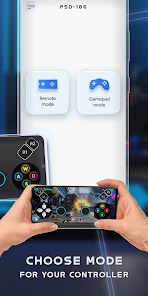
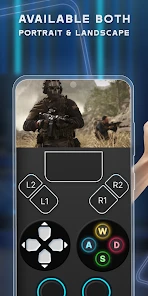
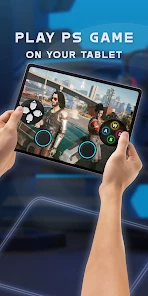
Analysis by Reviewed
Have you ever found yourself deeply engrossed in an intense gaming session on your PlayStation, only to be rudely interrupted by a call to dinner or some other trivial human necessity? Well, fret not, because the Remote Play Controller for PS is here to rescue your gaming adventures from such mundane interruptions.
Game On, Anytime, Anywhere
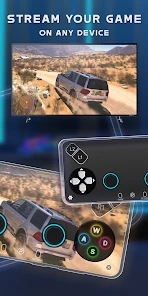
Imagine seamlessly transitioning from your PlayStation to your smartphone whenever the need arises. The Remote Play Controller for PS allows you to do just that. Whether you're lounging on your couch or sneaking in some game time during a lunch break at work, this app ensures your games are just a tap away. It’s like carrying a mini PlayStation in your pocket, minus the bulk.
Simple Setup, Seamless Experience
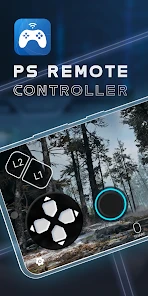
Setting up the app is a breeze. Once you download it, the app guides you through a few straightforward steps to link it with your PlayStation console. The interface is intuitive, making it user-friendly even for those who aren't tech-savvy. Within minutes, you’ll find yourself navigating through your favorite games as if you were holding the PS controller itself.
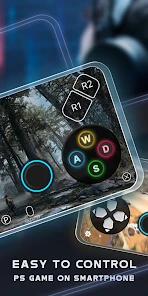
The real magic begins when you start playing. The app offers a responsive and smooth control experience, almost mirroring the physical controller. No more squinting at your phone trying to figure out which button does what. The layout is familiar, and the touch controls are remarkably precise.
Exploring New Dimensions
One of the standout features of the Remote Play Controller for PS is its ability to connect over Wi-Fi or mobile data. This means you’re not tethered to your home network. While playing over mobile data may consume some of your precious gigabytes, the freedom it offers is worth it. Imagine playing your favorite titles while waiting for your flight at the airport or during a long train commute. The possibilities are endless!
Furthermore, the app supports both landscape and portrait modes, adapting to whatever feels more comfortable for you. Personally, I find landscape mode gives a more authentic gaming feel, but the choice is yours. It’s this flexibility that makes the app truly stand out.
Keep It Connected
To ensure the best gaming experience, it’s crucial to have a stable internet connection. A laggy connection might cause some hiccups in your gameplay, which can be frustrating. So, if you’re planning on tackling a tough level, make sure your connection is up to the task.
More From Our News Desk

Weather by Xiaomi Review: Clear at a Glance, Less Clear Up Close

X Under Pressure: Can It Recover When Posting Goes Wrong?

Clash of Clans Is Won Between the Battles

Android Auto Makes the Case for Quieter Car Software

MobiOffice: Transforming Mobile Productivity with Seamless Integration

EA SPORTS FC™ Mobile Soccer: Redefining Mobile Sports Gaming
Also, it's worth noting that not every game is optimized for remote play, but many popular titles work seamlessly. It’s always a good idea to test your favorite games to see how they perform.
In conclusion, the Remote Play Controller for PS is a game-changer for PlayStation enthusiasts. It breaks the chains of traditional console gaming, offering a flexible and mobile-friendly alternative. Whether you're an avid gamer or just someone who enjoys the occasional gaming session, this app is a must-have. So, go ahead, give it a try, and unlock a new dimension of gaming freedom.
Remote Play Controller for PS Frequently Asked Questions
What is Remote Play Controller for PS?
Remote Play Controller for PS is a mobile application designed to allow users to connect their smartphones or tablets to their PlayStation consoles. This app enables gamers to stream and control their PS4 or PS5 games directly from their mobile devices, offering a flexible gaming experience on-the-go.
How do I set up Remote Play Controller for PS on my device?
To set up Remote Play Controller for PS, first, ensure your PlayStation console is updated to the latest software version. Install the app on your mobile device, sign in with your PlayStation Network account, and pair your device with the console following the on-screen instructions. Make sure both devices are connected to the same Wi-Fi network for optimal performance.
What devices are compatible with Remote Play Controller for PS?
Remote Play Controller for PS is compatible with most modern smartphones and tablets running iOS or Android operating systems. However, for the best performance, it's recommended to use devices with updated operating systems and strong Wi-Fi connectivity. Always check the app store listing for specific compatibility details before downloading.
Does using Remote Play Controller for PS affect my gameplay quality?
While Remote Play Controller for PS is designed to provide a seamless gaming experience, the quality of gameplay can be influenced by your internet connection's speed and stability. For optimal performance, a high-speed Wi-Fi connection is recommended. Users might experience some lag or reduced graphics quality if the connection is weak or unstable.
Is Remote Play Controller for PS free to use?
Remote Play Controller for PS is typically free to download and use. However, it requires a PlayStation Network account and a connection to your PlayStation console. Some features might be limited or require additional purchases, such as in-app purchases or subscription services, to unlock full functionality or enhance the gaming experience.
Pros
- Seamless PS4/PS5 connectivity.
- Low latency for smooth gaming.
- Customizable controller layout.
- Supports multiple devices.
- User-friendly interface.
Cons
- Requires strong internet connection.
- Limited compatibility with older devices.
- Occasional input lag.
- May drain battery quickly.
- Subscription needed for full features.
- Category
- Entertainment
- Version
- 19.5