

Regal: Tickets and Showtimes
- 13.78K
- 3.0
- Installs
- 5.00M
- Price
- Free

Screenshots


Analysis by Reviewed
When I’m trying to settle a movie plan, the hardest part is often not finding a film but making sure the theater, time, and seats work for everyone. Regal: Tickets and Showtimes is a free entertainment app from Regal Cinemas, and I see it as a practical companion for people who already choose Regal. It puts the planning and ticket purchase in the theater’s own app, while its usefulness naturally depends on whether a Regal location suits your plans.
Start with the theater, not just the movie
Before browsing, I’d decide whether Regal is a realistic option for the outing. If you need to compare several cinema chains, start with a broad listings service or check each theater’s app; Regal is focused on its own cinemas, so it is not the best place to build a complete picture of every nearby screening. Once you have a likely Regal location, though, it can be more convenient to check times and continue toward a booking without switching tools.
This distinction matters for people choosing a film together. One friend may care about the title, another about the time, and someone else about how far the theater is. I’d use the app to check whether a Regal screening fits those practical constraints first, then share the specific theater and showtime with the group before buying. That avoids treating a promising film page as proof that the whole plan is settled.
Small checks that prevent bigger hassles
Location is an easy detail to overlook when you are in a hurry. If the nearby choices seem wrong, I’d check which area the app is using and whether the selected theater is the one I intend to visit. A theater map can help orient a search, but it cannot decide whether the distance, route, or arrival time works for your group, so I’d confirm those separately.
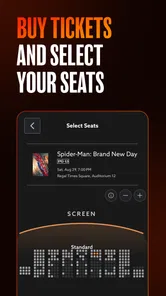
I’d also settle seat preferences before checkout, especially when buying for more than one person. If people want to sit together, verify the selected seats and showtime before confirming rather than relying on memory after moving through the booking steps. This is a modest habit, but it can prevent the awkward discovery that each person thought someone else had checked the arrangement.
Tickets, payment, and a sensible recovery plan
Regal’s app is built to take a ticket purchase from browsing toward checkout. The original review experience described saved payment details as a way to make later purchases quicker, and that convenience is useful if you buy at Regal repeatedly. It also makes a final pause worthwhile: check the total and the screening details before placing an order, particularly when coordinating several tickets.
If checkout appears to stall, I wouldn’t immediately submit the purchase again. First look for a confirmation or a ticket in the app; then decide whether another attempt is actually needed. That order of checks helps distinguish a slow screen from a purchase that never completed and is safer than guessing. Keep any confirmation where you can find it before leaving for the theater, rather than depending on a remembered showtime or a screenshot of an earlier step.
More From Our News Desk

 Gmail
Gmail in a Busy Inbox: Who Benefits Most?
From first account to crowded workday, Gmail earns its place through dependable search and flexible sorting—but its best fit depends on how much inbox maintenance you can tolerate.

 Prime Video
Switching to Prime Video: What Changes in Your Viewing Routine
Prime Video can make a compelling second home for streaming, but switching means learning a different catalog, rental layer, and route from browsing to playback.

 Universal TV Remote Control
 Works Best as a Reliable Backup
A phone remote earns its place through quick setup and reliable habits. Here is how to get more from Universal TV Remote Control—and where its limits show.

 Weather - By Xiaomi
Weather by Xiaomi Review: Clear at a Glance, Less Clear Up Close
Xiaomi’s weather app makes everyday forecasts quick to scan, but its calm surface can leave useful details and recovery paths harder to find than they should be.

 X
X Under Pressure: Can It Recover When Posting Goes Wrong?
A resilience-focused review of X, examining setup, mistaken posts, interruptions, weak connections, and the gaps that matter when recovery needs to be dependable.

 Clash of Clans
 Is Won Between the Battles
Its raids are quick; its community is a long-term project of coordination, teaching, rivalry, and shared responsibility—with all the friction that entails.
Latest News



The app is free to install, but movie tickets still cost money. I’d treat the purchase screen as the place to verify what I’m paying for, not assume that using the app makes a screening free. If an order looks wrong or the ticket does not appear after a completed purchase, use the confirmation details to work out what happened before starting another checkout.
Rewards make more sense for regular visits
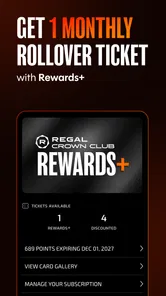
The rewards side is most relevant if Regal is already part of your routine. The app connects purchases with Regal Crown Club points, so frequent visitors have a reason to keep their movie planning and rewards activity together. For someone who goes to the cinema only occasionally, joining or tracking another program may not feel worthwhile; the value depends on how often you actually use Regal, not simply on having the app installed.
That is one useful way to decide whether to keep it: if you return to Regal, the booking and rewards workflow may earn a regular place on your phone. If your visits are scattered across different chains, a general search tool may serve as the better starting point, with Regal’s app used when you have chosen one of its theaters. Neither approach is universally better; it depends on whether you value chain-specific convenience or a wider comparison.
What the ratings can and cannot tell you
The app has a 3.0 average from around 47,000 ratings, alongside roughly 14,000 written reviews. I take that as a reason to keep expectations measured rather than as a prediction of how one specific booking will go. A rating can reflect many different phones, locations, and situations, so my practical advice is to make the important checks yourself: confirm the theater, showtime, seats, and purchase status.
Regal has more than five million installs and is rated Teen. It first arrived on February 23, 2012, and version 11.9.3 requires Android 10 or later. Those details are useful when deciding whether it fits your device and comfort level, but they do not replace checking your own phone’s software or the local theater options you need.
When a delay is not necessarily an app failure
A screening that no longer appears, a changed plan, or a theater that does not match your expectation may have more to do with the selected location or current availability than with the app itself. I’d recheck the location and screening details, then compare them with the booking confirmation if I already paid. If the connection is unreliable, wait until it is stable before trying checkout again; repeatedly restarting a purchase while the phone is struggling can make it harder to know which attempt, if any, completed.
For a group outing, this also helps separate an app issue from a coordination issue. If everyone is discussing a different theater or time, pause and agree on one plan before anyone buys. If only one person’s screen seems out of date, checking the chosen location and refreshing the plan calmly is more useful than having the whole group place separate orders in a rush.
A focused tool for Regal movie nights
I find cinema apps most useful when plans are still flexible: I can check what is playing, compare times, and decide whether a nearby screening fits the evening. Regal: Tickets and Showtimes is Regal Cinemas’ free entertainment app, built around moviegoing at its theaters. Its appeal is practical rather than broad: it makes the most sense when you already expect to see a film at Regal and want to handle the planning in one place.
Your Go-To Movie Companion
If you’re anything like me, you know the hassle of juggling through multiple websites to find movie schedules and book tickets. With Regal: Tickets and Showtimes, those days are over. This app is designed to be your one-stop solution for all your movie needs. From checking out the latest releases to securing your tickets, it’s all in one place. And guess what? It even lets you choose your preferred seating!
Where plans can get stuck
The main convenience is also the main trade-off: the app is most useful when Regal is the theater you want. If you are comparing several cinema chains, a general movie-search service or each theater’s own app may give you a broader view. I’d use Regal to narrow down a local screening and complete a Regal booking, rather than assume it replaces every cinema tool.
For a realistic evening plan, I’d check the film and showtime before coordinating with friends, then confirm the theater and seats before anyone sets off. That small pause matters when a group has different arrival times or seat preferences. A listing helps with the decision, but the final booking details are what I would rely on when plans are set.
Easy Navigation and User-Friendly Interface
The app welcomes you with a sleek and intuitive interface. Navigating through the app is a breeze, thanks to its well-organized layout. You can effortlessly search for movies, view trailers, and get detailed information about showtimes. It's like having a personal movie assistant in your pocket.
One of the standout features is the interactive map which helps you locate theaters nearby. No more wondering which theater is closest or what’s playing where. The app does all the heavy lifting, so you can just focus on which movie snack to bring!
Setup checks before checkout
I’d start by checking that the app is current and that the phone has a reliable connection before searching or buying. The current version is 11.9.3, and it requires Android 10 or later. If the app opens but nearby listings seem unhelpful, reviewing the chosen location and search area is a sensible first step; a map is only as useful as the place you are asking it to search around.
When choosing seats, I’d settle the group’s preferences before checkout instead of treating the seat map as a last-minute detail. If you’re buying for several people, double-check the selected seats and showtime before confirming. This is a simple way to avoid the common planning snag of one person assuming the group is together when the booking shows otherwise.
Seamless Ticket Booking Experience
Booking tickets has never been this easy. With a few taps, you can reserve your spot for the next big hit. The app even saves your payment details for a quicker checkout process on your next visit. And if you’re part of the Regal Crown Club, you can rack up points with every purchase, which is a neat perk for frequent moviegoers.
Recovering a stalled booking
If a screen takes longer than expected or a purchase does not appear to finish, I would avoid tapping the final purchase control repeatedly. First check whether the booking confirmation has arrived or whether the ticket is visible in the app, then try again only after you know the first attempt did not complete. That cautious sequence is especially helpful when buying for a group, since duplicate attempts can make an already confusing moment harder to sort out.
Rewards are a stronger reason to keep using Regal if you visit its cinemas regularly; occasional moviegoers may get less value from tracking another membership. The app is free, but that does not make every purchase free, so I’d review the total at checkout and keep the confirmation handy. Its audience rating averages 3.0 from around 47,000 ratings, which suggests experiences vary; I’d treat it as a useful booking option, not a guarantee that every session will go smoothly.
When the problem may be elsewhere
A missing or changed screening can reflect theater availability or a change in plans, not necessarily an app fault. I’d compare the selected location and showtime with the theater information, and check the booking confirmation before assuming a purchase failed. If the phone has a weak connection, waiting for it to stabilize before retrying is more sensible than repeatedly restarting the checkout process.
For someone who wants the widest comparison across cinema chains, a broader listings app may be the better starting point; for a Regal regular, buying through Regal keeps the search and rewards in the same place. The app is rated Teen, has more than five million installs, and has around 14,000 written reviews. Those figures show that it is an established option, but the practical test is whether its local theater selection and booking flow suit your habits.
Stay Updated with Movie Alerts
Are you always on the lookout for new releases? The app has a nifty feature that sends you alerts for upcoming movies and exclusive screenings. You won’t have to worry about missing out on tickets for that next big premiere. It’s like having a movie concierge service, keeping you in the loop.
Moreover, the app offers exclusive deals and discounts, which means you can watch more for less. Who doesn’t love a good bargain?
Final Thoughts
In a world where convenience is king, Regal: Tickets and Showtimes stands out as a must-have app for movie enthusiasts. It simplifies the entire movie-going experience, from finding the right film to securing the best seats. Whether you're a casual viewer or a die-hard cinephile, this app is set to enhance your cinematic adventures.
So, next time you plan a movie night, give this app a whirl. Trust me, once you go Regal, you might not look back!
Regal: Tickets and Showtimes Frequently Asked Questions
What kind of app is Regal: Tickets and Showtimes?
Regal: Tickets and Showtimes is an entertainment app for people who want to plan cinema visits through Regal. Its main purpose is to help you see films playing in nearby cinemas, check showtimes, buy tickets, and earn rewards as you make purchases. It is focused on moviegoing rather than watching films on your phone, so it is most useful when you are considering a trip to a Regal cinema.
Can I use Regal: Tickets and Showtimes to find movies playing near me?
Yes. The app is designed to show the latest films in cinemas near you, making it useful when you want to compare what is playing before choosing a movie. You can browse available films and look up showtimes as part of planning a visit. Its local cinema focus makes it a practical option for Regal moviegoers, rather than a general guide to films available on streaming services.
Is Regal: Tickets and Showtimes free to download?
Yes, Regal: Tickets and Showtimes is free to download. It is an entertainment app from Regal Cinemas for finding nearby cinema showtimes and buying movie tickets, with rewards available as you make purchases. The app is intended for a Teen audience. Its core purpose is practical: browse films playing in cinemas near you and manage moviegoing through Regal in one place.
What devices and operating systems are compatible with the Regal app?
The Regal app is available for Android and iOS devices, and the current version is 11.9.3. On Android, the minimum supported operating system is Android 10, so it is worth checking your device's software before installing. The app is designed for moviegoers who want to look up nearby showtimes and handle ticket purchases from a phone.
What features does the Regal app offer for moviegoers?
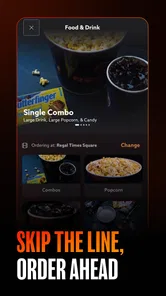
The Regal app provides a comprehensive platform for movie enthusiasts with features like easy browsing of current movie showtimes, advance ticket purchases, and exclusive access to special promotions and discounts. It also includes a rewards program where users can earn points on ticket and concession purchases, which can be redeemed for free tickets or other perks. Additionally, users can watch trailers, read movie reviews, and find information about upcoming releases.
Pros
- User-friendly interface for easy navigation.
- Fast ticket booking with minimal steps.
- Real-time updates on showtimes and availability.
- Secure payment options integrated.
- Exclusive deals and discounts on tickets.
Cons
- Limited to Regal theaters only.
- Occasional app crashes reported.
- Requires stable internet for smooth operation.
- No offline booking option available.
- Too many push notifications.











