Red Robin
- 1.80K
- 4.4
- Installs
- 1.00M
- Price
- Free

Screenshots
Analysis by Reviewed
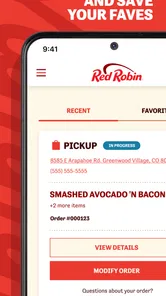
For a first-time visitor, the Red Robin app makes the most sense when you have a specific meal in mind: you can look over the menu, place an order, or use the rewards program while planning a visit. I’d treat it as a convenient companion to eating at Red Robin, not as a general restaurant-finder. If you already know the restaurant is where you want to go, the app can make the next steps feel more organized.
What to expect before you open it
This is a free Food & Drink app from Red Robin International, Inc., and its focus is the restaurant’s own ordering and rewards experience. It has a 4.2 average from around 4,300 ratings, with more than 500,000 installs. That gives a new user a useful sense of its reach, but ratings alone won’t tell you whether the ordering flow fits your plans. The app is for Everyone, and version 3.3.0 is listed for devices running Android 7.0 or later.
I’d choose it if Red Robin is already part of your routine, or if you want to check the menu and rewards before deciding what to order. If you are comparing restaurants across a neighborhood, a general maps or restaurant app is usually a better starting point; Red Robin’s value is in handling the steps connected to this particular chain.
Getting Started with Red Robin
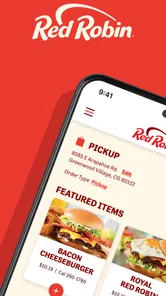
First things first, downloading the Red Robin app is a breeze. Available on both Android and iOS, I had it up and running in no time. Once installed, the app welcomes you with a clean and intuitive interface, which is always a good start. You can sign up or log in with ease, and before you know it, you're ready to dive into a world of delicious possibilities.
A simple route to your first useful result
For a low-pressure first run, I’d start by finding the location you actually plan to visit, then browse the menu before building an order. That sequence helps avoid the common mistake of choosing food first and only afterward realizing you were looking at the wrong restaurant for your plans. If you intend to earn rewards, sign in before completing a purchase so you can keep the account side of the visit in view.
A realistic use case is deciding on dinner during the ride home: browse options, settle on a burger and any customizations, then order ahead if that suits the location and your timing. I’d still leave room for a quick review of the final order before submitting it. A small change such as an added topping can affect what you receive, so checking the item details is more useful than rushing through the last screen.
Features that Stand Out
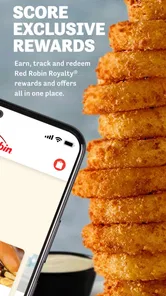
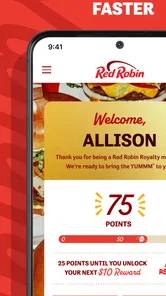
The app's standout feature has to be its Royalty Rewards program. I mean, who doesn't love earning rewards for something they were already going to do? With every purchase, you rack up points that can be redeemed for various perks and discounts, which is a sweet deal if you ask me. Plus, the app keeps track of your rewards, so you don’t have to worry about losing those precious points.
More From Our News Desk

Weather by Xiaomi Review: Clear at a Glance, Less Clear Up Close

X Under Pressure: Can It Recover When Posting Goes Wrong?

Clash of Clans Is Won Between the Battles

Android Auto Makes the Case for Quieter Car Software

MobiOffice: Transforming Mobile Productivity with Seamless Integration

EA SPORTS FC™ Mobile Soccer: Redefining Mobile Sports Gaming
For regular customers, the practical advantage is having rewards and ordering in the same place rather than trying to remember a separate account or search through old messages. I’d check the rewards area before deciding whether to place an order now or save a visit for another time. That habit can help you notice what is available without assuming every offer applies to every meal or location.
Another cool feature is the ability to order ahead. Whether you’re in a rush or just prefer having your meal ready upon arrival, this option is a lifesaver. The menu is right at your fingertips, and customization is a piece of cake. Want extra bacon on that burger? No problem, just a tap away!
Where convenience has limits
Ordering ahead is helpful when your plans are predictable, but I wouldn’t rely on it as a guarantee that a meal will be ready at an exact moment. A busy dinner run can change, and the app is best used to prepare an order rather than remove every uncertainty from a restaurant visit. If you prefer to ask questions before choosing ingredients or want to make several unusual requests, speaking with staff may be clearer than trying to express everything through customization options.
The trade-off compared with ordering in person is straightforward: the app gives you time to browse and make choices privately, while a direct conversation can be better for clarifying a special request. For a familiar burger order, digital ordering is appealing; for a complicated meal or a visit where you have not settled on what you want, browsing first and deciding at the restaurant may feel less constrained.
Dining Experience Enhanced
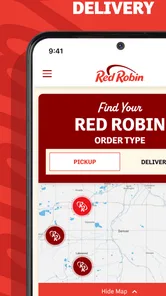
One thing that really impressed me was how the app enhances the overall dining experience. You can easily find the nearest Red Robin location, check out the wait times, and even join the waitlist right from your phone. No more standing around awkwardly in the entrance waiting for a table. It’s the small things like this that make the app a must-have for frequent visitors.
For a family or group, checking the location and waitlist before setting off can make the outing easier to coordinate, especially when everyone is hungry and nobody wants to decide after arriving. I’d use those tools as planning aids, then keep an eye on the situation as the visit approaches. That is more useful than treating a phone screen as a substitute for checking in or confirming plans once you are there.
Also, let’s not forget about the exclusive offers and promotions that pop up regularly. It's like having a little surprise waiting for you every time you open the app. Whether it's a discount on your favorite burger or a special deal on drinks, these offers keep things exciting and keep you coming back for more.
Making an order work for your plans
One helpful way to use the app is to separate choosing from committing. I’d browse the menu when I have a quiet moment, note the meal that sounds right, and then return to the order when I know which location and timing make sense. That small pause is useful when ordering for more than one person: it gives everyone a chance to settle on their choices before the order is submitted, instead of making last-minute changes while someone is waiting at the counter.
For a weekday pickup, for example, I might check the menu earlier in the afternoon, then place an order once I have a realistic sense of when I can get there. If plans shift, I would not assume the original timing remains ideal; I’d reassess before ordering rather than sending an order too early just because the option is available. The app can streamline a decision, but it cannot make a changing schedule predictable.
It is also worth treating customization as a careful review step, not just a chance to add extras. When a meal has several choices, I’d read the finished item description before moving on, especially if I am ordering for someone else or repeating a favorite from memory. That is a simple way to catch a missed change while there is still time to correct the order on screen.
Choosing between the app and other ways to order
Compared with a general delivery or restaurant-discovery app, Red Robin’s own app is most appealing when you already want this restaurant and care about its menu, rewards, or visit-planning tools. A broader service is more useful when you want to compare several places in one search or make a decision based on options across town. I would not install a restaurant-specific app just to browse casually if I am still undecided about where to eat.
There is also a difference between ordering ahead through an app and calling or ordering at the restaurant. The app is convenient for familiar items and gives you time to review your choices without holding up a conversation. A call or in-person order can be a better fit when a request needs explanation, when you want help deciding, or when the menu wording does not answer a question you have. I see these as complementary routes rather than one method replacing the others.
The same distinction applies to visiting for a table. The location and waitlist tools can help you plan, while a direct check with the restaurant is a sensible option if your group has a specific timing concern. For an ordinary outing, the app can reduce some of the small planning tasks; for a tight schedule, I would avoid treating any digital estimate as a promise.
Who will get the most from it
I’d recommend it most to people who visit Red Robin often enough to care about rewards, or who like choosing a meal before they arrive. It is less compelling if you rarely eat there, prefer to make every decision with a server, or mainly need a tool for comparing many different restaurants. In those cases, the app’s chain-specific focus may not justify another account on your phone.
If you are wondering whether you need an account, the app offers sign-up and login, and signing in is the sensible route if you want to keep track of rewards. If you only want to browse or plan, you can begin by exploring the restaurant options that are available to you. For a first order, I’d check the selected location, review customizations, and confirm the final details before submitting; those checks answer the practical questions that matter most without turning a quick meal into a project.
What to keep in mind on a first visit
New users may wonder whether the app is worthwhile before they have earned or used any rewards. My view is that the first useful outcome does not have to be a reward: finding a nearby restaurant, checking the menu, and deciding whether ordering ahead suits the day can already save a little uncertainty. Rewards matter more once Red Robin is somewhere you return to, rather than a reason on their own to choose a meal you did not want.
Another practical question is whether the app suits someone ordering for a group. It can help gather choices in one place, but I would still confirm each person’s customizations with them before submitting. That is especially useful if one person is ordering on behalf of people who are not present; assumptions about toppings or changes are easy to miss when everyone is hungry and the order is being assembled quickly.
If you are deciding between pickup and dining in, start from the kind of visit you actually want. Ordering ahead makes sense when you know what you want and have a workable arrival time. For a relaxed meal where you want to ask questions, browse at your own pace, or change your mind, going in and ordering there may feel more natural. The app’s strongest role is reducing friction around a decided plan, not deciding the whole outing for you.
Final Thoughts
In a nutshell, the Red Robin app is a fantastic companion for anyone who loves dining at Red Robin. It's user-friendly, packed with features, and genuinely enhances your dining experience. While it’s not without its occasional hiccups, like any app, the overall experience is overwhelmingly positive. If you're a fan of great food and love a good deal, downloading this app is a no-brainer. So, the next time you're craving a juicy burger, make sure you’ve got this app handy. Trust me, you won’t regret it!
Red Robin Frequently Asked Questions
What devices can run the Red Robin app?
Red Robin is a Food & Drink app for ordering and earning rewards. It is available for Android devices running version 7.0 or later, so check your device’s operating system before downloading. The app is free, and its Everyone age rating makes it suitable for a broad audience. Its current version is 3.3.0.
Who develops Red Robin, and what is the app mainly used for?
Red Robin is developed by Red Robin International, Inc. and is intended to make ordering from Red Robin easier while letting users earn rewards along the way. The app has over 500,000 installs, with an average rating of 4.2 from around 4,300 ratings. It was released on November 11, 2021.
What is Red Robin and what does it offer?
Red Robin is a popular app designed to provide users with a convenient and immersive experience in exploring our diverse menu options, placing orders, and managing loyalty rewards. The app offers features such as online ordering, table reservations, and personalized recommendations based on your preferences. This makes dining at Red Robin more enjoyable and effortless.
How does the Red Robin app's loyalty program work?
The Red Robin app includes a comprehensive loyalty program that rewards users for their purchases. By signing up, users earn points for every dollar spent, which can be redeemed for discounts on future meals. The app keeps track of your points and notifies you of any special offers or rewards, ensuring you never miss an opportunity to save.
Is it possible to customize my order through the Red Robin app?
Yes, the Red Robin app provides a user-friendly interface for customizing your order to fit your dietary preferences or taste. Whether you want to add or remove ingredients, choose a specific cooking style, or select a side dish, the app allows you to personalize your meal with ease, ensuring a satisfying dining experience every time.
Pros
- User-friendly interface for easy navigation.
- Offers exclusive discounts and deals.
- Loyalty program rewards frequent customers.
- High-quality images enhance menu browsing.
- Efficient order tracking feature.
Cons
- Limited customization options for orders.
- Occasional app crashes reported.
- Requires stable internet connection.
- Lacks detailed nutritional information.
- Limited payment methods available.











