Recipe Keeper
- 3.76K
- 4.7
- Installs
- 1.00M
- Price
- Free

Screenshots
Analysis by Reviewed
I find a shared recipe collection most useful when a household is tired of hunting through screenshots, messages, and scraps of paper. Recipe Keeper gives recipes, meal planning, and shopping lists a common home, which can make the handoff between whoever plans dinner and whoever shops feel less improvised. Its appeal is practical rather than flashy: it helps turn “we should make that again” into something you can find and use.
A household cookbook that needs a little upkeep
The app is a Food & Drink tool from Tudorspan Limited, and it is free to download. I’d think of it as a place to build your own cookbook, not a feed that constantly supplies new dinner ideas. The more care you put into saving and organizing recipes, the more useful it becomes. That means there is some setup work, especially if your household has a large collection scattered across paper, browser bookmarks, or chat threads.
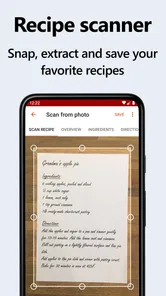
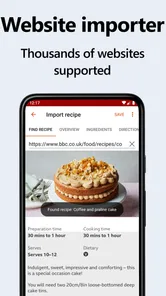
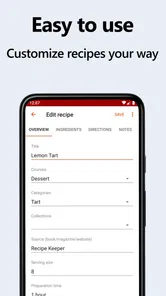
For a recipe you already have, entering ingredients and instructions gives you a clean copy you can return to. Importing a recipe from a website can be quicker, but I’d still check the saved version before relying on it: recipe pages vary, and a quick review helps catch anything that did not come across as expected. For family favorites, I’d also use categories consistently, so someone looking for weeknight meals does not have to remember which label another person chose.
Making a shared cookbook easy to use
The first useful decision is not how many recipes to add, but which ones deserve a place in the collection. I’d start with the meals people already cook often, then add recipes that have been tested at least once. That keeps the library immediately useful and avoids filling it with appealing links nobody has tried. A searchable cookbook only saves time when its contents are reliable enough to cook from.
When more than one person adds recipes, agree on a few simple naming habits. Put the main dish first in the title, and use categories for details such as meal type or dietary preference rather than inventing a new label every time. This is a small bit of housekeeping, but it helps another person find “lentil soup” without knowing whether its contributor filed it under winter meals, vegetarian dinners, or family favorites.
There is also a practical difference between a recipe archive and a working kitchen reference. An imported page may preserve the broad ingredients and method, while the household’s version includes the adjustment that actually matters: a longer cooking time, a preferred substitute, or a reminder to prepare a component ahead. I’d add those observations only after cooking, so the saved instructions reflect experience rather than guesswork.
Planning and shopping as a shared routine
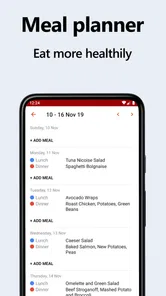
A realistic use is planning a few dinners before the weekly shop. I can add recipes to the meal plan, then use the resulting shopping list as a starting point at the store. That is more helpful than making a list from memory, but it does not remove the need to check what is already in the cupboard, or to adjust quantities and preferences for the people eating. Treat the list as a working draft rather than a perfect inventory.
More From Our News Desk

Weather by Xiaomi Review: Clear at a Glance, Less Clear Up Close

X Under Pressure: Can It Recover When Posting Goes Wrong?

Clash of Clans Is Won Between the Battles

Android Auto Makes the Case for Quieter Car Software

MobiOffice: Transforming Mobile Productivity with Seamless Integration

EA SPORTS FC™ Mobile Soccer: Redefining Mobile Sports Gaming
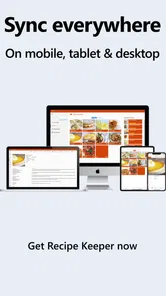
For coordination, a household can agree on a simple routine: one person chooses meals, another checks the list before shopping, and the cook opens the recipe when it is time to start. The benefit is having the same plan and recipe details available across devices. Still, shared access is not the same thing as separate household accounts or controls. If everyone needs an individually managed profile, or you want strict boundaries around who can change a plan, check that the app suits that arrangement before making it the household’s central system.
One everyday example is a busy evening when the person who planned dinner is not the one cooking. If the recipe has been saved clearly and the meal plan is current, the cook can work from the same instructions rather than asking which screenshot was meant or whether an ingredient was swapped. The coordination benefit depends on people keeping the information current; if plans change in a message but not in the app, the shared reference can become misleading.
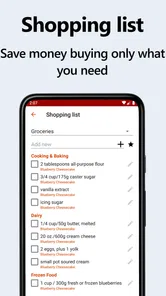
I’d also avoid treating the generated shopping list as a complete pantry system. Before leaving, check staples and quantities at home, and remove anything the household already has. That extra pass is especially worthwhile when recipes overlap: two planned meals may both call for the same ingredient, but the list still needs a human check to match how much is actually required and what is already in the kitchen.
Your Digital Cookbook
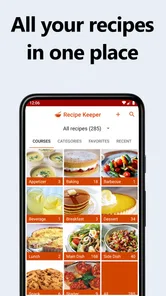
Recipe Keeper is essentially your digital cookbook. Remember all those times you scribbled a recipe on a piece of paper only to lose it later? No more of that! With this app, you can easily save and organize all your favorite recipes in one place. Plus, adding a recipe is a breeze. You just enter the ingredients, instructions, and voilà! It's saved forever. The best part? You can even import recipes from your favorite websites with just a tap. Talk about convenience!
Meal Planning Made Easy
One of the standout features of Recipe Keeper is its meal planning capabilities. If you're like me and struggle with deciding what to cook each week, this app has got your back. You can plan your meals for the week, or even the month, and never have to think about it again. It's like having a meal planner that doesn't charge by the hour.
And let's not forget about the shopping list feature. As you add recipes to your meal plan, the app automatically creates a shopping list for you. It's super handy when you're trying to stick to a budget or just want to make sure you don't forget anything at the store.
Making the list work in real life
For a more dependable shop, I’d plan only the meals that are genuinely likely to happen, then review the list once the week’s schedule is clear. A last-minute dinner elsewhere can leave ingredients unused, while a changed plan may require a quick list edit. The app helps connect decisions to shopping, but it cannot know which nights are uncertain or what the household will already have on hand.
This makes the tool particularly useful for people who cook from a familiar rotation. A parent who wants to keep a few dependable dinners handy, housemates taking turns cooking, or someone returning to a recipe after a long gap can all benefit from one organized source. It is less suited to people who want automatic grocery ordering, detailed stock tracking, or a constantly refreshed catalogue of meal ideas; those needs call for tools built around shopping or discovery first.
Sharing is Caring
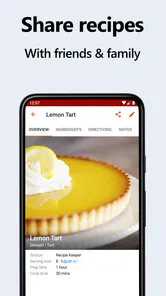
Another cool feature is the ability to share your recipes. Whether you want to send a recipe to a friend or share it on social media, Recipe Keeper makes it easy. You can even print recipes directly from the app if you're a fan of the old-school paper method.
For those who love customization, Recipe Keeper allows you to categorize your recipes just the way you like. Whether it's by cuisine, meal type, or dietary preference, you can organize your recipes to suit your style. It's all about making the app work for you.
Sharing is most helpful when it has a clear purpose: passing a tested family recipe to someone who wants to cook it, or keeping a favorite accessible to the person preparing dinner. Printing can also be a sensible choice when a cook prefers paper beside the counter or does not want to handle a device while cooking. I would not assume that sharing alone creates a managed household workspace, though; decide who maintains the main collection and how changes should be communicated.
Who will get the most from it?
I’d recommend it most to people who repeatedly cook from a personal collection and want planning and shopping to connect to those saved recipes. It is less compelling if you mainly browse for inspiration, already rely on a grocery service’s built-in list, or prefer a paper notebook you can annotate freely. Compared with a basic notes app, its advantage is the recipe-focused organization and link to planning; compared with a dedicated meal-discovery service, it is more about managing what you choose to cook than finding a constant stream of new dishes.
A useful habit is to save a recipe after you have actually cooked it, then add a short note in the instructions about a change you want to remember, such as reducing an ingredient or using a different side. That turns the collection into a personal reference rather than a pile of imported pages. I would also keep recipe names and categories predictable: a shared library is only quick to search when everyone files things in a way the rest of the household can understand.
The choice between this and a notes app comes down to what you want to connect. Notes can be more flexible for free-form comments and unrelated kitchen reminders, but they do not naturally make a recipe collection feel like a cookbook linked to planning. A meal-discovery app has the opposite emphasis: it may be a better fit when the hard part is deciding what to try, whereas this is strongest once you already have recipes worth keeping. For a household that mainly needs its own cooking history in order, that distinction matters more than having the largest collection.
Account boundaries and age context
The app is rated for Everyone, so its age label is broad, but that does not automatically make it a managed family account. I’d let children help choose recipes or read steps with an adult nearby, while keeping expectations clear about who edits the household plan. The app’s usefulness depends on the quality of the recipes and lists people maintain, and imported instructions still deserve a quick check before cooking.
For households sharing devices, I’d think about where the app is used and who can access the device, rather than assuming that a shared recipe collection provides separate personal spaces. The practical question is whether everyone is comfortable seeing and changing the same cooking information. If that is fine, a common cookbook can simplify handoffs. If different users need private collections or firm permission boundaries, a shared notebook or another system with the controls they need may be a better match.
It has a 4.7 average from around 17 thousand ratings, and more than a million installs. The current version is 3.45.1.0, with Android 5.1 as the minimum OS requirement; in-app purchases are listed at $19.99 per item. It first appeared in 2014. Those details make it easy to gauge whether it fits your device and budget, but I’d still consider how much of your cooking life you want to move into one organized collection.
Where I’d draw the line
The main trade-off is that this is a system you build and maintain. If the household rarely cooks from saved recipes, the effort of entering, sorting, and reviewing them may outweigh the convenience. Likewise, a person who wants ingredient inventory, automatic substitutions, or a detailed division of household responsibilities should not assume a recipe-focused app will cover those jobs. I’d choose it for a dependable personal cookbook and connected planning, not as an all-purpose kitchen manager.
Before moving a large collection over, I’d test the workflow with a handful of recipes: add one manually, import one, plan both, and check how the shopping list fits a real shop. That gives a better sense of whether the way information is organized suits the household than importing everything at once. It also makes it easier to spot whether people can agree on categories and keep the plan current.
In conclusion, Recipe Keeper is more than just an app; it's a game-changer for your kitchen routine. It's perfect for anyone who wants to keep their recipes organized, plan meals like a pro, and share culinary creations with ease. If you're passionate about cooking or just want to simplify your life in the kitchen, give Recipe Keeper a try. Trust me, your future self will thank you!
My household verdict is that it works best when people agree on a small routine and treat the shared cookbook as something to maintain together. I like the way one saved recipe can feed into planning and shopping, but I would not choose it as a substitute for a dedicated grocery tracker or a tightly managed multi-user system. If your main need is keeping tried-and-true meals findable across devices, it is an approachable option; if you want discovery first or firm account boundaries, another tool may fit better.
Recipe Keeper Frequently Asked Questions
Can Recipe Keeper help me plan meals and prepare for grocery shopping?
Yes. Recipe Keeper brings recipes, shopping lists, and meal planning together, which can make it easier to move from choosing meals to preparing for a grocery trip. You can keep cooking ideas organized in the app and use its shopping-list feature alongside your meal plans, rather than relying on separate notes for each part of the process.
Can I add recipes from websites, or do I have to enter them myself?
Recipe Keeper supports both manual recipe entry and importing recipes from websites. That gives you a choice: type in a recipe you already have, or bring in an online recipe when you find one you want to keep. Once added, recipes can be organized in the app, making them easier to find and use as part of meal planning.
What is the minimum operating-system version needed to install Recipe Keeper?
Recipe Keeper requires Android 5.1 or later. Before downloading, check the operating-system version in your device settings and make sure it meets that requirement. If your device runs an older version, you may need to update it before installing the app. Checking compatibility first helps avoid starting a download only to find the app cannot be installed on your device.
Who is Recipe Keeper designed for, and what can I use it to organize?
Recipe Keeper is aimed at anyone who wants a more organized way to keep track of cooking ideas, from occasional home cooks to people who plan meals regularly. It brings recipes, shopping lists, and meal planning together, so you can keep useful cooking information in one place rather than scattered across notes or websites.
What is Recipe Keeper and how does it work?
Recipe Keeper is a versatile app designed to help users organize, store, and manage their recipes in one convenient place. It allows users to add recipes manually or import them from websites. The app also offers options to categorize recipes, create shopping lists, and plan meals, making it a comprehensive tool for cooking enthusiasts.
Pros
- User-friendly interface for easy navigation.
- Syncs recipes across multiple devices.
- Allows adding personal notes to recipes.
- Supports importing recipes from websites.
- Offers meal planning and shopping list features.
Cons
- Limited free version features.
- No offline access to recipes.
- Occasional app crashes reported.
- Requires account registration.
- No option to print recipes directly.











