ReciMe: Recipes & Meal Planner
- 3.26K
- 4.7
- Installs
- 1.00M
- Price
- Free

Screenshots






Analysis by Reviewed
If you’re anything like me, finding the perfect recipe app is like searching for a needle in a haystack. Enter ReciMe: Recipes & Meal Planner, an app that promises to make meal planning a breeze. Let’s dive into what makes this app worth a download.
Exploring the Features
First off, the interface is super user-friendly. When you open the app, you’re greeted with a clean, minimalist design that doesn’t overwhelm you with too many options. It’s like walking into a well-organized kitchen—everything is where it should be.
The app boasts a massive collection of recipes. Whether you’re a fan of traditional dishes or looking to experiment with some exotic flavors, ReciMe: Recipes & Meal Planner has got you covered. I found myself scrolling for ages, bookmarking recipes that caught my eye. Seriously, it’s like having a global cookbook in your pocket.
One feature that really stands out is the meal planner. You can easily create a weekly meal plan, which is a game-changer for those of us who struggle with last-minute dinner decisions. The planner is intuitive and allows you to add your favorite recipes directly from the app. No more scrambling through cookbooks or endless online searches!
Saving Recipes in a Connected Kitchen
ReciMe is built around the way many of us find dinner ideas now: a quick clip or post shared on social platforms, rather than a recipe book opened on purpose. The app is from developer ReciMe, and its central appeal is bringing those discoveries into a place where I can organize and revisit them. That makes it especially useful if your saved posts are scattered across feeds and you can never remember where you saw the pasta dish you meant to try.
That workflow depends on connectivity at the moment of discovery. If I come across a recipe in a social feed, I need access to that post and a working connection to bring it into my cooking routine. I’d treat the saved collection as an organizer, not as a guarantee that every linked video or post will remain available forever. A creator may change or remove a post, and a social platform can behave differently from one day to the next.
A practical habit is to check a newly saved recipe before shopping: confirm that the ingredients and steps are useful to you, then decide whether it belongs in the week’s plan. That small review catches vague clip captions or missing quantities before they become a problem at the store. It also makes the app more than a dumping ground for tempting ideas.
More From Our News Desk

Weather by Xiaomi Review: Clear at a Glance, Less Clear Up Close

X Under Pressure: Can It Recover When Posting Goes Wrong?

Clash of Clans Is Won Between the Battles

Android Auto Makes the Case for Quieter Car Software

MobiOffice: Transforming Mobile Productivity with Seamless Integration

EA SPORTS FC™ Mobile Soccer: Redefining Mobile Sports Gaming
Using It Between Errands and Dinner
The most natural time to use ReciMe may not be while standing at the stove. I’d use a short break to save a dish that catches my eye, then return to it when I can give the ingredients and method proper attention. Separating discovery from commitment helps: a thirty-second clip can spark an idea, but it is not always enough information to decide what to cook.
For example, imagine I spot a recipe while waiting for a grocery pickup. I can save it, then later check whether it suits the evening, add it to the plan, and review the shopping list before leaving home. If one ingredient is missing or the steps look unclear, I can choose another dinner before I’m already in the checkout line. That is a more useful routine than collecting every appealing post and hoping I remember it at the right moment.
This approach also works for households where one person finds recipes and another does the shopping or cooking, though I would not assume that a particular sharing workflow is available without checking the app itself. A simple handoff can still be made by reviewing the planned meal and its list together. The key is to treat the app as a place to organize decisions, not as a substitute for agreeing on what the household actually wants to eat.
Cooking with Ease
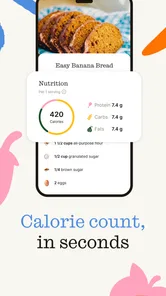
When it comes to actually cooking, the app provides step-by-step instructions that are easy to follow. Each recipe includes detailed ingredient lists and preparation steps. The instructions are clear enough that even novice cooks can whip up a delightful meal.
I particularly appreciate the timers integrated into the recipes. It’s like having a personal kitchen assistant that keeps you on track. Plus, the app lets you adjust serving sizes, which is perfect if you’re cooking for one or hosting a dinner party.
For a busy evening, I’d use the planner earlier in the day rather than waiting until I’m hungry and staring at the fridge. Pick a recipe, check its ingredients, and make sure the portions fit the people eating. If a recipe came from a short video, I’d also read through the steps before starting: video demonstrations can make a dish look straightforward while leaving out details that matter, such as timing or preparation order.
Creating Your Own Culinary Masterpieces
What makes ReciMe: Recipes & Meal Planner unique is its community aspect. You can share your own recipes and try out dishes from other users. It’s a fantastic way to discover new recipes and connect with fellow foodies. The app encourages creativity and experimentation, which I absolutely love.
The social feature also includes a rating and commenting system. It’s like having a virtual kitchen table where you can discuss and tweak recipes with others. I’ve already found a few gems through the community that I wouldn’t have tried otherwise.
This is where I’d be selective about what I save. A familiar dish from a creator I trust may need little extra checking, while an unfamiliar recipe with an unusually short description deserves a closer look before I commit groceries to it. Community feedback can help me judge whether other cooks found a recipe worth trying, but I still treat comments as guidance rather than a substitute for checking ingredients and technique myself.
Shopping Made Simple
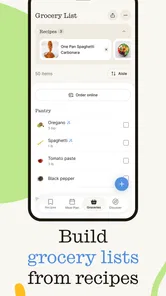
Another handy feature is the shopping list. As you plan your meals, the app automatically generates a shopping list based on your selected recipes. This saves so much time and prevents those annoying mid-cooking trips to the grocery store. You can even check off items as you shop, making the whole process seamless.
Additionally, the app allows for customization. You can add or remove items based on what you already have at home. It’s a thoughtful touch that shows the developers truly understand the needs of home cooks.
My most useful planning trick is to scan the generated list against the pantry before heading out. Recipe lists can’t know what is already in my cupboards, and checking first avoids buying another bag of rice or a spice I already own. I’d also group the week around ingredients I can use more than once: that makes a plan easier to shop for and can reduce leftovers that go unused.
When a Recipe or Connection Gets in the Way
Network access matters most when I’m discovering and bringing in recipes from online sources, and it may matter again when I want to revisit content tied to another platform. If a post will not load, I’d try opening the original source directly, then return to the app once the connection is stable. If the recipe is already in my plan, checking it before leaving home is a sensible safeguard, especially when I expect poor reception at the shop or in the kitchen.
I wouldn’t assume every part of the experience works offline, so I’d avoid relying on an untested saved item as my only cooking instructions. For a meal I’m preparing for guests, I’d keep the ingredient list and steps handy before I start. That is a modest bit of preparation, but it prevents a social post failing to load halfway through chopping vegetables from derailing dinner.
Compared with keeping browser bookmarks or saving social posts in separate apps, ReciMe offers a more food-focused route from inspiration to a planned meal and shopping list. Those simpler alternatives can be better if I only want to collect links, prefer not to manage another app, or need a dependable text recipe that is independent of a social post. ReciMe makes more sense when I want the planning and cooking stages connected, rather than when I just need a place to paste URLs.
Who Will Get the Most from It
I’d recommend trying it if you regularly find recipes on Instagram, TikTok, Facebook, or elsewhere and want a more organized way to turn those finds into meals. It’s also a good fit for someone who enjoys browsing community ideas and benefits from planning several dinners before shopping. A realistic use is saving a weeknight recipe during a lunch break, checking it later, adding it to the plan, and reviewing the resulting list before a grocery run.
On the other hand, if you rarely cook, already have a recipe system that works, or want a simple offline cookbook rather than a social-recipe organizer, this may be more app than you need. The same goes for anyone who prefers to follow a creator’s video in its original feed and does not care about meal planning or shopping lists. I’d decide based on whether the whole save-plan-shop routine solves a real annoyance, not simply on how many recipes I can collect.
Making the Collection Work for You
A growing recipe collection can become another kind of clutter if I save every appealing clip without making choices. I’d use a quick personal filter: save a recipe only if I can picture when I’d cook it, or if it teaches me a technique I genuinely want to try. That keeps the collection useful when I’m choosing dinner, rather than turning it into a second social feed to scroll through.
I’d also make the first attempt at an unfamiliar recipe on a relatively calm evening. That gives me room to interpret a step that is less clear than the video made it seem, adjust the seasoning, or learn that the preparation takes longer than I expected. Once I know how it works in my kitchen, I can add it to a busier week with more confidence.
People who want a conventional cookbook organized around tested, fully written recipes may be happier with a dedicated recipe collection instead. ReciMe’s particular strength is the path from online inspiration to planning; it is less compelling if the main thing I want is a curated set of recipes that do not depend on posts from elsewhere. I’d choose based on where my cooking ideas come from, not just on whether I like browsing food content.
Cost, Platform Fit, and Everyday Expectations
The app is free to download, with in-app purchases ranging from $9.99 to $69.99 per item. I’d start with the free version and see whether the core routine fits my cooking habits before considering a purchase. Since optional purchases can change what is available, I’d check the current in-app details before paying and judge the value against how often I would actually use the planning and recipe-collecting tools.
Its average rating is 4.6 from around 59,000 ratings, and it has over 1 million installs. The Teen content rating is worth noting for families choosing apps for younger users. The app was released on May 1, 2023, and version 3.0.3 requires iOS 12 or later. Those details make it straightforward to check basic device and audience fit before building a routine around it.
One practical question is whether it makes sense to pay before I know how often I’ll use it. I wouldn’t. I’d first try the basic save-plan-shop loop with a handful of meals, then decide whether the paid options address a specific need in my own routine. A feature is only worth paying for if it removes a real point of friction, not because a long list of recipes makes the app feel automatically valuable.
Another useful distinction is between an app that helps me plan and one that chooses dinner for me. ReciMe can make saved ideas easier to use, but I still need to decide whether a dish suits my time, ingredients, and appetite. If I want a rigid meal schedule or a recipe source that does all the choosing, I may prefer a different kind of service. If I mainly need a bridge between social inspiration and practical shopping, this one is a more natural fit.
Final Thoughts
So, is ReciMe: Recipes & Meal Planner worth downloading? Absolutely! Whether you’re a seasoned chef or just starting your culinary journey, this app offers something for everyone. The combination of a vast recipe library, intuitive meal planning, and a vibrant community makes it a must-have in any foodie’s digital arsenal.
In a world where convenience is king, this app delivers. It’s like having a personal chef, meal planner, and grocery assistant all rolled into one. So, grab your apron, fire up the app, and get cooking! You won’t be disappointed.
I’d temper that enthusiasm with one simple point: the best results come when I use it as a practical organizer, not as a guarantee that every online recipe is complete or permanently available. Check a recipe before shopping, review it before cooking, and keep a fallback dinner in mind when the connection or source post is unreliable. Those small habits make the app easier to trust in a real kitchen.
For me, the deciding question is whether I often discover meals outside traditional cookbooks and wish those discoveries were easier to turn into dinner. If the answer is yes, ReciMe is worth trying. If I already have a dependable collection and prefer to avoid social-linked recipes, I’d stick with that system. Its appeal is specific, and that is also its strength: it helps make online food inspiration more usable without removing the cook’s judgement from the process.
ReciMe: Recipes & Meal Planner Frequently Asked Questions
Can I save recipes from different websites, or only social media posts?
ReciMe is presented as a way to save recipes from Instagram, TikTok, Facebook, and more, so it is not limited to a single social platform. If you regularly find cooking ideas in different places online, the app can help bring those recipes together for later. You can then revisit them while deciding what to cook or organizing meals.
Can I use ReciMe to keep my cooking ideas organized?
Yes. ReciMe is centered on collecting recipes you find online and keeping them in one place, which can make it easier to return to dishes you want to try. Rather than relying on a trail of saved social posts, you can use the app as a home for your recipe ideas and refer to them when planning meals or getting ready to cook.
Is ReciMe free to download, and does it include paid features?
ReciMe is free to download, so you can install it and explore the app without an upfront purchase. It also offers in-app purchases, with items ranging from $9.99 to $69.99. If you are comparing options before downloading, keep in mind that some features or access may involve a purchase; check the app’s purchase details before committing.
Can ReciMe save recipes from social media?
Yes. ReciMe is built around saving recipes you come across online, including content from Instagram, TikTok, Facebook, and more. This makes it useful if you often spot dishes while browsing social feeds and want to keep them organized in one place. You can then return to saved recipes when choosing meals or planning what to cook.
What features does ReciMe offer to enhance my cooking experience?
ReciMe provides a comprehensive set of features, including a vast collection of recipes, a meal planner, and a grocery list generator. Users can explore a variety of cuisines, save their favorite recipes, and customize meal plans according to dietary preferences. The app also allows for easy sharing of recipes with friends and family.
Pros
- User-friendly interface simplifies navigation.
- Extensive recipe collection for diverse tastes.
- Personalized meal planning feature available.
- Offline access to saved recipes.
- Interactive cooking guides enhance experience.
Cons
- Limited free features without subscription.
- Occasional glitches in recipe search.
- In-app ads can be intrusive.
- No integration with grocery delivery services.
- Limited customization for dietary restrictions.











