ReadyRefresh My Water+
- 2.53K
- 4.5
- Installs
- 100.00K
- Price
- Free

Screenshots
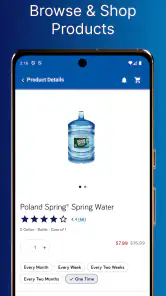
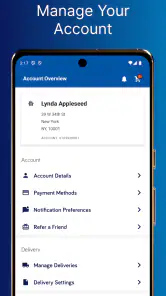
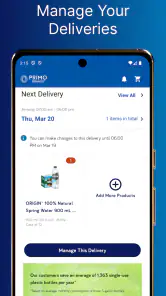
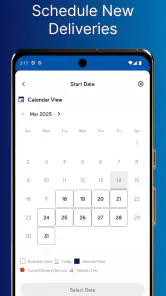
Analysis by Reviewed
I approached ReadyRefresh My Water+ as a practical shopping app rather than something I would open for entertainment. Its purpose is straightforward: help me arrange bottled-water delivery when keeping a reliable supply at home matters more than making another trip to a store. That narrow focus is also its biggest strength. I do not have to browse unrelated products or work through a broad marketplace before reaching the service I need.
The app comes from Primo Brands Corp and sits in the Shopping category. It is free to install, suitable for Everyone, and available on Android devices running version 7.0 or later. The current release is 6.5.7, while the app itself first appeared on October 26, 2022. Those details make it accessible to a wide range of phones, including older Android hardware, although the experience can still vary depending on the device and connection.
In everyday use, I see it as a tool for reducing a small but recurring chore: remembering when water is running low, deciding how much to buy, and organizing delivery before the shortage becomes inconvenient. It is most useful for households that already prefer delivered water. If I only need an occasional bottle from a nearby shop, the app may feel like an unnecessary extra step.
How ReadyRefresh My Water+ feels during everyday use
Speed expectations before placing an order
The first thing I value in a delivery app is not flashy design but a clear path from opening the app to understanding what I can do. ReadyRefresh My Water+ is built around that practical expectation. I would use it when I want to check my water needs, review available choices, and move toward delivery without turning the task into a long shopping session.
That does not mean every screen will feel instant. Shopping apps depend on account information, service availability, address details, and network responses. A quick connection should make ordinary browsing feel reasonably direct, while a weak mobile signal can make any delivery workflow feel slower. I would avoid judging the app solely by a brief pause while information loads, especially when the screen is retrieving location-specific details.
Its strongest speed advantage is the reduction in decision-making. A general supermarket app may offer water among thousands of unrelated items, forcing me to search, compare sellers, arrange pickup or delivery, and repeat the process later. Here, the narrower purpose keeps my attention on hydration supplies. The real time-saving benefit is not just faster tapping; it is fewer irrelevant choices.
I also appreciate that a focused service can fit a repeat routine better than a one-off shopping trip. If I already know the kind of water and delivery arrangement I want, the app should feel more useful on the second and third visit than on the first. The initial setup may require more care because delivery information needs to be correct, but that effort can pay off when the next order is a planned household task rather than an emergency errand.
More From Our News Desk

Clash of Clans Is Won Between the Battles

Android Auto Makes the Case for Quieter Car Software

MobiOffice: Transforming Mobile Productivity with Seamless Integration

EA SPORTS FC™ Mobile Soccer: Redefining Mobile Sports Gaming

How Microsoft OneDrive Became a Mobile Productivity Giant

How Google Translate Breaks Language Barriers Effortlessly
What happens during heavy-use moments
The demanding moments are not likely to be casual browsing. They are the occasions when I am checking several choices, reviewing an order carefully, or trying to arrange delivery while managing other household tasks. This is where a shopping app needs to remain readable and predictable. I would rather have a simple screen that gives me time to verify details than a crowded interface that appears fast but makes mistakes easy.
A realistic example is a busy weekend before guests arrive. I notice that the water supply is lower than expected, open the app, and try to arrange enough delivery for the household without guessing. In that situation, the useful workflow is to pause at each important step: confirm the destination, review the selected items, and check the final order information before submitting. The app can reduce the trip to the store, but it cannot remove the need for careful checking.
Another heavy-use moment is seasonal or routine planning. A family may be ordering for several people, while someone working from home may need a more dependable supply than a person who spends most days away. I would treat the app as a planning aid rather than a reason to buy more than necessary. Delivered water takes space, and convenience loses some of its value if the order is larger than the home can comfortably store.
Performance during these moments also depends on how much information the app needs to retrieve. A delivery service cannot behave exactly like an offline notes app. If the app seems slower while loading account or delivery details, I would give it a moment instead of repeatedly tapping buttons. Repeated taps are a small but realistic source of duplicate actions in any shopping workflow.
For that reason, my practical tip is to prepare the order when I am not rushing. I would use a stable connection, keep the delivery information nearby, and review the final screen once rather than trying to complete everything while walking through a store or switching between several apps. That habit improves the experience more reliably than expecting the application itself to solve every interruption.
Reliability, recovery, and confidence in the order
Reliability matters more here than visual polish. If I am depending on a delivery for a home, office, or family, I need confidence that my choices have been recorded correctly. I look for a workflow that lets me recognize where I am, what I selected, and whether I have reached the final stage. When something takes longer than expected, clear confirmation is more valuable than animation or decorative elements.
I would also separate app reliability from delivery reliability. The application is the place where I manage the purchase, but the arrival itself is a service outcome. A smooth interface cannot guarantee that every delivery situation will feel perfect, and a temporary loading issue does not automatically mean the order failed. Keeping those two parts separate helps me respond sensibly when something appears delayed.
If the app stops responding or the connection drops, my first recovery step would be to avoid immediately starting a second order. I would reopen the app, inspect the account or order area, and look for evidence of the previous action before submitting again. That is especially important when an order involves multiple items or a larger household supply. A few seconds of checking can prevent an accidental duplicate request.
The app’s reception suggests that many users find the overall service worthwhile: it holds an average rating of 4.5 from around 24 thousand ratings, with roughly 2.5 thousand written reviews. I read that as encouraging, not as a promise that every device, address, or delivery experience will be identical. User ratings are useful for judging general satisfaction, but my own connection, phone, and local service conditions still matter.
ReadyRefresh My Water+ has also passed the early launch stage, having been available since 2022. That gives me more confidence than an app that has just appeared, particularly for a task I might revisit over time. Still, I would keep the app updated through the normal store process and avoid treating an update as a guarantee of perfect behavior. Stability is something I judge across repeated visits, not from one successful order.
Older phones and practical device constraints
The minimum Android requirement of 7.0 is relatively approachable for people who do not replace their phone frequently. That matters for a household app because the person managing deliveries may not be using the newest device. A compatible older phone can be perfectly adequate for focused shopping, provided it has enough free space, a functioning connection, and a screen that makes order details easy to read.
Compatibility alone does not tell me how demanding the app feels. Older hardware may take longer to open or switch between screens, especially when other applications are active. I would close unnecessary apps if the experience became sluggish, but I would not expect every delay to disappear. The more important question is whether the interface remains understandable when the device is working at a slower pace.
Resource demands are also practical rather than dramatic. A delivery app should not need my constant attention throughout the day; I would open it when planning or checking a purchase and then leave it closed. That makes it a better fit for someone who wants an occasional household utility than for someone expecting a continuous background service. I would also avoid placing an order with a nearly empty battery or unstable connection, because recovery is more stressful when the phone shuts down mid-process.
People using iPhones should check the relevant App Store listing for their device requirements before installing. The Android requirement tells me where the Android version can run, but it does not describe every iOS model. That is a small but important distinction for households using different phone platforms.
Screen size can affect comfort as well. On a compact phone, product descriptions and order summaries may require more scrolling, while a larger display can make reviewing a delivery easier. I would not choose a phone solely for this app, but I would take extra care before confirming an order on a small screen. The most useful habit is to slow down at the summary stage, where quantity and destination matter more than speed.
Where it beats ordinary shopping alternatives
The usual alternative is buying water during a supermarket visit or adding it to a broader grocery order. That approach can be better when I am already shopping, want to compare several brands in person, or need the product immediately. A store also lets me inspect shelf availability and carry home only what fits my current needs, although heavy packages can make that trip inconvenient.
ReadyRefresh My Water+ makes more sense when delivery itself is the priority. It is especially appealing for people who find repeated lifting difficult, households that want to plan water supplies in advance, or anyone who prefers keeping this task separate from weekly grocery shopping. The advantage is not that it replaces every shopping method; it gives a dedicated route for a specific recurring need.
There is a trade-off in that specialization. A broad grocery app may be more convenient if I want water alongside food, cleaning products, and household essentials. A local store may offer more immediate flexibility if I have an unexpected need. This app is the better choice when I value a focused water-delivery workflow more than one-cart convenience or instant pickup.
I would also consider storage and consumption patterns before committing to regular use. Someone living alone and rarely drinking bottled water may find ordinary retail shopping simpler. A larger household, a home office, or a person who prefers planned replenishment can gain more from a dedicated service. The right decision depends less on the app’s category and more on whether delivery solves a problem I actually have.
Small workflow choices that make a difference
My first recommendation is to treat the opening order as a setup task rather than a rushed purchase. I would verify the delivery details carefully, learn where the order summary appears, and note how the app presents the choices I care about. Once that path is familiar, repeat visits should require less attention. This is a more useful approach than assuming the first screen tells me everything.
My second recommendation is to keep a simple household check before ordering. I would look at the remaining supply, estimate how quickly it is being used, and consider available storage. That prevents the common mistake of ordering based on a single busy day. The app can make delivery convenient, but a quick physical check at home keeps convenience from becoming waste or clutter.
My third recommendation concerns recovery. If a screen appears stuck after I submit something, I would wait, reopen the app, and inspect the account before trying again. I would not rely on a memory of what I tapped. This workflow is particularly important when the connection is unstable or when I am using older hardware. It turns a confusing interruption into a short verification step.
A fourth useful distinction is between browsing and commitment. I can use the app to understand what is available, but I should reserve the final confirmation for a moment when I can check the details without distraction. That separation is valuable for anyone ordering for a family, workplace, or guest visit, where a small mistake can be more inconvenient than a slightly slower session.
Who should use it and who should skip it
I would recommend ReadyRefresh My Water+ to someone who already wants water delivered and prefers a dedicated shopping experience. It suits households that plan their supplies, people who want to avoid carrying heavy water purchases, and users who appreciate having a repeatable route for a recurring chore. Its free price also makes trying the app less of a commitment, although the practical value still depends on whether delivery fits the user’s needs.
I would be more cautious about recommending it to someone who buys water only in emergencies. That person may be better served by a nearby shop or an existing grocery service. I would also point a highly comparison-focused shopper toward a broader marketplace if choosing among many unrelated products, sellers, or immediate pickup options is more important than a focused delivery process.
Users with older Android phones can reasonably consider it because Android 7.0 is supported, but they should keep expectations practical. A compatible phone is not automatically a fast phone. If the device struggles with other shopping apps, has limited storage, or frequently loses its connection, the experience may require patience. The app is most comfortable when the phone is maintained and the order is placed without rushing.
My performance verdict after weighing convenience against friction
ReadyRefresh My Water+ succeeds because it concentrates on one household task instead of pretending to be an all-purpose marketplace. I find that focus useful when I want to arrange water delivery with minimal distraction. The app’s broad Android compatibility, free installation, and established presence make it approachable, while its strong average rating indicates that the overall experience has worked well for many users.
Its limitations are equally clear. It is not the best answer for instant purchases, broad grocery comparisons, or people who do not need delivered water. Network quality, device age, address accuracy, storage space, and careful order review all influence the experience. Those are not reasons to dismiss it, but they are reasons to use it deliberately rather than expecting a single tap to handle the entire household routine.
In my view, the perceived speed is best when I already know what I need and have a stable connection. Heavy-use moments reward patience and verification more than rapid tapping. Reliability feels strongest when I distinguish an app interruption from delivery expectations and check the account before repeating an action. Resource demands appear appropriate for an occasional shopping utility, though older phones may make transitions less fluid.
Overall, I would keep it installed if delivered water is a regular part of my routine. It is a focused convenience tool, not a universal replacement for grocery shopping. For the right household, that focus is exactly what makes it worthwhile; for everyone else, a supermarket visit or a broader shopping app may remain simpler.
With over 100 thousand installs, it has found a meaningful audience without needing to be everything to everyone. I would start by using it for one carefully checked delivery cycle, then decide whether the time saved and reduced lifting justify making it part of my routine. That trial-and-review approach gives the app a fair chance while keeping the decision grounded in my actual water usage, device performance, and preferred way of shopping.
As a free Shopping app rated for Everyone, it is easy to consider, and the current 6.5.7 release gives Android users a clear version baseline. My final recommendation is positive but specific: choose it when dependable water delivery is the problem you want solved, and skip it when immediate retail access or one-stop grocery shopping matters more.
ReadyRefresh My Water+ Frequently Asked Questions
Is ReadyRefresh My Water+ available for iOS as well as Android?
ReadyRefresh My Water+ is a mobile app for managing ReadyRefresh water delivery, and the available app information lists Android compatibility. If you use an iPhone or iPad, check the Apple App Store for the app before planning to use it there. The app is free to download, but you will need a compatible device and a ReadyRefresh account for most account-management features.
Who publishes ReadyRefresh My Water+, and what is its rating and age rating?
ReadyRefresh My Water+ is published by Primo Brands Corp and is a shopping app for managing water delivery service. It has an average rating of 4.5 from around 24,000 ratings, with about 2,500 written reviews and over 100,000 installs. Its content rating is Everyone, so it is marked as suitable for a general audience.
What devices and operating systems can run ReadyRefresh My Water+?
ReadyRefresh My Water+ is available for Android devices running version 7.0 or later. Before downloading, check your device’s operating system in its settings to make sure it meets that requirement and that you have enough available storage for the installation. The app is free to download, and its current version is 6.5.7.
What is ReadyRefresh My Water+ and what can I do with it?
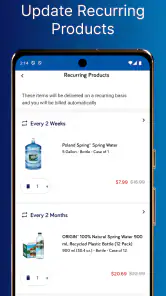
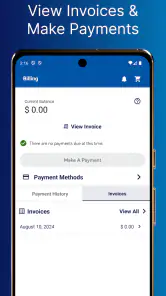
ReadyRefresh My Water+ is a mobile app for managing ReadyRefresh bottled-water deliveries and account details. After signing in, users can typically review upcoming deliveries, manage products and quantities, update delivery information, check order history, and handle billing or payment settings. The available options can vary depending on your location, account type, and the services offered in your area.
Can I use the app to schedule, pause, or change a water delivery?
The app is designed to make delivery management more convenient, allowing eligible customers to review scheduled orders and request changes such as adjusting quantities, modifying delivery dates, or pausing service. However, changes may be subject to cutoff times, product availability, route schedules, and local service rules. It is best to check the order details carefully before confirming any update.
Pros
- Tracks daily water intake with clear
- easy-to-read progress updates.
- Personalized reminders help build a consistent hydration routine.
- Supports multiple drink types
- not just plain water.
- Simple interface makes logging drinks quick and convenient.
- Useful history view helps identify hydration patterns over time.
Cons
- Reminder timing may feel repetitive for users with irregular schedules.
- Requires regular manual logging to keep hydration data accurate.
- Some personalization options may be limited without a connected device.
- The app’s usefulness depends on consistently allowing notifications.
- Not ideal for users seeking detailed nutrition or electrolyte tracking.
- Category
- Shopping
- Version
- 6.5.7











