Ramp
- 528.00
- 4.7
- Installs
- 100.00K
- Price
- Free

Screenshots
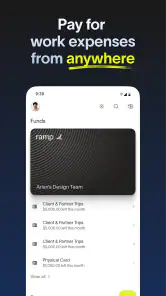

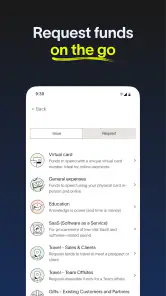




Analysis by Reviewed
When I tested Ramp, I approached it as a practical finance app rather than something I would open for entertainment. The situation is easy to imagine: a business expense needs to be made, someone has to approve it, and the person responsible for the company’s money wants a clear trail afterward. That is the kind of problem this app is designed to sit inside. It comes from Ramp Business Corporation, is free to install, and is aimed at business spending rather than personal budgeting.
My first impression was that Ramp makes the most sense when several people are involved in spending decisions. If you are the only person managing your own household money, a conventional banking app or personal finance tracker may feel more natural. Ramp becomes more interesting when employees, managers, and finance staff need to stay aligned without turning every purchase into a long email conversation.
The app is listed for Everyone, which makes it broadly accessible from an age-rating perspective, but its actual audience is clearly professional. It has built a solid user base, with more than one hundred thousand installs and a 4.7 average from roughly two thousand ratings. Those figures suggest that the basic experience is working for many users, although they do not remove the need to check whether its business workflow matches the way your own company operates.
Following a business expense from request to outcome
Starting with the spending problem
A useful way to understand Ramp is to begin before any money moves. Imagine that I need to buy software for a project. In a traditional setup, I might send a message to a manager, wait for approval, make the purchase, save the receipt, and later explain the charge to finance. Each handoff creates a chance for confusion. The approval may be buried in chat, the receipt may be lost, and the final transaction may not be easy to connect to the original request.
Ramp is built around bringing that process into a business spending environment. Instead of treating the purchase as an isolated card transaction, the workflow can be considered as a chain: a need appears, the spending is reviewed, the expense is made, and the record is handled afterward. That structure is the app’s strongest idea. It does not merely help me see that money left an account; it is intended to make the reason and responsibility around the expense easier to follow.
This distinction matters for small teams. A founder who handles every approval personally may not need a separate process for each purchase. Once a company has several people buying tools, booking travel, or paying suppliers, informal methods start to fail. Ramp is most useful at that point, because it gives the finance side a place to organize spending while giving employees a clearer route for legitimate requests.
I would still begin with a simple test before asking a whole team to adopt it. Pick one recurring expense type, such as software subscriptions or employee purchases, and see whether the app reduces questions rather than adding new ones. The best business finance tools are not the ones with the most screens; they are the ones that make the next action obvious to each person.
Moving through the request and approval flow
From the employee’s point of view, the important question is not whether the company has a sophisticated finance system. It is whether I can understand what I am allowed to spend, what needs approval, and what information I must provide. A well-organized Ramp workflow can make those boundaries clearer than a general-purpose banking app, where the transaction appears only after the fact.
For the manager, the handoff is different. The manager needs enough context to decide quickly without becoming a full-time finance administrator. The useful outcome is a decision connected to the purchase, not a separate approval message that has to be matched manually later. This is one of the less obvious advantages of a business-focused app: the approval is part of the spending story instead of being an unrelated conversation.
For finance staff, the workflow continues after approval. They need to know who spent the money, what it was for, and whether the supporting information is complete. That is where a business expense platform can be more practical than a normal personal banking app. A bank app is excellent at showing balances and transactions, but it usually does not organize the internal responsibility behind a company purchase in the same way.
My advice is to define the company’s internal rules before rolling out the app. Decide which expenses need review, who handles exceptions, and what employees should do when an urgent purchase does not fit the normal route. Ramp can provide a central workflow, but it cannot decide your company’s approval culture for you. If the rules are vague, the app may simply make vague rules more visible.
Understanding the handoffs between people
The handoffs are where Ramp has the most potential value. A purchase often travels through at least three perspectives: the person who needs something, the person who authorizes it, and the person who records or reconciles it. Each person cares about different information. The employee wants speed, the manager wants confidence, and finance wants a clean record.
In my view, the app should be judged by how little translation is required between those roles. If an employee enters a request in everyday terms, the manager should not have to reconstruct the business reason. If the manager approves it, finance should not have to search through unrelated messages to understand what was authorized. That continuity is more important than a visually polished dashboard.
There is also a human side to this process. Employees are more likely to follow a spending policy when the route is clear and does not feel like a punishment. A confusing approval process encourages workarounds, while a simple one makes compliance part of the normal purchase. This is a concrete use case where Ramp can be stronger than relying on email, spreadsheets, and screenshots from a bank account.
At the same time, centralization creates responsibility. Someone must keep the workflow understandable, review unusual activity, and help new users. If nobody owns that setup, employees may not know whether a delayed request is waiting for a manager, finance, or a missing detail. The app can connect the handoffs, but the business still needs a person who watches the process from beginning to end.
What happens after the purchase
The result of a good expense workflow is not simply that the purchase was completed. The better result is that the company can later answer basic questions without detective work: what was bought, why it was needed, who approved it, and which team should account for it. That is the point at which Ramp can save more time than it spends.
This is especially helpful for recurring business spending. Consider a small design team with several subscriptions and occasional purchases from contractors. If each employee handles receipts and explanations differently, the finance review becomes inconsistent. A shared process gives the team a common expectation. The person making the purchase knows what to provide, and the person reviewing the expense knows where to look.
Another useful scenario is a growing company where responsibility changes quickly. A manager may take over a team, an employee may begin buying supplies, or finance may need to review a larger volume of transactions. A centralized app is easier to scale than a collection of personal notes and private messages. I would not call that automatic efficiency, but it gives the business a better foundation for consistent habits.
The app can also help reveal process problems rather than just spending problems. If requests repeatedly stall at the same approval stage, the issue may be an unclear responsibility. If employees keep submitting incomplete information, the instructions may need to be simplified. This is a more advanced way to use a finance app: examine where the workflow breaks, not only whether the final amount looks correct.
That said, I would avoid expecting Ramp to replace every financial tool a company uses. A business may still need accounting software, payroll services, banking access, tax records, and detailed reporting outside the mobile experience. Ramp is best viewed as a spending and expense-management layer in the process, not as a universal replacement for the entire financial stack.
Where the workflow breaks down
The first possible friction is adoption. Employees already have a way to ask for purchases, even if that way is messy. Asking them to change habits can feel slower at the beginning, especially when a purchase is urgent. If the company introduces Ramp without explaining the reason for the new process, people may see it as another administrative hurdle rather than a way to reduce later questions.
The second issue is that approval workflows can become too rigid. A clear route is valuable for normal purchases, but real businesses have exceptions. A damaged laptop may need a quick replacement. A supplier may require immediate payment. A team may discover that an approved item is unavailable and need to choose an alternative. If the company has no sensible exception path, users may bypass the system, which weakens the record the app was meant to create.
There is also a trade-off between control and speed. Finance teams usually want more context, while employees want fewer fields and faster decisions. Ramp can support a more controlled process than a basic card or banking app, but that control only feels worthwhile when the information requested is genuinely useful. I would regularly remove unnecessary steps instead of assuming that more documentation always means better oversight.
Another limitation is audience fit. A freelancer tracking personal income and expenses may find a dedicated bookkeeping app more suitable. A family managing a household budget will probably prefer a personal finance tool with categories, goals, and account aggregation designed for individuals. Ramp is not the obvious choice simply because it is free; its value depends on having business spending and multiple roles to coordinate.
How it compares with familiar alternatives
Compared with a standard business banking app, Ramp offers a more process-oriented way to think about expenses. A bank application generally starts with the account balance and transaction list. That is useful for checking what happened, but it may not be enough for deciding what should happen before a purchase or for connecting the transaction to an internal approval.
Compared with email and spreadsheets, Ramp should be easier to follow once the team is using it consistently. Email is flexible, but approvals can disappear into long threads. Spreadsheets are adaptable, but they depend heavily on manual updates. The trade-off is that Ramp asks the company to work within a defined system. If your business changes its process every week, a spreadsheet may feel faster in the short term.
Compared with personal budgeting apps, the difference is even clearer. Personal tools are often built around household categories and individual financial goals. Ramp is aimed at business accountability, where the important question is not only “how much did I spend?” but also “was this business expense understood and handled by the right people?” Choosing between them should start with the type of money being managed, not with the app’s download price.
I also think the mobile format affects who will enjoy using it. A phone is convenient for an employee who needs to deal with an expense while away from a desk. It is less comfortable for someone doing a long reconciliation session or building a detailed financial report. For those tasks, I would expect a larger-screen workflow or another financial system to remain part of the routine.
Practical setup advice before inviting a team
My first tip is to map one complete expense before configuring everything. Write down who requests it, who approves it, who makes the purchase, and who checks the record afterward. Then compare that real path with the path you want Ramp to support. This exposes unnecessary handoffs early and prevents the company from copying a complicated process into a new tool.
My second tip is to separate normal spending from exceptions. Employees should not have to guess whether an urgent purchase should wait for a standard approval. A short, clearly explained exception route is better than pretending every expense follows the same pattern. This also gives finance a way to review unusual transactions without blocking ordinary work.
My third tip is to judge success by follow-up questions. After the first few weeks, ask finance how often it still needs to contact employees for basic details. Ask managers whether approvals are faster or merely moved to another screen. Ask employees whether they understand what happens after submission. Those answers will tell you more than a quick look at the app’s interface.
It is also worth preparing users for the handoff after approval. Approval does not necessarily mean the process is finished. The purchase may still need a receipt, an explanation, or a review. When employees understand that sequence, they are less likely to assume that a completed purchase automatically means a completed record.
Who should use it and who should skip it
I would recommend Ramp to a small or growing business that wants more structure around employee spending without forcing every approval through scattered messages. It is particularly suitable when finance needs a clearer trail and managers need to participate without manually maintaining a separate spreadsheet. The free price makes it easier to evaluate, and the Everyone content rating removes an obvious age-related barrier to access.
I would be more cautious if your company has almost no shared spending or if one person already handles every purchase and reconciliation. In that situation, the setup and training may outweigh the benefit. I would also look elsewhere if your main need is personal budgeting, investment tracking, tax preparation, or a full accounting replacement. Those jobs require different priorities.
Device compatibility is another practical point. The current version is 0.160.2 and requires at least iOS or Android 11, so I would check the operating system on older phones before asking a team to install it. That is a small step, but it avoids a frustrating rollout where some employees cannot participate from their usual devices.
My final view after following the workflow
Ramp works best when I treat it as a shared business-spending workflow rather than just another place to view transactions. Its real promise lies in connecting the starting request, the approval, the purchase, and the later review. That connection can reduce repeated explanations and make responsibility clearer, especially as more people become involved in company spending.
It is not effortless. The company still has to define rules, handle exceptions, train users, and decide which financial tasks belong elsewhere. A rigid or poorly explained setup could make simple purchases feel slower. But when the process is designed around real handoffs, the app has a sensible role between employees and the finance function.
With its free entry point, business focus, and strong 4.7 average, Ramp is worth considering for teams that have outgrown informal expense tracking. I would start with one complete workflow, measure the questions it removes, and expand only if the result is genuinely clearer. For the right business, that disciplined approach is where the app’s promise of saving time becomes believable.
Pros
- Simple interface makes navigation quick for new users.
- Useful tools work smoothly on most modern devices.
- Regular updates help improve stability and overall performance.
- Compact design uses little storage compared with similar apps.
- Clear visual feedback makes key actions easy to understand.
Cons
- Some features may require a paid plan or additional charges.
- Performance can vary depending on device model and connection quality.
- Advanced users may find the customization options limited.
- The app may request permissions that feel unnecessary for basic use.
- Support resources could be more detailed for troubleshooting complex issues.

- Category
- Finance
- Version
- 0.160.2











