Raising Cane's Chicken Fingers
- 5.19K
- 4.8
- Installs
- 1.00M
- Price
- Free

Screenshots
Analysis by Reviewed
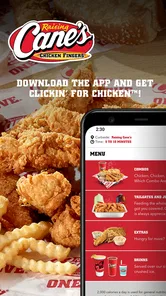
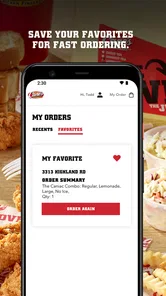
I judge a restaurant app by what it helps me do before I reach the counter: understand the choices, place an order without fuss, and know whether using it suits the moment. For Raising Cane’s, the main appeal is ordering and paying ahead for a meal from the chicken-focused chain. That makes the Raising Cane’s Chicken Fingers app most useful when I already know I want Cane’s and would rather handle the transaction on my phone than decide everything in line.
When ordering ahead fits the day
Picture a short lunch break: I know what I want, but I don’t want to spend the break waiting to order and pay. Ordering ahead can move those steps onto the phone, leaving pickup as the main task. I’d still check the order details before submitting, especially if I’m ordering for someone else; a small mistake in a group meal is more annoying to fix once everyone is waiting.
This is a focused restaurant app, not a broad food-discovery service. Compared with browsing a multi-restaurant delivery app, its advantage is keeping the decision centered on Cane’s. The trade-off is just as clear: if I’m comparing several nearby restaurants, looking for a different kind of meal, or need a choice that Cane’s does not suit, a broader service or another restaurant is the better starting point. I’d use this app for a planned Cane’s stop, not as my general-purpose answer to hunger.
Who benefits most from the focused approach
I can see it working well for regular customers, people who have already settled on a meal, and anyone who prefers to pay ahead rather than handle payment at the restaurant. It can also make a shared pickup easier to organize: one person places the order and checks the selections before leaving. That convenience depends on the group being ready to decide; if everyone is still debating what to eat, ordering at the counter or choosing a place with a wider menu may be simpler.
Useful details before you depend on it
The app is free and comes from Raising Cane’s Restaurants, L.L.C. Its Google Play average is 4.8 from around 76,000 ratings, and it has over one million installs. Those figures suggest plenty of people use it, but they don’t tell me whether the app is a good fit for a particular visit. I’d treat it as a convenience for ordering ahead, while keeping a little flexibility in case my plans or appetite change.
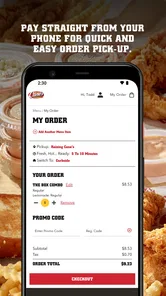
One practical habit is to review the order and pickup choice carefully before paying, rather than rushing through checkout while walking or multitasking. If I’m coordinating lunch for coworkers, I’d collect everyone’s choices first and submit once; that avoids repeatedly revisiting the order and makes it easier to catch a missing item. For a spontaneous visit, I’d compare the time saved with the effort of planning ahead—sometimes simply ordering when I arrive is the less complicated option.
It’s a Food & Drink app rated for Everyone, with a current version of 2.0.0 and a minimum Android requirement of 5.1. It was released on October 26, 2020. I’d check that my device can run it before relying on it for a time-sensitive meal, particularly if I use an older phone. The app’s role is straightforward: help me place and pay for a Cane’s order ahead, rather than replace the restaurant experience or solve every dining situation.
More From Our News Desk

Weather by Xiaomi Review: Clear at a Glance, Less Clear Up Close

X Under Pressure: Can It Recover When Posting Goes Wrong?

Clash of Clans Is Won Between the Battles

Android Auto Makes the Case for Quieter Car Software

MobiOffice: Transforming Mobile Productivity with Seamless Integration

EA SPORTS FC™ Mobile Soccer: Redefining Mobile Sports Gaming
Easy Navigation and User-Friendly Interface
First things first, the interface is super slick and intuitive. You don’t have to be a tech guru to navigate through it. I was able to find my way around the app with ease. Everything from the menu to the ordering process is laid out clearly. It’s like the app just knows what you need and makes it easy to get there.
Menu and Customization
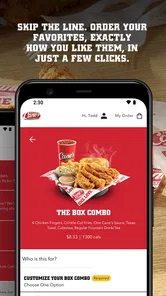
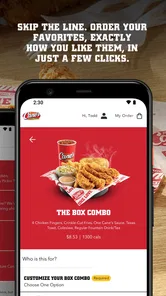
The Raising Cane’s Chicken Fingers app doesn’t just stop at offering their classic chicken fingers. Oh no, they’ve upped their game by allowing you to customize your order. Want more sauce? Less ice in your drink? No problem! The app gives you that freedom to tweak your order just the way you like it. And trust me, those little customizations can make your meal so much more enjoyable.
Quick and Convenient Ordering
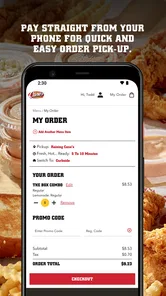
I love how quick it is to place an order. Whether you’re picking it up or getting it delivered, the app makes it a breeze. Plus, the payment process is secure, which is always a plus in my book. You can save your payment details for faster checkout next time, which is a nifty feature if you’re a frequent Cane’s eater like I am.
Special Offers and Loyalty Rewards
This is where the app really shines. They offer some sweet deals and rewards that you won’t find anywhere else. I’ve managed to snag a few discounts just by ordering through the app. Plus, they have a loyalty program that rewards you with even more perks the more you use it. Free chicken fingers? Yes, please!
Real-Time Order Tracking
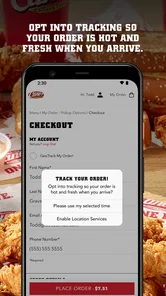
Another feature I absolutely adore is the real-time order tracking. It’s like having a personal assistant keeping you updated on your meal’s status. You’ll know exactly when your food is being prepared, when it’s ready, and when it’s out for delivery. It takes the guesswork out of waiting, which is something I really appreciate.
Legibility in everyday use
Clear organization matters when I’m scanning a menu quickly, and the original review experience found the main areas easy to locate. I still recommend slowing down at checkout: a readable screen does not prevent selecting the wrong item or overlooking a choice. If I’m ordering for someone with a particular preference, I’d confirm each selection together instead of assuming the customization controls cover every need.
For a more deliberate order, I find it helpful to decide the meal before opening the checkout flow. That way, I can focus on reading the available choices instead of comparing options under time pressure. When ordering for a group, I’d also keep the names or choices in a simple note beforehand; it makes checking the basket more reliable than trying to remember several requests while switching between screens.
Motor and sensory comfort
Ordering on a phone can be easier than speaking over a busy counter for someone who prefers to make choices quietly or needs extra time to consider them. It can also be less convenient for someone who finds small touch targets, scrolling, or screen glare difficult. I’d place the order while seated and in good light, rather than trying to tap through it while walking, carrying bags, or dealing with a noisy commute.
For a person with limited dexterity, the key question is whether the specific steps feel manageable on their own device; I wouldn’t assume that every screen or control will work equally well for everyone. A friend or family member can help review an order, but the app is most independent when the user can comfortably navigate the menu and complete payment themselves.
There is also a useful distinction between having more time to choose and having an easier interface. A phone order can let me pause before paying, but it still requires touch input and attention to the screen. If I use device-level tools such as larger text or voice control, I’d try the menu and checkout when I’m not in a hurry first. That gives me a chance to see whether those tools work smoothly with the app instead of discovering a problem when lunch plans depend on it.
Access depends on the situation
Ordering ahead can be useful when planning a pickup around work, school, or a drive, but the phone cannot remove every practical barrier. A meal still has to be collected through the restaurant’s available process, so I’d consider who is traveling, how much time there is, and whether pickup works for the person placing the order. When those details are uncertain, calling or ordering in person may be a more dependable choice than assuming the app will fit the situation.
A realistic example is a parent arranging a quick meal between school pickup and another appointment. If the family has already agreed on Cane’s and one person can place the order from a quiet moment, the app can simplify the payment and decision stages. But if the pickup driver changes, the group is still deciding, or a child’s request needs careful checking, I’d leave extra time and confirm the basket before submitting rather than treating the phone as a shortcut that guarantees a faster visit.
I also wouldn’t make an order at the last second if timing is critical. A phone order is helpful when it reduces a step, not when it adds pressure to make decisions quickly. Preparing the choices beforehand and checking the final order gives me a calmer experience and leaves room to switch to another option if the plan changes.
For someone who does not want to create or manage another account or payment setup, ordering at the restaurant may feel more straightforward. Likewise, a person with limited data access, a nearly depleted battery, or an unreliable connection should not make the app the only plan for a meal. I’d keep the usual in-person option in mind, particularly for a trip where reaching the restaurant is already difficult.
Where the convenience has limits
The app is built around Cane’s, so its usefulness depends on wanting that restaurant and being able to use the ordering flow. It won’t help me compare a wide range of cuisines, and ordering ahead is not automatically easier for someone who prefers face-to-face help. I’d skip it for a meal where the group has not agreed on a restaurant, or when a particular access need requires a process I cannot confirm in advance.
It also pays to separate app convenience from the restaurant’s actual pickup arrangements. The app can take care of placing and paying for an order, but the practical value depends on whether the chosen location and collection process suit my route and the people with me. Before building a tight schedule around it, I’d make sure the selected pickup option matches the plan and leave enough room for the handoff.
My inclusive take
Overall, I see this as a practical option for people who enjoy Cane’s and find phone ordering comfortable. The focused menu and ahead-of-time payment can reduce friction, while the need to navigate a screen and collect the order still matters. For my own use, I’d choose it when I know what I want and have time to check the details; if the interface, device, or pickup arrangement is a poor fit, another ordering method is a sensible choice.
My bottom line is that it works best as a planned, single-restaurant ordering tool, not as a substitute for every way of getting food. A regular customer who appreciates a familiar menu may get more value from its direct ordering path than from opening a marketplace and filtering through unrelated restaurants. Someone trying Cane’s for the first time may prefer to visit and ask questions face to face, especially if they need help understanding the choices or want to discuss a specific requirement before ordering.
The app is free, which makes trying it a low-commitment choice for anyone who already visits the chain. Its 4.8 average across around 76,000 ratings is a strong sign of broad satisfaction, though individual experiences will still depend on the device, ordering preferences, and pickup circumstances. I’d install it for repeat visits if the phone workflow suits me, but I wouldn’t download it expecting a general dining guide or a guaranteed solution to access needs.
In conclusion, if you’re a fan of crispy, delicious chicken fingers, the Raising Cane’s Chicken Fingers app is a must-download. It’s got everything you need to satisfy your cravings quickly and effortlessly. With its easy-to-use interface, customizable orders, and rewarding loyalty program, it’s no wonder this app has become my go-to for all my chicken finger needs. Don’t just take my word for it – give it a try and see for yourself!
Raising Cane's Chicken Fingers Frequently Asked Questions
Is the Raising Cane's Chicken Fingers app available in my region?
The app is intended for customers who want to order from Raising Cane's, so its usefulness depends on whether the restaurant serves your area. Before downloading, consider whether you have a nearby location where you can place an order. The app focuses on ordering and paying ahead, making it most relevant when you can use that service at a Raising Cane's restaurant.
Can I use the Raising Cane's app to order ahead and pay?
Yes. The app’s central purpose is to let customers order and pay ahead, giving you a mobile option for starting an order before visiting a Raising Cane's restaurant. This can be useful when you would rather arrange your order on your phone. Downloading the app is free, and you can decide whether its order-ahead approach fits the way you like to order.
What devices can run the Raising Cane's Chicken Fingers app?
The Raising Cane's Chicken Fingers app is available for Android and iOS, so you can use it on a compatible phone or tablet. On Android, it requires version 5.1 or later. The app is free to download and is rated for Everyone, making it suitable for a broad audience. Check your device’s operating system before installing.
Who developed the Raising Cane's Chicken Fingers app, and what is it for?
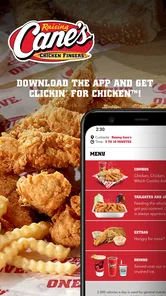
The app is developed by Raising Cane's Restaurants, L.L.C. and belongs to the Food & Drink category. Its central purpose is to let customers order and pay ahead, with the tagline “Get Clickin' for Chicken™!” If you already enjoy Raising Cane’s, it offers a mobile way to interact with the restaurant and begin an order.
What is Raising Cane's Chicken Fingers app?
Raising Cane's Chicken Fingers app is a mobile application designed to enhance the customer experience for fans of the popular chicken finger restaurant chain. It allows users to explore the menu, place orders for pickup or delivery, find nearby locations, and access exclusive promotions. Additionally, the app features a loyalty program where users can earn rewards with every purchase.
Pros
- Delicious and consistent chicken fingers
- Simple and easy-to-navigate menu
- Quick and efficient service
- Friendly and welcoming staff
- Clean and inviting restaurant environment
Cons
- Limited menu options for vegetarians
- No delivery service available
- Higher price point than competitors
- Lacks diverse sauce options
- Limited location availability











