

Quince: Luxury Essentials
- 170.00
- 4.7
- Installs
- 100.00K
- Price
- Free

Screenshots





Analysis by Reviewed
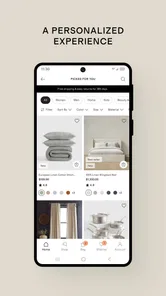
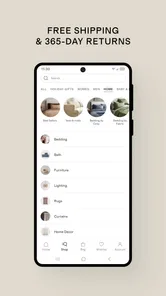
I spent time with Quince as a mobile shopping app, browsing apparel, home items, and other everyday products from the perspective of someone who usually shops in short bursts rather than planning a long session. The experience is most convincing when I have a stable connection and a clear idea of what I want, but it also shows why shopping apps need to be judged as tools for real situations: a quick search on a commute, comparing products from the sofa, or trying to recover after a page stops loading.
Developed by Quince, this free app is aimed at people who want to explore the brand’s catalog from an Android device. It is rated for Everyone, runs on Android 8.0 and later, and the current version is 1.260804.1. The app has reached over 100 thousand installs, with a 4.7 average from more than 600 ratings and over 100 written reviews. Those figures suggest a healthy level of interest, although they do not remove the need to judge whether its shopping flow suits your habits.
How Quince feels when shopping depends on the connection
I find that connection quality shapes more than loading speed: it determines whether a quick browse can turn into a useful comparison. In the section that follows, I focus on practical ways to pace a session, recover when a product page stalls, and decide when it is better to switch to a steadier connection.
Browsing is smoothest when the network stays steady
The first thing I noticed is how closely the useful parts of the experience depend on the network. Product discovery involves moving between catalog views, opening individual items, checking images, and returning to previous results. When the connection is reliable, that rhythm feels natural: I can scan a collection, pause on something interesting, and continue without thinking about the technology behind it.
That changes on a weak connection. A shopping app can still open, but the parts that matter most—product imagery, refreshed listings, and transitions between screens—may take longer to become useful. I would not treat Quince as a catalog I can confidently prepare with before going offline. Its value is tied to current access, so I prefer to use it when I can wait for pages to load rather than when I am rushing through a poor-signal area.
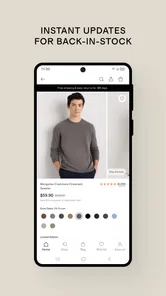
This is especially important for apparel. A name or short description rarely tells me enough to make a sensible decision. I want to inspect the item, compare nearby choices, and revisit details before I commit. With a stable connection, the phone works well for that kind of visual browsing. With interruptions, the process becomes less about shopping and more about waiting for the next piece of information.
A practical mobile scenario
My most realistic use case is a short evening session at home. I might begin by looking for a clothing item, then switch to home products after seeing something that suggests a broader browse. On a phone, this feels more casual than using a desktop store: I can look for a few minutes, stop, and return later when I have a better idea of what I need.
More From Our News Desk

 Instagram
Instagram’s Power Comes From Its Place in Your Phone
A close look at how Instagram turns Meta’s reach, recommendation systems and everyday camera habits into durable platform power—and what that costs users.

 Gmail
GmailGmail in a Busy Inbox: Who Benefits Most?
From first account to crowded workday, Gmail earns its place through dependable search and flexible sorting—but its best fit depends on how much inbox maintenance you can tolerate.

 Prime Video
Switching to Prime Video: What Changes in Your Viewing Routine
Prime Video can make a compelling second home for streaming, but switching means learning a different catalog, rental layer, and route from browsing to playback.

 Universal TV Remote Control
Universal TV Remote Control Works Best as a Reliable Backup
A phone remote earns its place through quick setup and reliable habits. Here is how to get more from Universal TV Remote Control—and where its limits show.

 Weather - By Xiaomi
Weather by Xiaomi Review: Clear at a Glance, Less Clear Up Close
Xiaomi’s weather app makes everyday forecasts quick to scan, but its calm surface can leave useful details and recovery paths harder to find than they should be.

 X
XX Under Pressure: Can It Recover When Posting Goes Wrong?
A resilience-focused review of X, examining setup, mistaken posts, interruptions, weak connections, and the gaps that matter when recovery needs to be dependable.
Latest News



The same flexibility works during a commute, but only when the journey has dependable reception. I would avoid starting a detailed comparison just before entering a tunnel, boarding an underground train, or moving through an area where the signal regularly drops. A product page that has not fully loaded is not a strong basis for a buying decision, particularly when images are central to judging style and finish.
One useful habit is to separate discovery from decision-making. I use the app first to notice categories and products that fit my needs, then slow down before making a final choice. That keeps a brief network delay from turning into an impatient purchase. It also makes the phone’s smaller screen less of a problem because I am not trying to evaluate everything at once.
Why the phone format helps—and where it does not
Quince makes the most sense for shoppers who already know the kind of item they want or who enjoy browsing in small sessions. The phone is always close, and that makes it easy to check the catalog at a convenient moment instead of sitting down for a formal shopping trip. I can move from an idea to a shortlist without opening a computer.
However, mobile shopping has a natural trade-off. A compact display is convenient, but it gives me less room to compare several products side by side. If I am weighing subtle differences in color, shape, or material, I may prefer a larger screen. That is not a flaw unique to this app, but it affects how I use it: I treat the phone as a strong discovery and shortlisting tool, not automatically as the best place for every final comparison.
Another limitation is attention. Shopping from a phone encourages quick decisions because the session feels informal. I have found it better to pause when an item seems appealing and ask whether I am responding to a genuine need or simply enjoying the scroll. The app supports casual exploration, but the responsibility for keeping that exploration deliberate remains with me.
What happens when loading fails
Connectivity problems are less frustrating when I have a simple recovery routine. If a page stalls, I first wait rather than repeatedly tapping. Multiple taps can make it harder to tell whether the app is still processing the request or whether the screen has genuinely stopped responding. If nothing changes, I go back once and reopen the product or catalog area.
When that does not help, I close the app and try again after checking that the phone has a usable connection. I also avoid judging an item from a partially loaded screen. The safe approach is to confirm that the page has refreshed properly before continuing with a comparison or purchase decision.
This recovery process is ordinary, but it matters because shopping sessions often happen in imperfect places. A brief interruption should not automatically make the app unusable, yet it can break the mental thread of a search. I recommend keeping a simple note of what I was looking for if I am browsing during travel, rather than assuming I will remember every product after restarting.
I also distinguish between a network issue and an app issue. If other online services are failing at the same time, changing networks is the sensible first step. If everything else works but Quince repeatedly struggles to display the same area, restarting the app is more useful than repeatedly refreshing one screen. That basic diagnosis saves time and prevents me from abandoning a promising search too quickly.
Using the app without wasting mobile data
Image-led shopping can consume more mobile data than a simple text-based store, especially when I open many products in succession. I therefore prefer to browse deeply over Wi-Fi when I am comparing a large number of items. On cellular data, I keep the session focused: search, inspect a small shortlist, and leave rather than endlessly opening every nearby option.
This approach is not only about saving data. It also improves decision quality. When I limit a session to a few serious candidates, I spend more time understanding what I am seeing and less time generating an oversized list that I will never revisit. Quince works better for me when I use it as a focused shopping aid instead of a background stream of product images.
For people with limited data plans, the practical question is whether the convenience of mobile browsing outweighs the cost of frequent image loading. I would use Wi-Fi for extended discovery and reserve cellular access for checking a specific item or returning to a product I already remember. That makes the app more predictable in everyday use without assuming that every connection behaves the same way.
Useful habits for a more controlled shopping session
I have developed a few habits that make the experience more efficient. First, I decide the purpose of the session before opening the app: finding a type of apparel, exploring home products, or simply checking what is available. That small decision prevents the catalog from pulling me into unrelated browsing.
Second, I avoid making a final judgment while a page is still loading. A product can look incomplete until all relevant visual information appears, and a weak connection can create a misleading first impression. Waiting for the page to settle is particularly worthwhile when I am comparing similar items.
Third, I use a stable connection for the serious part of the process and a mobile connection for lighter checks. This is not an advanced setting or a hidden mode; it is simply a better workflow for a network-dependent store. The result is fewer interrupted sessions and less temptation to make a rushed choice because I am about to lose reception.
Finally, I keep expectations realistic about what the app is for. It is a convenient window into Quince’s shopping range, not a replacement for physically examining fabric, fit, scale, or finish. For products where touch and exact dimensions are decisive, I would use the app to research and narrow options, then rely on the available product information and my own caution before ordering.
Who will appreciate it most
I think Quince is a good match for shoppers who like to browse apparel and home goods from a phone, value a free shopping tool, and usually have dependable internet access. It is also useful for people who prefer multiple short sessions: a few minutes during a break, another look later, and a final review when they are ready to decide.
The app is less suitable for someone who expects a fully useful shopping experience in areas with unreliable reception. I would also hesitate to recommend it as the only tool for a shopper who needs extensive side-by-side comparison or who makes decisions mainly through physical inspection. A desktop browser or an in-person visit may be better in those cases, depending on the purchase.
Its Everyone age rating makes it broadly approachable, but that does not mean every shopping decision is equally simple. Younger or less experienced shoppers may still benefit from discussing sizing, suitability, and spending choices with someone they trust. The app can present products; it cannot replace personal judgment.
My verdict on connectivity and everyday usefulness
After using Quince as a mobile shopping companion, I see its strongest quality in convenience rather than complexity. It gives me a direct way to explore apparel, home products, and more from an Android phone, and the free price removes a barrier to trying it. The solid 4.7 average and growing install base make it an appealing option to test, but my recommendation rests more on how well it fits a person’s shopping routine.
The key trade-off is simple: Quince is convenient when connected, but connection quality shapes how much of the experience is genuinely useful. On Wi-Fi or a reliable mobile signal, I can browse comfortably, build a shortlist, and return to decisions at my own pace. In weak-signal situations, I need patience and a more limited plan, especially if product imagery is important to the choice.
I would install it if I were already interested in Quince and wanted a practical way to browse from Android 8.0 or later. I would use it for discovery, focused comparisons, and quick checks rather than assuming it can replace every other shopping method. The current version, 1.260804.1, gives Android users a straightforward route into the catalog, but the best results still come from choosing the right moment, the right connection, and a deliberate reason for opening it.
Overall, my experience is positive with sensible limits. Quince is worth trying for mobile-first shoppers who have reliable access and enjoy exploring products in manageable sessions. If offline access, uninterrupted browsing in poor reception, or large-screen comparison is essential to you, another shopping route may serve you better. For everyone else, it is a useful, focused addition to a phone-based shopping routine.
Quince: Luxury Essentials Frequently Asked Questions
Can I browse Quince without creating an account?
Quince is a shopping app for exploring apparel, home goods, and other products on a mobile device. You can look through collections and product listings to see what is available before deciding whether to make a purchase. An account can be useful when you are ready to manage shopping activity, but the main appeal is being able to browse the catalog and review item details in the app.
What should I check before placing an order in the Quince app?
Before ordering, take time to review the individual product listing, including its description, available colors and sizes, and any customer feedback. These details can help you choose an item that suits your needs, particularly when shopping for apparel or home products. Check your selections and the checkout summary carefully before confirming, since the products, options, and final order details are specific to your purchase.
What is Quince: Luxury Essentials?
Quince: Luxury Essentials is a shopping app focused on clothing, accessories, home goods, and other everyday products positioned as affordable alternatives to luxury items. The app lets you browse collections, view product details, compare available colors and sizes, read customer feedback, and place orders from a mobile device. Its catalog commonly emphasizes materials, manufacturing details, and direct-to-consumer pricing.
What types of products can I buy through the Quince app?
The app offers a broad selection rather than specializing in one category. Depending on the current catalog, you may find cashmere and other clothing, shoes, bags, jewelry, travel accessories, bedding, towels, furniture, and home essentials. Product availability, colors, sizes, and seasonal collections can change, so it is worth checking individual listings carefully before ordering, especially for limited-stock items.
Is Quince: Luxury Essentials free to download and use?
Yes, the Quince shopping app is generally free to download and use. You can browse products, search categories, save items, and review product information without paying for access to the app itself. Costs apply when you purchase merchandise, and the final amount may include shipping, taxes, or other charges depending on the destination, order value, and the terms shown during checkout.
Pros
- Premium fabrics and polished designs suit elevated everyday wardrobes.
- Curated essentials make it easy to build a coordinated capsule closet.
- Product pages provide useful details on materials
- sizing
- and care.
- App browsing is clean
- with straightforward categories and search tools.
- Frequent promotions can make luxury-inspired pieces more affordable.
Cons
- Some items may sell out quickly
- especially popular sizes and colors.
- Fit can vary between product categories
- so checking measurements is important.
- Limited physical retail access makes trying on items difficult before ordering.
- Returns may be less convenient for shoppers outside supported regions.
- The selection focuses on minimalist styles
- which may feel too conservative for some users.











