QuikTrip: Food, Coupons & Fuel
- 8.33K
- 2.7
- Installs
- 1.00M
- Price
- Free

Screenshots
Analysis by Reviewed
I think QuikTrip’s app makes the most sense when you already plan to stop at one of its stores. It brings food ordering, coupons, fuel prices and location finding into a single place, which can save a few steps on a busy day. I’d treat it as a useful companion to a QuikTrip stop, though—not a universal food or fuel app. Whether it earns a spot on your phone depends on how often you use the chain and whether its nearby locations fit your route.
A practical companion, not an all-purpose service
The main decision is whether you want a tool built around one retailer or a broad service that searches across many options. QuikTrip’s app is firmly in the first camp: its value comes from bringing several parts of a QuikTrip visit together. I find that focused approach more helpful than a crowded collection of unrelated features, but it also sets a clear limit. If the chain is not already part of your routine, the app has less to offer than a general map, restaurant finder, or fuel comparison tool.
That distinction matters most when plans change. If I’m already driving past a QuikTrip and want food or a quick look at its fuel prices, keeping those tasks in one app is convenient. If I’m deciding where to eat across an entire neighborhood, or choosing among competing fuel brands, I’d start with a broader option and use QuikTrip’s app only if one of its locations becomes a likely stop.
What’s All the Buzz About?
So, you might be wondering, what exactly does the QuikTrip: Food, Coupons & Fuel app do? Essentially, it’s your one-stop-shop for locating the nearest QuikTrip store, snagging some sweet deals with coupons, and even ordering food ahead of time. It's like having a QuikTrip in your pocket, minus the slushie machine (unfortunately!).
Navigate Your Way to Savings
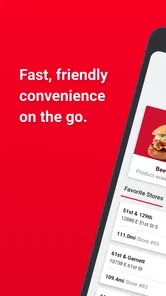
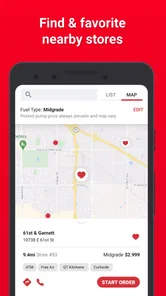
The app’s user interface is super intuitive. From the moment you open it, you’re greeted with a map pinpointing all nearby QuikTrip locations. I found this feature particularly handy on a recent road trip. Just tap on a store, and boom, you’ve got directions, store hours, and even a peek at what’s on the menu.
For me, the useful trick is to check the map before I’m nearly out of fuel or already committed to a detour. A location that looks close on a screen may not suit the direction I’m travelling, so I’d compare the route with the stop rather than choosing by distance alone. Fuel prices are most helpful as a quick comparison among QuikTrip locations; they don’t turn the app into a complete survey of every station nearby. If the cheapest option overall matters more than staying with this chain, a general map or fuel-finding app may be a better second check.
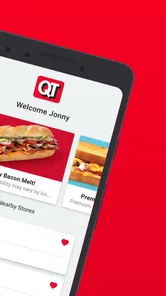
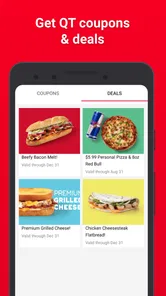
But wait, there's more! The coupons section is a treasure trove of discounts. Whether you’re in the mood for a hotdog or just need a caffeine fix, there’s usually a deal waiting for you. I mean, who doesn’t love scoring a bargain?
More From Our News Desk

Weather by Xiaomi Review: Clear at a Glance, Less Clear Up Close

X Under Pressure: Can It Recover When Posting Goes Wrong?

Clash of Clans Is Won Between the Battles

Android Auto Makes the Case for Quieter Car Software

MobiOffice: Transforming Mobile Productivity with Seamless Integration

EA SPORTS FC™ Mobile Soccer: Redefining Mobile Sports Gaming
I’d make a habit of looking through offers before ordering, not after I’ve settled on a meal. That simple order of operations helps me decide whether a coupon is relevant to what I actually want, instead of letting a discount talk me into an unnecessary extra. The trade-off is that coupons are useful only when they match your plans and the store you intend to visit; I wouldn’t assume every offer will suit every stop. If you mostly want broad restaurant deals, a general coupon app has a wider purpose, while this one keeps the search focused on QuikTrip.
Order Ahead and Skip the Line
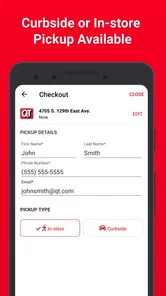
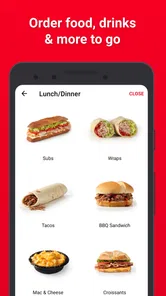
One of the standout features for me was the ability to order food ahead of time. Let’s face it, nobody likes waiting in line, especially when you’re in a rush. With just a few taps, I was able to customize my order, pay through the app, and simply pick it up at the counter. It’s fast, convenient, and perfect for those of us who are perpetually running late.
A realistic use for this is a workday lunch break: I can browse and place an order before leaving, then make the QuikTrip stop part of a trip I already need to take. It works best when I know which location I’m heading to and have enough time to collect the food; I would not rely on ordering ahead to make a tight schedule foolproof. For people who want a broad choice of restaurants delivered to them, a delivery service is the more natural fit. This app’s advantage is narrower: combining a planned QuikTrip food pickup with the other reasons to stop there.
Fuel Up Without the Hassle
Running low on gas? No problem. The app also helps you find the best fuel prices at QuikTrip locations nearby. Plus, it integrates with their rewards program, so you can rack up points for every gallon you pump. It’s a win-win situation!
That combination is most appealing if you already make regular QuikTrip stops, since food, coupons and fuel information then support the same routine. If you rarely visit the chain, the convenience is less compelling: you may be better served by keeping your usual navigation or fuel tool and choosing a station that fits your route. I also wouldn’t install it solely for one possible coupon; its stronger case is having several of its functions matter to you over time.
Small habits that make the app more useful
I’d use the app as a planning tool rather than something to open only after I’ve pulled into a forecourt. Before a familiar commute, I can check whether a QuikTrip location falls along the route, then decide whether a food pickup or fuel stop makes sense. That avoids treating the closest pin as automatically convenient. On an unfamiliar drive, I’d check the location against my actual direction of travel and keep a broader navigation app available for the rest of the journey.
There’s also a useful distinction between browsing a coupon and building a purchase around it. I’d first decide what I want to eat or drink, then see whether an offer applies. That keeps the discount from becoming the reason to buy something I did not need. For a regular customer, even a modest offer can be a nice extra; for someone who visits only once in a while, searching through promotions may take more attention than the savings are worth.
For food ordering, I’d choose the pickup location before spending time customizing a meal. That makes the order part of a real route, rather than a plan that depends on finding a convenient store later. It is especially sensible when coordinating a quick stop with a commute or an errand. If the route changes, I’d reassess the stop instead of assuming the original pickup still works with the new plan.
Who Gets the Most Out of It?
QuikTrip is a food-and-drink app from QuikTrip Corporation. It is free, rated for Everyone, and has reached over a million installs. Its average rating is 2.7 from around 21,000 ratings, a mixed reception worth weighing against your own needs. The app first appeared in 2015, and version 3.37.2 is the current release. It requires Android 8.1 or later.
I’d recommend it to regular QuikTrip customers, commuters who pass its stores, and drivers who like checking a familiar chain’s fuel prices before stopping. It is less suitable if you want a nationwide view across competing stations, restaurant discovery beyond QuikTrip, or a tool you can use without depending on the chain’s locations. The key question is not whether the app has several features, but whether those features line up with stops you already make.
What to expect from a first try
A low-friction way to judge it is to use the parts that match a stop you already expect to make. Find a familiar location, check whether its position works with your route, and look through the current food and coupon options before you leave. That gives you a practical sense of whether the app saves effort without turning a routine errand into extra planning. You do not need to make every feature part of your habit for the app to be useful; one reliable use, such as checking locations or preparing a pickup, may be enough.
The mixed average rating is a reason to keep expectations measured, not a verdict that every user will have the same experience. I would pay attention to whether the functions I personally need are easy to use on my device and at the stores I visit. If the app feels clumsy in that first routine, there is little reason to force it into a daily workflow when general navigation and food apps already cover the basics for you.
One likely question is whether it replaces a maps app. I wouldn’t treat it as a full replacement: it is useful for locating QuikTrip stores and considering their fuel prices, while a general navigation app remains better suited to planning routes that include other destinations or brands. Likewise, its food ordering is for a QuikTrip pickup rather than a substitute for a service that offers many restaurants or delivery choices.
Another practical question is whether coupons make it worthwhile on their own. In my view, only if you already visit often enough to check them naturally. Offers can add value to a planned stop, but they are not a reason to assume every visit will be cheaper or every location will suit your needs. The app is most convincing when a coupon is an occasional bonus alongside location, fuel, or food use—not the whole reason to install it.
It is also worth being realistic about the audience. Someone who buys fuel and snacks at QuikTrip as part of a regular drive has a straightforward reason to keep the app. A visitor who rarely encounters the chain may be better off with general-purpose tools already on their phone. And anyone who needs to compare all nearby fuel brands or browse a wide range of restaurants should start with those broader services, then use this app only when a QuikTrip stop is genuinely in the running.
In conclusion, the QuikTrip: Food, Coupons & Fuel app is a must-have for anyone who frequents QuikTrip stores or just loves convenience. It's packed with features that make life easier, from finding the best deals to ordering food on the go. So, next time you’re out and about, give it a try. Trust me, your wallet (and your stomach) will thank you!
I’d put that recommendation more narrowly: it is worth trying if you expect to use its store map, food ordering, coupons or fuel information as part of one regular routine. The low average rating suggests experiences are not uniformly positive, so I’d judge it by a practical first test—find a location you actually visit, inspect the available offers, and see whether ordering ahead fits your schedule. If those steps feel useful, it can earn its place; if not, your regular maps and food apps may already do the job.
My verdict for everyday use
What I like most is the way the app can make a planned stop more deliberate: choose a location that fits, consider fuel, and decide on food or a coupon before you arrive. The trade-off is that its convenience depends on the chain being relevant to your route. It does not remove the need to compare other stations or food options when those matter more than staying within QuikTrip.
For a regular customer, I think that focus is a fair bargain, especially when a single app supports several parts of the same errand. For an occasional visitor, it may be easier to use familiar general-purpose tools and open this one only when a QuikTrip stop is already likely. That is the clearest way to decide: install it for a routine you actually have, not for a list of features you may never use.
QuikTrip: Food, Coupons & Fuel Frequently Asked Questions
What does the QuikTrip app include, and is it suitable for everyday use?
QuikTrip brings several convenience-store tasks together in one app: users can order food and drinks, look for coupons, view fuel prices, and find locations. That combination may be useful if you visit QuikTrip regularly and prefer checking these options on your phone before stopping. It is a Food & Drink app developed by QuikTrip Corporation.
Is QuikTrip free to download, and what should I know before installing it?
QuikTrip is free to download and is a Food & Drink app from QuikTrip Corporation. It is rated for Everyone, so its content is intended for a broad audience. Before installing, check that your device runs a compatible operating system; the app’s listed minimum is version 8.1. The app is designed for people who want food ordering, coupons, fuel prices, and store-finding features in one place.
What is QuikTrip and what services does it offer?
QuikTrip is a mobile application designed to enhance your convenience store experience by offering a range of services, including food ordering, fuel price tracking, and access to exclusive coupons. The app allows users to quickly locate nearby QuikTrip stores, order fresh food and beverages, and view current fuel prices. In addition, QuikTrip often includes special promotions and discounts, making it a valuable tool for regular customers looking to save money on their purchases.
How do I use the QuikTrip app to find the nearest store?
Using the QuikTrip app to locate the nearest store is straightforward. Simply open the app and allow it to access your location. The app will then display a map with nearby QuikTrip locations. You can view additional details such as store addresses, operating hours, and available services. This feature ensures that you can always find a QuikTrip store no matter where you are, making it easier to plan your visits around your schedule.
Can I order food through the QuikTrip app?
Yes, the QuikTrip app allows users to order food directly through the platform. You can browse the menu to select from a variety of fresh foods, snacks, and beverages. After placing your order, you'll receive a confirmation with the pickup time and location. This service is particularly beneficial for those who are on the go and want to minimize waiting times, ensuring a quick and efficient experience.
Pros
- User-friendly interface
- Wide range of food options
- Exclusive coupons available
- Real-time fuel prices
- Loyalty rewards program
Cons
- Limited locations
- Occasional app crashes
- Slow customer service response
- In-app ads can be intrusive
- Requires frequent updates











