QDOBA Mexican Eats
- 6.36K
- 4.8
- Installs
- 1.00M
- Price
- Free

Screenshots
Analysis by Reviewed
When I first stumbled upon QDOBA Mexican Eats app, I was curious to see how an app could capture the vibrant flavors and experience of an actual QDOBA restaurant. I mean, who doesn't love a good burrito or taco bowl? So, I decided to dive in and see what this app had to offer for all the Mexican food lovers out there.
What makes this kind of ordering app most useful to me is not simply avoiding a queue; it is having time to make choices before everyone is hungry. I can look over a meal, consider what I want to change, and talk through the options with someone else instead of trying to decide at a busy counter. That shift is especially welcome when a household is ordering several different meals, though it still helps to agree on one person who will check the basket before placing it.
For shared use, I would make a simple distinction between choosing food and controlling the order. People can contribute requests without needing access to the account itself. One person can collect those preferences, enter them, and confirm the final basket. That arrangement is particularly useful when several people share a device: it limits accidental taps and keeps the responsibility for submitting the purchase clear.
Getting Started
Downloading the QDOBA Mexican Eats app was a breeze, and it’s available for both Android and iOS. As soon as I opened it, I was greeted with a clean and colorful interface that immediately made me want to order something delicious. Navigation is straightforward, with all the main options like ordering, customizing, and finding deals right at your fingertips. The app also requires you to create an account or log in, which is quite standard. It’s a quick process, and once you're logged in, you're ready to explore.
Since ordering is tied to an account, I would decide early whether one person in a shared household will handle the order or whether each adult will use a separate login. A single account can make one person the practical coordinator, but it also means that person should review the final order and payment details. I would not treat a shared phone as a reason to pass around login credentials casually; keeping account access with the person responsible for ordering is a simpler boundary.
There is a small but useful workflow advantage in opening the app before the group starts debating every ingredient. I would first see what sort of meal each person has in mind, then use the customization choices to translate those requests into an actual item. This keeps the conversation grounded in what can be ordered rather than turning into an open-ended list of toppings. If anyone is unsure, it is better to settle that before checkout than to treat the submitted order as a draft.
Customizing Your Order
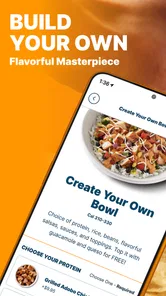
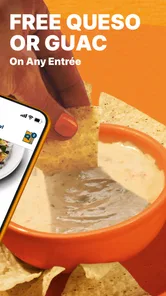
One of the standout features of this app is the ability to customize your order just the way you like it. Are you a fan of extra guac or perhaps prefer a little more spice in your burrito? The app allows you to tailor your meal with a variety of toppings, proteins, and extras. It’s like having your very own QDOBA chef in your pocket. Plus, they show you the real-time price as you add or remove ingredients, so no surprises at checkout.
More From Our News Desk

Weather by Xiaomi Review: Clear at a Glance, Less Clear Up Close

X Under Pressure: Can It Recover When Posting Goes Wrong?

Clash of Clans Is Won Between the Battles

Android Auto Makes the Case for Quieter Car Software

MobiOffice: Transforming Mobile Productivity with Seamless Integration

EA SPORTS FC™ Mobile Soccer: Redefining Mobile Sports Gaming
For a group order, I find it useful to settle the broad choices first—burrito or bowl, preferred protein, and any ingredients people want to avoid—then make individual adjustments. That reduces the chance of mixing up two nearly identical meals. I would pause at the basket and read each item aloud before confirming, especially if more than one person has a similar order. Customization is a real advantage over picking from a short set of fixed combinations, but it also creates more decisions and gives a rushed person more opportunities to miss a detail.
That basket review is also where I would check whether a request is essential or simply a preference. When someone needs an ingredient left out, I would make that adjustment deliberately and then inspect the finished item rather than assuming the right selection carried over from another meal. For a household with similar-looking orders, I would avoid building several items from memory in one quick burst. A slower pass through each one is less exciting, but it is the more reliable way to catch an accidental extra or omission before sending the order.
Rewards and Deals
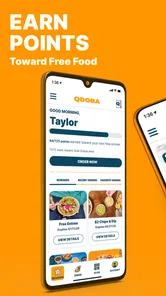
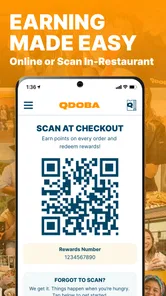
If there's one thing that keeps me coming back to an app, it's the rewards. QDOBA Mexican Eats doesn’t disappoint on this front. The app features a rewards program where you can earn points for every purchase. It’s pretty satisfying watching those points add up, knowing you’re inching closer to a free entree. Plus, they frequently offer exclusive deals and discounts via the app, which is a win-win for any food enthusiast on a budget.
I would check any deal against what the group already intends to order rather than letting a promotion decide dinner. A discount only helps if it suits the meal and the final total still makes sense. For households that order together regularly, it is also worth agreeing whose account receives the rewards, since the app’s account-based setup makes that a practical question. If the group rarely chooses QDOBA, the rewards may not be a strong reason to keep using the app; a nearby restaurant’s own ordering option or an in-person purchase could be more convenient.
For a shared household, rewards raise a question that is easy to overlook: who is placing the order, and who is accumulating the benefit? I would settle that before a regular group order becomes routine, especially if different adults take turns paying. Keeping the account holder and the person handling the purchase aligned avoids turning a small perk into a source of confusion. I would also treat a deal as a prompt to compare the finished basket, not as proof that the app is automatically the cheapest way to feed everyone.
Location Finder
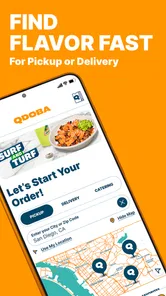
Whether you’re on the go or just exploring new neighborhoods, the app’s location finder helps you track down the nearest QDOBA restaurant. The built-in map is incredibly handy, and it even provides directions, so you don't have to switch between apps. It’s a small feature, but it really adds to the convenience, especially when you’re in a new area and craving some Mexican fare.
Before building a detailed order, I would use the location information to orient myself around a restaurant that is actually convenient for the trip. That matters when coordinating pickup around a commute or another errand: the closest place in a map view may not be the easiest stop on the route. For delivery, the useful first question is whether the available option suits the household’s timing and location; if speed or a specific delivery arrangement matters most, comparing the choices available at the time is sensible. The app is focused on QDOBA rather than acting as a broad restaurant marketplace, so it is not the right tool when the group has not settled on the restaurant yet.
One practical distinction is that finding a restaurant and planning a smooth collection are not quite the same job. If I am picking up while another person waits at home, I would confirm which location makes sense for the route before everyone invests time in customizing. If the group changes its mind about where to order from, I would revisit that choice before submitting anything. This is a simple safeguard against coordinating around a location that is technically nearby but inconvenient for the person actually making the trip.
Age, Trust, and Shared Use
The app is rated for Everyone, and it is free to download, which makes it approachable for a household to keep on a shared device. I would still have an adult handle account access, payment, and the final order rather than leaving a child to submit a purchase. The age rating is useful context, but it does not replace ordinary supervision around ordering and spending. For a family meal, younger diners can say what they want while the adult checks that each customized item matches those requests.
It is also a food-ordering app, not a shared household planner. I would not rely on it to coordinate everyone’s schedule or preferences beyond the meal being placed. A quick conversation or a message in the household’s usual chat can settle who is collecting the food and who is paying someone back; the app’s role is to build and submit the QDOBA order. That simple division keeps expectations clear and avoids assuming the app has family-management tools.
The Everyone rating makes the app approachable for a broad household, but it should not be confused with permission for every person to manage an account or spend money independently. I would let younger family members help choose what they want while an adult remains responsible for checking the selections and completing the order. On a shared device, signing out or handing the phone back to its usual owner after ordering is also a sensible everyday boundary, particularly when the account is used for purchases.
Who Will Get the Most From It
I think the app suits people who already like QDOBA and want to make a specific meal their own, especially when they prefer to decide in advance or arrange pickup or delivery. It is also handy for a household with mixed tastes: one person can choose a straightforward meal while another adjusts toppings and extras. In contrast, someone who wants the atmosphere of eating at a restaurant, or who prefers to choose from many cuisines in one place, may be happier dining in or using a broader ordering service.
A realistic use case is a weeknight when one adult is heading home and the rest of the household is hungry. They can collect everyone’s choices, check the customized items carefully, and place the order before making the stop. That is more orderly than trying to remember several requests on the way, but it only works well if the group leaves enough time to review the basket and confirm the restaurant and order details. For a solo meal, the same app may feel like extra setup if walking in and ordering at the counter is already easy.
The app is less compelling if the household is still deciding between several kinds of food. A general restaurant-ordering service is better suited to comparing many cuisines in one place, while a quick counter visit may beat opening an account when the group is already at the restaurant. I would also skip app ordering when the main priority is a relaxed sit-down meal: the convenience of arranging food ahead does not replace the experience of eating in. Its strongest use is narrower and clearer—when QDOBA is already the choice and customization or advance planning makes the order easier.
Everyday Trade-Offs
QDOBA Digital is the developer, and the app has a 4.8 average from around 35,000 ratings, with more than a million installs. Those figures suggest that it has found an audience, but they cannot tell me whether a particular restaurant, pickup moment, or customized meal will suit every person. The app is free, yet the food order itself is a separate purchase, so I would judge value by the meal and convenience rather than by the download cost.
The current version is 37.3.0, and the app has been available since December 4, 2016. It runs on Android 7.1 or later, so an older device may need an operating-system check before installation. I would also keep the app updated when using it regularly, since ordering tools can change over time. For someone deciding whether to install it, the practical question is straightforward: do you order from QDOBA often enough to benefit from customizing ahead, checking deals, and finding a location? If yes, it earns a place on the phone; if not, occasional counter ordering may be less hassle.
In everyday terms, I would think of it as a restaurant-specific tool rather than a replacement for every way of ordering food. Its focus can be a strength: when I know I want QDOBA, I can concentrate on that menu and shape a meal without browsing unrelated restaurants. The trade-off is that it cannot help much with the earlier decision of where the household wants to eat. If the answer is uncertain, compare options first; if the answer is already QDOBA, the dedicated app has a clearer purpose.
People often wonder whether they need an account before they can make use of the ordering experience. In practice, the account step is part of getting ready to place an order, so I would expect to log in or register rather than treat the app as a casual menu viewer. That makes it most worthwhile for someone who expects to order, use rewards, or return to the app. If you only want to decide whether the restaurant sounds appealing, you may prefer to make that choice before taking on account setup.
Final Thoughts
Overall, the QDOBA Mexican Eats app is a fantastic companion for anyone who loves Mexican cuisine and enjoys the convenience of ordering on the go. From easy ordering and customization to rewarding loyalty programs, it’s designed with the user in mind. While you can’t quite replicate the ambiance of dining in a QDOBA restaurant, this app brings you pretty close with its user-friendly design and mouth-watering options. So, if you haven’t tried it yet, give it a download and let your taste buds embark on a flavorful journey!
My household verdict is that I would keep it available when QDOBA is a regular choice and one person can take clear responsibility for the account, basket, and final submission. It works best as a practical coordinator for a meal, not as a family organizer or a universal food finder. A little agreement about preferences, rewards, and who is collecting turns its conveniences into a smoother routine. If your household seldom orders from QDOBA, or values browsing many restaurants more than tailoring one restaurant’s menu, another option will probably fit better.
QDOBA Mexican Eats Frequently Asked Questions
Can I browse the QDOBA menu before deciding what to order?
Yes. The app lets you browse QDOBA’s menu and explore customizable food before placing an order. That can help you compare meal choices and decide what you want at your own pace, whether you are planning pickup or delivery. Once you are ready, you can select a restaurant and use the available ordering options to build and submit your meal.
Can I choose a restaurant in the app?
Yes. QDOBA Mexican Eats includes a feature for locating nearby QDOBA restaurants, and the restaurant you select can affect which ordering choices are available. Choosing a location is useful before you start an order because pickup and delivery options depend on the restaurant serving your area. You can use the app to explore locations and then continue with the options offered for your selection.
Do I need an account to use QDOBA Mexican Eats?
The app includes account features connected with ordering and the QDOBA rewards program. An account can be useful if you want to link purchases to rewards or keep using personalized offers. You can also browse menu choices and explore ordering in the app. If you plan to use rewards, review the account and checkout prompts as you place an order so your purchase is associated with the right profile.
Is QDOBA Mexican Eats free to download, and which devices can run it?
QDOBA Mexican Eats is free to download and is rated for everyone, so it is suitable for a broad audience. Before installing, check that your device is running at least iOS 7.1, the minimum operating system requirement. The app is developed by Qdoba Digital and is intended for people who want to explore QDOBA’s food and place orders from a mobile device.
Can I use the app to order food for pickup or delivery?
Yes. QDOBA Mexican Eats is designed to let customers order customizable food for pickup or delivery. You can browse the menu, make choices for your meal, and submit an order through the app, which can be useful when you want to plan a meal before visiting a restaurant or having food delivered. Available ordering choices may depend on the location you select.
Pros
- Easy to navigate menu interface.
- Wide variety of Mexican dishes.
- Customizable meal options.
- Fast and efficient service.
- Loyalty rewards program.
Cons
- Limited vegetarian options.
- Inconsistent portion sizes.
- App crashes occasionally.
- Delivery zones are limited.
- No nutritional info in-app.











