

PuzzlePlay: Games & Rewards
- 2.84K
- 4.7
- Installs
- 100.00K
- Price
- Free

Screenshots
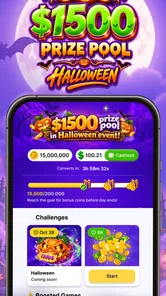
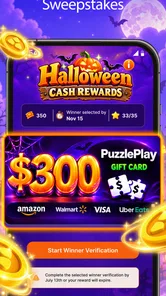

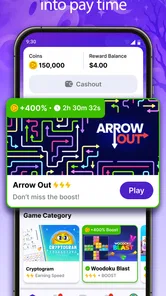
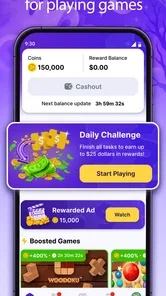
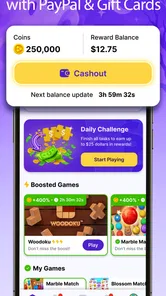
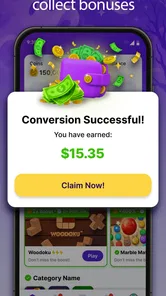

Analysis by Reviewed
I approached PuzzlePlay: Games & Rewards as an entertainment app for people who want a little more purpose from casual puzzle sessions. Its basic idea is easy to understand: play puzzle games and work toward gift cards. That combination sounds simple, but the real question is whether the experience feels clear and worthwhile once you move beyond the store summary.
My overall impression is that it is best viewed as a lightweight reward-oriented pastime rather than a dependable earning tool. I would open it when I wanted a short mental break, especially if I already enjoyed puzzle games, but I would not treat the rewards as a substitute for income or as the main reason to spend a large amount of time inside the app. The entertainment comes first; the reward element is an extra incentive.
PuzzlePlay sits in the Entertainment category and is developed by PuzzlePlay. It is free to install, has a mature 17+ content rating, and runs on Android 10 or later. The app reached its current version, 1.30.0, after being released on November 7, 2025. Those details matter because compatibility and age suitability should be checked before spending time troubleshooting an installation that may not fit your device or household.
Where the experience can become confusing
The first point where I would expect users to hesitate is the relationship between playing, progress, and rewards. A phrase like “earn gift cards” can create the impression that every completed puzzle immediately produces something tangible. In practice, reward-based entertainment apps usually require patience and careful attention to how progress is recorded. I recommend treating the app as a game with a possible benefit, not as a direct exchange of minutes for guaranteed cash value.
That mindset prevents one of the most common disappointments: opening the app expecting a quick payout after a single session. PuzzlePlay may be enjoyable even when progress is gradual, but users who dislike waiting, tracking milestones, or checking redemption conditions may find the reward layer more frustrating than motivating. If your priority is simply solving puzzles, a conventional puzzle app may offer a cleaner experience with fewer expectations attached.
Another possible sticking point is understanding what counts as meaningful activity. I would pay attention to the wording shown around each game, any progress indicator, and the point at which a reward becomes available. Rather than tapping rapidly through screens, I would pause when a new task or reward panel appears. This small habit helps avoid confusing a completed round with completed reward progress.
The most useful rule is to separate game progress from reward progress. They may feel connected, but they are not necessarily the same thing from a user’s point of view. A puzzle can be finished while the reward-related step still needs to be recognized, accumulated, or reviewed. Keeping that distinction in mind makes the interface easier to interpret and reduces the temptation to repeat actions blindly.
More From Our News Desk

 Gmail
GmailGmail in a Busy Inbox: Who Benefits Most?
From first account to crowded workday, Gmail earns its place through dependable search and flexible sorting—but its best fit depends on how much inbox maintenance you can tolerate.

 Prime Video
Switching to Prime Video: What Changes in Your Viewing Routine
Prime Video can make a compelling second home for streaming, but switching means learning a different catalog, rental layer, and route from browsing to playback.

 Universal TV Remote Control
Universal TV Remote Control Works Best as a Reliable Backup
A phone remote earns its place through quick setup and reliable habits. Here is how to get more from Universal TV Remote Control—and where its limits show.

 Weather - By Xiaomi
Weather by Xiaomi Review: Clear at a Glance, Less Clear Up Close
Xiaomi’s weather app makes everyday forecasts quick to scan, but its calm surface can leave useful details and recovery paths harder to find than they should be.

 X
XX Under Pressure: Can It Recover When Posting Goes Wrong?
A resilience-focused review of X, examining setup, mistaken posts, interruptions, weak connections, and the gaps that matter when recovery needs to be dependable.

 Clash of Clans
Clash of Clans Is Won Between the Battles
Its raids are quick; its community is a long-term project of coordination, teaching, rivalry, and shared responsibility—with all the friction that entails.
Latest News



I would also avoid judging the app by its first few minutes. Reward apps often need a little exploration before their rhythm becomes obvious. Start with one puzzle type, observe how the app records your activity, and only then decide whether the process suits you. Switching constantly between activities before understanding the tracking flow can make it harder to tell which action produced progress.
What I would check before starting a session
Before playing seriously, I would confirm that the device uses Android 10 or a newer version. This is a simple check, but it is especially important for people using an older phone or a secondary device. If the operating system is below the requirement, reinstalling the app, restarting the phone, or clearing storage will not solve the underlying compatibility problem.
I would also make sure the app is installed from the official app marketplace and that it has finished updating. PuzzlePlay’s current version is 1.30.0, so a device carrying an older build may behave differently from the version most users now encounter. An update can be particularly relevant if screens fail to load, progress appears inconsistent, or the app closes during ordinary use.
After installation, I would launch the app with a stable internet connection and leave enough free storage for normal operation. I would not assume that a weak connection is harmless simply because the puzzles themselves look casual. Reward tracking and account-related screens may depend on communication with the service, so an unstable connection can make a completed action appear delayed or incomplete.
There is also a practical age check. The app is rated Mature 17+, so it is not something I would hand to a younger child simply because the games look approachable. Parents should consider both the age classification and the reward-oriented design before allowing use. The mature rating is a reason to review the app in context, not to assume that every puzzle is automatically suitable for all ages.
For a smoother first session, I would use this order:
Confirm the phone meets the Android 10 minimum and has enough free space.
Install or update the app through the normal store process.
Open it on a reliable connection and allow the initial screens to finish loading.
Play one puzzle without rushing through menus.
Check how progress and rewards are displayed before starting a longer session.
This sequence is not exciting, but it prevents a lot of avoidable confusion. In my experience, a few minutes spent learning the flow is more valuable than immediately chasing the fastest-looking reward path.
A realistic everyday use case
Imagine having a twenty-minute break between errands. You want something more engaging than scrolling, but you do not want to commit to a long competitive game. PuzzlePlay can fit that moment well: open it, choose a puzzle, play at a relaxed pace, and stop when the break ends. The reward possibility gives the session a little direction without requiring the same concentration as a full-length game.
The trade-off is that the reward objective can change the way you play. Instead of choosing the puzzle you enjoy most, you may feel pushed toward whatever appears to advance your progress. I would resist that pressure. If a particular activity is tedious, it is probably not worth forcing yourself through it merely because the reward idea sounds attractive. The app works better when the puzzle remains enjoyable on its own.
For that reason, I see it as a good match for casual players who like variety and small goals. It is less suitable for someone who wants a deep puzzle campaign, detailed statistics, or a serious competitive ladder. Those users may be happier with a dedicated puzzle game designed around mastery rather than incentives.
Recovering when progress or screens do not behave as expected
When something appears stuck, I would begin with the least disruptive checks. Wait briefly on the current screen, confirm the connection is still working, and return to the relevant area rather than repeatedly tapping the same control. Rapid repeated taps can create uncertainty about what the app has actually received, especially when a page is loading slowly.
If the app does not respond, close it normally and reopen it. Then check whether the activity you completed is reflected after the restart. A delayed update is different from lost progress, and restarting once can help distinguish the two. I would avoid uninstalling immediately because that can remove local information or force me to repeat setup steps.
If a puzzle loads but the reward area looks unchanged, I would first review the wording around the task and make sure I completed the intended action. It is easy to assume that finishing a round is enough when the app may be looking for a particular stage of activity. I would also give the screen time to refresh before beginning the same task again.
One of the more useful habits is to keep a simple personal note of the session: which puzzle I played, roughly when I finished it, and what progress indicator I saw afterward. I am not suggesting a detailed log for every casual round. A short note becomes valuable only when something seems missing, because it gives me a clear reference instead of relying on memory.
If the app repeatedly closes, I would restart the phone, check for a pending app update, and make sure the device is not overloaded with other open applications. I would also test whether the issue happens only in one puzzle or across the whole app. That distinction matters. A single activity behaving badly points to a narrower problem, while crashes everywhere suggest a broader device, installation, or compatibility issue.
I would not use aggressive “cleaner” tools or unofficial modified versions to fix reward tracking. Those approaches can introduce new problems and make it harder to know whether the original app is functioning normally. Staying with the official installation and ordinary device checks is the safer recovery path.
When the app may not be the cause
Not every missing update is caused by PuzzlePlay. A phone with very little free storage can struggle to update or save temporary information. Battery-saving modes may limit background activity, and a poor Wi-Fi or mobile connection can interrupt a screen at exactly the moment progress is being synchronized. These are ordinary device conditions worth checking before blaming the app.
The same applies to account or store problems. If the app itself opens normally but installation, updating, or device verification fails, the issue may sit with the operating system or app marketplace rather than the game experience. I would check whether other apps can download and update successfully. If they cannot, PuzzlePlay is probably only the visible symptom of a wider problem.
Time and expectations can also create a false impression of failure. If a reward is not immediate, that does not automatically mean the session was wasted. I would review the progress display, continue only if the puzzle remains enjoyable, and avoid assuming that repeated play will fix an unclear status. When the interface gives no understandable indication of what happened, that is a genuine usability concern, but it is still better to investigate calmly than to repeat the same action for hours.
Privacy and comfort are part of the decision as well. Because the app is mature-rated and reward-focused, I would read the screens carefully and avoid sharing information I am not comfortable providing. I would also keep expectations realistic about gift cards: the possibility of earning them does not make every session equally valuable, and the app should never be used as a reason to overspend time, mobile data, or attention.
Who should use it and who should skip it
I would recommend PuzzlePlay to adults who already enjoy casual puzzle games and like having a small external goal attached to their play. It can make short idle periods feel more structured, particularly for people who prefer simple activities over social feeds. The free price removes the need to make an upfront purchase, which makes trying it relatively straightforward for eligible devices.
I would be more cautious recommending it to users who need predictable rewards, instant results, or a polished long-form puzzle experience. If you are comparing it with a paid puzzle game, the paid alternative may be better when your main goal is uninterrupted play without reward tracking. If you are comparing it with a standard free puzzle app, the standard option may be preferable when you want a simpler interface and do not care about gift cards.
It is also not the right choice for younger users because of the Mature 17+ rating. Nor would I suggest it to someone using an unsupported Android phone and hoping a workaround will make it reliable. Compatibility is a basic requirement, not a minor inconvenience. A different app designed for the available device will usually be the more sensible choice.
My practical verdict after weighing the trade-offs
PuzzlePlay has a clear appeal: it combines casual puzzle entertainment with the possibility of working toward gift cards, and it is free to try. Its strongest use is as a short-session app for adults who would play puzzles anyway. The reward layer can add motivation, but it should remain secondary to whether the games are actually pleasant to play.
The main friction comes from expectations and progress clarity. Users need to understand that playing, recording progress, and reaching a reward may be separate parts of the experience. A stable connection, a supported Android version, and a little patience during updates can prevent many avoidable problems. When something goes wrong, restarting carefully and checking the device environment is more useful than repeatedly tapping or reinstalling.
The app’s 4.7 average from around 7,100 ratings and more than 100,000 installs suggest that it has attracted a meaningful audience, while roughly 2,800 written reviews show that many users have chosen to comment on their experience. I would treat those figures as evidence of interest, not as a guarantee that every player will enjoy the reward workflow. Personal tolerance for waiting and tracking matters more here than a headline score.
My recommendation is therefore conditional but positive: try it if you want casual puzzles and can regard gift cards as a possible bonus rather than a promise of quick value. Start with a short session, learn how progress is shown, and decide whether the entertainment stands on its own. If the puzzles are not enjoyable without the reward, this probably is not the right app for you. If they are, PuzzlePlay can be a reasonable way to turn spare minutes into a more purposeful gaming break.
PuzzlePlay: Games & Rewards Frequently Asked Questions
Is PuzzlePlay: Games & Rewards suitable for children?
PuzzlePlay: Games & Rewards is marked Mature 17+, so it is intended for adults rather than children. Parents and guardians should check the age rating before installing it on a shared device and consider whether its games, advertising, and reward-related activities are appropriate. If a younger person uses the device, parental controls can help manage access to apps and purchases.
Which devices can run PuzzlePlay: Games & Rewards?
PuzzlePlay: Games & Rewards is available for Android and iOS, though the exact compatibility depends on the device and operating system. The current version is 1.30.0, and Android users need version 10 or later. Before downloading, check the app’s store page on your device to confirm that it is offered for your platform and meets the device’s requirements.
What is PuzzlePlay: Games & Rewards?
PuzzlePlay: Games & Rewards is a mobile gaming app that combines casual puzzle-style entertainment with a rewards system. After installing it, users can browse the available games, play selected challenges, and collect points or other in-app rewards according to the platform’s current rules. The exact game selection, earning options, and reward availability may vary by country, device, and promotional period.
How do rewards work in PuzzlePlay: Games & Rewards?
Rewards are generally connected to gameplay activity, completed challenges, milestones, or other tasks offered inside the app. Before spending significant time, open the rewards section and review the current requirements, minimum redemption threshold, and available options. Reward programs can change, and some offers may include conditions such as account verification, advertising interactions, or regional eligibility.
Is PuzzlePlay: Games & Rewards free to download and use?
PuzzlePlay: Games & Rewards is free to download. However, free access does not necessarily mean the experience is completely without commercial content. You may encounter advertisements, optional purchases, or sponsored activities while playing. Check the store listing and the app’s payment settings before installing, particularly if the device is shared with children. Never assume that playing guarantees cash or valuable prizes.
Pros
- Wide variety of casual puzzles for short or extended play sessions.
- Simple controls make the games accessible to most players.
- Reward system adds extra motivation beyond completing levels.
- Suitable for users looking for lightweight entertainment on mobile.
- Regular challenges can help keep gameplay feeling fresh.
Cons
- Rewards may require considerable time or repeated gameplay to earn.
- Some features may depend on watching advertisements.
- Game variety and quality can differ between individual puzzles.
- Progress may feel slow without optional purchases or bonus rewards.
- An internet connection may be needed for rewards and certain features.











