Publer: Social Media Tools
- 727.00
- 4.6
- Installs
- 1.00M
- Price
- Free

Screenshots



Analysis by Reviewed
I like the idea behind Publer: Social Media Tools: instead of bouncing between social networks to keep a posting routine alive, you can plan and manage work from one place. That makes it most interesting to people who treat social media as an ongoing task rather than an occasional way to share a photo. I’d still judge it by whether its workflow fits the accounts and habits you actually have, not by how many tools appear on a feature list.
Start free, then judge the cost by your routine
Publer is a free social app from Kalemi Code LLC, and its current version is 2.2.3. Optional in-app purchases range from $2.99 to $119.99 per item, so “free” is a useful starting point, not a promise that every paid option will suit every user. I’d begin without spending anything, identify which parts of my routine the app genuinely improves, and only then consider a purchase. The price range is broad enough that I would check the particular item and its value before committing.
The app is rated for Everyone and requires Android 7.0 or later. It has a 4.6 average from around 62,000 ratings, with over a million installs. Those figures suggest that many people have tried it, but they don’t tell me whether a paid feature is worthwhile for my own workflow. For a solo user who posts occasionally, free access may be all that makes sense; someone coordinating regular content across accounts may have a stronger reason to explore paid options.
Value comes from fewer repeated decisions
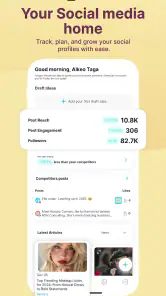
The practical value is less about posting more and more about reducing repeated decisions. I can imagine a small shop owner using a quiet hour to draft several updates, arrange them across the coming days, and then spend the rest of the week on customers instead of remembering what to publish. Performance insights can also help turn a vague feeling that “this post did well” into a more considered choice about what to make next.
Recycling evergreen posts has a useful trade-off: it can keep dependable information visible without requiring a fresh idea every time, but reused material still deserves a quick review. A seasonal offer, old opening hours, or a post tied to a past event can become misleading if it goes out again unchanged. I’d treat recycling as a reminder to refresh proven content, not as permission to leave the queue unattended.
A realistic week, not a perfect content calendar
For example, I might run a neighborhood café and have a busy stretch coming up. I could gather a few post ideas while they occur to me, then use a quieter moment to prepare updates for the days ahead. The useful part is not pretending every post can be planned perfectly; it is keeping routine announcements from slipping through the cracks while leaving room to respond to what is happening that day.
I’d also separate posts that can safely be planned from posts that depend on current conditions. A general introduction to the café or a recurring reminder may be suitable for a queue, while a change to today’s hours or a time-sensitive offer should get a fresh check before it appears. That small distinction makes scheduling more dependable and prevents convenience from turning into stale information.
More From Our News Desk

Clash of Clans Is Won Between the Battles

Android Auto Makes the Case for Quieter Car Software

MobiOffice: Transforming Mobile Productivity with Seamless Integration

EA SPORTS FC™ Mobile Soccer: Redefining Mobile Sports Gaming

How Microsoft OneDrive Became a Mobile Productivity Giant

How Google Translate Breaks Language Barriers Effortlessly
Where a shared workflow helps—and where it adds work
Compared with posting directly in each social network, a management app can make planning across accounts feel more coherent: I can think about a week of content as one workload rather than several disconnected visits. That advantage matters most when there are multiple accounts or a regular publishing rhythm. If I use one network casually, its own composer may be faster, and another dashboard can become an unnecessary stop between me and a simple post.
At the other end, a larger marketing suite may make more sense for a team that needs formal review steps or a broader set of coordinated work. I would not pick Publer simply because a single place sounds convenient; I’d first identify the actual handoffs and responsibilities involved. For a small operation or an individual, the lighter planning approach may be enough, while a team with more complex approval needs should compare its requirements carefully before moving its process.
Useful checks before trusting the queue
A practical habit is to review scheduled content in context rather than only checking that something is queued. I’d ask whether the message still fits the intended day, account, and audience, and whether a reused post needs updated wording. This is especially important when an otherwise evergreen post contains details that can change, such as dates, availability, or a temporary promotion.
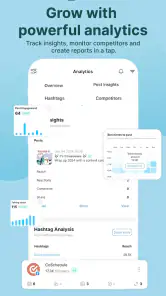
For analytics, I’d look for a pattern across several posts rather than letting one unusually strong result dictate the next month’s plan. If a certain kind of update seems to attract more attention, I’d test a related idea and compare how it performs. That keeps insights useful without treating them as a guarantee; social audiences and circumstances change, and the final judgment still belongs to the person managing the account.
Get to Know Publer
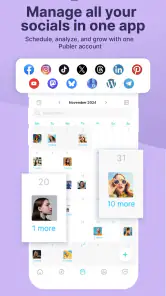
First things first, let’s get acquainted with what Publer is all about. Imagine having a personal assistant who can schedule your posts, analyze performance, and even recycle old content to keep your feed fresh. That’s precisely what Publer aims to do. It’s a comprehensive social media management tool that supports a wide array of platforms including Facebook, Instagram, Twitter, LinkedIn, and more. With its user-friendly interface, even the most tech-challenged among us can navigate it with ease.
Setting Up and First Impressions
Setting up Publer was a breeze. After a quick sign-up process, I was greeted with a clean and intuitive dashboard. The design is sleek, making it easy to find all the features you need without getting overwhelmed. It’s clear that the developers put a lot of thought into making the user experience as smooth as possible. You can easily connect your social media accounts, and within minutes, you’ll have access to a plethora of tools designed to make your social media game strong.
Features That Stand Out
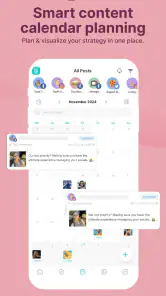
One of the standout features of Publer is its scheduling capability. You can plan your posts days, weeks, or even months in advance. The automatic scheduling feature is a lifesaver for those busy days when remembering to post is the last thing on your mind. Another cool feature is the ability to recycle evergreen content. This means your timeless posts can get a second life, keeping your audience engaged without you having to lift a finger.
Analytics is another area where Publer shines. It provides detailed insights into how your posts are performing, helping you understand what works and what doesn’t. This is invaluable for anyone looking to optimize their social media strategy.
Room for Improvement
While Publer is packed with features, there’s always room for improvement. One area it could enhance is its mobile app functionality. Although the web version is superb, having a more robust mobile app would make managing social media on the go even easier. However, this is a minor gripe in an otherwise stellar package.
Who will get the most from it?
I’d put Publer on my shortlist if I ran a small business, handled social accounts for a few clients, or simply wanted a steadier publishing habit across more than one network. Its appeal is clearest when the same planning work would otherwise be repeated in separate apps. If I only post now and then to one account, the extra dashboard may be more process than payoff; the native tools in that social network could be quicker and easier to maintain.
It also sits between two familiar approaches: publishing directly inside each social platform, and using a broader marketing suite for a team with more formal workflows. Publer’s appeal is having scheduling, recycling, and performance review together, while direct posting keeps things simple and avoids learning another workspace. I’d choose based on the work I need to coordinate, rather than assume a single tool is automatically better for every account.
A routine that keeps the queue useful
For a practical weekly routine, I’d collect post ideas as they occur, then set aside one session to draft and schedule them in batches. Before confirming the queue, I’d check that each post still makes sense for its intended day and account. When reviewing results, I’d look for patterns worth testing in the next batch rather than treating one strong post as a guaranteed formula. This makes the analytics a prompt for better decisions, not a substitute for judgment.
There are a few questions I’d settle before relying on any social management app. Does it cover the networks I actively use? Can I review queued posts comfortably from my phone, given that mobile functionality is a weak spot here? And do the paid options address a real bottleneck, or am I paying for capacity I won’t use? Those checks matter more than signing up for every available tool or feature at once.
The Final Verdict
In conclusion, Publer: Social Media Tools is a must-have for anyone serious about managing their social media effectively. It’s a powerful tool that simplifies the process, saving you time and effort. Whether you’re a business owner, a marketer, or just someone who loves sharing content, Publer is equipped to handle all your social media needs. So, if you’re ready to take your social media game to the next level, give Publer a try. You won’t be disappointed!
My more measured recommendation is to start with the free access and test it against a real week of posting. If planning across accounts saves enough attention to justify keeping another app in your routine, Publer may be a worthwhile fit; if direct posting already feels effortless, there’s no need to force a change. I’d skip a paid purchase until I know exactly which limitation it solves, and I’d keep a human check on recycled posts and scheduled content. That makes it a sensible option to try, rather than an automatic buy for every social media user.
Publer: Social Media Tools Frequently Asked Questions
What is Publer’s age rating, and is it suitable for personal or business use?
Publer is a social media management app from Kalemi Code LLC, rated Everyone. Its tools are intended to help people manage social media accounts and grow using marketing features, so it may suit individual creators as well as people handling accounts for a business. Before installing, consider whether its account-management and planning approach fits the way you create and share content.
How much space or setup should I expect before I can start using Publer?
Publer is a mobile app for managing social media accounts, so you should have a compatible phone and be ready to connect the accounts you want to manage. The app’s purpose is to bring social media work together with tools for planning and marketing. Thinking ahead about which accounts you want to use can make the initial setup more straightforward.
Is Publer free to download, and are there in-app purchases?
Publer is free to download, so you can get started without paying for the app itself. It also offers in-app purchases, with options ranging from $2.99 to $119.99 per item. Consider what features you need and review the available purchase options before committing, especially if you plan to manage several accounts or use the app regularly.
Which devices and operating systems can run Publer?
Publer is a social app from Kalemi Code LLC, and the Android version requires Android 7.0 or later. It is also available for iOS, giving users a mobile option across both major phone platforms. Checking your device’s operating system before downloading can help avoid installation problems. The app is rated Everyone.
What is Publer and how can it benefit my social media management?
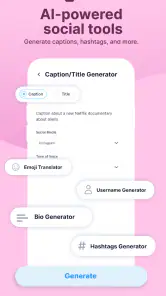
Publer is a versatile social media management tool that allows users to schedule, manage, and analyze social media posts across multiple platforms such as Facebook, Twitter, Instagram, and LinkedIn. It saves time by enabling users to plan content in advance and maintain a consistent online presence, which is vital for growing and engaging with an audience effectively.
Pros
- User-friendly interface for easy navigation.
- Supports multiple social media platforms.
- Offers post scheduling and automation.
- Analytics to track social media performance.
- Affordable pricing plans.
Cons
- Limited features in the free version.
- Occasional bugs in the mobile app.
- Customer support can be slow.
- No integration with some niche platforms.
- Learning curve for advanced features.

- Category
- Social
- Version
- 2.2.3