Potbelly Sandwich Works
- 3.06K
- 4.6
- Installs
- 500.00K
- Price
- Free

Screenshots
Analysis by Reviewed
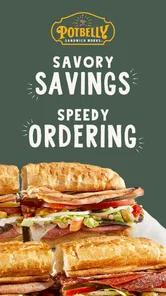
If you're anything like me, always on the hunt for the next best thing to satisfy your sandwich cravings, then Potbelly Sandwich Works might just be your next stop. This app, available for both Android and iOS, has been turning heads with its promise of delivering delicious sandwiches right at your fingertips. Let's dive in and see what makes it tick.
Free to install, with a purchase decision still ahead
The app is free to download, which makes trying it a low-commitment choice; the food you order is a separate purchase. I’d think of it as a convenient ordering channel rather than a way to make lunch itself cheaper. If you already know you want Potbelly, browsing and arranging an order in the app may save a little effort. If you’re comparing lunch prices, though, the free download alone does not make it the best-value meal.
Potbelly Sandwich Works is a Food & Drink app from Potbelly Sandwich Works, and its focus is clear: order sandwiches and other food for pickup or delivery, with rewards as part of the experience. It has a 4.7 average from around 34,000 ratings, and more than 500,000 installs. Those figures suggest that plenty of people use it, but they don’t tell me whether a nearby location, menu choice, or delivery option will suit a particular order.
The App Experience
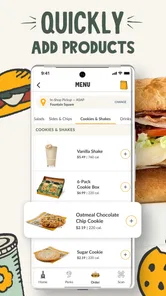
First things first, the user interface of Potbelly Sandwich Works is as inviting as the aroma of freshly baked bread. From the moment you open the app, you're greeted with a clean, easy-to-navigate layout that doesn't overwhelm you with too many options. The design is straightforward, with a menu that's easy to scroll through, showcasing a variety of mouth-watering options. Whether you're a first-timer or a regular, placing an order is as simple as a few taps on your screen.
Menu and Customization
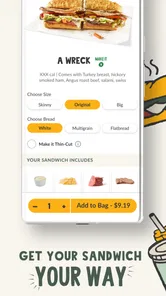
One of the standout features of the app is the extensive menu and the level of customization it offers. Whether you're into hearty subs or lighter vegetarian options, there's something for everyone. The app allows you to tweak your orders just the way you like them. Want extra cheese? No problem! Prefer your bread toasted to perfection? They've got you covered. It’s like having your own personal sandwich artist at your beck and call.
For a useful real-world workflow, I’d build an order around the person who needs the most changes first, then check each sandwich before adding the next. That makes it easier to catch a missed topping or bread preference in a shared lunch order, rather than trying to remember everyone’s choices at checkout. The trade-off is that customization is only helpful when you know what you want; if you prefer a staff member to suggest a combination or answer questions face to face, ordering in person may feel easier.
Seamless Ordering and Payment
Now, let’s talk about the ordering process. The app has integrated a seamless ordering system that lets you place your order without any hiccups. The payment process is secure and offers multiple options, be it credit card, debit card, or digital wallets. What’s more, you can even schedule your order for a later time, which is perfect for those days when you’re running on a tight schedule.
More From Our News Desk

Weather by Xiaomi Review: Clear at a Glance, Less Clear Up Close

X Under Pressure: Can It Recover When Posting Goes Wrong?

Clash of Clans Is Won Between the Battles

Android Auto Makes the Case for Quieter Car Software

MobiOffice: Transforming Mobile Productivity with Seamless Integration

EA SPORTS FC™ Mobile Soccer: Redefining Mobile Sports Gaming
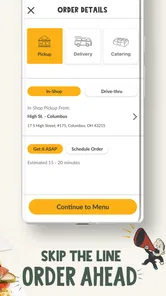
That scheduling option is most useful when lunch has a predictable shape: for example, I could sort out a workday pickup before a meeting, then avoid making the whole group wait while everyone chooses at the counter. I’d still check the selected pickup or delivery details before confirming, especially when plans change. For a last-minute meal, a nearby restaurant’s direct counter service or another ordering option may be more practical than spending time setting up an app order.
Rewards and Deals
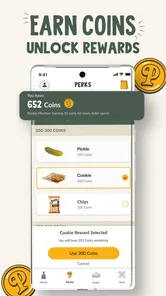
Who doesn’t love a good deal? The app features a rewards system that lets you earn points with every purchase. Accumulate enough points, and you can redeem them for free items or discounts on your next order. Plus, they regularly update the app with exclusive deals and offers, making it even more enticing to keep coming back for more.
I’d treat rewards as a bonus for purchases I already planned, not as a reason to add food I don’t need. If Potbelly is already in your lunch rotation, keeping your orders together in its own app gives the rewards program a natural place in your routine. If you visit only occasionally, the points may matter less than choosing whichever restaurant has the food and pickup arrangement you want that day. Compared with general delivery apps, this one is more focused on Potbelly; a broader service is often more useful when you’re still deciding between several restaurants.
Who will get the most from it
This is a better fit for people who order Potbelly often, want to customize sandwiches without a counter conversation, or like planning a pickup around a busy day. It can also help when one person is coordinating a few individual orders, since each set of sandwich choices can be considered before placing the order. Someone who rarely eats at Potbelly, wants to compare many nearby cuisines, or prefers spontaneous walk-in ordering may get more use from a general restaurant app or the counter instead.
The app is free and is rated for Everyone. It was released on March 3, 2014, and version 8.2.0 lists Android 8.0 as its minimum operating-system requirement. Those details make it straightforward to judge basic access, but the practical question remains whether Potbelly serves the area and occasion you have in mind. I’d check that before relying on it for a time-sensitive meal.
Making an order work for your day
A useful way to decide whether this app belongs in your routine is to start with the occasion, not the rewards. If I’m already passing a Potbelly on my commute and want a sandwich at a particular point in the day, arranging pickup in advance can make the stop easier to fit around work or errands. If I’m ordering from home and need food brought to me, delivery is the more relevant option, but I would first make sure the app offers a suitable choice for my location and timing.
For a small group, I’d gather everyone’s choices before opening the ordering flow. That avoids the common lunch-order problem of one person trying to make decisions for others while also watching the clock. I’d keep names or a simple note beside each sandwich while customizing, then review the finished selections before paying. It is a low-tech habit, but it reduces mix-ups when several orders differ by bread, toppings, or other preferences.
For a solo order, the opposite approach works well: use the menu to settle on a familiar choice quickly, then make only the changes that matter to you. A long string of customizations can make it harder to spot a mistake, so I wouldn’t adjust ingredients just because the controls are available. When I’m unsure whether a particular combination will suit me, asking in person is a better way to get guidance than guessing through a screen.
How it compares with other ways to order
The main alternative is walking into a Potbelly and ordering at the counter. That gives you a direct chance to ask a question or change your mind while talking with staff, and it makes sense when you are already nearby and have no need to plan ahead. The app is more appealing when you know what you want, want to arrange a pickup, or would rather make choices privately before the meal rush.
A general delivery app solves a different problem. It can be more convenient when the important decision is which restaurant to choose, since it brings multiple places into one browsing session. Potbelly’s own app is narrower by design: its advantage is keeping the ordering experience centered on this sandwich shop and connecting the order with its rewards. If you are undecided about cuisine, start with a broader service; if Potbelly is already the destination, the dedicated app is the more focused route.
There is also the option of ordering directly through another channel offered by a restaurant. I wouldn’t assume that one route is always faster or cheaper than another; the best choice depends on what is available for the location and meal you want. The app earns its place when its convenience and Potbelly-specific rewards matter to you, not simply because it is installed on your phone.
Small checks that prevent ordering friction
Before placing a time-sensitive order, I’d confirm the location and whether I’m arranging pickup or delivery. It sounds obvious, but it is the detail most likely to matter when you are ordering while distracted or coordinating food for someone else. I’d also pause at the final review and read every sandwich as a separate item rather than trusting my memory of what I tapped earlier.
For a scheduled meal, I’d choose a time that leaves room for the rest of the day rather than planning around an unrealistically tight gap. The app can help organize an order, but it cannot make a meeting end on time or guarantee that changing plans will be painless. When my schedule is uncertain, waiting until I know where I’ll be may be wiser than placing an order too early.
Rewards are easiest to evaluate over time. I’d keep using the app for purchases I would make anyway and notice whether the program feels worthwhile for my habits. A person who buys from Potbelly regularly has a better chance of valuing that connection than someone who visits once in a while. I wouldn’t add an extra item or choose a less suitable meal just to chase a future reward.
What to expect from the app itself
The app is a practical ordering tool, not a substitute for deciding whether a particular Potbelly meal fits your budget, appetite, or dietary needs. The menu and customization controls can make it easier to express a preference, but a screen cannot answer every question as naturally as a conversation with staff. If a dietary concern depends on precise ingredient or preparation details, I’d seek a clear answer before ordering rather than treating a customization button as a guarantee.
Likewise, having pickup and delivery as ordering options does not mean every option will suit every address or occasion. I’d check what is available before building a plan around it. Someone choosing lunch for a fixed break should have a backup if the selected arrangement does not fit, while a flexible diner can simply switch to counter ordering or another restaurant.
The app is free to install, but that should be understood narrowly: it removes the cost of trying the ordering channel, not the cost of the meal. I see the value as saved decision time, the ability to customize before ordering, and a place to use Potbelly’s rewards. Whether those conveniences justify choosing Potbelly is a separate question from whether the app itself costs anything.
A practical choice, not a reason to order more
In conclusion, the Potbelly Sandwich Works app is more than just a tool for ordering food; it's an experience in itself. With its user-friendly interface, extensive menu customizations, and rewarding deals, it’s no wonder that this app is becoming a favorite among sandwich lovers. So next time your stomach rumbles, remember that a delicious sandwich is just a few taps away. Happy eating!
My recommendation is simple: install it if Potbelly is already a place you choose and you value planning, customization, or rewards. Skip it if you mainly want to browse a wide range of restaurants or if the restaurant’s menu is not what you’re craving. The download costs nothing, but the food is still a purchase, so the best value comes from using the app for an order you genuinely wanted in the first place.
Potbelly Sandwich Works Frequently Asked Questions
Is the Potbelly Sandwich Works app free, and what devices can run it?
The Potbelly Sandwich Works app is free to download and is intended for Android and iOS users. On Android, it requires version 8.0 or later, so it is worth checking your device’s operating system before installing. The app is rated for Everyone and is listed in the Food & Drink category, making it a straightforward option for customers who want to order from Potbelly on a phone or tablet.
What is Potbelly Sandwich Works app and how does it work?
Potbelly Sandwich Works app is a convenient mobile application designed for food lovers who enjoy delicious sandwiches and meals from Potbelly. The app allows users to browse the menu, customize their orders, and place them directly through their smartphones. Additionally, it offers features like location finding for nearby stores, tracking orders, and accessing exclusive promotions and rewards. Whether you're a regular or a new customer, the app enhances your dining experience by making ordering quick and hassle-free.
Is the Potbelly app available on both Android and iOS platforms?
Yes, the Potbelly Sandwich Works app is available for download on both Android and iOS platforms. You can easily find it on the Google Play Store for Android devices and the Apple App Store for iOS devices. The app is designed to offer a seamless experience across both operating systems, ensuring that all users can enjoy the convenience of ordering their favorite Potbelly meals from their smartphones.
Can I order for pickup or delivery with the Potbelly app?
Yes, the app supports ordering food for pickup or delivery, so you can choose the option that suits your plans. You can browse the menu, customize your selections, and submit your order from your phone. Pickup is useful when you are heading to a nearby store, while delivery lets you order without making the trip. Available choices may depend on the location you select.
Are there any exclusive benefits for using the Potbelly Sandwich Works app?
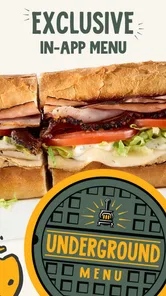
Using the Potbelly Sandwich Works app provides several exclusive benefits. Users can access special promotions and discounts that are only available through the app. Additionally, the app features a rewards program where users can earn points with every purchase. These points can be redeemed for free items or discounts on future orders. The app also offers a more personalized experience, with tailored offers and recommendations based on your past orders and preferences.
Pros
- Varied menu with customizable options.
- Quick service and friendly staff.
- Convenient locations available.
- Online ordering is user-friendly.
- High-quality
- fresh ingredients.
Cons
- Limited vegan options.
- Higher prices than competitors.
- Crowded during lunch hours.
- Inconsistent portion sizes.
- Limited seating in some locations.











